
1. හැඳින්වීම
This manual provides detailed instructions for the installation, operation, and maintenance of the BAUDCOM BD-OLT-1000GZ GPON Optical Line Terminal (OLT) Router. This device is designed for business use, offering robust Ethernet connectivity and high-speed data transfer capabilities for up to 128 users.
2. නිෂ්පාදන අවසන්view
2.1 ප්රධාන ලක්ෂණ
- සම්බන්ධතා තාක්ෂණය: Gigabit Ethernet with 1 RJ45 port for stable and fast data transfer.
- Max Upstream Data Transfer Rate: 1000 megabits per second for smooth and efficient data transmission.
- පාලක වර්ගය: Web Management and EMS (Element Management System) for easy and centralized control.
- ආදර්ශ අංකය: BD-OLT-1000GZ, specifically designed for GPON Optical Line Terminal applications.
- පරිශීලක ධාරිතාව: පරිශීලකයින් 128ක් දක්වා සහය දක්වයි.
- ඉහළ සබැඳිය: 10G uplink capability.
2.2 පෙට්ටියේ ඇති දේ
- BAUDCOM BD-OLT-1000GZ OLT Unit
2.3 භෞතික විස්තරය
The BD-OLT-1000GZ features a compact design with clearly labeled ports and indicators.
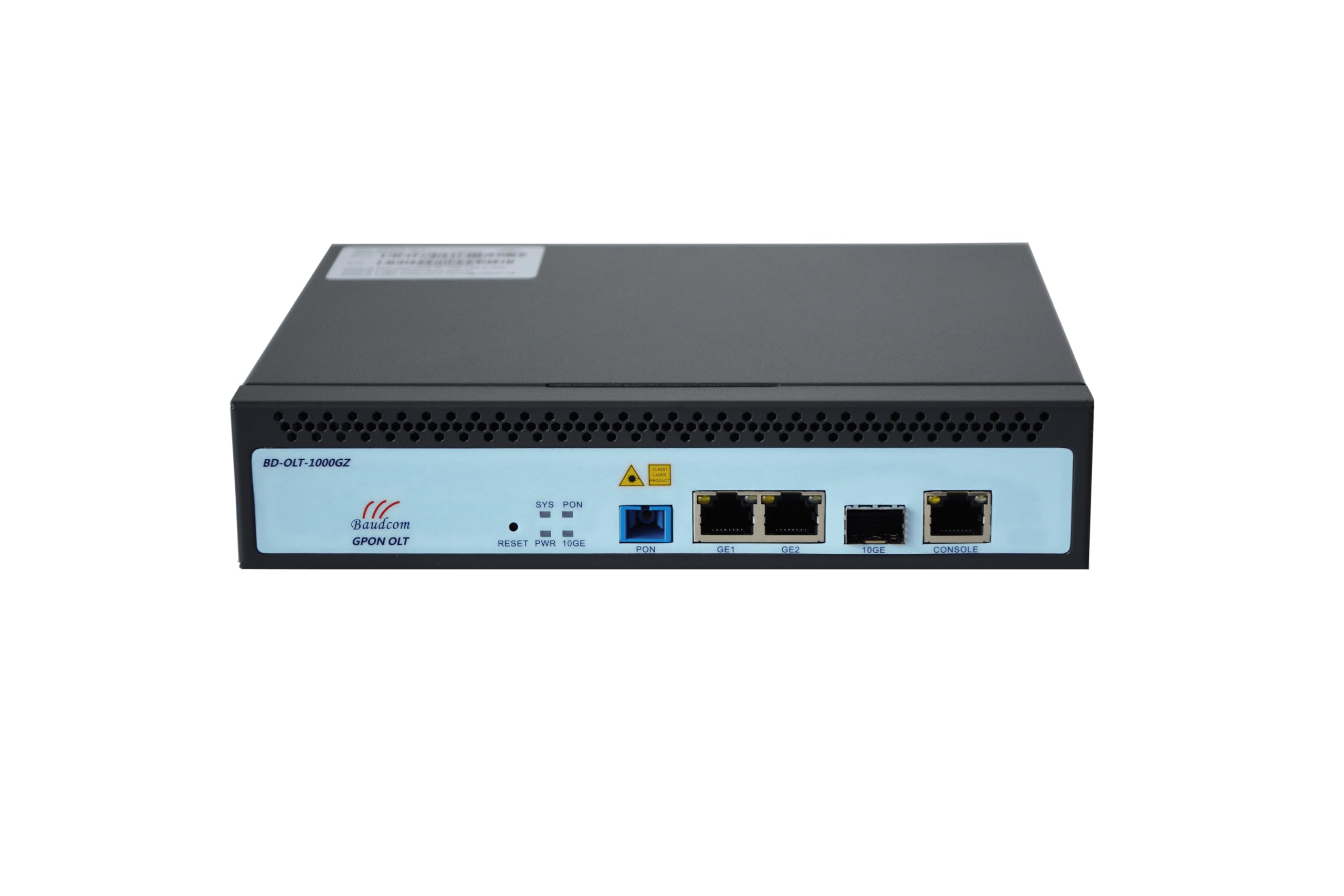
රූපය 1: ඉදිරිපස View of the OLT Unit. This image shows the front panel of the BAUDCOM BD-OLT-1000GZ OLT. Visible components include LED indicators for System (SYS), PON, and Power (PWR), a Reset button, a PON port, two GE (Gigabit Ethernet) ports, a 10GE SFP+ port, and a Console port.
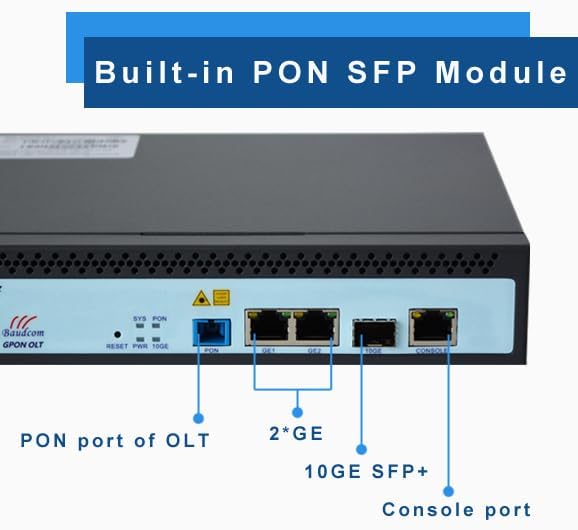
Figure 2: Front Panel Port Identification. This image provides a closer look at the front panel, clearly labeling the PON port, the two GE ports, the 10GE SFP+ port, and the Console port. It also highlights the built-in PON SFP Module.
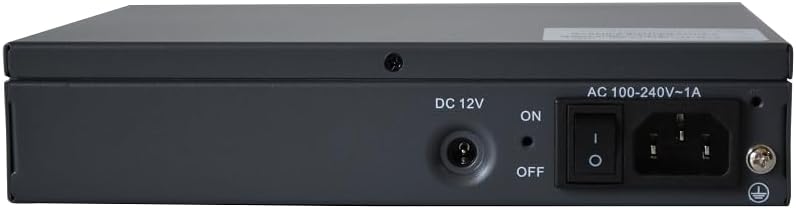
රූපය 3: පසුපස View of the OLT Unit. The rear panel includes the DC 12V power input, an ON/OFF power switch, and an AC 100-240V~1A power inlet, along with a grounding screw.

Figure 4: Pluggable Power Module. This image emphasizes the flexibility of the power input, allowing for both AC and DC power options.
3. පිහිටුවීම
3.1 රාක්ක සවි කිරීම (විකල්ප)
The OLT unit can be mounted in a standard equipment rack using the provided rack ears.

Figure 5: OLT Unit with Rack Ears. This image shows the OLT unit alongside its detachable rack mounting ears, ready for installation into a cabinet.
- Attach the rack ears to the sides of the OLT unit using the screws provided.
- Secure the OLT unit into the equipment rack using appropriate rack screws.
3.2 බල සම්බන්ධතාවය
- Ensure the power switch on the rear panel is in the අක්රියයි තනතුර.
- Connect the appropriate power cable (AC or DC, depending on your setup) to the power inlet on the rear panel.
- Plug the other end of the power cable into a suitable power source.
- For grounding, connect a grounding wire to the grounding screw on the rear panel and to a reliable ground source.
3.3 ජාල සම්බන්ධතා
- PON Port: Connect your GPON fiber optic cable to the PON port.
- GE Ports (GE1, GE2): Connect Ethernet cables from your network devices (e.g., switches, routers) to the Gigabit Ethernet ports.
- 10GE SFP+ Port: Insert a 10G SFP+ module (if not already built-in) and connect a fiber optic cable for high-speed uplink.
- කොන්සෝල වරාය: For initial configuration or direct management, connect a console cable to this port and to a computer.
4. මෙහෙයුම් උපදෙස්
4.1 බල ගැන්වීම සක්රිය / අක්රිය කිරීම
- To power on the device, flip the power switch on the rear panel to the ON තනතුර.
- To power off the device, flip the power switch on the rear panel to the අක්රියයි තනතුර.
4.2 LED දර්ශක
- SYS (පද්ධතිය): Indicates the system status. A steady green light typically means the system is operating normally.
- පොන්: Indicates the status of the GPON link. A steady green light usually means the PON link is established.
- PWR (බලය): Indicates power status. A steady green light means the device is receiving power.
4.3 මූලික වින්යාසය
Initial configuration is typically performed via the Console port or through Web Management. Refer to the detailed software configuration guide for specific steps on setting up IP addresses, VLANs, and GPON services.
5. Web Management and EMS
The BAUDCOM BD-OLT-1000GZ supports both Web Management and Element Management System (EMS) for comprehensive control and monitoring.
- Web කළමනාකරණය: උපාංගය වෙත පිවිසෙන්න web-based interface by entering its IP address into a web browser. This provides a graphical user interface for configuration and monitoring.
- ඊඑම්එස්: For larger deployments and centralized management, the OLT can be integrated into an Element Management System. Consult your network administrator or BAUDCOM support for EMS integration details.
6. පිරිවිතර
| විශේෂාංගය | පිරිවිතර |
|---|---|
| වෙළඳ නාමය | BAUDCOM |
| මාදිලියේ නම | OLT-1000GZ |
| සම්බන්ධතා තාක්ෂණය | ඊතර්නෙට් |
| වරායන් ගණන | 1 (GPON PON port) + 2 (GE) + 1 (10GE SFP+) + 1 (Console) |
| දත්ත හුවමාරු අනුපාතය | 1000 Megabits Per Second (GE ports) |
| උපරිම උඩුගං බලා දත්ත හුවමාරු අනුපාතය | තත්පරයට මෙගාබිට් 1000 |
| LAN තොට කලාප පළල | 1000 Mbps |
| පාලක වර්ගය | Web Management, EMS (Element Management System) |
| නිර්දේශිත භාවිතයන් | ව්යාපාර |
| විශේෂ ලක්ෂණය | LED දර්ශකය |
| මෙහෙයුම් පද්ධතිය | RouterOS (as per product specifications, though typically OLTs run proprietary OS) |
| බල ආදානය | AC 100-240V~1A, DC 12V |
| UPC | 717018320494 |
7. නඩත්තු කිරීම
- පිරිසිදු කිරීම: Regularly clean the exterior of the device with a soft, dry cloth. Do not use liquid or aerosol cleaners.
- වාතාශ්රය: අධික උනුසුම් වීම වැළැක්වීම සඳහා උපාංගය වටා නිසි වායු ප්රවාහය සහතික කරන්න. වාතාශ්රය විවරයන් අවහිර නොකරන්න.
- පරිසරය: Operate the device in a cool, dry environment, away from direct sunlight, heat sources, and excessive dust or moisture.
- ස්ථිරාංග යාවත්කාලීන කිරීම්: නිෂ්පාදකයාගේ webප්රශස්ත කාර්ය සාධනය සහ ආරක්ෂාව සහතික කිරීම සඳහා ස්ථිරාංග යාවත්කාලීන කිරීම් සඳහා අඩවිය.
8. දෝශ නිරාකරණය
- බලය නැත:
- Check if the power cable is securely connected to both the device and the power outlet.
- Ensure the power switch on the rear panel is in the ON තනතුර.
- බල සැපයුම ක්රියාත්මක දැයි තහවුරු කරන්න.
- ජාල සම්බන්ධතාවයක් නොමැත:
- Check all Ethernet and fiber optic cable connections.
- සම්බන්ධිත වරායන් සඳහා සබැඳි/ක්රියාකාරකම් LED සක්රීය දැයි තහවුරු කරන්න.
- Ensure proper IP configuration and VLAN settings.
- PON Link Issues:
- Check the fiber optic cable for damage or improper connection.
- Ensure the PON module is correctly seated.
- Verify PON signal levels through the management interface.
- උපාංගය ප්රතිචාර නොදක්වයි:
- Attempt to access the device via the Console port.
- If necessary, perform a soft reset using the Reset button (refer to the software guide for reset procedures).
9. වගකීම් සහ සහාය
9.1 වගකීම් තොරතුරු
The BAUDCOM BD-OLT-1000GZ comes with a වසර 1ක වගකීමක් from the date of purchase. Please retain your proof of purchase for warranty claims. The warranty covers manufacturing defects but does not cover damage caused by misuse, accidents, unauthorized modifications, or improper installation.
9.2 තාක්ෂණික සහාය
For technical assistance, troubleshooting, or warranty inquiries, please contact BAUDCOM support using the following information:

Figure 6: BAUDCOM Contact Information. This image provides various methods to contact BAUDCOM for support.
- විද්යුත් තැපෑල: info@baudcom.com.cn
- දුරකථනය: +86 21 37709251
- ස්කයිප්: robert.luo905
- WhatsApp: +8617317919235
- ලිපිනය: 519A, Building A, Lianming Road 389, Minhang District, Shanghai City, China
- Webඅඩවිය: www.baudcom.com.cn