
හැඳින්වීම
Welcome to the GOBOULT Mirage Smart Watch user manual. This guide provides detailed instructions on how to set up, operate, and maintain your new smartwatch. Please read this manual thoroughly to ensure optimal performance and longevity of your device.
නිෂ්පාදනය අවසන්view
The GOBOULT Mirage Smart Watch is a feature-rich device designed to enhance your daily life with advanced health monitoring, communication, and fitness tracking capabilities. It features a vibrant 1.39-inch HD display, Bluetooth calling, and a durable zinc alloy frame.
ප්රධාන ලක්ෂණ:
- අඟල් 1.39 HD සංදර්ශකය: Bright and clear screen with 500 nits brightness and 360x360 pixel resolution.
- බ්ලූටූත් ඇමතුම්: Make and receive calls directly from your wrist with a built-in speaker and microphone.
- විස්තීර්ණ සෞඛ්ය අධීක්ෂණය: Includes SpO2, heart rate, blood pressure, sleep tracking, breath training, and menstrual cycle tracking.
- 120+ ක්රීඩා මාතයන්: Track a wide range of physical activities with detailed metrics.
- AI හඬ සහායක: Hands-free control and access to features.
- IP67 ජල ප්රතිරෝධය: Designed to withstand splashes and dust.
- අභිරුචිකරණය කළ හැකි ඔරලෝසු මුහුණු: Over 300 cloud-based watch faces to personalize your device.
- ස්මාර්ට් දැනුම්දීම්: ඇමතුම්, පණිවිඩ සහ යෙදුම් දැනුම්දීම් සඳහා ඇඟවීම් ලබා ගන්න.
- දිගු බැටරි ආයු කාලය: සාමාන්ය භාවිතයේ දින 7 දක්වා.
කොටුවේ ඇති දේ:
- GOBOULT Mirage Smart Watch (Coal Black)
- ආරෝපණ කේබලය
- පරිශීලක අත්පොත
- වගකීම් කාඩ්පත

රූපය: අවසන්view of the GOBOULT Mirage Smart Watch highlighting its main features.
සැකසුම් මාර්ගෝපදේශය
1. ස්මාර්ට් ඔරලෝසුව ආරෝපණය කිරීම
- Connect the magnetic charging cable to the charging pins on the back of your smartwatch.
- කේබලයේ USB කෙළවර සම්මත USB බල ඇඩැප්ටරයකට (5V/1A නිර්දේශිත) හෝ පරිගණකයේ USB පෝට් එකකට සම්බන්ධ කරන්න.
- The watch display will show a charging indicator. A full charge takes approximately 120 minutes.
- Ensure the charging pins are clean and dry before charging to prevent corrosion.
2. බල ගැන්වීම / අක්රිය කිරීම
- බල ගැන්වීම: Press and hold the side button (digital crown) for a few seconds until the GOBOULT logo appears.
- විදුලිය විසන්ධි කිරීම: From the watch face, swipe down to access quick settings, or navigate to the settings menu. Select "Power Off" and confirm. Alternatively, press and hold the side button until the power off option appears.
3. ඔබගේ ස්මාර්ට් ජංගම දුරකථනය සමඟ යුගල කිරීම
- Download the official GOBOULT companion app from your smartphone's app store (available for iOS and Android).
- ඔබගේ ස්මාර්ට් ජංගම දුරකතනයේ බ්ලූටූත් සබල කර ඇති බව සහතික කර ගන්න.
- Open the GOBOULT app and follow the on-screen instructions to create an account or log in.
- In the app, select "Add Device" or a similar option to search for your smartwatch.
- Select "GOBOULT Mirage" from the list of available devices.
- ඔබගේ ස්මාර්ට් ජංගම දුරකථනයේ සහ ස්මාර්ට් ඔරලෝසුවේ යුගල කිරීමේ ඉල්ලීම තහවුරු කරන්න.
- යුගලනය කළ පසු, ඔරලෝසුව ඔබගේ දුරකථනය සමඟ දත්ත සමමුහුර්ත කරනු ඇති අතර, ඔබට යෙදුම හරහා සැකසුම් අභිරුචිකරණය කළ හැකිය.
මෙහෙයුම් උපදෙස්
මූලික සංචාලනය:
- ස්පර්ශ තිරය: මෙනු සහ දැනුම්දීම් හරහා සංචාලනය කිරීමට වමට/දකුණට, ඉහළට/පහළට ස්වයිප් කරන්න. අයිතම තේරීමට තට්ටු කරන්න.
- Digital Crown (Side Button):
- වරක් ඔබන්න: Return to the watch face from any screen, or wake the screen.
- ඔබාගෙන සිටින්න: Power on/off, or access the AI Voice Assistant (configurable).
- කරකවන්න: Scroll through menus, lists, or adjust settings.
- කෙටිමං බොත්තම: The second physical button on the side can be customized for quick access to specific functions, such as launching sports modes.

Image: Digital crown and button functionalities for navigation and quick access.
සෞඛ්ය නිරීක්ෂණ
The GOBOULT Mirage Smart Watch offers a comprehensive suite of health tracking features. For accurate readings, ensure the watch is worn snugly on your wrist, about one finger's width from your wrist bone.
- හෘද ස්පන්දන වේගය නිරීක්ෂණය කිරීම: ඔරලෝසුව ඔබේ හෘද ස්පන්දන වේගය අඛණ්ඩව නිරීක්ෂණය කරයි. View ඔරලෝසුවේ තත්ය කාලීන දත්ත හෝ යෙදුමේ සවිස්තරාත්මක ප්රවණතා.
- SpO2 (රුධිර ඔක්සිජන්) නිරීක්ෂණය: Measure your blood oxygen levels on demand. Navigate to the SpO2 function on your watch and remain still for accurate results.
- රුධිර පීඩනය අධීක්ෂණය: Access the blood pressure feature on your watch for readings.
- නින්ද නිරීක්ෂණය: Wear your watch to bed to track your sleep patterns, including deep sleep, light sleep, and awake times. Data is available in the app.
- Breath Training Mode: Follow guided breathing exercises to help reduce stress and improve relaxation.
- ක්රියාකාරකම් ලුහුබැඳීම: Monitors steps, distance, and calories burned throughout the day.
- පානීය ජල මතක් කිරීම: Set reminders in the app to ensure you stay hydrated.
- වාඩි වී සිටින මතක් කිරීම: ඔබ දිගු වේලාවක් අක්රියව සිටින විට ඇඟවීම් ලබා ගන්න, එමඟින් ඔබට චලනය වීමට දිරිගැන්වීමක් ලැබේ.
- ඔසප් චක්ර ලුහුබැඳීම: For female users, track and predict menstrual cycles through the companion app.

Image: The watch's health sensors and a summary of its health monitoring capabilities.
ක්රීඩා මාතයන්
The GOBOULT Mirage Smart Watch supports over 120 sports modes to accurately track your workouts. From running to yoga, you can monitor your performance and progress.
Using Sports Modes:
- Access the sports mode menu from the watch's main interface or by using the dedicated shortcut button.
- Scroll through the list and select your desired activity (e.g., Running, Cycling, Yoga, Cricket, Badminton, Basketball).
- Tap to start the activity. The watch will begin recording data such as duration, heart rate, calories burned, and distance (where applicable).
- To pause or end an activity, swipe right or press the side button and follow the on-screen prompts.
- Review your workout summaries on the watch or in detail within the companion app.

Image: The watch interface showing various sports modes and quick access options.
බ්ලූටූත් ඇමතුම් සහ ස්මාර්ට් දැනුම්දීම්
With Bluetooth 5.3 connectivity, your GOBOULT Mirage Smart Watch allows you to manage calls and receive notifications directly on your wrist.
බ්ලූටූත් ඇමතුම්:
- Ensure your watch is paired with your phone via Bluetooth.
- ඇමතුම් ලබා ගැනීම: ඇමතුමක් ආරම්භ කිරීමට ඔබගේ ඔරලෝසුවේ ඩයල් පෑඩයට හෝ සම්බන්ධතා ලැයිස්තුවට ප්රවේශ වන්න.
- ඇමතුම් ලැබීම: When a call comes in, the watch will display the caller ID. You can answer or reject the call directly from your wrist using the built-in speaker and microphone.
- Contact Sync: Synchronize your phone contacts with the watch through the companion app for easy access.
ස්මාර්ට් දැනුම්දීම්:
- Enable app notifications in the GOBOULT companion app on your smartphone.
- Your watch will display incoming messages, social media alerts, and other app notifications.
- Swipe up or down on the watch face to view ඔබගේ දැනුම්දීම් ඉතිහාසය.

Image: Bluetooth calling features and interface on the smartwatch.

Image: Smart notifications and other quick access features like calculator and voice assistant.
අභිරුචිකරණය
මුහුණු බලන්න:
Personalize your GOBOULT Mirage Smart Watch with over 300 cloud-based watch faces. You can change the watch face directly from the device or through the companion app.
- ඔරලෝසුව මත: From the watch face, press and hold the screen. Swipe left or right to browse available watch faces and tap to select.
- යෙදුම හරහා: Open the GOBOULT app, navigate to the watch face section, and explore a wider selection of designs. Download and apply your preferred watch face.

රූපය: උදාamples of customizable watch faces available for the smartwatch.
අමතර විශේෂාංග
AI හඬ සහායක:
Activate the AI Voice Assistant (compatible with Hey Siri and Ok Google) by long-pressing the digital crown or through a dedicated menu option. Use voice commands to perform various tasks hands-free.
මගේ දුරකථනය සොයන්න:
If your paired smartphone is misplaced, use the "Find My Phone" feature on your watch to make it ring or vibrate, helping you locate it quickly.
- Go to the watch menu.
- Select the "Find Phone" option.
- The connected phone will ring or vibrate.
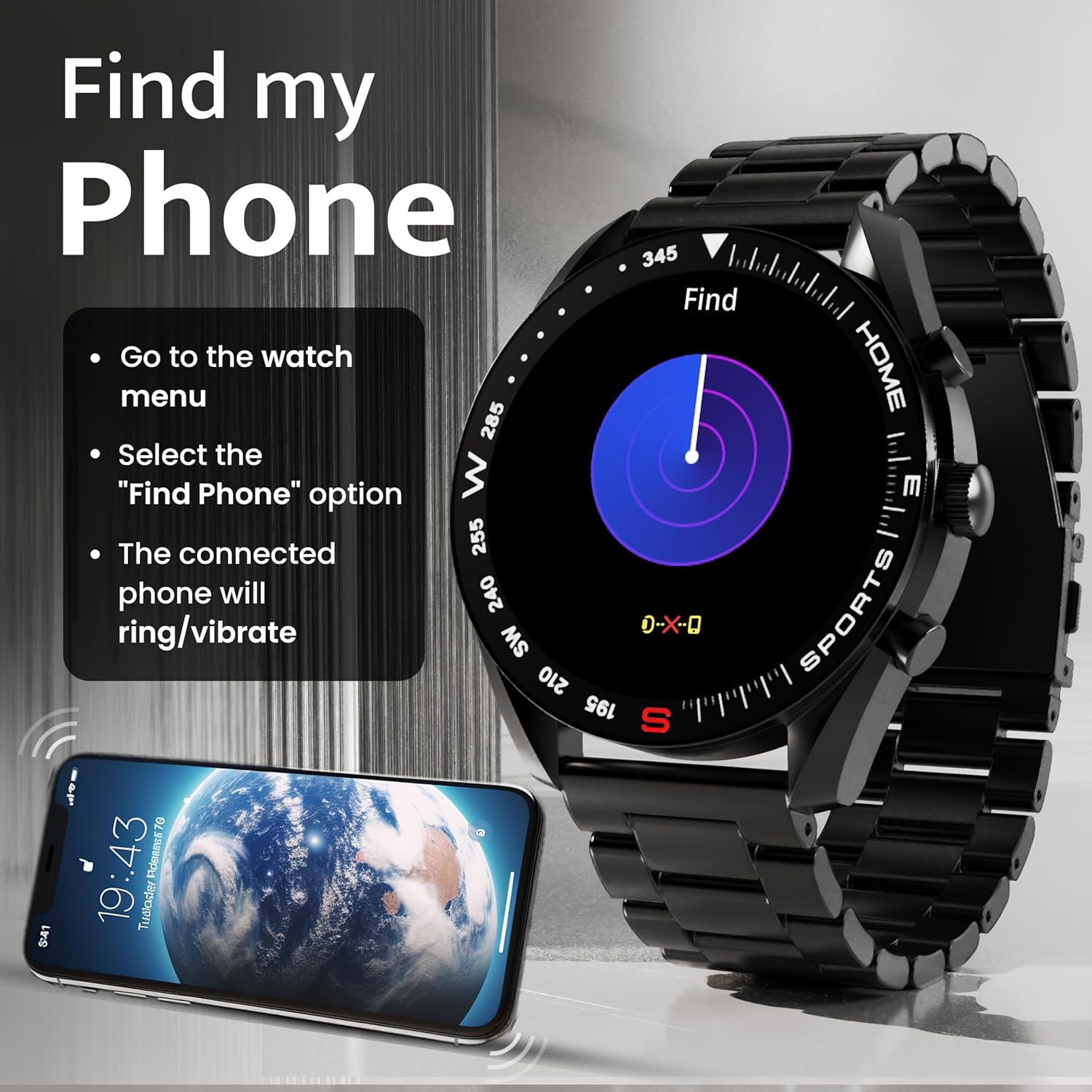
Image: How to use the 'Find My Phone' feature on the smartwatch.
කුඩා ක්රීඩා:
The watch includes several mini-games for entertainment, such as 2048, Battleship, Hamster, and Young Bird.

රූපය: උදාamples of mini-games available on the smartwatch.
නඩත්තු කිරීම
Cleaning Your Smart Watch:
- ඔරලෝසු තිරය සහ බඳ මෘදු, ලින්ට් රහිත රෙද්දකින් පිස දමන්න.
- මුරණ්ඩු අපිරිසිදුකම සඳහා, තරමක් dampen රෙදි කැබැල්ල වතුරෙන් සෝදන්න. සැර රසායනික ද්රව්ය හෝ උල්ෙල්ඛ ද්රව්ය භාවිතා කිරීමෙන් වළකින්න.
- Clean the charging pins regularly with a dry cloth or cotton swab to ensure proper charging.
ජල ප්රතිරෝධය (IP67):
The GOBOULT Mirage Smart Watch is IP67 water-resistant, meaning it is protected against dust ingress and can withstand immersion in water up to 1 meter for up to 30 minutes. However, it is not suitable for swimming, showering with hot water, or diving. Avoid exposure to high-pressure water or corrosive liquids.

Image: Information regarding the IP67 water and dust resistance of the smartwatch.
පටි ගැලපීම:
The watch comes with a metallic strap adjustment tool. Refer to the included instructions or a professional for adjusting the strap length to ensure a comfortable and secure fit.

Image: The watch's zinc alloy frame and the metallic strap adjustment tool.
දෝෂගවේෂණය
- ඔරලෝසුව ක්රියාත්මක නොවීම: Ensure the watch is fully charged. Connect it to the charging cable and allow it to charge for at least 30 minutes before attempting to power it on again.
- දුරකථනය සමඟ යුගල කළ නොහැක:
- ඔබගේ දුරකථනයේ සහ ඔරලෝසුවේ බ්ලූටූත් සක්රීය කර ඇති බවට වග බලා ගන්න.
- Ensure the watch is within the Bluetooth range (up to 10 meters).
- ඔබගේ දුරකථනය සහ ස්මාර්ට් ඔරලෝසුව නැවත ආරම්භ කරන්න.
- Clear the Bluetooth cache on your phone or forget the device and try pairing again.
- Ensure the GOBOULT companion app is updated to the latest version.
- සාවද්ය සෞඛ්ය දත්ත: ඔරලෝසුව ඔබේ මැණික් කටුවෙහි හොඳින් පැළඳ සිටින බවට වග බලා ගන්න, ඕනෑවට වඩා තද හෝ ලිහිල් නොවන බවට වග බලා ගන්න. ඔරලෝසුවේ පිටුපස ඇති සංවේදක පිරිසිදු කරන්න. මිනුම් අතරතුර අධික චලනයෙන් වළකින්න.
- දැනුම්දීම් නොපෙන්වයි:
- Check if notifications are enabled for the specific apps in the GOBOULT companion app.
- Ensure your phone's notification settings allow the GOBOULT app to display alerts.
- බ්ලූටූත් හරහා ඔරලෝසුව ඔබගේ දුරකථනයට නිසි ලෙස සම්බන්ධ වී ඇති බව තහවුරු කරන්න.
- කෙටි බැටරි ආයු කාලය: Reduce screen brightness, disable unnecessary features like continuous heart rate monitoring if not needed, and limit the number of active notifications. Ensure the watch is fully charged.
- ස්පර්ශ තිරය ප්රතිචාර නොදක්වයි: ඔරලෝසුව නැවත ආරම්භ කරන්න. ගැටලුව දිගටම පවතී නම්, තිරය පිරිසිදුව හා වියලිව ඇති බවට වග බලා ගන්න.
පිරිවිතර
| විශේෂාංගය | විස්තර |
|---|---|
| මාදිලියේ නම | මිරාජ් |
| සංදර්ශක ප්රමාණය | අඟල් 1.39 HD |
| සංදර්ශක විභේදනය | 360 x 360 පික්සල |
| දීප්තිය | නයිට්ස් 500 උච්ච දීප්තිය |
| සම්බන්ධතාවය | බ්ලූටූත් 5.3 |
| ජල ප්රතිරෝධය | IP67 |
| රාමු ද්රව්ය | සින්ක් මිශ්ර ලෝහය |
| බැටරි වර්ගය | ලිතියම් පොලිමර් |
| සාමාන්ය බැටරි ආයු කාලය | දින 7 දක්වා |
| ආරෝපණ කාලය | ආසන්න වශයෙන් 120 විනාඩි |
| මෙහෙයුම් පද්ධති අනුකූලතාව | iOS, Android |
| අයිතමයේ බර | 106 ග්රෑම් |
| ඇතුළත් සංරචක | Smart Watch, Charging Cable, User Manual, Warranty Card |
වගකීම් සහ සහාය
වගකීම් තොරතුරු:
Your GOBOULT Mirage Smart Watch comes with a manufacturer's warranty. Please refer to the included Warranty Card for specific terms, conditions, and duration of the warranty. Keep your purchase receipt as proof of purchase.
පාරිභෝගික සහාය:
If you encounter any issues or have questions not covered in this manual, please contact GOBOULT customer support. Contact details can typically be found on the Warranty Card or the official GOBOULT webඅඩවිය.