
නිෂ්පාදනය අවසන්view
The XO BE18 is a stereo audio wireless Bluetooth headset featuring RGB lighting. It is designed for immersive listening experiences and convenient communication, offering multiple playback modes including Bluetooth, AUX, TF card, and FM radio.
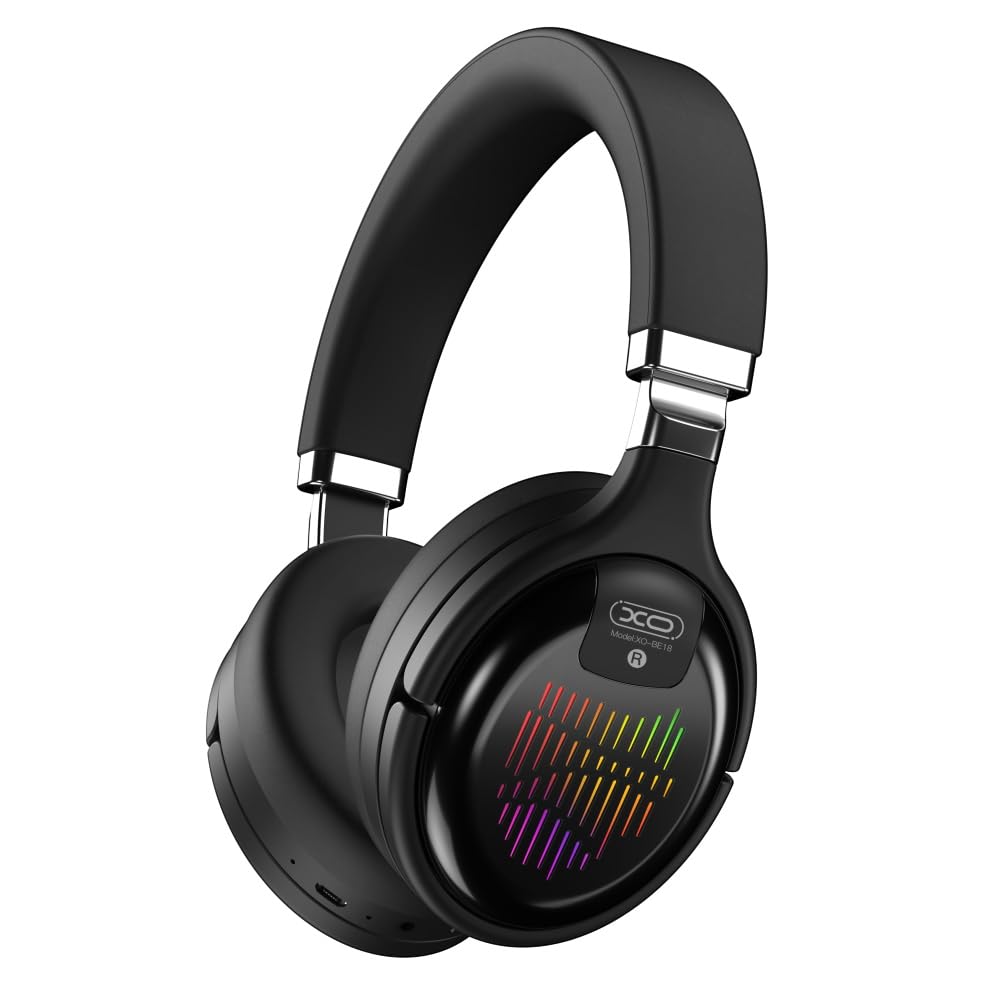
Image: The XO BE18 Wireless Bluetooth Headset, showcasing its over-ear design and integrated RGB lighting on the earcups.
පැකේජයේ අන්තර්ගතය
කරුණාකර සියලුම අයිතම පැකේජයේ ඇති බවට වග බලා ගන්න:
- XO BE18 Wireless Bluetooth Headset
- ආරෝපණ කේබලය
- පරිශීලක අත්පොත (මෙම ලේඛනය)

Image: The XO BE18 headset shown within its retail packaging, indicating the included accessories.
සැලසුම
හෙඩ්සෙට් එක ආරෝපණය කිරීම
- හෙඩ්සෙට් එකේ ආරෝපණ වරාය සොයා ගන්න.
- Connect the provided charging cable to the headset and a compatible USB power source (e.g., computer USB port, USB wall adapter).
- The LED indicator on the headset will typically show a specific color (e.g., red) during charging and change (e.g., turn off or blue) when fully charged.
- සම්පූර්ණ ආරෝපණය සඳහා ආසන්න වශයෙන් පැය 2.5 ක් ගතවේ.
බල ගැන්වීම / අක්රිය කිරීම
- බල ගැන්වීමට: Press and hold the Power button for approximately 3-5 seconds until the LED indicator lights up and you hear an audible prompt.
- බලය අක්රිය කිරීමට: LED දර්ශකය ක්රියා විරහිත වන තෙක් සහ ඔබට ඇසෙන ප්රේරකයක් ඇසෙන තෙක් බල බොත්තම තත්පර 3-5ක් පමණ ඔබාගෙන සිටින්න.
මෙහෙයුම් උපදෙස්
බ්ලූටූත් යුගලනය
- හෙඩ්සෙට් එක ක්රියා විරහිත කර ඇති බවට සහතික වන්න.
- Press and hold the Power button for approximately 5-7 seconds until the LED indicator flashes rapidly (e.g., alternating blue and red), indicating pairing mode.
- ඔබගේ උපාංගයේ (ස්මාර්ට්ෆෝන්, ටැබ්ලටය, පරිගණකය), බ්ලූටූත් සක්රීය කර පවතින උපාංග සොයන්න.
- Select "XO BE18" from the list of found devices.
- Once paired, the LED indicator will typically flash slowly or turn solid blue, and you will hear a confirmation tone.
මූලික පාලන
The headset features various buttons for controlling audio playback and calls. Refer to the image below for button locations.

රූපය: සමීප රූපය view of the XO BE18 headset earcup, highlighting the control buttons and ports.
- බල බොත්තම: බලය සක්රිය/අක්රිය කිරීමට ඔබා අල්ලාගෙන සිටින්න. සංගීතය වාදනය කිරීමට/විරාම කිරීමට හෝ ඇමතුම්වලට පිළිතුරු දීමට/අවසන් කිරීමට කෙටි ඔබන්න.
- පරිමාව වැඩි කරන්න (+): ශබ්දය වැඩි කිරීමට කෙටි ඔබන්න. ඊළඟ ධාවන පථය සඳහා දිගු ඔබන්න.
- ශබ්දය අඩු කිරීම (-): ශබ්දය අඩු කිරීමට කෙටි ඔබන්න. පෙර ධාවන පථය සඳහා දිගු ඔබන්න.
- මාදිලි බොත්තම (M): Short press to switch between Bluetooth, AUX, TF card, and Radio modes.
RGB ආලෝකකරණය
The headset features integrated RGB lighting on the earcups. This lighting typically activates automatically when the headset is powered on. Specific controls for the RGB lighting (if any) may be integrated with the mode button or a dedicated button not explicitly detailed.

Image: The XO BE18 headset displaying its colorful RGB lighting on the earcups.
මයික්රොෆෝනය භාවිතා කිරීම
The built-in microphone allows for hands-free calls. When a call comes in, press the Power button once to answer. Press again to end the call.
AUX ප්රකාරය
Connect an audio cable (not included) from your device's 3.5mm audio jack to the headset's AUX port to use it in wired mode. The headset does not require power in AUX mode.
ටීඑෆ් කාඩ් ප්රකාරය
ශ්රව්ය සහිත TF (microSD) කාඩ්පතක් ඇතුළු කරන්න files into the designated slot. Use the Mode button to switch to TF card mode.
ගුවන්විදුලි මාදිලිය
Use the Mode button to switch to Radio mode. The headset will automatically scan for available FM radio stations.
නඩත්තු කිරීම
- පිරිසිදු කිරීම: හෙඩ්සෙට් එක පිරිසිදු කිරීමට මෘදු වියළි රෙද්දක් භාවිතා කරන්න. උල්ෙල්ඛ පිරිසිදු කරන්නන් හෝ ද්රාවක භාවිතා නොකරන්න.
- ගබඩා: When not in use, store the headset in a cool, dry place. The headset features a portable folding design for compact storage.
- බැටරි සත්කාර: බැටරි ආයු කාලය දීර්ඝ කිරීම සඳහා, බැටරිය නිතර නිතර සම්පූර්ණයෙන්ම විසර්ජනය කිරීමෙන් වළකින්න. නිරන්තරයෙන් භාවිතයේ නොමැති වුවද, හෙඩ්සෙට් එක නිතිපතා ආරෝපණය කරන්න.
- ජල නිරාවරණය: This headset is not waterproof. Avoid exposure to water or excessive moisture.

Image: The XO BE18 headset shown in its folded configuration, demonstrating its portable design.
දෝෂගවේෂණය
| ගැටලුව | හැකි විසඳුම |
|---|---|
| හෙඩ්සෙට් එක ක්රියාත්මක නොවේ. | Ensure the headset is fully charged. Connect to a power source and try again. |
| උපාංගය සමඟ යුගල කළ නොහැක. |
|
| ශබ්දයක් නැත හෝ අඩු පරිමාවක් නැත. |
|
| මයික්රෆෝනය ක්රියා නොකරයි. |
|
| RGB ආලෝකකරණය ක්රියා නොකරයි. | Ensure the headset is powered on. If the issue persists, contact customer support. |
පිරිවිතර
| විශේෂාංගය | විස්තර |
|---|---|
| මාදිලියේ නම | BE18 |
| සම්බන්ධතාවය | රැහැන් රහිත (බ්ලූටූත් V5.0) |
| රැහැන් රහිත පරාසය | මීටර් 10 ක් පමණ |
| ශ්රව්ය තාක්ෂණය | Hi-Fis Audio, Intelligent Noise Reduction |
| කන් ස්ථානගත කිරීම | කණ මත |
| ශබ්ද පාලනය | ශබ්ද හුදකලා කිරීම |
| මයික්රෆෝනය | බිල්ට්-ඉන් |
| බැටරි ධාරිතාව | 250mAh |
| සංගීත ධාවන කාලය | පැය 4 ක් පමණ |
| ඇමතුම් වේලාව | පැය 4 ක් පමණ |
| ආරෝපණ කාලය | පැය 2.5 ක් පමණ |
| පොරොත්තු කාලය | Long Standby Capability |
| කථානායක බලය | 3 mW |
| සංවේදීතාව | 94 ± 3dBm |
| S/N අනුපාතය | >=75dB |
| වැඩ කරන සංඛ්යාතය | 20Hz-20KHz |
| Play Modes | Bluetooth, AUX, TF Card, Radio |
| බ්ලූටූත් ප්රොටෝකෝල | A2DP, HSP, HFP |
| මානයන් (පැකේජය) | 195 x 195 x 80 මි.මී |
| වර්ණය | කළු |

Image: A detailed table outlining the technical specifications and product information for the XO BE18 headset.
වගකීම් සහ සහාය
This product comes with a standard manufacturer's warranty. For specific warranty terms and conditions, please refer to the warranty card included in your product packaging or contact the retailer where you purchased the product.
For technical support or further assistance, please contact your retailer or visit the official XO webවෙබ් අඩවිය (තිබේ නම්).