
1. හැඳින්වීම
Welcome to the user manual for your Emerson CKSS7071 Sunrise Smartset Alarm Clock Radio. This device is designed to enhance your daily routine with its unique features, including a sunrise simulation, soothing sound options, Bluetooth connectivity, and an 8-color dimmable LED display. Please read this manual thoroughly to understand the full functionality and ensure proper use and care of your new alarm clock radio.
වීඩියෝ 1: ඉවරයිview of the Emerson CKSS7071 Sunrise Smartset Alarm Clock Radio. This video demonstrates the key features and design of the product.
2. වැදගත් ආරක්ෂක තොරතුරු
- උපකරණය ක්රියාත්මක කිරීමට පෙර සියලු උපදෙස් කියවන්න.
- අනාගත යොමුව සඳහා මෙම උපදෙස් තබා ගන්න.
- ජලය අසල මෙම උපකරණය භාවිතා නොකරන්න.
- වියළි රෙද්දකින් පමණක් පිරිසිදු කරන්න.
- කිසිදු වාතාශ්රය විවරයක් අවහිර නොකරන්න. නිෂ්පාදකයාගේ උපදෙස් අනුව ස්ථාපනය කරන්න.
- රේඩියේටර්, තාප රෙජිස්ටර්, ලිප, හෝ වෙනත් උපකරණ (ඇතුළුව) වැනි තාප ප්රභවයන් අසල ස්ථාපනය නොකරන්න. ampලිෆයර්) තාපය නිපදවන.
- විදුලි රැහැන ඇවිදීමෙන් හෝ ඇණ ගැසීමෙන්, විශේෂයෙන් ප්ලග්, පහසුව සඳහා භාජන සහ ඒවා උපකරණයෙන් පිටවන ස්ථානයේ ආරක්ෂා කරන්න.
- නිෂ්පාදකයා විසින් නිශ්චිතව දක්වා ඇති ඇමුණුම්/උපාංග පමණක් භාවිතා කරන්න.
- අකුණු කුණාටු වලදී හෝ දිගු කාලයක් භාවිතා නොකළ විට මෙම උපකරණය විසන්ධි කරන්න.
- සියලුම සේවා සුදුසුකම් ලත් සේවා පුද්ගලයින් වෙත යොමු කරන්න. බල සැපයුම් ලණුවකට හෝ ප්ලග් එකට හානි වූ විට, දියර කාන්දු වී ඇති විට හෝ උපකරණයට වස්තූන් වැටී ඇති විට, උපකරණය වර්ෂාවට හෝ තෙතමනයට නිරාවරණය වී ඇති විට, සාමාන්යයෙන් ක්රියා නොකරන විට, උපකරණයට යම් ආකාරයකින් හානි වී ඇති විට, සේවා සැපයීම අවශ්ය වේ. , හෝ අතහැර දමා ඇත.
3. පැකේජ අන්තර්ගතය
පැකේජය විවෘත කිරීමෙන් පසු සියලුම අයිතම එහි ඇති බව තහවුරු කර ගන්න:
- Emerson CKSS7071 Sunrise Smartset Alarm Clock Radio
- AC බල ඇඩැප්ටරය
- පරිශීලක අත්පොත
4. නිෂ්පාදන අවසන්view
4.1 ඉදිරිපස View

රූපය 1: ඉදිරිපස view of the alarm clock, featuring the digital time display and the sunrise simulation light panel.
The front of the unit features the main 1.2-inch LED time display and the large circular light panel for sunrise simulation and ambient lighting. Indicators for AM/PM, Alarm 1/2, and Bluetooth status are also visible.
4.2 පැත්ත View (පාලන)
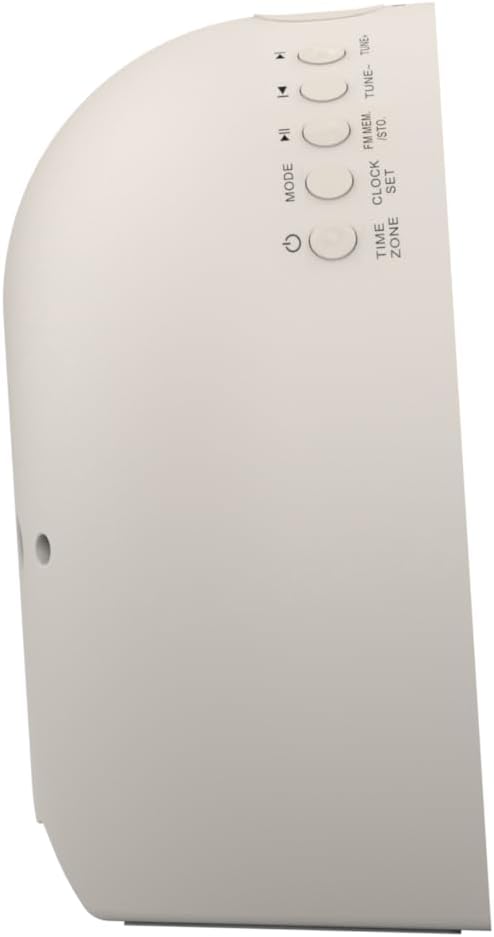
රූපය 2: පැත්ත view of the alarm clock, highlighting the control buttons for various functions.
The side panel houses the primary control buttons, including Power, Mode, Clock Set, Time Zone, Tune/Skip, and Volume controls. These buttons are used for setting time, alarms, and navigating audio functions.
4.3 පසුපස View

රූපය 3: පසුපස view of the alarm clock, showing the speaker grille and power connection port.
The rear of the unit features the main speaker grille and the power input port for connecting the AC adapter.
5. පිහිටුවීම
5.1 බල සම්බන්ධතාවය
- Plug the AC power adapter into the DC IN jack located on the back of the unit.
- Plug the other end of the adapter into a standard wall outlet (AC 100-240V, 50/60Hz).
- ඒකකය ස්වයංක්රීයව ක්රියාත්මක වේ.
5.2 SmartSet Automatic Time Setting
The SmartSet system automatically sets the correct time and date as soon as you plug in the unit. It also maintains time and alarm settings during power disruptions or outages, provided the button cell battery is installed.
5.3 බැටරි උපස්ථ ස්ථාපනය
A button cell battery (CR2032, included) is required for battery backup. This ensures that time and alarm settings are retained during a power outage.
- ඒකකයේ පතුලේ බැටරි මැදිරිය සොයා ගන්න.
- බැටරි මැදිරි කවරය විවෘත කරන්න.
- Insert one CR2032 button cell battery, ensuring the correct polarity (+/-).
- බැටරි මැදිරි කවරය ආරක්ෂිතව වසා දමන්න.
6. මෙහෙයුම් උපදෙස්
6.1 Setting the Clock Manually
- ඔබා අල්ලාගෙන සිටින්න කට්ටලය ක්ලික් කරන්න බොත්තම. පැය ඉලක්කම් දැල්වෙනු ඇත.
- භාවිතා කරන්න TUNE -/+ පැය සීරුමාරු කිරීමට බොත්තම්. ඔබන්න කට්ටලය ක්ලික් කරන්න තහවුරු කිරීමට.
- The minute digits will flash. Use the TUNE -/+ මිනිත්තු සකස් කිරීමට බොත්තම්. ඔබන්න කට්ටලය ක්ලික් කරන්න තහවුරු කිරීමට.
- Continue this process to set the year, month, and day.
- ඔබන්න කට්ටලය ක්ලික් කරන්න කාල සැකසුම් මාදිලියෙන් ඉවත් වීමට නැවතත්.
6.2 අනතුරු ඇඟවීම් සැකසීම (එලාම් 1 සහ එලාම් 2)
The unit features dual alarms. Follow these steps for each alarm:
- ඔබා අල්ලාගෙන සිටින්න ඇලාර්ම් 1 or ඇලාර්ම් 2 බොත්තම. අනතුරු ඇඟවීමේ පැය ඉලක්කම් දැල්වෙනු ඇත.
- භාවිතා කරන්න TUNE -/+ buttons to adjust the alarm hour. Press the respective අනතුරු ඇඟවීම තහවුරු කිරීමට බොත්තම.
- අනතුරු ඇඟවීමේ මිනිත්තු ඉලක්කම් දැල්වෙනු ඇත. භාවිතා කරන්න TUNE -/+ buttons to adjust the alarm minutes. Press the respective අනතුරු ඇඟවීම තහවුරු කිරීමට බොත්තම.
- Select the alarm source (Buzzer, FM Radio, or Soothing Sound). Press the respective අනතුරු ඇඟවීම තහවුරු කිරීමට බොත්තම.
- භාවිතයෙන් අනතුරු ඇඟවීමේ ශබ්දය සකසන්න VOL -/+ buttons. Press the respective අනතුරු ඇඟවීම තහවුරු කිරීමට බොත්තම.
- The alarm is now set. The alarm indicator (AL1 or AL2) will appear on the display.
6.3 Sunrise Simulation
The sunrise simulation feature gradually brightens the light panel before your set alarm time, mimicking a natural sunrise to gently wake you.
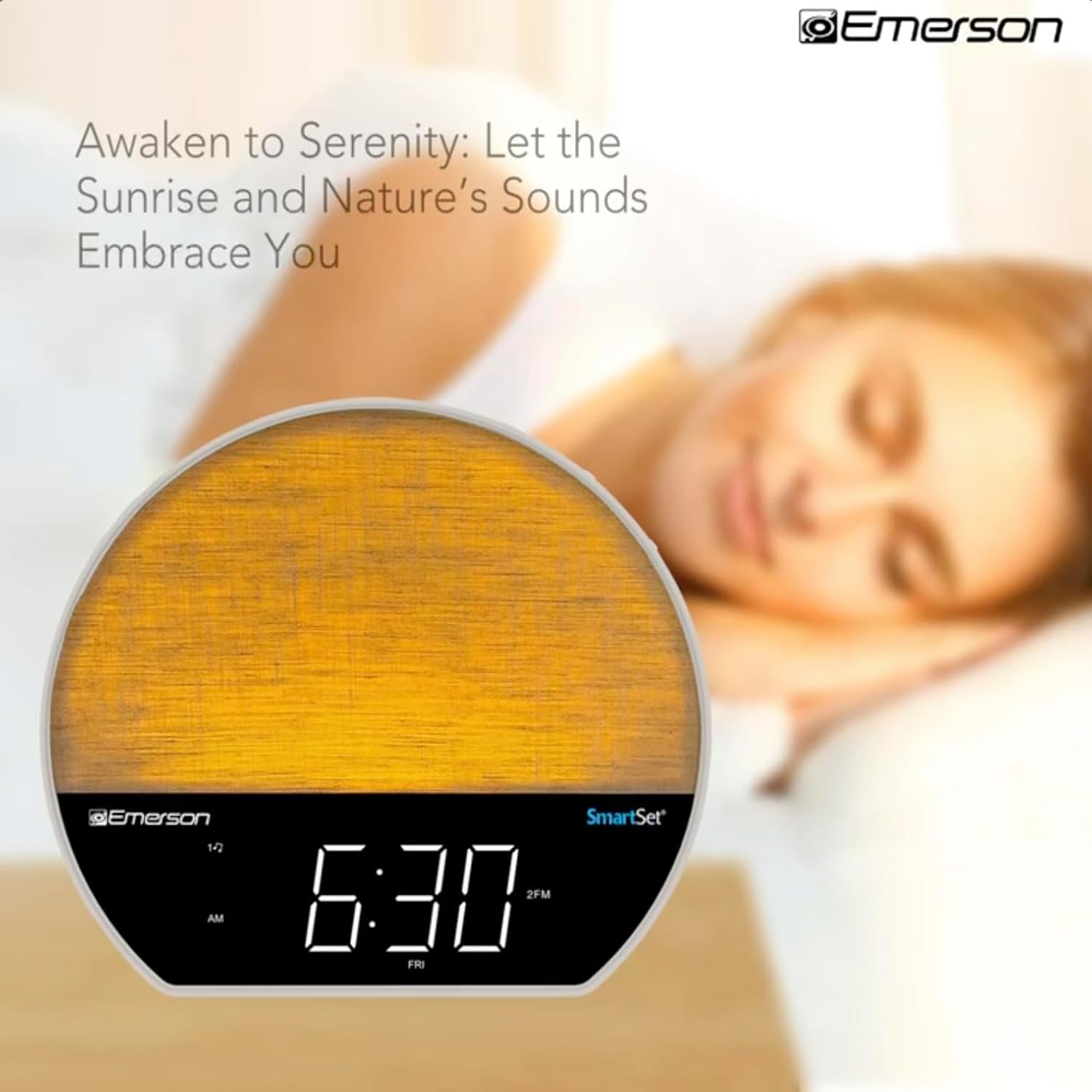
රූපය 4: The alarm clock simulating a sunrise with a warm, increasing light intensity.
To activate, ensure the sunrise option is selected during alarm setup. The light will begin to brighten 30 minutes before the alarm sounds.
6.4 Soothing Sounds and White Noise
The unit includes 6 soothing sounds and white noise to help with relaxation or waking up.
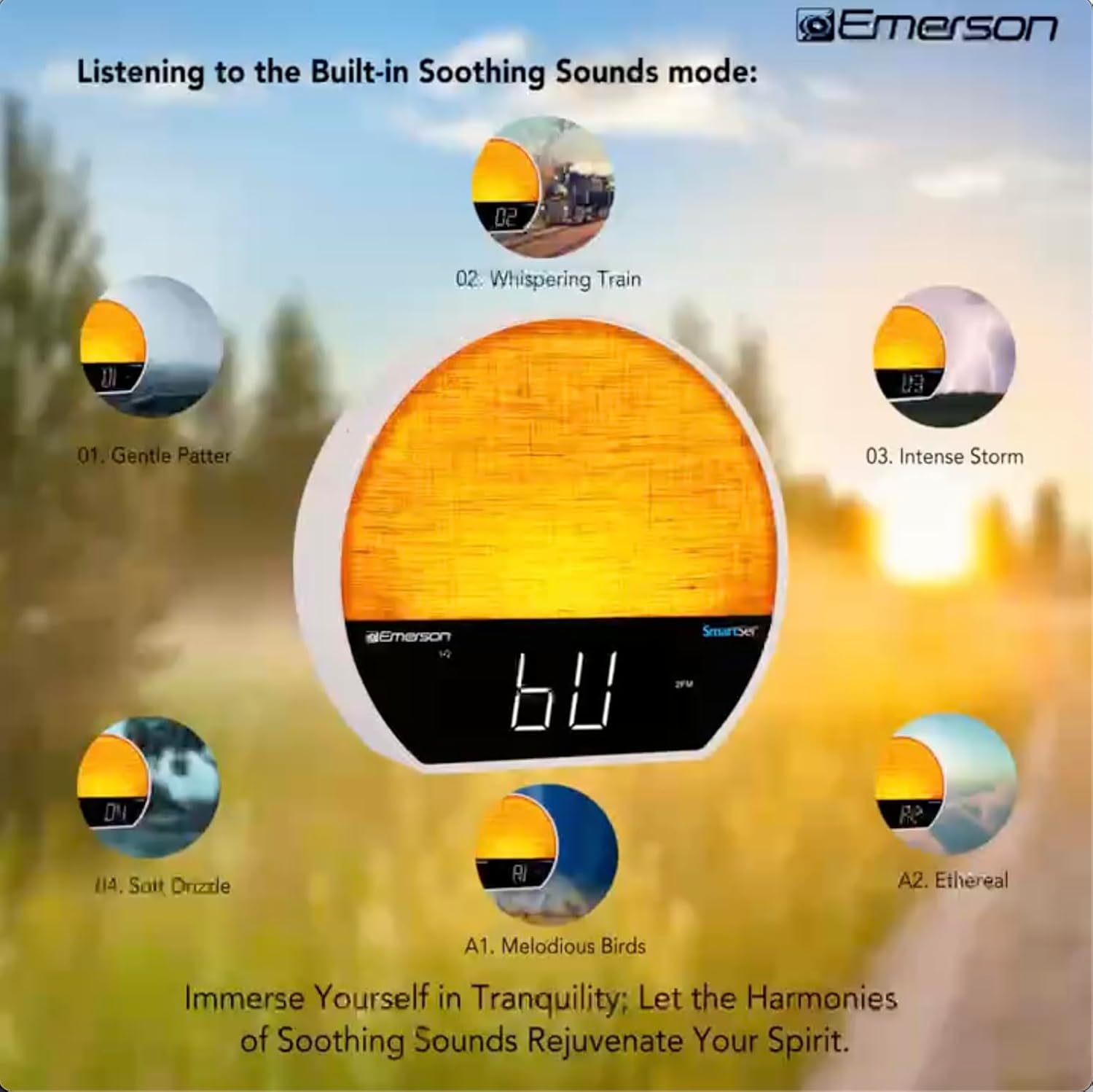
රූපය 5: Visual representation of the six soothing sound modes available on the alarm clock.
- ඔබන්න මාදිලිය button repeatedly until the Soothing Sound mode is selected.
- භාවිතා කරන්න TUNE -/+ buttons to cycle through the available sounds (e.g., Gentle Patter, Whispering Train, Intense Storm, Soft Drizzle, Melodious Birds, Ethereal, White Noise).
- භාවිතා කරමින් පරිමාව සකසන්න VOL -/+ බොත්තම්.
6.5 බ්ලූටූත් ස්පීකර් කාර්යය
Connect your smartphone or other Bluetooth-enabled device to stream audio wirelessly.

රූපය 6: The alarm clock in Bluetooth mode, paired with a mobile device for audio streaming.
- ඔබන්න මාදිලිය button until 'BT' appears on the display, indicating Bluetooth mode.
- On your device, enable Bluetooth and search for 'Emerson CKSS7071'.
- Select the device to pair. A confirmation tone will sound upon successful pairing.
- You can now play audio from your device through the alarm clock's speaker.
6.6 FM රේඩියෝ ක්රියාකාරිත්වය
ඔබේ ප්රියතම FM ගුවන් විදුලි මධ්යස්ථානවලට සවන් දෙන්න.
- ඔබන්න මාදිලිය සංදර්ශකය මත 'FM' දිස්වන තුරු බොත්තම ඔබාගෙන සිටින්න.
- ඔබන්න TUNE -/+ buttons briefly to manually tune to a station.
- ඔබා අල්ලාගෙන සිටින්න TUNE -/+ ඊළඟ ලබා ගත හැකි ස්ථානය සඳහා ස්වයංක්රීයව පරිලෝකනය කිරීමට බොත්තම්.
- ස්ථානයක් සුරැකීමට, ඔබා අල්ලාගෙන සිටින්න FM MEM පෙර සැකසූ අංකය දැල්වෙන තුරු බොත්තම. භාවිතා කරන්න TUNE -/+ පෙර සැකසූ අංකයක් තේරීමට, පසුව ඔබන්න FM MEM නැවත සුරැකීමට.
6.7 LED Decor and Dimmer Control
Customize the ambient light with 8 different colors and adjust the brightness.

රූපය 7: The alarm clock demonstrating its 8-color dimmable LED decor options.
- ඔබන්න ආලෝකය button to cycle through the 8 available colors or turn the light off.
- To adjust the brightness of the LED decor light, press and hold the ආලෝකය button. The brightness will cycle through 5 levels. Release the button at your desired brightness.
6.8 ඩිමර් පාලනය පෙන්වන්න
Adjust the brightness of the 1.2-inch LED time display.

රූපය 8: The alarm clock illustrating the five distinct levels of display luminescence.
ඔබන්න ඩිමර් button (often combined with another function, refer to button labels) to cycle through 4 levels of display brightness (Bright, Moderate, Dim, Faint).
6.9 නිදන වේලාව
Set a timer for the audio to automatically turn off after a specified duration.

රූපය 9: The alarm clock set for a sunset sleep timer, providing a harmonious end to the day.
- While audio is playing (FM or Soothing Sound), press the නිදාගන්න බොත්තම.
- නැවත නැවතත් ඔබන්න නිදාගන්න button to cycle through available sleep timer durations (e.g., 15, 30, 60, 90 minutes, or OFF).
- The audio will automatically turn off after the selected time.
6.10 ස්නූස් කිරීමේ ක්රියාවලිය
අනතුරු ඇඟවීමක් ඇසෙන විට, ඔබන්න ස්නූස් කරන්න button (usually a large button on top) to temporarily silence the alarm for a few minutes. The alarm will sound again after the snooze period.
7. නඩත්තු කිරීම
7.1 පිරිසිදු කිරීම
- පිරිසිදු කිරීමට පෙර සෑම විටම විදුලිබලාගාරයෙන් ඒකකය විසන්ධි කරන්න.
- බාහිර පෘෂ්ඨයන් පිරිසිදු කිරීම සඳහා මෘදු වියළි රෙද්දක් භාවිතා කරන්න.
- Do not use liquid cleaners, abrasive cleaners, or chemical sprays, as these may damage the finish.
7.2 බැටරි ප්රතිස්ථාපනය
විදුලි සැපයුමක් අතරතුර වේලාව සහ අනතුරු ඇඟවීමේ සැකසුම් රඳවා නොගන්නේ නම්tage, the button cell backup battery may need to be replaced. Follow the instructions in section 5.3 to replace the CR2032 battery.
8. දෝශ නිරාකරණය
| ගැටලුව | විය හැකි හේතුව | විසඳුම |
|---|---|---|
| ඒකකය බලය සක්රිය නොවේ. | බල ඇඩැප්ටරය සම්බන්ධ වී නැත හෝ දෝෂ සහිතයි. | AC ඇඩැප්ටරය ඒකකයට සහ වැඩ කරන බිත්ති අලෙවිසැලකට ආරක්ෂිතව සම්බන්ධ කර ඇති බවට වග බලා ගන්න. |
| බලය ඇණහිටීමෙන් පසු වේලාව/අනතුරු ඇඟවීමේ සැකසුම් නැති වියtage. | උපස්ථ බැටරිය අක්රිය වී හෝ ස්ථාපනය කර නැත. | Install or replace the CR2032 button cell battery (see section 5.3). |
| එලාම් එක නාද වෙන්නේ නැහැ. | අනතුරු ඇඟවීම සක්රිය කර නැත නැතහොත් ශබ්දය ඉතා අඩුය. | Ensure the alarm is set and activated (AL1/AL2 indicator on). Increase alarm volume. |
| බ්ලූටූත් උපාංගය යුගල කළ නොහැක. | Unit not in Bluetooth mode or device too far. | Ensure the unit is in Bluetooth mode ('BT' displayed). Move your device closer to the unit. Try unpairing and re-pairing. |
| දුර්වල FM රේඩියෝ පිළිගැනීම. | ඇන්ටනාව දිගු කර හෝ බාධා කර නැත. | Extend the FM wire antenna fully and reposition it for better reception. Avoid placing near other electronic devices. |
| සංදර්ශකය ඉතා දීප්තිමත්/අඳුරුයි. | Display dimmer setting needs adjustment. | ඔබන්න ඩිමර් button to cycle through brightness levels (see section 6.8). |
9. පිරිවිතර
| විශේෂාංගය | විස්තර |
|---|---|
| ආදර්ශ අංකය | CKSS7071 |
| බලශක්ති ප්රභවය | AC 100-240V, 50/60Hz (via AC adapter) |
| බැටරි බැකප් | 1 x CR2032 බොත්තම් සෛල බැටරිය (ඇතුළත්) |
| සංදර්ශක වර්ගය | 1.2-inch LED Display |
| බ්ලූටූත් අනුවාදය | V5.4 |
| සන්සුන් ශබ්ද | 6 Nature Sounds + White Noise |
| LED Decor Colors | 8 Dimmable Colors |
| නිෂ්පාදන මානයන් (W x D x H) | 7.09" x 3.15" x 6.37" |
| බර | විශේෂයෙන් දක්වා නැති |
10. වගකීම් තොරතුරු
Emerson products are manufactured to the highest quality standards. This product is covered by a limited warranty against defects in materials and workmanship for a period of one (1) year from the original date of purchase. This warranty does not cover damage caused by misuse, accident, unauthorized modification, or normal wear and tear. Proof of purchase is required for all warranty claims. Please retain your receipt.
11. පාරිභෝගික සහාය
If you have any questions, require assistance, or experience issues with your Emerson CKSS7071 Sunrise Smartset Alarm Clock Radio, please contact our customer support team.
- Webඅඩවිය: නිල එමර්සන් වෙත පිවිසෙන්න webනිතර අසන ප්රශ්න සහ සහාය සම්පත් සඳහා අඩවිය.
- විද්යුත් තැපෑල: ඔබේ නිෂ්පාදන ඇසුරුම්කරණය හෝ නිල website for customer service email contact.
- දුරකථනය: ඔබේ නිෂ්පාදන ඇසුරුම්කරණය හෝ නිල webපාරිභෝගික සේවා දුරකථන අංක සඳහා අඩවිය.
Please have your model number (CKSS7071) and proof of purchase ready when contacting support.