හැඳින්වීම
This document provides essential instructions for the use and maintenance of your Generic replacement remote control. This remote is specifically designed to be compatible with Ridgeway QS-2821 and QS-855 portable stereo power amplifiers, offering a direct replacement for your original remote without requiring any programming.
Please read this manual thoroughly to ensure proper operation and longevity of your remote control.
සැකසුම: බැටරි ස්ථාපනය
The remote control requires batteries for operation. Batteries are not included in the package and must be purchased separately.
- දුරස්ථ පාලකයේ පිටුපස බැටරි මැදිරිය සොයා ගන්න.
- ස්ලයිඩයෙන් බැටරි මැදිරියේ කවරය විවෘත කරන්න.
- ඇතුල් කරන්න one (1) AAA battery, ensuring the positive (+) and negative (-) terminals align correctly with the markings inside the compartment.
- බැටරි මැදිරි කවරය ආරක්ෂිතව වසා දමන්න.
Once new batteries are inserted, the remote control is ready for immediate use with your compatible Ridgeway ampජීවිතාරක්ෂකයා.
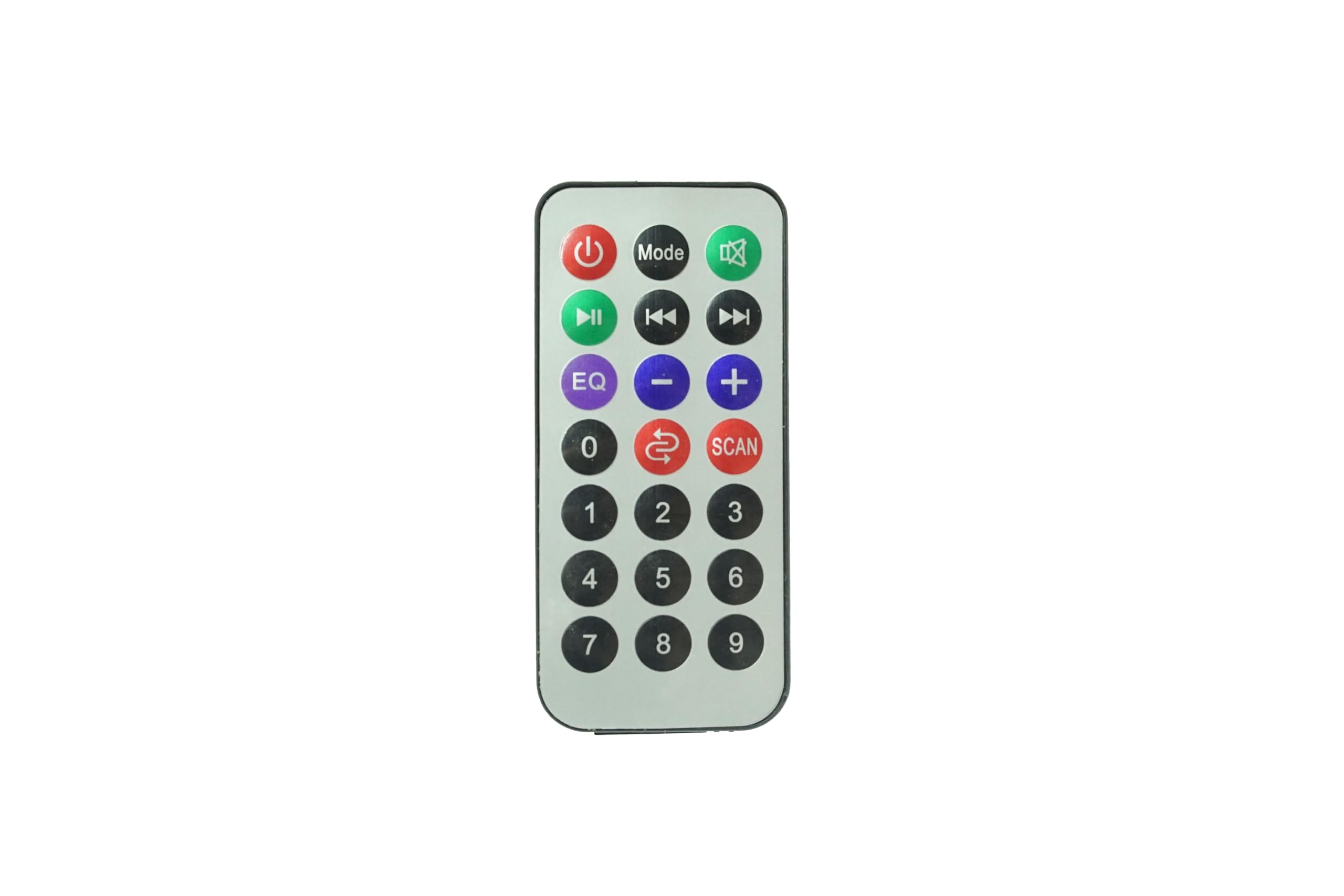
රූපය: ඉදිරිපස view of the Generic Replacement Remote Control. This image displays the layout of buttons including power, volume, and navigation controls, designed for compatibility with Ridgeway QS-2821 and QS-855 ampජීවිතාරක්ෂක.
මෙහෙයුම් උපදෙස්
This replacement remote control is pre-programmed and requires no additional setup or coding. It functions identically to the original remote control for your Ridgeway QS-2821 or QS-855 ampජීවිතාරක්ෂකයා.
To operate your ampජීවිත කාලය:
- බලය සක්රිය / අක්රිය: ඔබන්න බලය හැරවීමට බොත්තම ampජීවිත කාලය ක්රියාත්මක කිරීම හෝ අක්රිය කිරීම.
- ශබ්ද පාලනය: භාවිතා කරන්න වෙළුම + සහ වෙළුම - ශබ්ද මට්ටම සකස් කිරීමට බොත්තම්.
- ආදාන තේරීම: භාවිතා කරන්න ආදානය or source buttons to switch between different audio inputs (e.g., AUX, USB, Bluetooth).
- පසුධාවන පාලන: For media playback, use buttons such as වාදනය / විරාමය, ඉදිරියට යන්න, සහ පසුපසට පනින්න.
- නිශ්ශබ්ද කරන්න: ඔබන්න නිශ්ශබ්ද කරන්න ශ්රව්ය තාවකාලිකව නිහඬ කිරීමට බොත්තම.
Ensure there is a clear line of sight between the remote control and the infrared (IR) receiver on your ampප්රශස්ත කාර්ය සාධනය සඳහා lifier.
නඩත්තු කිරීම
- පිරිසිදු කිරීම: මෘදු වියළි රෙද්දකින් දුරස්ථ පාලකය පිස දමන්න. දියර පිරිසිදු කරන්නන් හෝ උල්ෙල්ඛ ද්රව්ය භාවිතා නොකරන්න, මන්ද ඒවා මතුපිටට හෝ අභ්යන්තර සංරචක වලට හානි කළ හැකිය.
- බැටරි ආදේශනය: Replace batteries when the remote control's response becomes sluggish or stops working. Always replace with new batteries of the specified type (AAA).
- ගබඩා: Store the remote control in a cool, dry place away from direct sunlight and extreme temperatures. If the remote will not be used for an extended period, remove the batteries to prevent leakage.
- බිංදු වළකින්න: බිංදු අභ්යන්තර පරිපථයට හානි කළ හැකි බැවින්, භෞතික බලපෑමෙන් දුරස්ථ පාලකය ආරක්ෂා කරන්න.
දෝෂගවේෂණය
| ගැටලුව | විය හැකි හේතුව | විසඳුම |
|---|---|---|
| දුරස්ථ පාලකය ක්රියා නොකරයි. |
|
|
| බොත්තම් ප්රතිචාර නොදක්වයි හෝ ප්රමාද වේ. |
|
|
| දුරස්ථ පාලකය සමහර කාර්යයන් සඳහා ක්රියා කරයි, නමුත් අනෙක් ඒවා සඳහා නොවේ. |
|
|
පිරිවිතර
- වෙළඳ නාමය: සාමාන්ය
- ගැළපෙන උපාංග: Ridgeway QS-2821, Ridgeway QS-855 Portable Stereo Power Ampජීවිතාරක්ෂක
- විශේෂ ලක්ෂණය: ක්රමලේඛනය අවශ්ය නොවේ
- සම්බන්ධක වර්ගය: අධෝරක්ත කිරණ (IR)
- අවශ්ය බැටරි: 1 x AAA (ඇතුළත් කර නැත)
- උපරිම සහාය දක්වන උපාංග ගණන: 1
- වර්ණය: පෙන්වා ඇති පරිදි
වගකීම් සහ සහාය
Specific warranty information for this Generic replacement remote control is not provided in the product details. For any warranty claims, technical support, or inquiries regarding your purchase, please contact the seller directly through the platform where the item was purchased.
ඕනෑම සහාය ඉල්ලීමක් සඳහා කරුණාකර ඔබේ මිලදී ගැනීමේ සාක්ෂි තබා ගන්න.


