
1. නිෂ්පාදන අවසන්view
The Morpheus 360 Sanctuary ANC Wireless UC Headset is designed for professional communication and audio playback. It features Active Noise Canceling (ANC), a noise-canceling boom microphone, and Bluetooth connectivity with an included USB dongle for unified communication platforms.
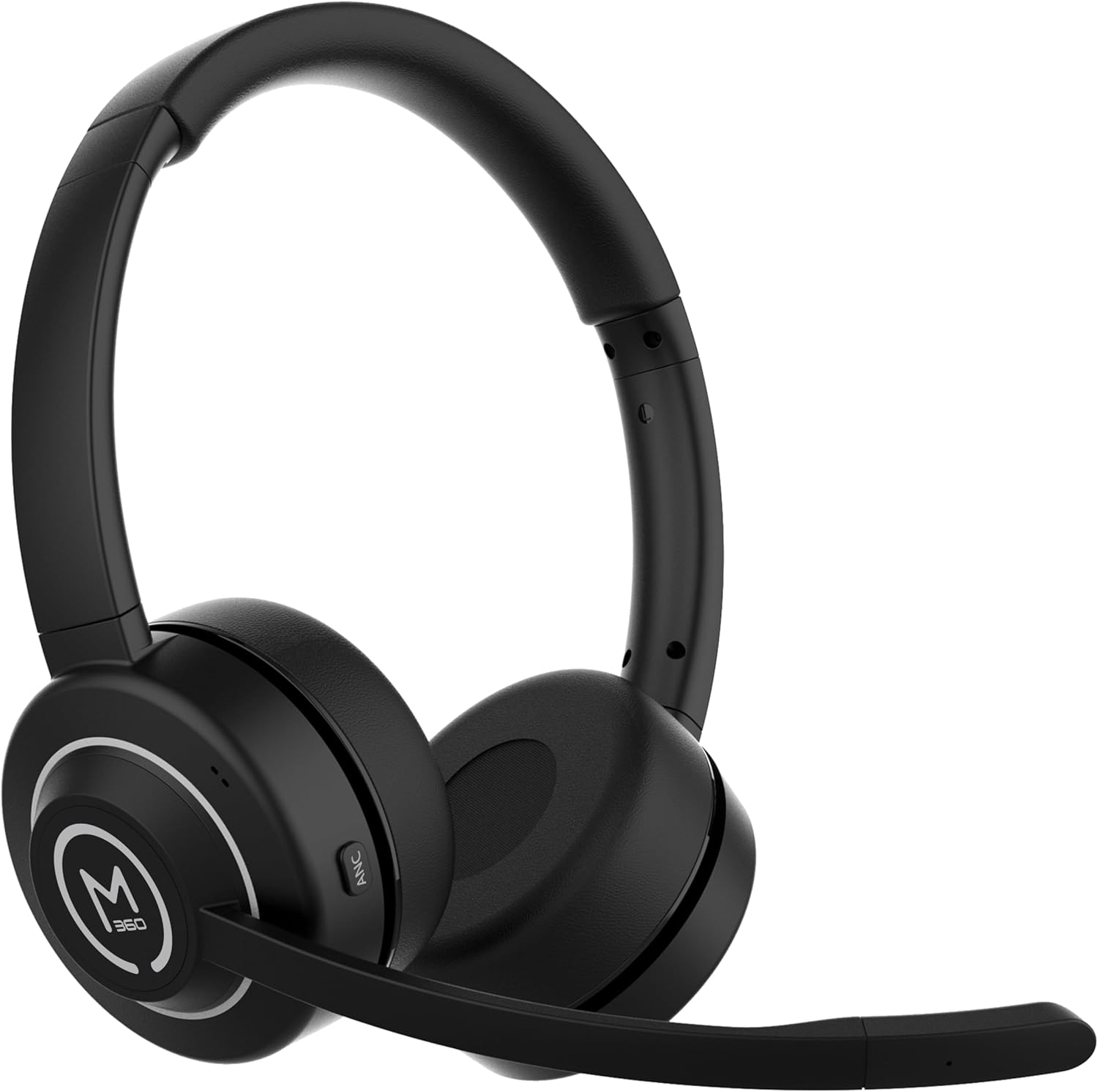
රූපය 1.1: ඉදිරිපස view of the Morpheus 360 Sanctuary ANC Wireless UC Headset.
2. පෙට්ටියේ ඇති දේ
- Morpheus 360 Sanctuary ANC Wireless UC Headset
- USB Bluetooth Dongle
- ආරෝපණ ස්ථාවරය
- USB-C ආරෝපණ කේබලය

Image 2.1: The dedicated charging stand for the headset.
3. පිහිටුවීම
3.1 හෙඩ්සෙට් එක ආරෝපණය කිරීම
- Connect the USB-C charging cable to the charging stand and a power source.
- Place the headset onto the charging stand, ensuring proper alignment. The headset will begin charging.
- සම්පූර්ණ ආරෝපණයක් මඟින් ආසන්න වශයෙන් පැය 55 ක බැටරි ආයු කාලයක් ලබා දේ.
සටහන: The headset cannot be used while it is charging on the stand.
3.2 උපාංග සමඟ යුගල කිරීම
The headset can be paired via Bluetooth or using the included USB dongle.
බ්ලූටූත් යුගලනය:
- හෙඩ්සෙට් එක ක්රියා විරහිත කර ඇති බවට සහතික වන්න.
- යුගල කිරීමේ මාදිලිය දක්වමින් LED දර්ශකය නිල් සහ රතු පැහැයෙන් දැල්වෙන තුරු බල බොත්තම ඔබාගෙන සිටින්න.
- On your device (smartphone, tablet), go to Bluetooth settings and select "Morpheus 360 Sanctuary" from the list of available devices.
- Once connected, the LED indicator will show a solid blue light.
USB Dongle Pairing (for PC/Mac):
- Plug the USB Bluetooth dongle into an available USB port on your computer.
- Power on the headset. It should automatically connect to the dongle. The LED on the dongle will indicate a successful connection.
- ඔබේ පරිගණකයේ ශබ්ද සැකසුම් තුළ ශ්රව්ය ආදාන සහ ප්රතිදාන උපාංගය ලෙස හෙඩ්සෙට් එක තෝරාගෙන ඇති බවට වග බලා ගන්න.
අවවාදයයි: Handle the USB dongle with care. Repeated insertion and removal, or improper handling, may cause the dongle to separate.
3.3 හෙඩ්සෙට් එක පැළඳීම
- ඔබේ හිසට පහසුවෙන් ගැළපෙන පරිදි හෙඩ්බෑන්ඩ් එක සකසන්න.
- Position the earcups so they sit gently on your ears. The eco-leather ear cushions are designed for comfort.
- Adjust the flexible boom microphone to be near your mouth for optimal voice pickup.

රූපය 3.1: පැත්ත view of the headset highlighting the boom microphone and control buttons.
4. හෙඩ්සෙට් එක ක්රියාත්මක කිරීම
4.1 බලය සක්රිය / අක්රිය
- බල ගැන්වීම: තත්පර 3 ක් සඳහා බල බොත්තම ඔබාගෙන සිටින්න.
- විදුලිය විසන්ධි කිරීම: තත්පර 5 ක් සඳහා බල බොත්තම ඔබාගෙන සිටින්න.
4.2 ක්රියාකාරී ශබ්ද අවලංගු කිරීම (ANC)
The ANC feature detects and reduces background noise by up to 20dB, helping you focus. This is effective against consistent low-frequency sounds like office chatter or keyboard noise.
- ANC සක්රිය කරන්න: Press the ANC button located on the earcup.
- ANC අක්රිය කරන්න: නැවත ANC බොත්තම ඔබන්න.
4.3 විනිවිදභාවය මාදිලිය
Transparency Mode allows you to hear your surroundings without removing the headset, useful for quick conversations or awareness.
- විනිවිදභාවය ප්රකාරය සක්රිය/අක්රිය කරන්න: Refer to the specific button on your headset (often shared with ANC or a dedicated button).
4.4 ඇමතුම් කළමනාකරණය
- පිළිතුර/අවසන් ඇමතුම: බහු ක්රියාකාරී බොත්තම වරක් ඔබන්න.
- ඇමතුම ප්රතික්ෂේප කරන්න: බහුකාර්ය බොත්තම තත්පර 2ක් ඔබාගෙන සිටින්න.
- මයික්රෆෝනය නිශ්ශබ්ද කරන්න/නිශ්ශබ්ද කරන්න: Use the dedicated mute button on the boom microphone or earcup.
The noise-canceling boom microphone uses specialized technology to filter out background noise from your voice during calls.
4.5 සංගීත වාදනය
- වාදනය/විරාමය: බහු ක්රියාකාරී බොත්තම වරක් ඔබන්න.
- ඊළඟ ධාවන පථය: ශබ්දය වැඩි කිරීමේ බොත්තම ඔබාගෙන සිටින්න.
- පෙර ධාවන පථය: Volume Down බොත්තම ඔබාගෙන සිටින්න.
4.6 වෙළුම් පාලනය
- පරිමාව වැඩි කරන්න: ශබ්දය වැඩි කිරීමේ බොත්තම ඔබන්න.
- ශබ්දය අඩු කරන්න: ශබ්දය අඩු කිරීමේ බොත්තම ඔබන්න.
5. නඩත්තු කිරීම
5.1 පිරිසිදු කිරීම
- Wipe the headset and ear cushions with a soft, dry, lint-free cloth.
- දරුණු රසායනික ද්රව්ය, පිරිසිදු කිරීමේ ද්රාවණ හෝ ශක්තිමත් ඩිටර්ජන්ට් භාවිතා නොකරන්න.
- ඕනෑම විවරයකට තෙතමනය ලබා ගැනීමෙන් වළකින්න.
5.2 ගබඩා කිරීම
- හෙඩ්සෙට් එක සෘජු හිරු එළියෙන් සහ අධික උෂ්ණත්වයන්ගෙන් ඈත්ව සිසිල් වියළි ස්ථානයක ගබඩා කරන්න.
- When not in use, placing the headset on its charging stand can help keep it organized and ready for use.
5.3 බැටරි සත්කාර
- බැටරි ආයු කාලය දීර්ඝ කිරීම සඳහා, හෙඩ්සෙට් එක නිතර සම්පූර්ණයෙන්ම විසර්ජනය කිරීමෙන් වළකින්න.
- Charge the headset regularly, even if not used for extended periods.
6. දෝශ නිරාකරණය
6.1 සම්බන්ධතා ගැටළු
- හෙඩ්සෙට් එක යුගල නොවේ: Ensure the headset is in pairing mode (flashing blue/red LED). Check your device's Bluetooth settings.
- USB Dongle not connecting: Ensure the dongle is fully inserted into the USB port. Try a different USB port. Re-pair the headset if necessary.
- අතරමැදි සම්බන්ධතාවය: Ensure no major obstructions are between the headset and your device/dongle. Move closer to the connected device.
6.2 ශ්රව්ය ගැටළු
- ශබ්දයක් නැත: Check volume levels on both the headset and your connected device. Ensure the headset is selected as the audio output device.
- මයික්රෆෝනය ක්රියා නොකරයි: Ensure the microphone is not muted. Check that the headset is selected as the audio input device in your computer's sound settings.
6.3 Active Noise Canceling (ANC) Performance
- ANC is most effective against consistent low-frequency sounds. It may not completely block out human speech or sudden loud noises.
- Ensure the earcups are properly seated on your ears for optimal ANC performance.
6.4 USB Dongle Durability
Some users have reported the USB dongle separating. To prevent this, handle the dongle gently when inserting or removing it from USB ports or the charging stand. Avoid pulling it out by the plastic casing alone.
6.5 Battery Alerts
The headset may issue 'Charge headset' warnings when the battery level is around 30%. This is normal behavior to prompt early recharging.
7. පිරිවිතර
| ආදර්ශ අංකය | HS6750ANC |
| වෙළඳ නාමය | මෝෆියස් 360 |
| වර්ණය | කළු |
| ද්රව්ය | Faux Leather, Plastic, Stainless Steel |
| බැටරි ආයු කාලය | පැය 55 දක්වා |
| ක්රියාකාරී ශබ්ද අවලංගු කිරීම | Up to 20dB reduction |
| මයික්රෆෝනය | Noise Canceling Boom Microphone |
| සම්බන්ධතාවය | Bluetooth, USB Dongle |
| UPC | 856816008590 |
8. වගකීම් තොරතුරු
The Morpheus 360 Sanctuary ANC Wireless UC Headset (Model HS6750ANC) comes with a 1 වසර කොටස් සහ ශ්රමය warranty from the date of purchase. Please retain your proof of purchase for warranty claims.
9. සහාය
For further assistance, technical support, or warranty inquiries, please refer to the official Morpheus 360 webවෙබ් අඩවියට පිවිසෙන්න හෝ ඔවුන්ගේ පාරිභෝගික සේවා දෙපාර්තමේන්තුව අමතන්න. සම්බන්ධතා තොරතුරු සාමාන්යයෙන් නිෂ්පාදන ඇසුරුම්කරණයේ හෝ වෙළඳ නාමයේ නිල මාර්ගගත පැවැත්මෙන් සොයාගත හැකිය.