
Jectse Jectsesikcd0et3w-11
Jectse Digital Camera User Manual
Model: Jectsesikcd0et3w-11
හැඳින්වීම
ස්තූතියි, උදව් කළාටasing the Jectse Digital Camera. This compact and portable camera is designed to capture high-quality photos and videos, offering features such as 5K video resolution, 80MP photo resolution, and 18X digital zoom. This manual provides detailed instructions on how to set up, operate, and maintain your camera to ensure optimal performance and longevity.
ආරක්ෂිත තොරතුරු
- කැමරාව ජලයට හෝ අධික තෙතමනයට නිරාවරණය නොකරන්න.
- කැමරාව බිම හෙළීමෙන් හෝ දැඩි බලපෑම්වලට ලක් කිරීමෙන් වළකින්න.
- කැමරාව සෘජු හිරු එළියෙන් සහ අධික උෂ්ණත්වයෙන් ඈත් කර තබන්න.
- නිශ්චිත ආරෝපණ කේබලය සහ බල ඇඩැප්ටරය පමණක් භාවිතා කරන්න.
- කැමරාව ඔබම විසුරුවා හැරීමට හෝ අලුත්වැඩියා කිරීමට උත්සාහ නොකරන්න. සහාය සඳහා පාරිභෝගික සහාය අමතන්න.
- කුඩා දරුවන්ට ළඟා විය නොහැකි ලෙස තබා ගන්න.
පැකේජයේ අන්තර්ගතය
කරුණාකර ඔබගේ පැකේජයේ සියලුම අයිතම තිබේදැයි පරීක්ෂා කරන්න:
- 1 x Jectse Digital Camera
- 1 x Type-C Charging Cable
- 1 x අත් පටිය
- 1 x පරිශීලක අත්පොත
- Note: Small Memory Card is not included.

Image: The Jectse Digital Camera shown alongside its included Type-C charging cable and hand strap, illustrating the complete package contents.
නිෂ්පාදනය අවසන්view
Familiarize yourself with the various parts and controls of your Jectse Digital Camera.

රූපය: ඉදිරිපස view of the Jectse Digital Camera, highlighting the lens and flash.

රූපය: ආපසු view of the Jectse Digital Camera, showing the 2.8-inch display screen and control buttons.
ප්රධාන සංරචක:
- කාච: F/2.2 f=3.83mm wide angle lens with 18X digital zoom capability.
- ෆ්ලෑෂ්: අඩු ආලෝක තත්ත්වයන් සඳහා බිල්ට්-ඉන් ෆ්ලෑෂ්.
- සංදර්ශක තිරය: ඡායාරූප රාමු කිරීම සහ නැවත ලබා ගැනීම සඳහා අඟල් 2.8 තිරයක්viewඅන්තර්ගතය.
- W/T Key: Used for zooming in (W) and out (T).
- Shutter Key: Press to capture photos or start/stop video recording.
- හරි/ප්රකාර බොත්තම: Confirms selections and switches between modes.
- මෙනු බොත්තම: කැමරා සැකසුම් සහ විකල්ප වෙත ප්රවේශ වේ.
- DISP බොත්තම: Changes display information on the screen.
- බැටරි මැදිරිය: Houses the built-in 750mAh rechargeable battery.
- වර්ගය-සී වරාය: කැමරාව ආරෝපණය කිරීම සඳහා.
- මතක කාඩ්පත් තව්: Supports Small Memory Cards up to 256GB (not included).
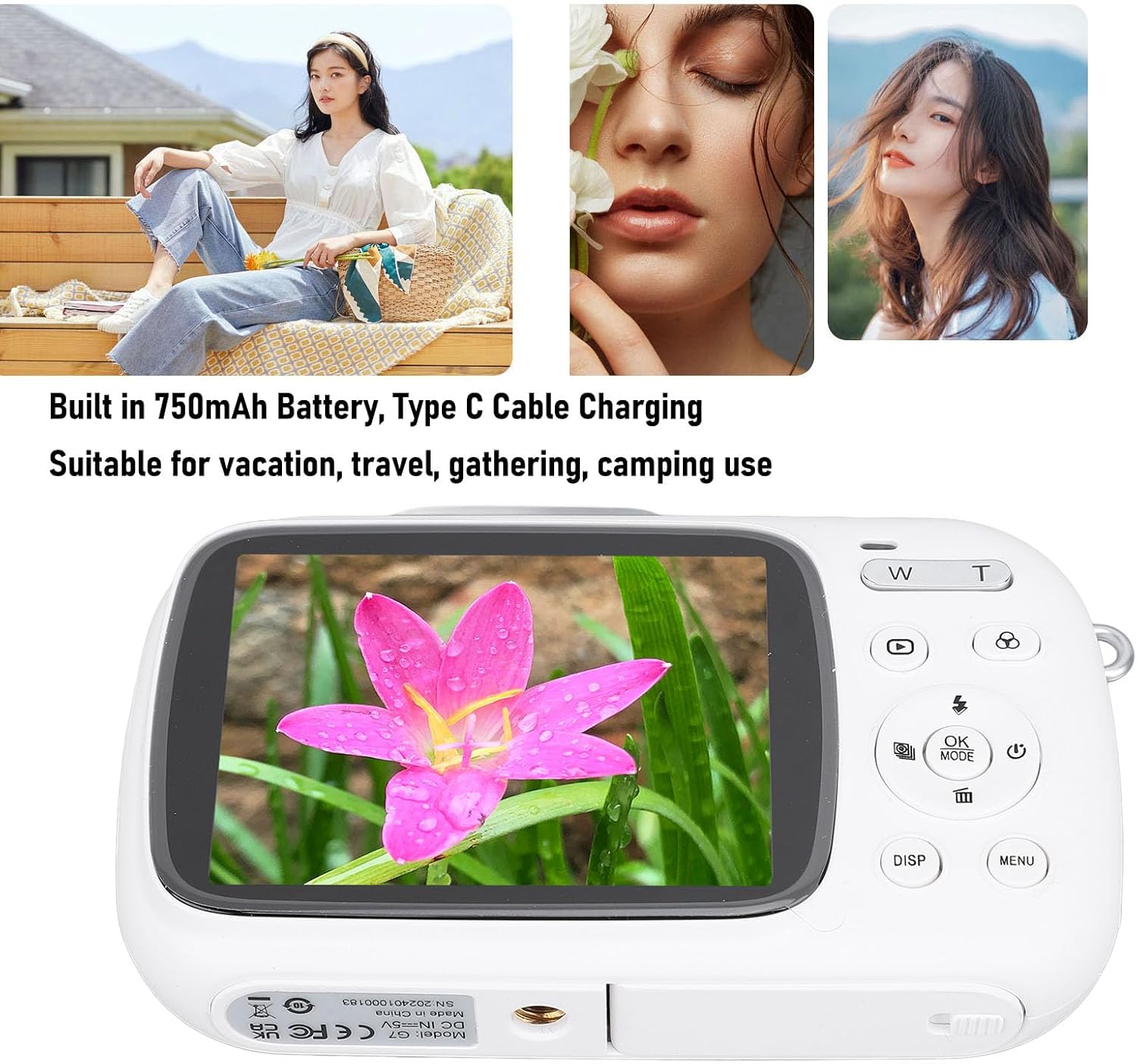
Image: Visual representation of key camera features including 80MP photo pixels, 5K HD video recording, 18X digital zoom, auto focusing, beauty filter, smiling selfie, continuous photo taking, built-in flash, and 2.8-inch display.
සැලසුම
1. බැටරිය ආරෝපණය කිරීම
The camera has a built-in 750mAh rechargeable lithium-ion battery. Before first use, ensure the battery is fully charged.
- Connect the provided Type-C charging cable to the camera's Type-C port.
- කේබලයේ අනෙක් කෙළවර USB බල ඇඩැප්ටරයකට (ඇතුළත් කර නැත) හෝ පරිගණකයේ USB පෝට් එකකට සම්බන්ධ කරන්න.
- The charging indicator light will illuminate. Charging typically takes about 3 hours.
- සම්පූර්ණයෙන්ම ආරෝපණය වූ පසු, දර්ශක ආලෝකය වෙනස් වීමට හෝ නිවා දැමීමට හැකිය. කේබලය විසන්ධි කරන්න.
2. මතක කාඩ්පතක් ඇතුල් කිරීම
A Small Memory Card (up to 256GB) is required to store photos and videos. It is not included in the package.
- Locate the memory card slot on the side or bottom of the camera.
- Insert the Small Memory Card into the slot with the metal contacts facing the correct direction (refer to the diagram near the slot if available).
- කාඩ්පත නිසි තැනට ගැළපෙන තුරු මෘදු ලෙස තල්ලු කරන්න.
- To remove the card, push it in again until it springs out slightly, then pull it out.
3. අත් පටිය සවි කිරීම
Attach the included hand strap to prevent accidental drops.
- Thread the thin loop of the hand strap through the strap eyelet on the camera body.
- Pass the larger end of the strap through the loop you just created and pull tight to secure it.
මෙහෙයුම් උපදෙස්
1. බල ගැන්වීම / අක්රිය කිරීම
- To power on, press and hold the Power button (usually marked with a circle and a vertical line).
- බලය අක්රිය කිරීමට, තිරය නිවී යන තුරු නැවත බල බොත්තම ඔබාගෙන සිටින්න.
2. ඡායාරූප ගැනීම
- Turn on the camera. It will typically default to photo mode. If not, press the මාදිලිය button to switch to photo mode.
- Frame your shot using the 2.8-inch display screen.
- භාවිතා කරන්න W/T keys to zoom in or out (18X digital zoom).
- ඔබන්න ෂටරය key halfway down to focus (if applicable).
- ඔබන්න ෂටරය key fully down to capture the 80MP photo.
3. වීඩියෝ පටිගත කිරීම
- Turn on the camera. Press the මාදිලිය වීඩියෝ පටිගත කිරීමේ මාදිලියට මාරු වීමට බොත්තම.
- Frame your video using the display screen.
- ඔබන්න ෂටරය key to start recording 5K video. A recording indicator will appear on the screen.
- ඔබන්න ෂටරය පටිගත කිරීම නැවැත්වීමට නැවත යතුර.
4. Using Special Functions
The camera offers several creative functions:
- අඛණ්ඩ ඡායාරූපකරණය: Allows you to take multiple photos in quick succession. Access this setting via the මෙනුව.
- Time Lapse Photography: Captures images at set intervals to create a time-lapse video. Configure in මෙනුව.
- ලූප් වීඩියෝ: Records video in segments, overwriting older footage when the memory card is full. Useful for continuous recording.
- සංයුති රේඛා: Displays grid lines on the screen to help with framing and composition. Toggle with ඩී.එස්.පී. button or in මෙනුව.
- මුහුණු හඳුනාගැනීම: Automatically detects and focuses on faces in the frame. Enable/disable in මෙනුව සැකසුම්.
- බිල්ට් ෆ්ලෑෂ්: The flash will automatically activate in low-light conditions or can be manually controlled via the flash button or මෙනුව.
5. නැවත ධාවනය සහ නැවතview
- ඔබන්න නැවත ධාවනය නැවත ධාවනය කිරීමේ මාදිලියට ඇතුළු වීමට බොත්තම (බොහෝ විට ත්රිකෝණ නිරූපකයකින් දැක්වේ).
- Use the directional buttons to navigate through your photos and videos.
- ඔබන්න OK දක්වා view වීඩියෝවක් හෝ ඡායාරූපයකට විශාලනය කරන්න.
- ඔබන්න නැවත ධාවනය නැවත ධාවනය කිරීමේ මාදිලියෙන් ඉවත් වීමට නැවත බොත්තම ඔබන්න.
නඩත්තු කිරීම
කැමරාව පිරිසිදු කිරීම
- Use a soft, lint-free cloth to wipe the camera body. Do not use liquid cleaners or solvents.
- For the lens and screen, use a specialized lens cleaning cloth or air blower to remove dust. Avoid touching the lens directly with your fingers.
- පිරිසිදු කිරීමට පෙර කැමරාව ක්රියා විරහිත කර ඇති බවට වග බලා ගන්න.
ගබඩා කිරීම
- කැමරාව සෘජු හිරු එළියෙන් සහ අධික උෂ්ණත්වයන්ගෙන් ඈත්ව සිසිල් වියළි ස්ථානයක ගබඩා කරන්න.
- දිගු කාලයක් ගබඩා කරන්නේ නම්, බැටරිය අර්ධ වශයෙන් ආරෝපණය වී ඇති බවට (50% පමණ) සහතික කර ගන්න සහ බැටරි සෞඛ්යය පවත්වා ගැනීම සඳහා සෑම මාස කිහිපයකට වරක් එය නැවත ආරෝපණය කරන්න.
දෝෂගවේෂණය
| ගැටලුව | විය හැකි හේතුව / විසඳුම |
|---|---|
| කැමරාව ක්රියාත්මක නොවේ. |
|
| ඡායාරූප ගැනීමට/වීඩියෝ පටිගත කිරීමට නොහැකිය. |
|
| පින්තූර බොඳයි. |
|
| බැටරි ආයු කාලය කෙටියි. |
|
පිරිවිතර
| විශේෂාංගය | විස්තර |
|---|---|
| නිෂ්පාදන ද්රව්ය | ABS |
| වීඩියෝ විභේදනය | 5K (Maximum), 15FPS |
| ඡායාරූප විභේදනය | 80MP (Maximum) |
| කාච | F/2.2 f=3.83mm Wide Angle Lens |
| ඩිජිටල් විශාලනය | 18X |
| සංදර්ශක තිරය | අඟල් 2.8 |
| ගබඩා කිරීම | Small Memory Card, up to 256GB (not included) |
| බැටරි | 750mAh Lithium Ion Battery (built-in) |
| ආරෝපණ වරාය | වර්ගය-C |
| ආරෝපණ කාලය | ආසන්න වශයෙන්. පැය 3 යි |
| විඳදරාගැනීමේ කාලය | Approx. 2 hours (usage dependent) |
| අයිතමයේ බර | අවුන්ස 9.1 කි |
| ආදර්ශ අංකය | Jectsesikcd0et3w-11 |
වගකීම් සහ සහාය
Jectse products are manufactured to the highest quality standards. For information regarding warranty coverage, technical support, or service inquiries, please refer to the contact information provided with your purchase or visit the official Jectse webඅඩවිය.
වගකීම් හිමිකම් සඳහා කරුණාකර ඔබගේ මිලදී ගැනීමේ සාක්ෂි තබා ගන්න.
Ask a question about this manual
Ask about setup, troubleshooting, compatibility, parts, safety, or missing instructions. Manuals+ will review the question and use this page’s manual context to help answer it.