
නිෂ්පාදනය අවසන්view
The MCHOSE X75 V2 is a versatile 75% layout mechanical keyboard designed for various uses, from gaming to professional work. It features multiple connectivity options, customizable RGB lighting, and an ergonomic design for comfortable use.
ප්රධාන ලක්ෂණ
- Embedded Multimedia Knob: Convenient control for media and mouse actions.
- Ergonomic Design & 75% Compact Layout: 18.5mm front height for comfortable typing, 82 keys saving 30% desktop space.
- Hot-Swappable Custom Mechanical Keyboard: Supports 3-pin & 5-pin mechanical switches, equipped with pre-lubed Hyacinth Switches.
- 5-Layer Gasket Structure Design: Enhances sound dampening and shock absorption for a consistent typing feel.
- ද්විත්ව-වෙඩි PBT යතුරු කැප්: Durable keycaps that resist wear and shine.
- Per-key RGB Lighting & MCHOSE HUB: 16.8 million colors, various lighting effects, customizable via MCHOSE HUB software.
- Tri-Mode Connection & Large Capacity 8000mAh Battery: Bluetooth 5.0, 2.4GHz wireless, and USB-C wired connections, with long battery life.

Image: The MCHOSE X75 V2 Wireless Mechanical Keyboard in Retro White, highlighting its compact design and vibrant RGB lighting.
පෙට්ටියේ ඇති දේ
Your MCHOSE X75 V2 keyboard package includes the following items:
- MCHOSE X75 V2 යතුරුපුවරුව
- දූවිලි ආවරණය
- USB-C කේබලය
- 1 x හැන්ඩි මාර්ගෝපදේශය
- 2.4GHz ලබන්නා
- Keycap සහ Switch Puller
- 2 x Hyacinth Switches
- 1 x පරිශීලක අත්පොත

Image: Contents of the MCHOSE X75 V2 keyboard box, including the keyboard, USB-C cable, 2.4GHz receiver, keycap/switch puller, extra switches, and documentation.
සැකසුම සහ සම්බන්ධතාවය
ත්රි-ප්රකාර සම්බන්ධතාවය
The MCHOSE X75 V2 keyboard supports three connection modes: Bluetooth 5.0, 2.4GHz wireless, and USB-C wired.

Image: The MCHOSE X75 V2 keyboard supports Bluetooth 5.0, 2.4GHz wireless, and USB-C wired connections, compatible with various devices.
2.4GHz රැහැන් රහිත සම්බන්ධතාවය
- Locate the 2.4GHz USB receiver. It is stored in a hidden magnetic compartment on the right side of the keyboard.
- ඔබගේ උපාංගයේ පවතින USB පෝට් එකකට ග්රාහකය පේනුගත කරන්න.
- Toggle the switch on the right side of the keyboard to "2.4G" mode.
- The keyboard will automatically connect.
බ්ලූටූත් 5.0 සම්බන්ධතාවය
- Toggle the switch on the right side of the keyboard to "BT" mode.
- On your device, search for Bluetooth devices and select "MCHOSE X75 V2".
- Pair the keyboard with your device.
USB-C රැහැන්ගත සම්බන්ධතාවය
- Connect the provided USB-C cable to the keyboard's port (located on the front top edge).
- Connect the other end of the USB-C cable to an available USB port on your device.
- යතුරු පුවරුව රැහැන්ගත ආකාරයෙන් ක්රියාත්මක වන අතර එකවර ආරෝපණය වේ.
Video: This video demonstrates how to connect the MCHOSE X75 V2 keyboard using its web driver and desktop driver.
මෙහෙයුම් උපදෙස්
බහුමාධ්ය බොත්තම
The embedded multimedia knob on the left side of the keyboard allows for easy volume control. Rotate to adjust volume, press to mute/unmute.
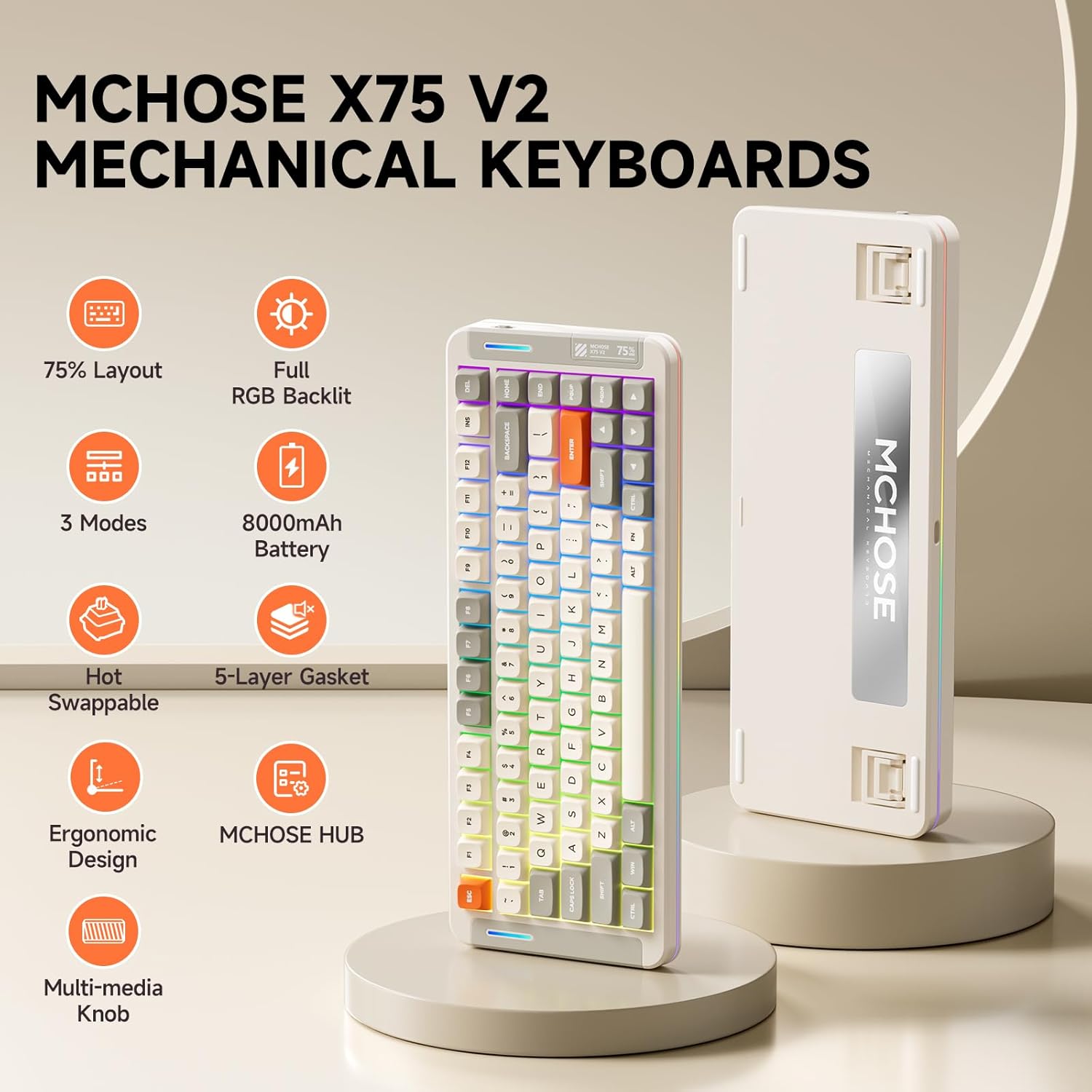
Image: The multimedia knob on the MCHOSE X75 V2 keyboard for volume control.
ආර්ජීබී ආලෝකකරණ පාලනය
The keyboard features per-key RGB lighting and an atmosphere light bar with 16.8 million colors and various effects.
පසුතල සැකසුම්
- එෆ්එන් + ටැබ්: Switch backlight color.
- Fn + Q/W/E/R/T/Y: Switch backlight mode.
- Fn + ඉහළ/පහළ ඊතලය: පසුබිම් ආලෝකයේ දීප්තිය සකසන්න.
- Fn + වම්/දකුණු ඊතලය: පසුතල ආලෝකයේ වේගය සකසන්න.
Atmosphere Lighting Settings
- Fn + දකුණු මාරුව: Switch atmosphere lighting mode.
- Fn + B: Switch ambient light strip to power mode.
- එෆ්එන් + ඉසෙඩ්: Switch atmosphere lighting color.

Image: Key combinations for adjusting the keyboard's RGB backlight and atmosphere lighting.
Video: An introduction to the MCHOSE X75 V2 Retro White keyboard, highlighting its features and design.
Ergonomic Design
The keyboard features a front height of approximately 18.5mm for comfortable typing. It also includes two-stage adjustable tilt legs on the underside to customize your typing angle, reducing strain on your fingers and wrists.

Image: The ergonomic design of the MCHOSE X75 V2 keyboard with adjustable tilt legs for personalized comfort.
Customization with MCHOSE HUB
The MCHOSE HUB software allows you to customize various settings of your X75 V2 keyboard, including macros, key assignments, rhythm effects, and lighting modes. Download the software from the official MCHOSE webඅඩවිය.
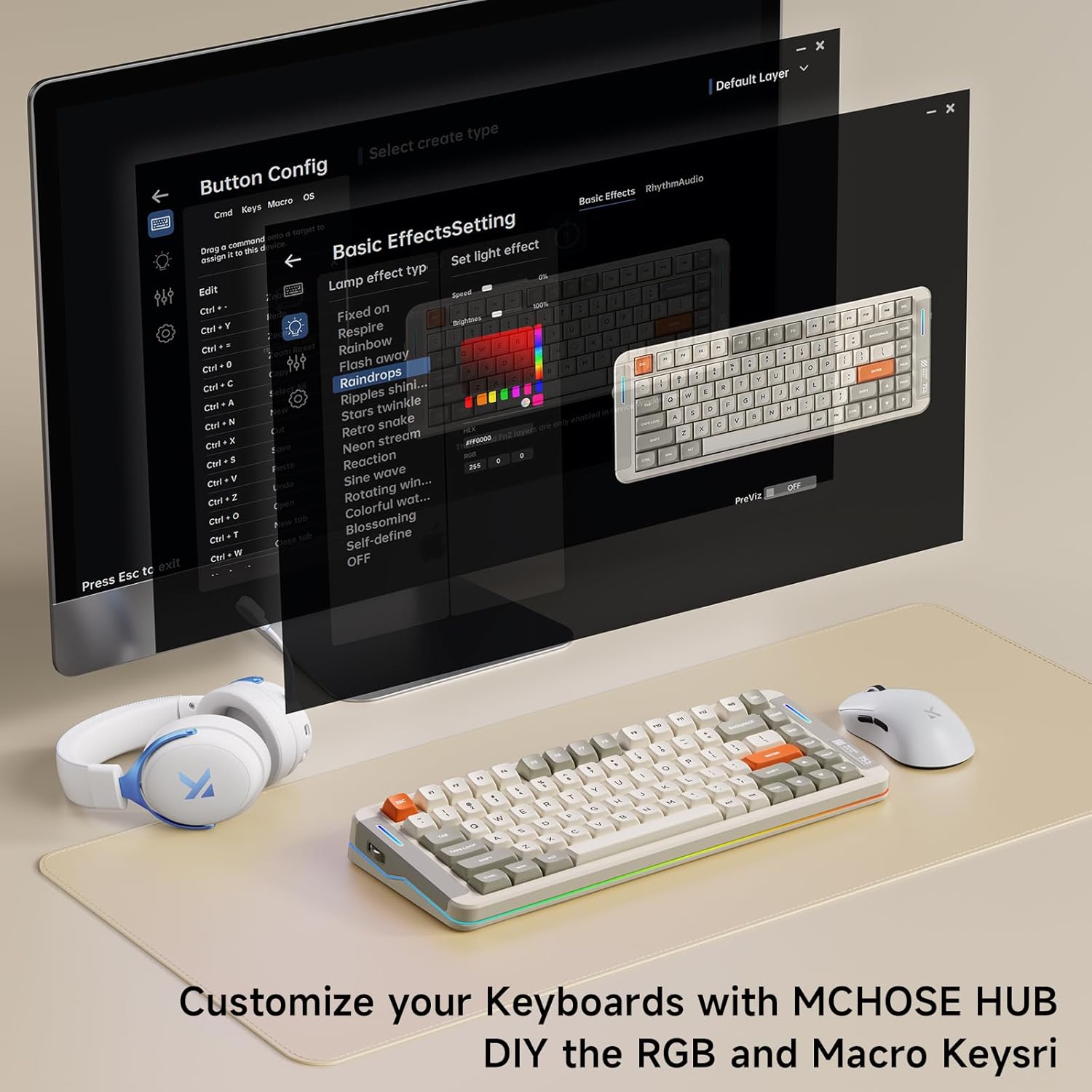
Image: The MCHOSE HUB software interface for customizing keyboard settings.
නඩත්තු කිරීම
උණුසුම්-හුවමාරු කළ හැකි ස්විච
The MCHOSE X75 V2 features hot-swappable PCB sockets, allowing you to easily change 3-pin and 5-pin mechanical switches without soldering. Use the provided keycap and switch puller for safe removal and installation.

Image: The hot-swappable design allows for easy customization of switches.
යතුරු ආවරණ සත්කාරය
The double-shot PBT keycaps are designed for durability and resistance to shine and wear. Clean them with a soft, damp රෙදි. දරුණු රසායනික ද්රව්ය වලින් වළකින්න.
5-ස්ථර ගෑස්කට් ව්යුහය
The keyboard's 5-layer gasket structure enhances sound dampening and shock absorption, contributing to a consistent and pleasant typing experience. This design also helps protect internal components.

රූපය: පුපුරා ගියේය view of the keyboard's 5-layer gasket structure, detailing its components for enhanced typing feel and sound.
Video: A typing sound test of the MCHOSE X75 V2 keyboard, demonstrating its 'creamy' sound profile.
පිරිවිතර
| විශේෂාංගය | විස්තර |
|---|---|
| වෙළඳ නාමය | Mchose |
| ආදර්ශ අංකය | X75 V2 |
| සම්බන්ධතා තාක්ෂණය | 2.4GHz රැහැන් රහිත, BT5.0, USB-C |
| යතුරුපුවරු විස්තරය | යාන්ත්රික |
| විශේෂ ලක්ෂණ | Backlit, Customizable Display Keys, Ergonomic, Hot-Swappable, Rechargeable |
| වර්ණය | White (Retro White variant) |
| යතුරුපුවරු පසුතල ආලෝකය | RGB |
| නිෂ්පාදන මානයන් | 13.7"අඟල් x 5.5"අඟල් x 1.57"උ |
| බලශක්ති ප්රභවය | බැටරි බලයෙන් ක්රියාත්මක (8000mAh) |
| මාරු වර්ගය | Linear (Hyacinth Switches) |
| යතුරු ගණන | 82 |
| සංවෘත ද්රව්ය | Metal, Plastic, Polycarbonate, Silicone |
දෝෂගවේෂණය
සම්බන්ධතා ගැටළු
- 2.4GHz රැහැන් රහිත: Ensure the USB receiver is securely plugged in and the keyboard switch is set to "2.4G". Try a different USB port.
- බ්ලූටූත්: Ensure the keyboard switch is set to "BT" and your device's Bluetooth is enabled. Re-pair the device if necessary.
- වයර්: Check the USB-C cable connection at both ends. Try a different USB-C cable or port.
ආලෝකය ක්රියා නොකරයි
- Check battery level; low battery can affect lighting.
- Ensure RGB lighting is enabled via Fn key combinations or MCHOSE HUB software.
යතුරු ප්රතිචාර නොදක්වයි
- යතුරුපුවරුව නිසි ලෙස සම්බන්ධ වී බලගන්වා ඇති බවට වග බලා ගන්න.
- If using wireless modes, check battery level.
- For individual keys, ensure the switch is properly seated in the hot-swappable socket.
වගකීම් සහ සහාය
The MCHOSE X75 V2 keyboard comes with a 1-year manufacturer warranty.
For further assistance, please visit the MCHOSE Official webවෙබ් අඩවිය හෝ පාරිභෝගික සහාය අමතන්න.
MCHOSE Official Seller: MCHOSE නිල