නිෂ්පාදනය අවසන්view
The Generic F998 Live Sound Card & Audio Mixer is a portable studio mixer designed for streaming, podcasting, and recording. It features an imported DSP Dual Chip for superior sound processing, capturing voices with a 120kHz sample rate and 24-bit bitrate, ensuring stable and clear audio. This versatile device offers multiple connectivity options and functional modes to enhance your audio production.

Image: The F998 Live Sound Card connected to three mobile phones, illustrating its capability for simultaneous live broadcasting on multiple platforms.

Image: Two individuals wearing headphones, actively engaged in recording or streaming with the F998 sound card, emphasizing clear sound output.
පැකේජයේ අන්තර්ගතය
The F998 Live Sound Card & Audio Mixer package typically includes the following items:
- F998 Sound Mixer Board
- Data Cable (for power and PC connection)
- Two Audio Cables (for mobile phone connections)
- උපදෙස් අත්පොත
සැකසුම් මාර්ගෝපදේශය
1. බලගැන්වීම
Connect the provided data cable to the sound card's charging port and a suitable power source, such as a computer's USB port or a USB power adapter. Press the power button located on the sound card to turn the device on.
2. Connecting Microphones and Headphones
Insert your condenser microphone into the designated "Condenser mic" port. Connect your headset or earphones to the "Headset" or "Earphone" output ports for monitoring audio.
3. Connecting to Devices (Phones/PC)
Use the provided audio cables to connect your mobile phones to the "OTG/PC Live" ports for live streaming or recording. For connecting to a PC, use the data cable to establish a connection.

Image: A detailed diagram illustrating the various input and output connections on the F998 sound card, including ports for condenser mic, headset, earphone, backing track, and live output to PC/mobile devices.
4. බ්ලූටූත් සම්බන්ධතාව
To connect wirelessly for accompaniment or other audio input, activate Bluetooth on your mobile device. ඒ සඳහා සොයන්න "F998" in the list of available devices and pair with it. This allows for cable-free audio input.
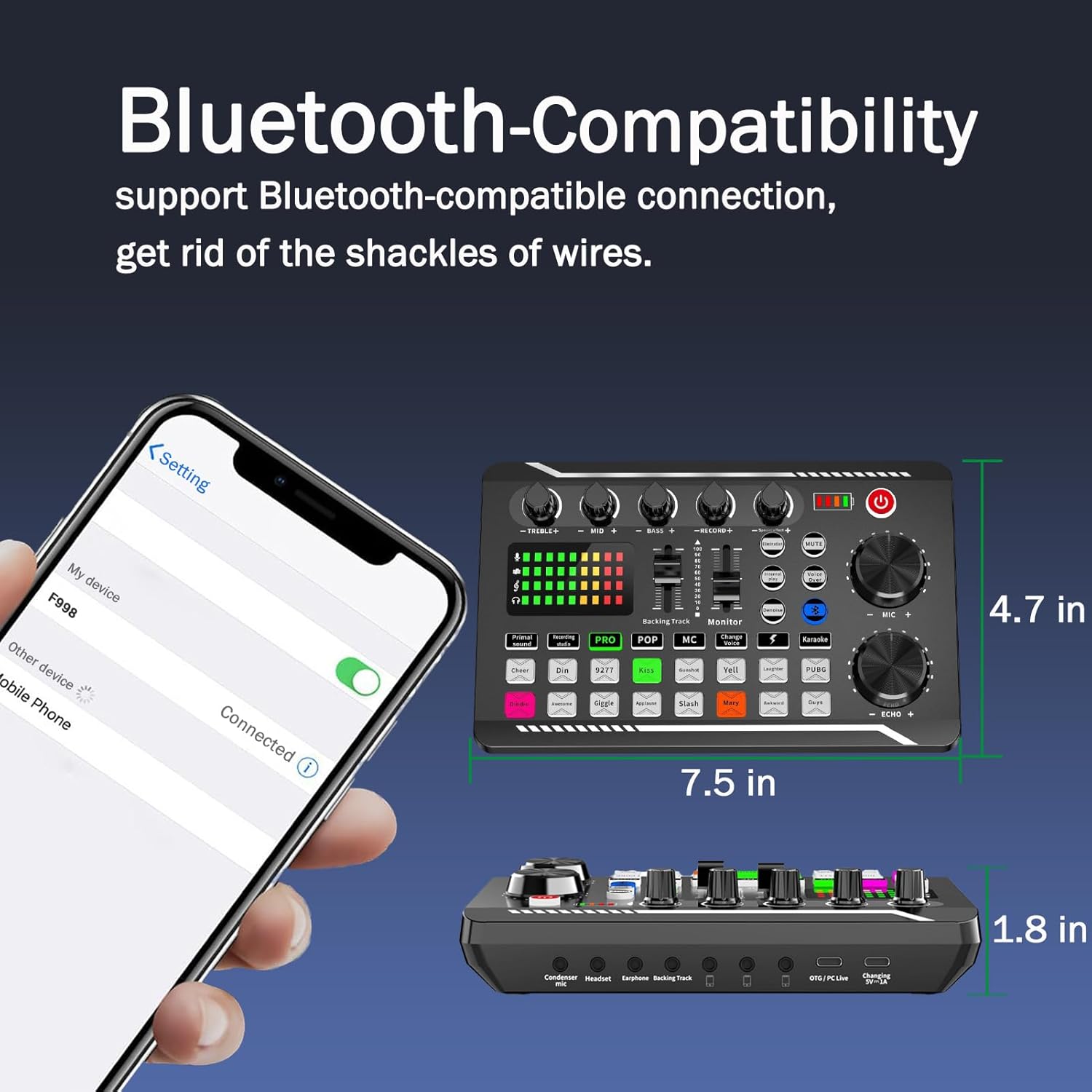
Image: A smartphone screen displaying a successful Bluetooth connection to the "F998" device, with the sound card visible in the background, demonstrating wireless connectivity.
මෙහෙයුම් උපදෙස්
Basic Operation Sequence
මූලික මෙහෙයුම සඳහා මෙම පියවර අනුගමනය කරන්න:
- බල ගැන්වීම: Press the power button to activate the sound card.
- මාදිලිය තෝරන්න: Choose from the 7 available podcast & recording modes (e.g., PRO, POP, MC) using the dedicated buttons on the control panel.
- පරිමාව සකසන්න: Use the MIC+ knob to adjust the microphone input volume. Utilize other faders and knobs to fine-tune various audio levels as needed.

Image: A visual step-by-step guide demonstrating the initial setup and operation of the F998 sound card, including powering on, selecting a mode, and adjusting microphone volume.
විශේෂ ප්රයෝග සහ කාර්යයන්
The F998 offers a range of audio enhancements:
- 16 Fixed Background Special Effects: Access various sound effects like "Cheer," "Kiss," "Yell," "Laughter," and more via dedicated buttons.
- 4 Voice Changer Modes: Modify your vocal tone for creative applications.
- ඉවත් කිරීම: Removes vocals from music tracks, ideal for karaoke.
- ඩෙනොයිස්: Reduces unwanted background noise for cleaner audio recordings.
- කටහඬ: Automatically lowers background music volume when speech is detected.
- Internal Play: Enables internal audio looping for specific effects or playback.

රූපය: සමීප ඡායාරූපයක් view of the F998 sound card's control panel, highlighting the array of 16 live effects buttons, each labeled with a distinct sound effect.
ශ්රව්ය මට්ටම් සකස් කිරීම
Utilize the faders and rotary knobs on the sound card to precisely control various audio parameters:
- TREBLE+, MID+, BASS+: Adjust the equalization for your microphone input to achieve desired tonal characteristics.
- RECORD+: Controls the overall recording volume level.
- අධීක්ෂණය: Adjusts the volume of the audio heard through your connected headphones or earphones.
- ECHO+: Controls the intensity and presence of the reverb effect.
නඩත්තු කිරීම
To ensure the longevity and optimal performance of your F998 Live Sound Card & Audio Mixer, please adhere to the following maintenance guidelines:
- පිරිසිදු කිරීම: Keep the device clean and free from dust. Use a soft, dry cloth for wiping surfaces. Avoid using liquid cleaners or abrasive materials.
- පාරිසරික තත්ත්වයන්: Avoid exposing the device to extreme temperatures, high humidity, or direct sunlight. Operate and store it in a dry, temperate environment.
- හැසිරවීම: Handle the sound card with care to prevent physical damage. Do not drop or subject it to strong impacts.
- සේවා: Do not attempt to disassemble or repair the device yourself. Refer to qualified service personnel for any repairs or technical issues.
- ගබඩා: When not in use for extended periods, store the device in its original packaging or a protective case.
දෝෂගවේෂණය
If you encounter issues with your F998 Live Sound Card & Audio Mixer, refer to the following common problems and solutions:
Sound Output නැත
- කේබල් සම්බන්ධතා: Ensure all audio cables (microphone, headphones, output to phone/PC) are securely and correctly connected to their respective ports.
- වෙළුම් මට්ටම්: Check that all relevant volume knobs and faders on the sound card are turned up sufficiently. Also, verify volume settings on your connected devices (phone, PC).
- උපාංග තේරීම: Confirm that the F998 is selected as the default input and output audio device in your computer's sound settings or streaming software.
දුර්වල ශබ්ද ගුණාත්මකභාවය / ශබ්දය
- මයික්රෆෝනය ස්ථානගත කිරීම: Adjust the microphone's distance and angle to optimize sound capture and minimize unwanted noise.
- ඩෙනොයිස් කාර්යය: Activate the "Denoise" function on the sound card to reduce background noise.
- බාධා කිරීම්: Ensure there are no strong electromagnetic interference sources (e.g., other electronic devices) near the sound card or microphone.
- EQ ගැලපීම: Experiment with the TREBLE, MID, and BASS controls to fine-tune the sound quality.
බ්ලූටූත් සම්බන්ධතා ගැටළු
- බ්ලූටූත් සක්රිය කිරීම: Ensure the sound card's Bluetooth is active and discoverable.
- උපාංග නැවත ආරම්භ කරන්න: Try restarting both the sound card and your Bluetooth-enabled device (e.g., smartphone, tablet).
- සමීපත්වය: Ensure your Bluetooth device is within the effective wireless range of the sound card.
පිරිවිතර
| විශේෂාංගය | විස්තර |
|---|---|
| වෙළඳ නාමය | සාමාන්ය |
| ආකෘතිය | F998 |
| බලශක්ති ප්රභවය | Corded Electric (Built-in 1200 mAh battery) |
| නාලිකා ගණන | 3 |
| සම්බන්ධතා තාක්ෂණය | බ්ලූටූත්-අනුකූල |
| සංඛ්යාතය | 120 KHz |
| Sampලේ අනුපාතය | 120kHz |
| බිට්රේට් | 24-bit |
වගකීම් සහ සහාය
For detailed warranty information, technical assistance, or customer support regarding your Generic F998 Live Sound Card & Audio Mixer, please refer to the specific documentation included with your purchase. Alternatively, you may contact the retailer or manufacturer directly. Warranty terms and support options may vary based on your region and point of purchase.


