
හැඳින්වීම
Thank you for choosing Gsangoo USB C Wired Headphones. These earphones are designed to provide a high-fidelity audio experience with convenient wired control and broad compatibility with USB Type-C devices. This manual provides essential information for setup, operation, and maintenance to ensure optimal performance and longevity of your product.

Image: Gsangoo USB C Wired Headphones, showcasing the earbuds and USB-C connector.
නිෂ්පාදන විශේෂාංග
- USB C Connectivity: Designed for devices without a 3.5mm audio jack, offering direct digital audio transmission.
- Comfortable & Ergonomic Design: Shaped to fit the ear's natural curve for extended wear comfort.
- චුම්භක ඉයර්බඩ්: Integrated magnets help prevent cable tangling when not in use.
- උසස් තත්ත්වයේ ශබ්දය: Features a 14.2mm sound driver for immersive audio reproduction.
- In-line Control & HD Microphone: Allows for volume adjustment, music playback control, and clear hands-free calls.
- කල් පවතින ඉදිකිරීම්: Made with a lightweight ABS shell and TPE wire for enhanced durability and service life.
- Advanced DAC Chip: Ensures wide compatibility and stable, high-quality sound transmission.
සැලසුම
To begin using your Gsangoo USB C Wired Headphones, simply plug the USB Type-C connector into the compatible port on your device. No additional drivers or software are typically required. The headphones are designed for immediate plug-and-play functionality.

Image: Illustration of connecting the USB Type-C headphones to a device, highlighting the port and built-in DAC chip.
මෙහෙයුම් උපදෙස්
The in-line control unit allows for easy management of audio and calls:
- පරිමාව: Tap the '+' button once.
- ශබ්දය පහළට: Tap the '-' button once.
- සංගීතය වාදනය/විරාම කරන්න: මැද බොත්තම වරක් තට්ටු කරන්න.
- ඊළඟ ගීතය: Tap the center button twice.
- පෙර ගීතය: Tap the center button three times.
- පිළිතුරු ඇමතුම: Tap the center button once during an incoming call.
- ඇමතුම අවසන් කරන්න: Tap the center button once during an active call.
- ඇමතුම ප්රතික්ෂේප කරන්න: Tap the center button three times during an incoming call.
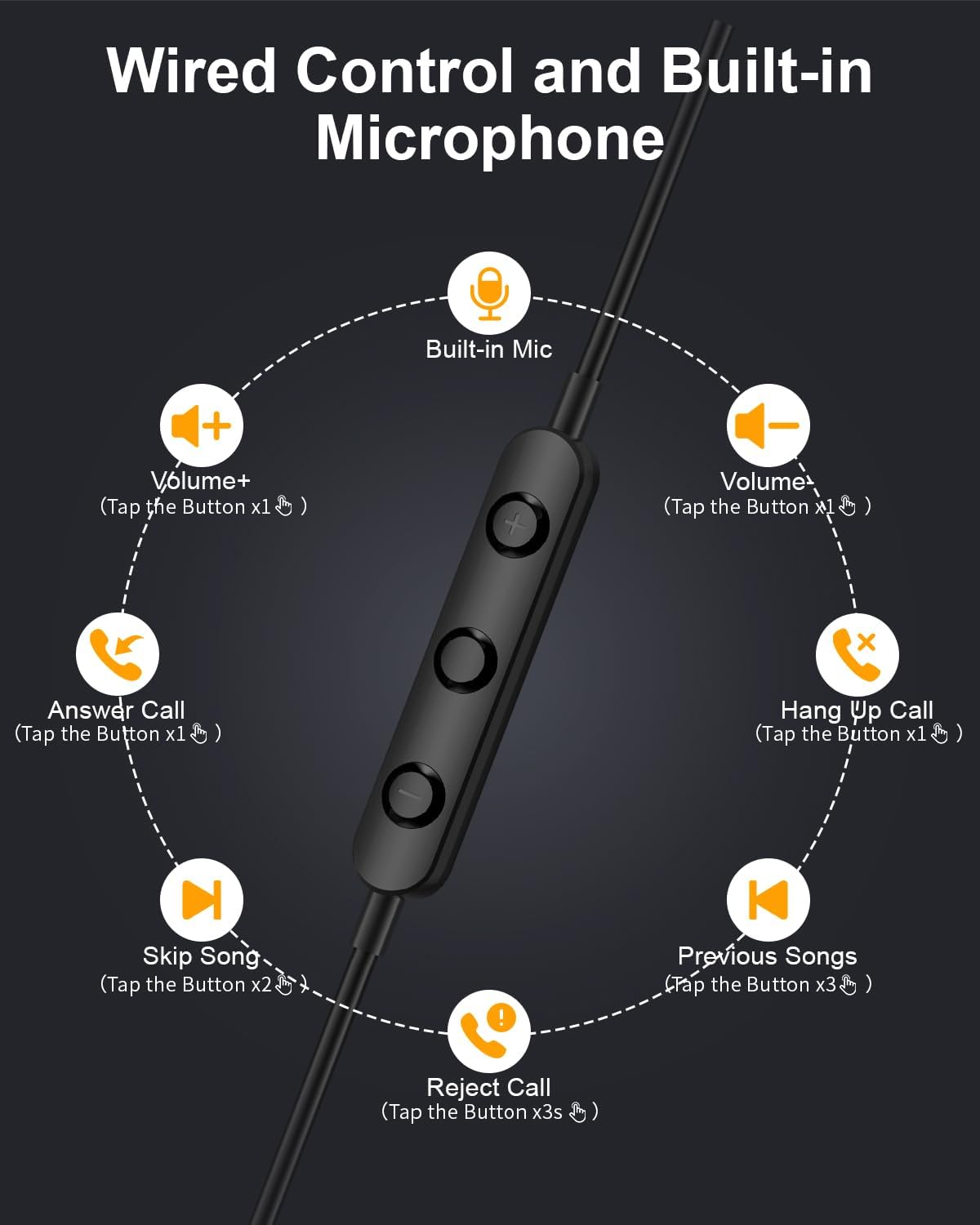
Image: Diagram illustrating the functions of the in-line control buttons for volume, music, and call management.
ගැළපුම
These USB C wired earphones are compatible with a wide range of devices that feature a USB Type-C audio output and do not have a 3.5mm headphone jack. Please note: These headphones are not compatible with devices that have both a USB-C jack and a 3.5mm jack, as the device may prioritize the 3.5mm port.
අනුකූල උපාංගවලට ඇතුළත් වන්නේ:
- Apple සඳහා: iPhone 17/17 Air/17 Pro/16/16 Pro/16 Pro Max/15/15 Plus/15 Pro/15 Pro Max, iPad 10th Gen/iPad Air 4th/5th/11/13 inch/iPad Pro 11/12.9/iPad Mini 6th.
- Samsung සඳහා: Galaxy S25 Ultra/S25/S24 Ultra/S24/S23 FE/S23/S23 Ultra/S22/S22 Ultra/S21 FE/S21/S21 Ultra/S20 FE/S20 Ultra/Z Flip6/Z Fold5/A55/A54/A16 5G/A56 5G/A34 5G/A53 5G/A33 5G.
- Google සඳහා: Pixel 9 Pro/8 Pro/8/7/7 Pro/7a/6a/6/6 Pro.
- For OnePlus: 12R/12/11R/11/10T/10 Pro/9/Nord/8T.
- And other Phone USB C devices without a 3.5mm jack.

Image: Visual guide to USB C headphone compatibility, showing various devices and emphasizing the requirement for a USB-C only audio port.
නඩත්තු කිරීම
නිසි සැලකිල්ල ඔබේ හෙඩ්ෆෝන් වල ආයු කාලය දීර්ඝ කරයි:
- පිරිසිදු කිරීම: Gently wipe the earbuds and cable with a soft, dry cloth. Avoid using harsh chemicals or abrasive materials.
- ගබඩා: When not in use, store the headphones in the provided storage bag to prevent tangling and damage. The magnetic design helps keep the earbuds together.
- තෙතමනය වළක්වා ගන්න: මෙම හෙඩ්ෆෝන් ජලයට ඔරොත්තු නොදේ. ඒවා ද්රව සහ අධික ආර්ද්රතාවයෙන් ඈත් කර තබන්න.
- පරිස්සමින් හැසිරවීම: Avoid pulling the cable forcefully or bending the connector at sharp angles.

Image: Close-up of the magnetic earbuds, demonstrating how they connect to prevent tangling.
දෝෂගවේෂණය
If you encounter issues with your headphones, please refer to the following common solutions:
- ශබ්දයක් නැත:
- Ensure the USB-C connector is fully inserted into your device.
- ඔබගේ උපාංගයේ ශබ්ද සැකසුම් පරීක්ෂා කරන්න.
- Verify that your device supports audio output via its USB-C port and does not have a 3.5mm jack that might be prioritized.
- Test the headphones with another compatible device to rule out a device-specific issue.
- මයික්රෆෝනය ක්රියා නොකරයි:
- හෙඩ්ෆෝන් ආරක්ෂිතව සම්බන්ධ කර ඇති බවට සහතික වන්න.
- Check your device's microphone input settings.
- මයික්රොෆෝනය බාධාවක් නොවන බව තහවුරු කරන්න.
- Sound Quality Issues (e.g., static, distortion):
- Ensure the connector is clean and free of debris.
- Try playing different audio sources to determine if the issue is with the content.
- ප්රතිචාර නොදක්වන පාලන:
- Ensure the headphones are properly connected.
- Some older devices or specific apps may have limited support for in-line controls.
If these steps do not resolve the issue, please contact Gsangoo customer support for further assistance.
පිරිවිතර
| මාදිලියේ නම | 945-Black-USBC |
| හෙඩ්ෆෝන් ජැක් | USB C |
| සම්බන්ධතා තාක්ෂණය | රැහැන්ගත |
| ද්රව්ය | Acrylonitrile Butadiene Styrene (ABS) Shell, Thermoplastic Elastomer (TPE) Wire |
| පාලන වර්ගය | Button Control (Push Button) |
| කේබල් විශේෂාංගය | පටලැවීම නිදහස් |
| අයිතමයේ බර | අවුන්ස 0.634 (කිලෝග්රෑම් 0.02) |
| ජල ප්රතිරෝධක මට්ටම | ජලයට ඔරොත්තු නොදෙන |
| ශ්රව්ය ධාවක වර්ගය | ගතික ධාවකය |
| ඉයර්පීස් හැඩය | Bud (In Ear) |
| ශබ්ද පාලන විශේෂාංග | Passive Noise Cancellation, Sound Isolation |
| බ්ලූටූත් තාක්ෂණයට සහය දක්වයි | නැත |
| විශේෂ ලක්ෂණය | සැහැල්ලුයි |
| නිෂ්පාදන මානයන් | අඟල් 1 x 1 x 0.3 |
වගකීම් සහ සහාය
Gsangoo is committed to providing high-quality products and customer satisfaction. We offer after-sales service to address any questions or concerns you may have regarding your USB C Wired Headphones.
For product support, troubleshooting assistance, or warranty inquiries, please contact Gsangoo customer service through the platform where you purchased the product or visit the official Gsangoo store page.
We aim to respond to all inquiries within 24 hours to provide satisfactory assistance.