
JUNJIEUNVO YYK-Q16 PRO
JUNJIEUNVO Q30 Bluetooth Earphones User Manual
Model: YYK-Q16 PRO
1. හැඳින්වීම
Thank you for choosing the JUNJIEUNVO Q30 Bluetooth Earphones. These earphones are designed to provide a superior audio experience with advanced features such as an intelligent color touch screen, Active Noise Cancellation (ANC), and Environmental Noise Cancellation (ENC). This manual will guide you through the setup, operation, and maintenance of your new earphones.
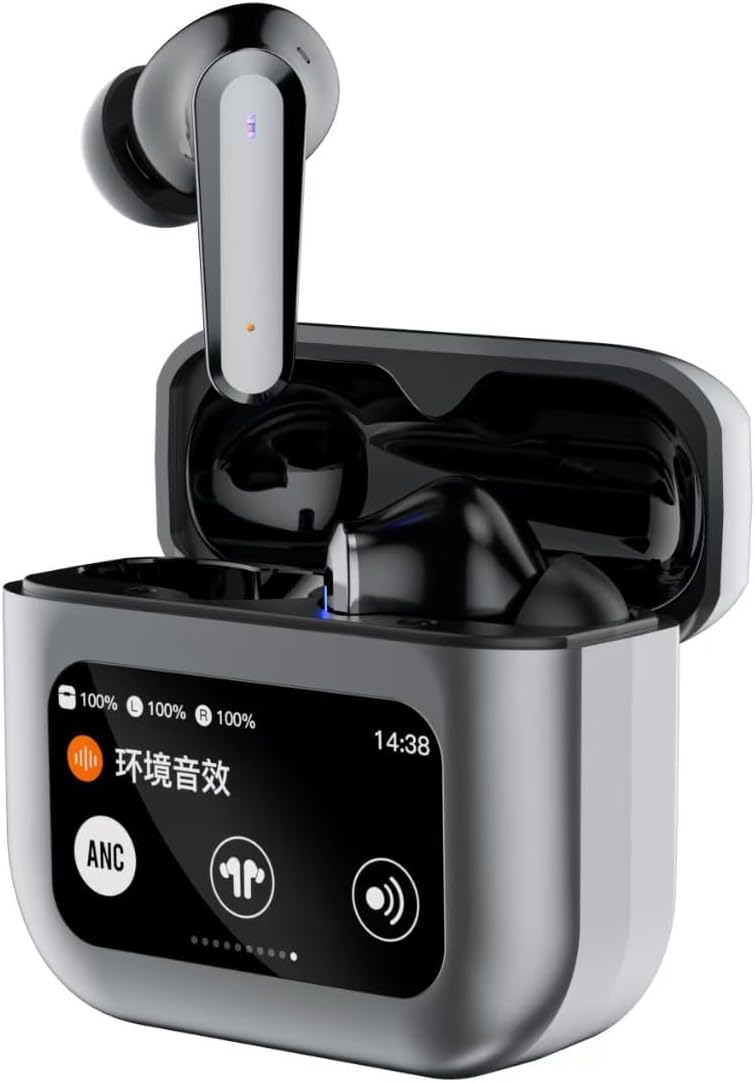
Image 1.1: JUNJIEUNVO Q30 Bluetooth Earphones in their charging case, showcasing the intelligent color touch screen.
2. පැකේජ අන්තර්ගතය
කරුණාකර පහත අයිතම සඳහා පැකේජය පරීක්ෂා කරන්න:
- JUNJIEUNVO Q30 Bluetooth Earphones (Left and Right)
- Charging Case with Intelligent Color Touch Screen
- USB ආරෝපණ කේබලය
- පරිශීලක අත්පොත
- කන් ඉඟි වල බහු ප්රමාණයන් (S, M, L)
3. වැදගත් ආරක්ෂක තොරතුරු
- Do not disassemble or modify the earphones or charging case.
- Keep the device away from extreme temperatures, humidity, and liquids.
- ශ්රවණාබාධ වැලැක්වීම සඳහා අධික ශබ්ද මට්ටම්වලට දිගු කලක් නිරාවරණය වීමෙන් වළකින්න.
- සපයා ඇති ආරෝපණ කේබලය හෝ සහතික කළ සමාන ආරෝපණ කේබලයක් පමණක් භාවිතා කරන්න.
- දේශීය රෙගුලාසි වලට අනුව උපාංගය සහ එහි බැටරිය වගකීමෙන් යුතුව බැහැර කරන්න.
4. පිහිටුවීම
4.1. ඉයර්ෆෝන් සහ කේස් ආරෝපණය කිරීම
පළමු භාවිතයට පෙර, ඉයර්ෆෝන් සහ ආරෝපණ පෙට්ටිය සම්පූර්ණයෙන්ම ආරෝපණය කරන්න.
- USB ආරෝපණ කේබලය නඩුවේ ආරෝපණ වරායට සහ බල ප්රභවයකට සම්බන්ධ කරන්න.
- නඩුවේ ස්පර්ශ තිරය ආරෝපණ තත්ත්වය පෙන්වනු ඇත.
- ඉයර්ෆෝන් ආරෝපණ පෙට්ටියට දමන්න. ඒවා ස්වයංක්රීයව ආරෝපණය වීමට පටන් ගනී.
- සම්පූර්ණ ආරෝපණයක් සාමාන්යයෙන් පැය 1.5ක් පමණ ගතවේ.
4.2. බ්ලූටූත් යුගලනය
ඔබගේ ඉයර්ෆෝන් උපාංගයකට සම්බන්ධ කිරීමට:
- Ensure the earphones are charged and inside the charging case.
- Open the charging case lid. The earphones will automatically enter pairing mode.
- ඔබගේ උපාංගයේ (ස්මාර්ට්ෆෝන්, ටැබ්ලටය, ආදිය), බ්ලූටූත් සක්රීය කරන්න.
- ඒ සඳහා සොයන්න ලබා ගත හැකි බ්ලූටූත් උපාංග සහ ලැයිස්තුවෙන් "Q30" තෝරන්න.
- Once connected, the earphones will indicate successful pairing, and the touch screen on the case may show connection status.
4.3. ඉයර්ෆෝන් පැළඳීම
For optimal sound quality and comfort, choose the ear tips that best fit your ears. Insert the earphones gently into your ear canal and rotate them slightly until they feel secure and comfortable.

Image 4.1: Illustration of proper earphone fit for comfort and sound.
5. මෙහෙයුම් උපදෙස්
5.1. බලය සක්රිය / අක්රිය කරන්න
- බල ගැන්වීම: Open the charging case lid, or take the earphones out of the case. They will power on automatically.
- විදුලිය විසන්ධි කිරීම: ඉයර්ෆෝන් නැවත ආරෝපණ පෙට්ටියට දමා පියන වසා දමන්න. ඒවා ස්වයංක්රීයව ක්රියා විරහිත වේ.
5.2. Touch Controls (Earbuds)
The earphones feature touch-sensitive areas for various functions:
- වාදනය/විරාමය: ඉයර්බඩ් දෙකෙන් එකක් මත එක තට්ටු කරන්න.
- ඊළඟ ධාවන පථය: දකුණු ඉයර්බඩ් එක දෙවරක් තට්ටු කරන්න.
- පෙර ධාවන පථය: වම් ඉයර්බඩ් එක දෙවරක් තට්ටු කරන්න.
- පිළිතුර/අවසන් ඇමතුම: ඉයර්බඩ් දෙකෙන් එකක් මත එක තට්ටු කරන්න.
- ඇමතුම ප්රතික්ෂේප කරන්න: ඉයර්බඩ් එකක් තත්පර 2ක් ඔබාගෙන සිටින්න.
- හ oice සහකාර සක්රිය කරන්න: ඉයර්බඩ් දෙකෙන් එකක් තුන් වරක් තට්ටු කරන්න.
- Switch ANC/ENC Modes: Press and hold the left earbud for 2 seconds to cycle through ANC On, Transparency Mode, and ANC Off.
5.3. Intelligent Color Touch Screen Functions (Charging Case)
The charging case features a full-color touch screen for advanced control and settings. Swipe left or right to navigate through the menus.

රූපය 5.1: ඉවරයිview of the intelligent color touch screen functions on the charging case.
- සංගීත පාලනය: Play, pause, skip tracks directly from the screen.
- ශබ්ද ගැලපුම: Control the playback volume.
- සමකරනය: Select from preset equalizer modes or customize your sound profile.
- Pattern Selection (Mode Select): Choose different audio modes, such as gaming or movie mode.
- Lock Wallpaper: තිර පසුබිම අභිරුචිකරණය කරන්න.
- වේලාව සැකසීම: Adjust the device's time.
- තිරයේ දීප්තිය: දර්ශන දීප්තිය සකසන්න.
- ෆ්ලෑෂ් ලයිට් කාර්යය: Activate a small flashlight feature.
- භාෂාව: සංදර්ශක භාෂාව වෙනස් කරන්න.
- Find Earphone: Locate misplaced earbuds by emitting a sound.
- කැමරා කාර්යය: ඔබගේ දුරකථනයේ කැමරා ෂටරය දුරස්ථව ක්රියාරම්භ කරන්න.
- හ Call ඇමතුම: Initiate or manage voice calls.
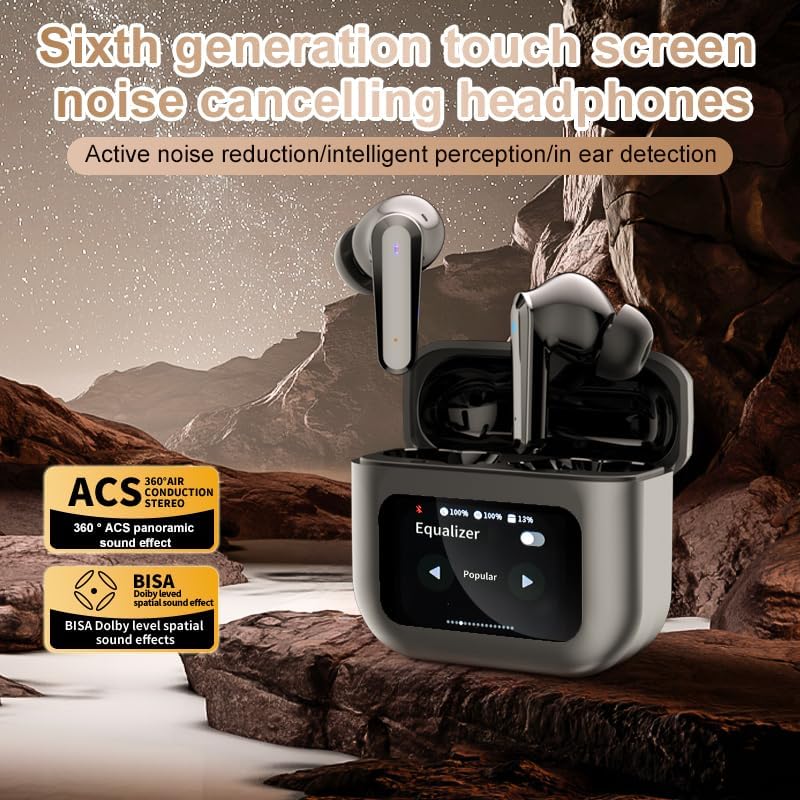
Image 5.2: The touch screen displaying equalizer settings for audio customization.
5.4. ක්රියාකාරී ශබ්ද අවලංගු කිරීම (ANC) සහ පාරිසරික ශබ්ද අවලංගු කිරීම (ENC)
The Q30 earphones feature both ANC for reducing ambient noise and ENC for clear call quality.
- ANC: Reduces external low-frequency noise, ideal for travel or noisy environments. Activate via earbud touch control or the charging case screen.
- විනිවිදභාවය ප්රකාරය: Allows you to hear your surroundings without removing the earphones. Cycle through modes using the earbud touch control.
- ENC: Enhances voice clarity during calls by filtering out background noise from your microphone. This feature is automatically active during calls.

Image 5.3: The touch screen interface for selecting various modes, including noise cancellation options.
6. නඩත්තු කිරීම
6.1 පිරිසිදු කිරීම
- Gently wipe the earphones and charging case with a soft, dry, lint-free cloth.
- උල්ෙල්ඛ පිරිසිදු කරන්නන්, මධ්යසාර හෝ රසායනික ද්රාවක භාවිතා නොකරන්න.
- වෙළඳ දැන්වීම සමඟ කන් ඉඟි නිතිපතා පිරිසිදු කරන්නamp cloth and allow them to dry completely before reattaching.
- Ensure charging contacts on both earphones and case are clean and free of debris.
6.2. ගබඩා කිරීම
- භාවිතයේ නොමැති විට, ඉයර්ෆෝන් ආරක්ෂා කර ගැනීමට සහ ආරෝපණය කර තබා ගැනීමට ඒවායේ ආරෝපණ පෙට්ටියේ ගබඩා කරන්න.
- සෘජු හිරු එළියෙන් සහ අධික උෂ්ණත්වයන්ගෙන් ඈත්ව සිසිල් වියළි ස්ථානයක ගබඩා කරන්න.
7. දෝශ නිරාකරණය
| ගැටලුව | විය හැකි හේතුව | විසඳුම |
|---|---|---|
| ඉයර්ෆෝන් යුගල නොවේ | Earphones not in pairing mode; Bluetooth off on device; out of range. | Ensure earphones are in pairing mode (open case lid). Turn Bluetooth on your device. Move device closer to earphones. |
| ඉයර්ෆෝන් වලින් ශබ්දයක් නැත | Volume too low; earphones not connected; media paused. | Increase volume on device and earphones. Reconnect earphones. Check if media is playing. |
| එක් ඉයර්ෆෝනයක ශබ්දයක් නැත | බැටරිය අඩුයි; සම්බන්ධතා ගැටළුවක්. | Place both earphones back in the case, close, then reopen to reset connection. Ensure both are charged. |
| ආරෝපණ නඩුව ආරෝපණය නොවේ | Faulty cable; power source issue. | වෙනස් USB කේබලයක් සහ බල ඇඩැප්ටරයක් උත්සාහ කරන්න. සම්බන්ධතා ආරක්ෂිත බව සහතික කර ගන්න. |
| ස්පර්ශ තිරය ප්රතිචාර නොදක්වයි | තාවකාලික මෘදුකාංග දෝෂයක්. | Restart the case by closing and reopening it, or allow the battery to drain and recharge. |
8. පිරිවිතර
| විශේෂාංගය | විස්තර |
|---|---|
| මාදිලියේ නම | YYK-Q16 PRO (Q30) |
| බ්ලූටූත් අනුවාදය | V5.4 + EDR |
| චිප් | Blue Flood |
| සහාය දක්වන ප්රොටෝකෝල | AVRCP V1.6, A2DP V1.3, HFP V1.7, Simultaneous LE and BR / EDR |
| ශබ්ද පාලනය | ක්රියාකාරී ශබ්ද අවලංගු කිරීම (ANC), පාරිසරික ශබ්ද අවලංගු කිරීම (ENC) |
| පසුධාවන කාලය | ආසන්න වශයෙන් පැය 8 (80% පරිමාවකින්) |
| පොරොත්තු කාලය | පැය 80 යි |
| ආරෝපණ කාලය | ආසන්න වශයෙන් පැය 1.5 කි |
| රැහැන් රහිත දුර | මීටර් 10 කි |
| හෙඩ්ෆෝන් බැටරි ධාරිතාව | 40mAh |
| ආරෝපණ කේස් බැටරි ධාරිතාව | 500mAh |
| ජල ආරක්ෂිත ශ්රේණිගත කිරීම | IPX5 (ඉයර්ෆෝන්) |
| සම්බාධනය | 32 ඕම් |
| UPC | 884613749491 |
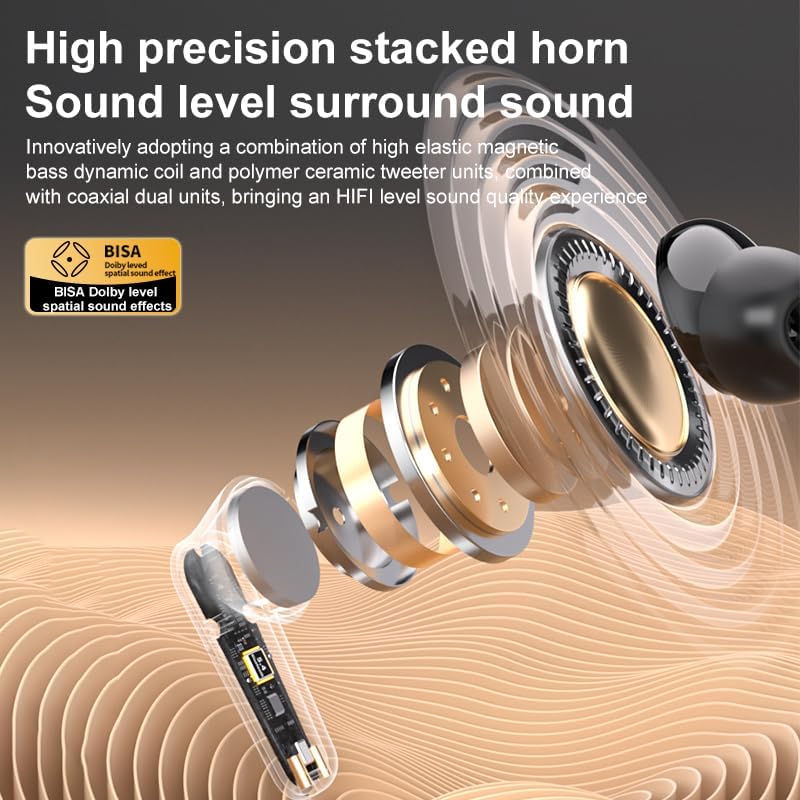
රූපය 8.1: විස්තරාත්මක view of the high-precision stacked horn and internal components for sound delivery.
9. වගකීම් සහ සහාය
For warranty information or technical support, please refer to the warranty card included with your product or contact the manufacturer directly. Please have your model number (YYK-Q16 PRO) and purchase details ready when contacting support.
Manufacturer: UNVO
Ask a question about this manual
Ask about setup, troubleshooting, compatibility, parts, safety, or missing instructions. Manuals+ will review the question and use this page’s manual context to help answer it.