
1. නිෂ්පාදන අවසන්view
The Hisense 65E7Q QLED Smart TV offers a premium viewing experience with its 65-inch QLED display. This television integrates advanced technologies such as Dolby Vision and Dolby Atmos for immersive audio-visuals, AI Smooth Motion for fluid images, and dedicated modes for gaming and sports. Powered by the VIDAA operating system, it provides easy access to a wide range of streaming content and smart features, including voice control.

ඉදිරිපස view of the Hisense 65E7Q QLED Smart TV.
ප්රධාන ලක්ෂණ:
- QLED Colour: Experience rich, vibrant, and realistic colors.
- AI සුමට චලිතය: Advanced MEMC and 3D Noise Reduction for fluid, blur-free images.
- Dolby Vision සහ Dolby Atmos: Cinematic picture and immersive sound for an enhanced entertainment experience.
- Game Mode Plus: Reduces input lag to 16ms, with 60Hz VRR and ALLM for ultra-fluid gaming.
- AI ක්රීඩා මාදිලිය: Optimizes picture and sound for sports content, reducing motion blur and enhancing stadium-like audio.
- AI 4K ඉහළ පරිමාණය කරන්නා: Enhances blurry images to near-4K quality.
- VIDAA Smart TV OS: Fast, secure, and intuitive operating system with access to popular streaming applications.
- හඬ පාලනය: Integrated Alexa and VIDAA Voice for convenient operation.
2 ආරක්ෂිත තොරතුරු
Please read all safety instructions carefully before using your TV. Keep this manual for future reference. Always ensure the TV is placed on a stable surface to prevent tipping. Do not expose the TV to rain or moisture. Refer to the full safety guidelines in the included safety manual.
3. පැකේජ අන්තර්ගතය
කොටුව තුළ සියලුම අයිතම ඇති බව තහවුරු කරගන්න:
- Hisense 65E7Q QLED Smart TV
- බල කේබලය
- දුරස්ථ පාලකය (AAAA බැටරි 1ක් ඇතුළුව)
- රූපවාහිනී නැවතුම්පොළ (කෑලි 2)
- ස්ටෑන්ඩ් එකලස් කිරීම සඳහා ඉස්කුරුප්පු
- පරිශීලක අත්පොත (මෙම ලේඛනය)
- වගකීම් කාඩ්පත
4. පිහිටුවීම
4.1 ස්ථාවරය එකලස් කිරීම
- හානි වැළැක්වීම සඳහා රූපවාහිනී තිරය මෘදු, පැතලි මතුපිටක් මත ප්රවේශමෙන් තබන්න.
- රූපවාහිනියේ පතුලේ ඇති අනුරූප තව් සමඟ ස්ටෑන්ඩ් කෑලි පෙළගස්වන්න.
- සපයා ඇති ඉස්කුරුප්පු භාවිතයෙන් ස්ටෑන්ඩ් කොටස් සුරක්ෂිත කරන්න. ඒවා තදින් තද කර ඇති බවට සහතික වන්න.

Diagram illustrating TV dimensions and stand installation points.
4.2 බිත්ති සවි කිරීම
If you plan to wall mount your TV, ensure you use a VESA-compatible wall mount kit (not included). The Hisense 65E7Q supports a VESA mounting standard of 600 x 400 mm. Follow the instructions provided with your wall mount kit for safe installation.
4.3 සම්බන්ධක පර්යන්ත
Connect your external devices to the TV's ports as needed. Refer to the port diagram below:

පසුපස view showing available ports and connections.
- HDMI තොට (x3): Connect Blu-ray players, game consoles, and other HDMI devices. One port supports eARC for enhanced audio return.
- USB තොට (x2): Connect USB flash drives for media playback. (1x USB 3.0, 1x USB 2.0)
- ඇන්ටෙනා ආදාන (x2): ඔබේ භූමිෂ්ඨ හෝ කේබල් ඇන්ටනාව සම්බන්ධ කරන්න.
- ඊතර්නෙට් (LAN): රැහැන්ගත ජාල සම්බන්ධතාවය සඳහා.
- ඔප්ටිකල් ඕඩියෝ අවුට්: ඩිජිටල් ශ්රව්ය සඳහා ශබ්ද තීරුවකට හෝ ශ්රව්ය ග්රාහකයකට සම්බන්ධ කරන්න.
- හෙඩ්ෆෝන් ජැක්: පුද්ගලික සවන්දීම සඳහා.
- AV ආදාන: සංයුක්ත වීඩියෝ සහ ස්ටීරියෝ ශ්රව්ය කේබල් භාවිතයෙන් පැරණි උපාංග සම්බන්ධ කිරීම සඳහා.
4.4 ආරම්භක බලය සක්රීය කිරීම
- විදුලි රැහැන රූපවාහිනියට සම්බන්ධ කර, පසුව විදුලිබල අලෙවිසැලකට සම්බන්ධ කරන්න.
- දුරස්ථ පාලකයේ හෝ රූපවාහිනියේ බල බොත්තම ඔබන්න.
- භාෂා තේරීම, ජාල සම්බන්ධතාවය සහ නාලිකා පරිලෝකනය ඇතුළුව මූලික සැකසුම සම්පූර්ණ කිරීමට තිරයේ ඇති උපදෙස් අනුගමනය කරන්න.
5. ඔබේ රූපවාහිනිය ක්රියාත්මක කිරීම
5.1 දුරස්ථ පාලනය
The included remote control allows you to navigate the TV's features. Insert the provided AAAA battery into the remote. The remote supports voice control for convenient operation.
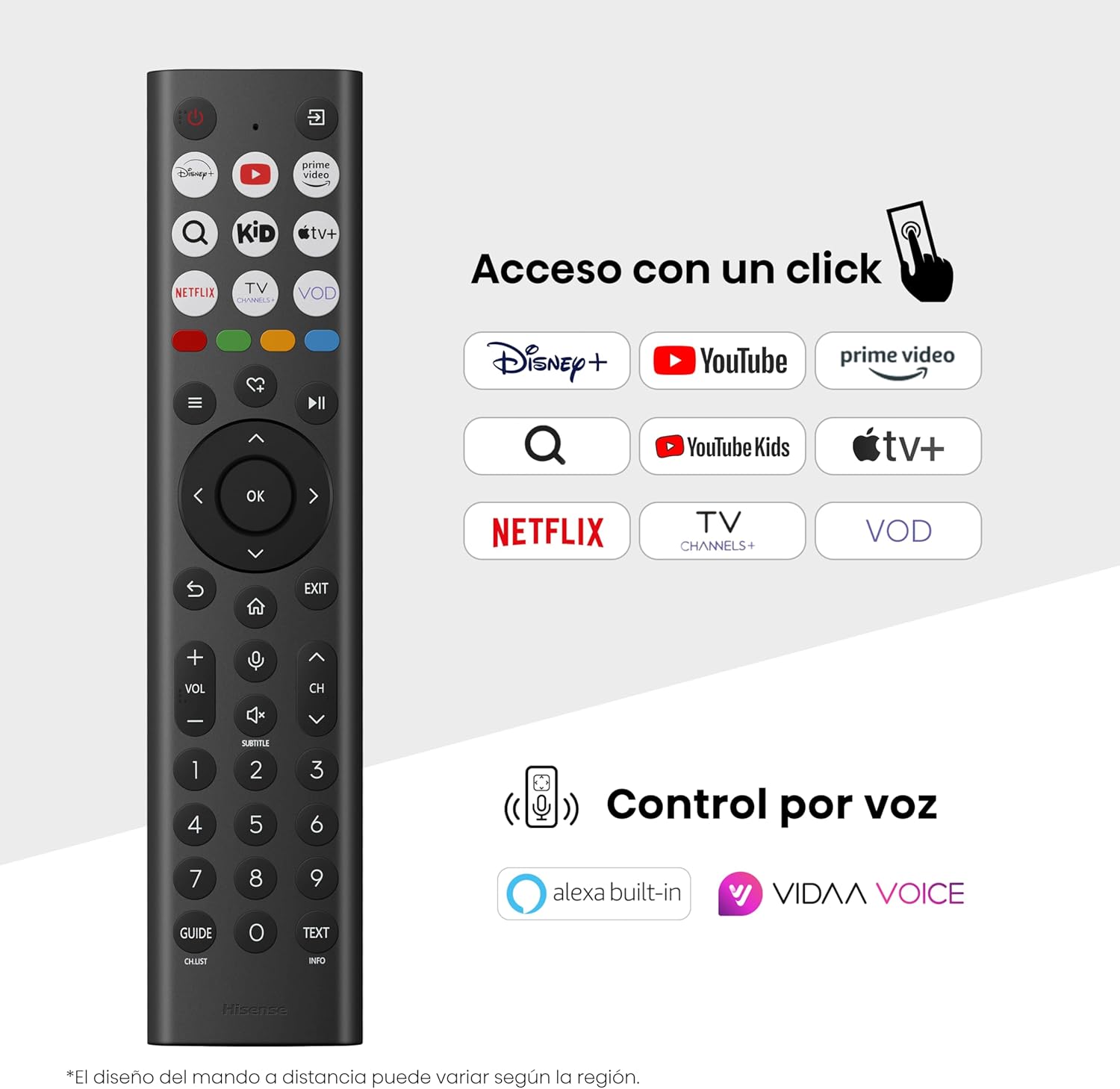
Hisense Smart TV remote control with dedicated app buttons and voice control.
5.2 Smart TV විශේෂාංග (VIDAA OS)
Your Hisense TV runs on the VIDAA operating system, offering a user-friendly interface for accessing various applications and services.

The VIDAA Smart TV interface with popular streaming applications.
- යෙදුම්: Access pre-installed apps like Netflix, YouTube, Prime Video, and more.
- හඬ පාලනය: Use the remote's voice function to search for content, adjust settings, or interact with Alexa built-in and VIDAA Voice.
- Screen Mirroring (AirPlay): Share content from your Apple devices directly to the TV.
- රූපවාහිනියට බෙදා ගන්න: Easily send content from your mobile devices to the TV.
5.3 පින්තූර සැකසුම්
ඔබගේ ප්රශස්ත කරන්න viewing experience with various picture enhancement technologies:
- QLED Colour: Delivers over a billion shades of vibrant, lifelike colors.
- AI 4K ඉහළ පරිමාණය කරන්නා: Automatically enhances lower-resolution content to near-4K quality.
- AI සුමට චලිතය: Reduces motion blur in fast-paced scenes, ensuring clear and fluid visuals.
- ඩොල්බි දැක්ම: Provides stunning brightness, contrast, and color for a dramatic visual experience.
- චිත්රපට නිෂ්පාදක මාදිලිය: Preserves the original aspect ratio, colors, and frame rates to display movies as intended by the director.
- AI ආලෝක සංවේදකය: Intelligently adjusts screen brightness based on ambient light for optimal viewing and energy efficiency.
- අක්ෂි සත්කාර මාදිලිය: Reduces blue light emission to minimize eye strain.
- බලශක්ති ඉතිරි කිරීමේ මාදිලිය: Optimizes power consumption without significantly compromising picture quality.

QLED technology delivers over a billion vibrant color tones.

AI 4K Upscaler enhances lower resolution content to near 4K clarity.

AI Smooth Motion ensures fluid images without blur, especially in fast-moving scenes.

Filmmaker Mode presents content exactly as the director intended.
5.4 ශබ්ද සැකසුම්
Enhance your audio experience with:
- Dolby Atmos: Immersive, multi-dimensional sound that fills your room.
- ඒකාබද්ධ කථානායක: Built-in speakers with a maximum output of 1 Watt per channel.
- එස්ප්ලේ: Seamlessly control compatible Hisense soundbars directly from your TV screen.

Dolby Vision and Dolby Atmos combine for a spectacular audio-visual experience.
5.5 ක්රීඩා විශේෂාංග
ක්රීඩකයින් සඳහා, රූපවාහිනිය පිරිනමන්නේ:
- Game Mode Plus: Reduces input lag to 16ms, ensuring responsive gameplay.
- 60Hz VRR (විචල්ය නැවුම් කිරීමේ අනුපාතය): Synchronizes the TV's refresh rate with the game console's output to prevent screen tearing.
- ALLM (ස්වයං අඩු ප්රමාද ප්රකාරය): Automatically switches the TV to low-latency mode when a game is detected.
- ක්රීඩා තීරුව: An integrated control center for quick access to game settings and real-time performance monitoring.

Game Mode Plus provides ultra-fluid, lag-free gaming.

The Game Bar offers centralized control for game settings.
5.6 Sports Features
- AI ක්රීඩා මාදිලිය: Automatically detects sports content and optimizes picture and sound settings for a stadium-like experience, enhancing clarity and audio effects.
6. නඩත්තු කිරීම
6.1 රූපවාහිනිය පිරිසිදු කිරීම
- පිරිසිදු කිරීමට පෙර සෑම විටම රූපවාහිනිය විසන්ධි කරන්න.
- තිරය සහ රූපවාහිනී බඳ මෘදු ලෙස පිස දැමීමට මෘදු, වියලි, ලින්ට් රහිත රෙද්දක් භාවිතා කරන්න.
- මුරණ්ඩු සලකුණු සඳහා, සැහැල්ලුවෙන් dampජලය හෝ විශේෂිත තිර පිරිසිදු කරන්නෙකු සහිත රෙදි කැබැල්ලකින් (තිරය මත කෙලින්ම ඉසින්න එපා).
- Avoid using abrasive cleaners, alcohol, benzene, or thinners, as these can damage the TV's surface.
6.2 මෘදුකාංග යාවත්කාලීන
Your TV may receive software updates periodically to improve performance and add new features. Ensure your TV is connected to the internet to receive these updates. You can usually check for updates manually in the TV's settings menu.
7. දෝශ නිරාකරණය
ඔබේ රූපවාහිනිය සමඟ ගැටළු ඇති වුවහොත්, පහත පොදු විසඳුම් වෙත යොමු වන්න:
- බලය නැත: විදුලි රැහැන ආරක්ෂිතව සම්බන්ධ වී ඇති බවත් විදුලි අලෙවිසැල ක්රියා කරන බවත් පරීක්ෂා කරන්න. වෙනත් අලෙවිසැලක් උත්සාහ කරන්න.
- පින්තූරයක්/ශබ්දයක් නැත: නිවැරදි ආදාන මූලාශ්රය තෝරාගෙන ඇති බව සහතික කර ගන්න. සියලුම කේබල් සම්බන්ධතා (HDMI, ඇන්ටෙනාව) පරීක්ෂා කරන්න.
- දුරස්ථ පාලකය ක්රියා නොකරයි: Check the battery (1 AAAA battery). Ensure there are no obstructions between the remote and the TV.
- ජාල සම්බන්ධතා ගැටළු: ඔබගේ Wi-Fi මුරපදය හෝ ඊතර්නෙට් කේබල් සම්බන්ධතාවය සත්යාපනය කරන්න. ඔබගේ රවුටරය නැවත ආරම්භ කරන්න.
- දුර්වල පින්තූර ගුණාත්මකභාවය: පින්තූර සැකසුම් සකසන්න (දීප්තිය, වෙනස, තියුණු බව). ආදාන ප්රභවය උසස් තත්ත්වයේ සංඥාවක් සපයන බවට වග බලා ගන්න.
- ශබ්ද විකෘති කිරීම: Check audio settings. If using external speakers, ensure they are connected correctly.
For more detailed troubleshooting, consult the full electronic user manual or contact Hisense customer support.
8. පිරිවිතර
Detailed technical specifications for the Hisense 65E7Q QLED Smart TV:
| විශේෂාංගය | පිරිවිතර |
|---|---|
| ආදර්ශ අංකය | 65E7Q |
| තිර ප්රමාණය | අඟල් 65 |
| සංදර්ශක තාක්ෂණය | QLED |
| විභේදනය | 4K (3840 x 2160) |
| Refresh Rate | 60 Hz |
| HDR ආකෘති සහාය | ඩොල්බි විෂන් |
| Motion Enhancement Technology | AI සුමට චලිතය |
| රූපයේ ගුණාත්මකභාවය වැඩි දියුණු කිරීම | AI 4K Upscaler, AI Smooth Motion, QLED Colour |
| ප්රතිචාර කාලය | 100 මිලි තත්පර |
| Backlight Configuration | Direct Illumination, Dimming |
| කථානායක විස්තරය | Integrated speaker with Dolby Atmos |
| උපරිම කථික ප්රතිදාන බලය | වොට් 1 |
| ශ්රව්ය නාලිකා | බහු නාලිකා |
| Surround Sound Format | ඩොල්බි ඇට්මෝස් |
| මෙහෙයුම් පද්ධතිය | VIDAA |
| මතක ගබඩා ධාරිතාව | 1 GB |
| පාලන ක්රමය | හඬ |
| සම්බන්ධතා තාක්ෂණය | බ්ලූටූත්, HDMI, Wi-Fi |
| Internet Applications | Netflix, YouTube, Prime Video, AirPlay 2 |
| HDMI වරායන් | 3 (including HDMI 2.1 with eARC) |
| USB Ports | 2 (1x USB 3.0, 1x USB 2.0) |
| රැහැන් රහිත තාක්ෂණය | Wifi |
| Screen Mirroring Technology | AirPlay |
| VESA සවිකිරීමේ සම්මතය | 600 x 400 මි.මී |
| නිෂ්පාදන මානයන් (DxWxH) | 7.6 x 145.3 x 83.8 සෙ.මී |
| නිෂ්පාදන බර | 15.2 kg (නැවතුම් සහිත) |
| බලශක්ති කාර්යක්ෂමතා පන්තිය | E |
| වාර්ෂික බලශක්ති පරිභෝජනය | 84 kWh/1000h (SDR), 160 kWh/1000h (HDR) |
| බලය | 1 Watt (standby) |
| වෙළුමtage | 100-240 VCA 50-60 Hz |
| ඇතුළත් සංරචක | බල කේබලය, දුරස්ථ පාලකය, ස්ථාවරය |
| ආදර්ශ වර්ෂය | 2025 |
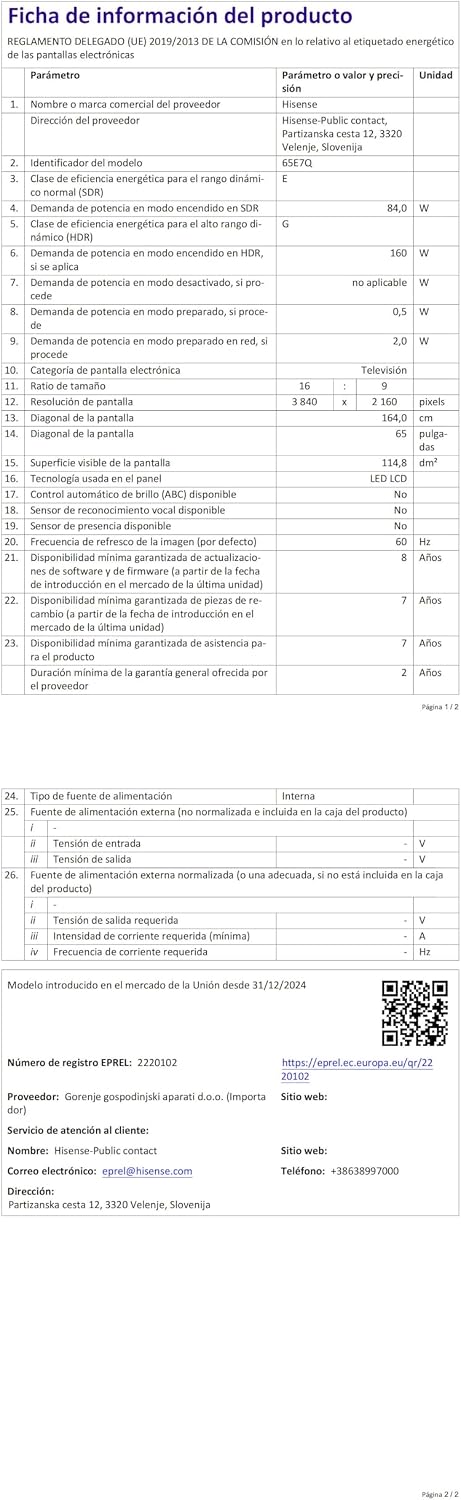
Energy label for the Hisense 65E7Q TV.
වඩාත් සවිස්තරාත්මක නිෂ්පාදන තොරතුරු සඳහා, කරුණාකර EPREL දත්ත සමුදාය බලන්න: https://eprel.ec.europa.eu/qr/2220102
9. වගකීම් සහ සහාය
9.1 නිෂ්පාදන වගකීම්
මෙම හයිසෙන්ස් රූපවාහිනිය පැමිණෙන්නේ වසර 3ක නිෂ්පාදන වගකීමක්වගකීම් හිමිකම් සඳහා කරුණාකර ඔබේ මිලදී ගැනීමේ සාක්ෂි තබා ගන්න.
9.2 අමතර කොටස් ලබා ගැනීමේ හැකියාව
Spare parts for this model are guaranteed to be available in the EU for a duration of අවුරුදු 10 ක් from the product's market introduction.
9.3 පාරිභෝගික සහාය
For technical assistance, troubleshooting, or warranty service, please contact Hisense customer support. Refer to the contact information provided in your warranty card or visit the official Hisense webඔබේ කලාපය සඳහා අඩවිය.