
ttec KM156
ttec SoundFlow OWS Wireless Bluetooth Earphones KM156 User Manual
මාදිලිය: KM156
1. හැඳින්වීම
This manual provides instructions for the proper use and maintenance of your ttec SoundFlow OWS Wireless Bluetooth Earphones, model KM156. Please read this manual thoroughly before using the product to ensure optimal performance and longevity.
The ttec SoundFlow OWS earphones feature an open-ear design for situational awareness, dynamic acoustic system for clear sound, and Bluetooth 5.4 for stable wireless connectivity.
2. පැකේජ අන්තර්ගතය
ඔබගේ නිෂ්පාදන පැකේජයේ සියලුම අයිතම ඇති බව තහවුරු කරගන්න:
- ttec SoundFlow OWS Wireless Bluetooth Earphones (Left and Right)
- අයකිරීමේ නඩුව
- USB-C ආරෝපණ කේබලය
- පරිශීලක අත්පොත
3. නිෂ්පාදන අවසන්view
Familiarize yourself with the components of your ttec SoundFlow OWS earphones.

Image 3.1: ttec SoundFlow OWS Earphones and Charging Case. The image displays the two black earphones with ear hooks, positioned above their open black charging case.
ඉයර්ෆෝන් සංරචක:
- කන් කොක්ක: කනට ආරක්ෂිත සහ සුවපහසු ගැළපීමක් සපයයි.
- කථානායක ඒකකය: ශ්රව්ය ප්රතිදානය ලබා දෙයි.
- මයික්රෆෝනය: ඇමතුම් සහ හඬ විධාන සඳහා.
- Touch Sensor Area: For controlling music, calls, and other functions.
- ආරෝපණ සම්බන්ධතා: බලය සඳහා ආරෝපණ පෙට්ටිය සමඟ සම්බන්ධ වේ.

Image 3.2: Close-up of an earbud highlighting the touch sensor area. The image shows a detailed view of the earbud's outer surface, indicating the touch-sensitive zone for controls.
ආරෝපණ නඩු සංරචක:
- Earphone Slots: Securely holds and charges the earphones.
- USB-C ආරෝපණ වරාය: නඩු පැවරීම සඳහා.
- LED දර්ශකය: Shows charging status and battery level.
4. පිහිටුවීම
4.1 ඉයර්ෆෝන් සහ කේස් ආරෝපණය කිරීම
පළමු භාවිතයට පෙර, ඉයර්ෆෝන් සහ ආරෝපණ පෙට්ටිය සම්පූර්ණයෙන්ම ආරෝපණය කරන්න.
- Place the earphones into the charging case. Ensure the charging contacts align.
- USB-C ආරෝපණ කේබලය නඩුවේ ආරෝපණ වරායට සම්බන්ධ කරන්න, අනෙක් කෙළවර බල ප්රභවයකට සම්බන්ධ කරන්න (උදා: USB බිත්ති ඇඩැප්ටරය, පරිගණක USB පෝට් එක).
- The LED indicator on the case will show the charging status. Once fully charged, the indicator will change or turn off.
A full charge provides up to 6 hours of earphone use, and the charging case provides up to 30 hours of additional battery life. The Charge&Go feature allows 2.5 hours of use from a 15-minute charge.
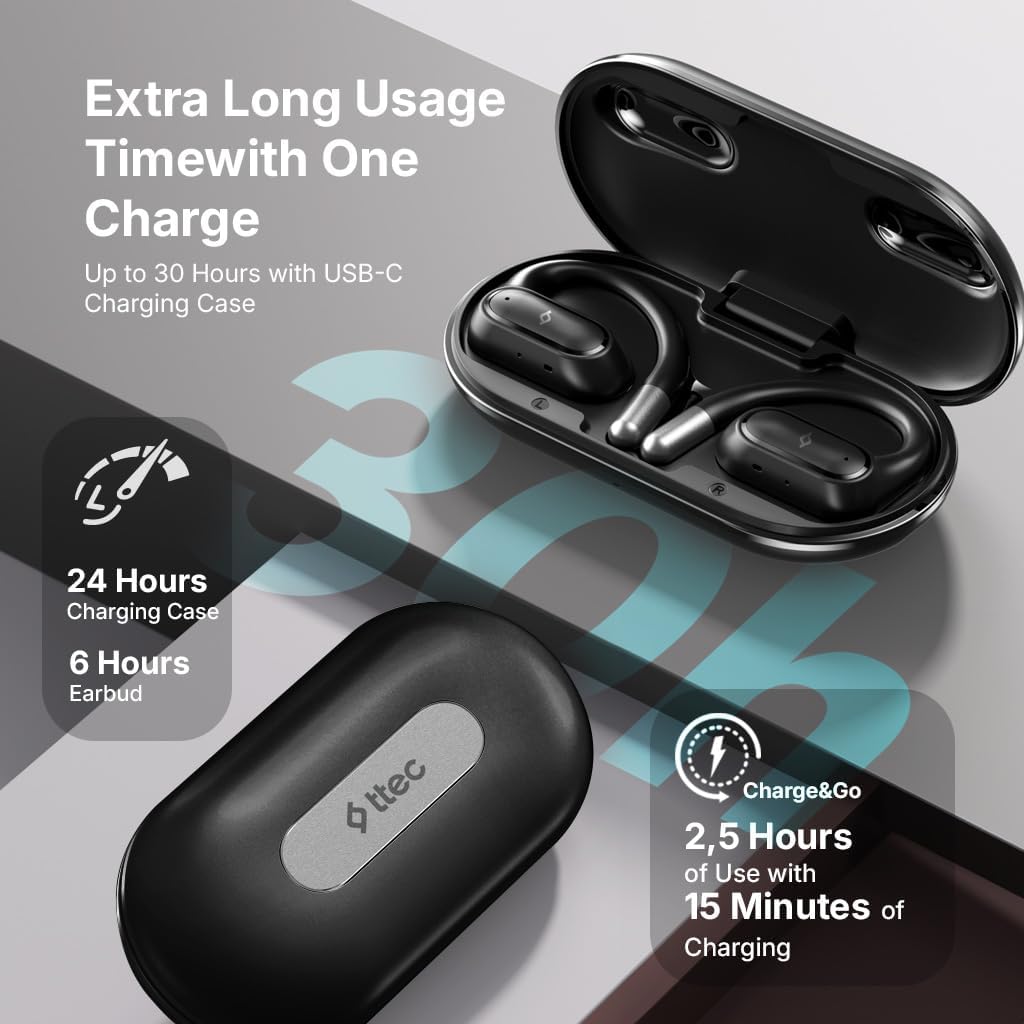
Image 4.1: Charging case displaying battery life. The image illustrates the charging case with text indicating 24 hours from the charging case, 6 hours from earbuds, and 2.5 hours of use from 15 minutes of charging.
4.2 බ්ලූටූත් උපාංගයක් සමඟ යුගල කිරීම
ඔබගේ ඉයර්ෆෝන් ස්මාර්ට් ජංගම දුරකථනයකට හෝ වෙනත් බ්ලූටූත් සක්රීය උපාංගයකට සම්බන්ධ කිරීමට:
- ඉයර්ෆෝන් ආරෝපණය කර ආරෝපණ පෙට්ටියේ තබා ඇති බවට වග බලා ගන්න.
- Open the charging case. The earphones will automatically enter pairing mode, and their LED indicators will flash.
- ඔබගේ උපාංගයේ, බ්ලූටූත් සබල කර පවතින උපාංග සඳහා සොයන්න.
- Select "ttec SoundFlow" from the list of found devices.
- Once connected, the earphone LED indicators will stop flashing or turn off, and you will hear a confirmation tone.
උපාංගයේ බ්ලූටූත් සක්රීය කර ඇත්නම්, ඉයර්ෆෝන් කවරයෙන් ඉවත් කළ විට අවසන් වරට යුගලනය කළ උපාංගයට ස්වයංක්රීයව නැවත සම්බන්ධ වේ.
5. මෙහෙයුම් උපදෙස්
5.1 ඉයර්ෆෝන් පැළඳීම
Gently place the ear hook over your ear and position the speaker unit comfortably in front of your ear canal. The open-ear design allows you to remain aware of your surroundings.

Image 5.1: A person cycling while wearing the ttec SoundFlow OWS earphones. The image highlights the open-ear design, allowing the user to stay connected to their surroundings.

Image 5.2: A woman wearing a ttec SoundFlow earbud, demonstrating the comfortable and secure fit. The image also indicates the lightweight design: 8.2g per earbud and 52g for the charging case.
5.2 ස්පර්ශ පාලන
The earphones feature touch sensors for easy control of various functions:
| ක්රියාව | කාර්යය |
|---|---|
| තනි ටැප් (වම්/ව) | සංගීතය වාදනය කරන්න/විරාම කරන්න, ඇමතුමට පිළිතුරු දෙන්න |
| දෙවරක් තට්ටු කරන්න (ව) | පෙර ධාවන පථය |
| දෙවරක් තට්ටු කරන්න (ද) | ඊළඟ ධාවන පථය |
| ත්රිත්ව ටැප් (වම්/ව) | හඬ සහායක සක්රිය කරන්න |
| දිගු මුද්රණය (L/R) | Reject Call, End Call |
5.3 ක්රීඩා මාදිලිය
The earphones feature a low-latency game mode for an enhanced gaming and video experience. This mode reduces audio delay to 50ms.
- To activate Game Mode: Refer to the specific instructions in the quick start guide or product packaging for the exact touch gesture to enable/disable game mode. (Typically a specific tap sequence or long press).
- When Game Mode is active, you may notice a slight change in audio profile, optimized for lower latency.

Image 5.3: ttec SoundFlow earphones and charging case, surrounded by gaming console symbols, highlighting the 50ms low latency feature for an optimized gaming and video experience.
6. නඩත්තු කිරීම
6.1 පිරිසිදු කිරීම
- Wipe the earphones and charging case with a soft, dry, lint-free cloth.
- උල්ෙල්ඛ පිරිසිදු කරන්නන්, මධ්යසාර හෝ රසායනික ද්රාවක භාවිතා නොකරන්න.
- Ensure charging contacts are clean and dry to prevent charging issues.
6.2 ජලය සහ දහඩිය ප්රතිරෝධය
The ttec SoundFlow OWS earphones are IPX6 rated, meaning they are resistant to high-pressure water jets from any direction. This makes them suitable for use during workouts and in light rain.
- ඉයර්ෆෝන් වතුරේ ගිල්වන්න එපා.
- Ensure the earphones are dry before placing them back into the charging case to prevent damage.

Image 6.1: A man running outdoors, illustrating the sweat and water-resistant design of the ttec SoundFlow earphones, which are IPX6 rated.
6.3 ගබඩා කිරීම
භාවිතයේ නොමැති විට, ඉයර්ෆෝන් ආරක්ෂා කර ගැනීමට සහ ආරෝපණය කර තබා ගැනීමට ඒවායේ ආරෝපණ පෙට්ටියේ ගබඩා කරන්න. අධික උෂ්ණත්වයන්ගෙන් ඈත්ව සිසිල් වියළි ස්ථානයක ගබඩා කරන්න.
7. දෝශ නිරාකරණය
If you encounter issues with your earphones, refer to the following common solutions:
| ගැටලුව | විසඳුම |
|---|---|
| ඉයර්ෆෝන් යුගල නොවේ | Ensure earphones are charged. Turn off and on Bluetooth on your device. Forget the device in your Bluetooth settings and re-pair. |
| එක ඉයර්ෆෝන් එකක් විතරයි වැඩ කරන්නේ | ඉයර්ෆෝන් දෙකම නැවත කේස් එකට දමා, පියන වසා, පසුව නැවත විවෘත කරන්න. දෙකම ආරෝපණය වී ඇති බවට වග බලා ගන්න. |
| ශබ්දයක් නැත | උපාංගයේ ශබ්දය පරීක්ෂා කරන්න. හෙඩ්ෆෝන් සම්බන්ධ කර ඇති බවට වග බලා ගන්න. වෙනස් ශ්රව්ය වාදනය කිරීමට උත්සාහ කරන්න. |
| අයකිරීමේ ගැටළු | Ensure charging cable is securely connected. Clean charging contacts on earphones and case. Try a different USB-C cable or power source. |
ගැටලුව දිගටම පවතින්නේ නම්, කරුණාකර පාරිභෝගික සහාය අමතන්න.
8. පිරිවිතර
| විශේෂාංගය | විස්තර |
|---|---|
| මාදිලියේ නම | SoundFlow |
| ආදර්ශ අංකය | KM156 |
| සම්බන්ධතා තාක්ෂණය | රැහැන් රහිත (බ්ලූටූත් 5.4) |
| ආකෘති සාධකය | True Wireless, Open-Ear |
| Earbud බර | ග්රෑම් 8.2 (එක් එක්) |
| ආරෝපණ නඩුවේ බර | ග්රෑම් 52 කි |
| ඉයර්බඩ් බැටරි ආයු කාලය | පැය 6ක් දක්වා (තනි ආරෝපණයකින්) |
| සම්පූර්ණ බැටරි ආයු කාලය (කේස් එක සමඟ) | පැය 30 දක්වා |
| වේගවත් ආරෝපණය | 15 min charge for 2.5 hours use (Charge&Go) |
| ජල ප්රතිරෝධය | IPX6 Rated (Sweat and Water Resistant) |
| අඩු ප්රමාදය | 50ms (ක්රීඩා ප්රකාරය) |
| නිෂ්පාදකයා | ttec |
9. වගකීම් සහ සහාය
Your ttec SoundFlow OWS Wireless Bluetooth Earphones are covered by a manufacturer's warranty. For detailed warranty information, please refer to the warranty card included in your product packaging or visit the official ttec webඅඩවිය.
For technical support, troubleshooting assistance, or to inquire about replacement parts, please contact ttec customer service through their official channels. Contact information can typically be found on the product packaging or the official ttec webඅඩවිය.
Ask a question about this manual
Ask about setup, troubleshooting, compatibility, parts, safety, or missing instructions. Manuals+ will review the question and use this page’s manual context to help answer it.