1. හැඳින්වීම
Welcome to the user manual for your new Onyx E Ink Tablet Go Series 6 Inch B/W eReader Digital Paper Black. This manual provides essential information on setting up, operating, and maintaining your device to ensure optimal performance and longevity. Please read this manual thoroughly before using your eReader.
2. නිෂ්පාදන අවසන්view
2.1 පැකේජයේ අන්තර්ගතය
පෙට්ටියෙන් ඉවත් කිරීමෙන් පසු, පහත ලැයිස්තුගත කර ඇති සියලුම අයිතම පවතින බව කරුණාකර තහවුරු කරගන්න:
- Onyx E Ink Tablet Go Series 6 Inch B/W eReader Digital Paper Black
- USB-C කේබලය
- Card Tray Eject Tool
- ඉක්මන් ආරම්භක මාර්ගෝපදේශය
- වගකීම් කාඩ්පත
2.2 ප්රධාන ලක්ෂණ
The Onyx E Ink Tablet Go Series 6 Inch eReader is designed for an exceptional reading experience. Key features include:
- High-Resolution E Ink Display: The E Ink Carta 1300 delivers crisp text and images with 300 PPI, making everything as sharp as if it's printed on high-quality paper. The flush screen creates modern aesthetics, enhancing sleekness and durability.
- Personalized Reading: Get a truly personalized reading experience with our powerful native reading app NeoReader and enjoy a wide range of features tailored to your needs.
- Adjustable Front Light: Read whenever and wherever with an adjustable front light. It sheds evenly across the screen, gently on your eyes. Choose from white cold light for focused reading or warm amber light for a cozy nighttime ambience.
- සංයුක්ත සහ අතේ ගෙන යා හැකි නිර්මාණය: Explore without limits with this 6'' eReader. Sleek at 6.8mm thick and weighing just 146g, it follows you all the way in a quaint café, on a slow-moving train, and under the trees in the forest.
- Theme Customization: Effortlessly toggle between white and dark themes. Customize your reading experience for a clean, calming feel or a futuristic, high-tech look. Lose yourself in the text with your favorite vibe.
- Smart Word Menu: The Word Menu offers a handy toolkit, where you can highlight and annotate text that inspires you, search for information directly, or summon an AI assistant to answer your questions - all within a few taps.
2.3 උපාංග පිරිසැලසුම

රූපය 1: ඉදිරිපස සහ පසුපස view of the Onyx E Ink Tablet. Shows the sleek design and the E Ink display.

රූපය 2: ඉදිරිපස සහ පැත්ත view of the Onyx E Ink Tablet, highlighting its thin profile.

රූපය 3: A person holding the Onyx E Ink Tablet, demonstrating its comfortable size for reading.

රූපය 4: A woman using the Onyx E Ink Tablet at a table, showcasing its use in a relaxed setting.

රූපය 5: Close-up of a person holding the Onyx E Ink Tablet, displaying text on the E Ink screen.
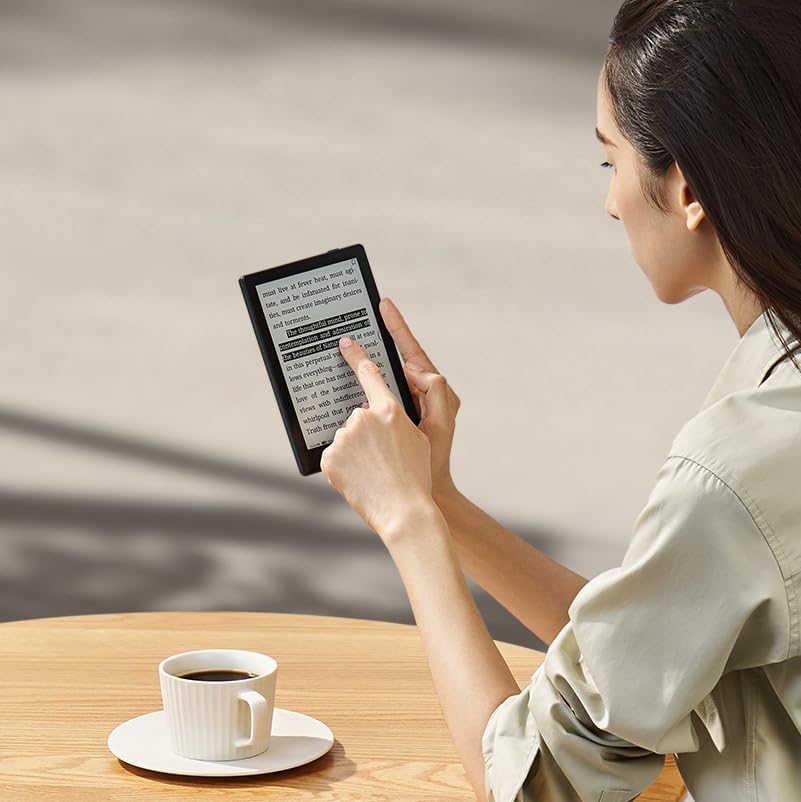
රූපය 6: A woman interacting with the Onyx E Ink Tablet, demonstrating touch screen functionality.

රූපය 7: A person holding the Onyx E Ink Tablet casually by their side, emphasizing its portability.
3. පිහිටුවීම
3.1 මූලික ගාස්තුව
Before first use, fully charge your Onyx eReader. Connect the provided USB-C cable to the device's USB-C port and the other end to a compatible USB power adapter (not included) or a computer's USB port. The charging indicator will show the charging status.
3.2 බලය සක්රිය / අක්රිය
- බල ගැන්වීමට: Press and hold the Power Button located on the device for a few seconds until the screen illuminates.
- බලය අක්රිය කිරීමට: Press and hold the Power Button until a power-off menu appears. Select "Power Off".
- නිදා ගැනීමට/අවදි කිරීමට: Briefly press the Power Button to put the device into sleep mode or wake it up.
3.3 මූලික වින්යාසය
පළමු වරට බලගැන්වීමෙන් පසු, ඔබගේ උපාංගය වින්යාස කිරීමට තිරයේ ඇති විමසීම් අනුගමනය කරන්න:
- ඔබ කැමති භාෂාව තෝරන්න.
- Connect to a Wi-Fi network (2.4GHz + 5GHz supported) to enable online features and updates.
- දිනය සහ වේලාව සකසන්න.
- Log in to your Google account (optional, for Google Play Store access).
4. Operating Your eReader
4.1 අතුරුමුහුණත සැරිසැරීම
The Onyx eReader features a capacitive touch screen for intuitive navigation. Tap icons to open applications, swipe to turn pages, and use pinch-to-zoom for adjusting text size or image magnification.
4.2 ලේඛන කියවීම
The device supports a wide range of document formats including PDF, EPUB, MOBI, TXT, DOC, and more. Open the NeoReader app or navigate to your Library to access your books. Tap the left or right side of the screen to turn pages, or swipe horizontally.
4.3 Adjusting Front Light
To adjust the front light, swipe down from the top of the screen to access the quick settings panel. You can adjust both the brightness and the color temperature (warm to cold) to suit your environment and preference.
4.4 Using the Word Menu
While reading, long-press on a word to activate the Word Menu. This menu allows you to highlight text, add annotations, search for definitions, or use the AI assistant for more information.
4.5 කළමනාකරණය Files
ඔබට මාරු කළ හැකිය files to your device via USB-C cable connection to a computer or by using Wi-Fi transfer services like BOOXDrop. The device has 32GB of internal storage and supports microSD cards for expanded storage.
5. නඩත්තු කිරීම
5.1 උපාංගය පිරිසිදු කිරීම
Use a soft, lint-free cloth to gently wipe the screen and body of the device. Do not use liquid cleaners, aerosols, or abrasive materials, as these can damage the screen or finish.
5.2 බැටරි සත්කාර
To prolong battery life, avoid exposing the device to extreme temperatures. Charge the device regularly, but avoid leaving it fully discharged for extended periods. The built-in 1,500mAh Li-ion Polymer battery is designed for long reading sessions.
5.3 මෘදුකාංග යාවත්කාලීන
Periodically check for software updates to ensure your device has the latest features and performance improvements. Updates can typically be found in the device's settings menu under "System Update".
6. දෝශ නිරාකරණය
6.1 උපාංගය ප්රතිචාර නොදක්වයි
If the device becomes unresponsive, press and hold the Power Button for approximately 10-15 seconds to force a restart.
6.2 Screen Ghosting
E Ink screens may exhibit minor ghosting (faint remnants of previous images). This is normal for E Ink technology. The device performs full screen refreshes periodically to clear ghosting. You can also manually trigger a full refresh in the display settings if needed.
6.3 Wi-Fi සම්බන්ධතා ගැටළු
Ensure your Wi-Fi network is active and within range. Try restarting your eReader and your Wi-Fi router. Verify that the Wi-Fi password entered is correct.
6.4 Unable to Open Files
දැයි පරීක්ෂා කරන්න file format is supported by the device (PDF, EPUB, MOBI, TXT, etc.). Ensure the file is not corrupted. Try transferring the file නැවතත්.
7. පිරිවිතර
| විශේෂාංගය | විස්තර |
|---|---|
| තිරය | 6" HD Carta 1300 glass screen with flat cover-lens |
| විභේදනය | 1448x1072 (300 ppi) |
| ස්පර්ශ කරන්න | ධාරිත්රක ස්පර්ශය |
| CPU | 2.0Ghz Octa-core |
| RAM | 2GB |
| ROM | 32GB |
| සම්බන්ධතාවය | Wi-Fi (2.4GHz + 5GHz) + BT 5.0 |
| ඉදිරිපස ආලෝකය | With CTM (Warm and Cold) |
| මෙහෙයුම් පද්ධතිය | Android 11 |
| Document Formats | PDF, CAJ, DJVU, CBR, CBZ, EPUB, EPUB3, AZW3, MOBI, TXT, DOC, DOCX, FB2, CHM, RTF, HTML, ZIP, PRC, PPT, PPTX |
| රූප ආකෘති | PNG, JPG, BMP, TIFF |
| ශ්රව්ය ආකෘති | ඩබ්ලිව්ඒවී, එම්පී 3 |
| බොත්තම් | බල බොත්තම |
| වරායන් | USB-C (Supports OTG or audio jack), microSD Card Slot |
| මයික්රෆෝනය | බිල්ට්-ඉන් |
| බැටරි | 1,500mAh Li-ion Polymer |
| මානයන් | 148*108*6.8mm (5.8" x 4.3" x 0.27") |
| බර | දළ වශයෙන්. 146g (5.15oz) |
8. වගකීම් සහ සහාය
8.1 වගකීම් තොරතුරු
Your Onyx E Ink Tablet Go Series 6 Inch B/W eReader Digital Paper Black comes with a warranty. Please refer to the included "Warranty card" for detailed terms and conditions, including warranty period and coverage. Keep your proof of purchase for warranty claims.
8.2 පාරිභෝගික සහාය
For technical assistance, troubleshooting beyond this manual, or warranty inquiries, please contact the manufacturer's customer support. Refer to the contact information provided on the warranty card or the official Onyx webඅඩවිය.


