1. හැඳින්වීම
ස්තූතියි, උදව් කළාටasing the COLSUR K8-WHITE Portable Bluetooth CD Player. This device is designed to provide versatile audio entertainment, combining CD playback with modern features like Bluetooth connectivity, FM radio, and a multi-level table lamp. Please read this manual thoroughly before use to ensure proper operation and to maximize your enjoyment of the product.
2 ආරක්ෂිත තොරතුරු
- උපාංගය වර්ෂාව, තෙතමනය හෝ අධික උෂ්ණත්වයන්ට නිරාවරණය නොකරන්න.
- උපාංගය තාප ප්රභවයන් අසල හෝ සෘජු හිරු එළියේ තැබීමෙන් වළකින්න.
- උපාංගය ඔබම විසුරුවා හැරීම හෝ අලුත්වැඩියා කිරීමට උත්සාහ නොකරන්න. සියලුම සේවා සුදුසුකම් ලත් පුද්ගලයින් වෙත යොමු කරන්න.
- උපාංගය ශක්තිමත් චුම්බක ක්ෂේත්ර වලින් ඈත් කරන්න.
- Use only the provided Type-C charging cable and a compatible power adapter (not included) for charging.
- උපාංගය ක්රියාත්මක කිරීමේදී නිසි වාතාශ්රය සහතික කරන්න.
3. පැකේජ අන්තර්ගතය
කරුණාකර පහත අයිතම සඳහා පැකේජය පරීක්ෂා කරන්න:
- COLSUR K8-WHITE Portable Bluetooth CD Player
- Type-C ආරෝපණ කේබලය
- පරිශීලක අත්පොත
- බිත්ති සවිකිරීමේ කට්ටලය (අදාළ නම්)
- Table Stand (if applicable)
4. නිෂ්පාදන අවසන්view
The COLSUR K8-WHITE is a versatile audio device designed for various listening experiences. It features a compact design suitable for tabletop placement or wall mounting.
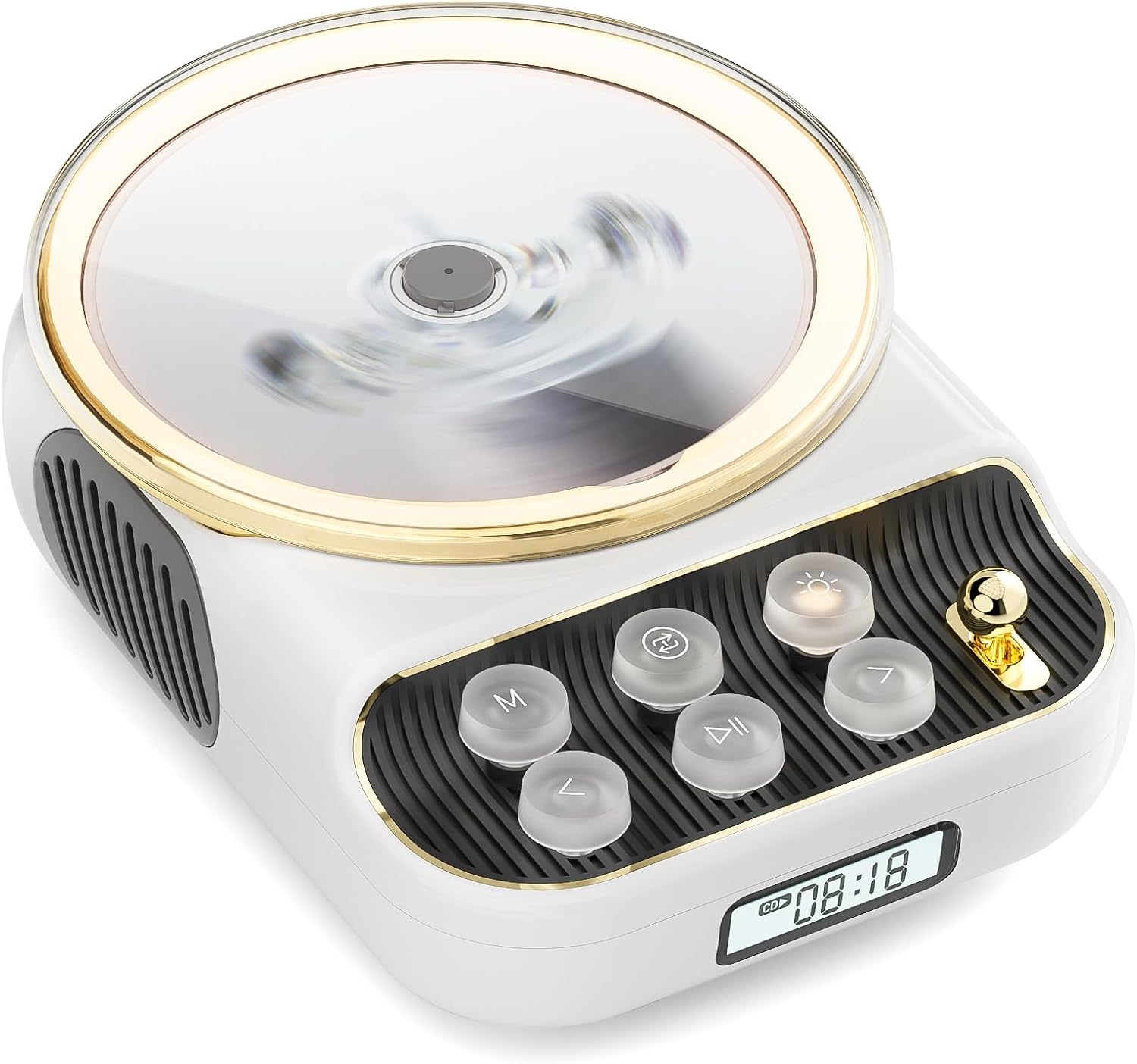
ඉදිරිපස view of the COLSUR K8-WHITE Portable Bluetooth CD Player, showcasing its circular CD compartment, control buttons, and digital display.

This image illustrates the multifunctionality of the COLSUR K8-WHITE, highlighting its capabilities for CD playback, Bluetooth mode, FM radio, TF card speaker, 3.5mm audio jack, and night light function.
පාලන පිරිසැලසුම

A detailed diagram showing the various buttons, ports, and features of the COLSUR K8-WHITE CD Player, including the CD cover, function buttons, display, Type-C charging port, TF card interface, and speaker.
- සීඩී මැදිරිය: ශ්රව්ය සංයුක්ත තැටි ඇතුළු කිරීම සඳහා.
- සංදර්ශකය: Shows current mode, track number, time, or FM frequency.
- ක්රියාකාරී බොත්තම්: (M) Mode, (Loop) Repeat, (Light) Light/Bluetooth Transmit, (Play/Pause), (Previous/Volume Down), (Next/Volume Up).
- වෙළුම් බොත්තම: ශ්රව්ය පරිමාව සීරුමාරු කරයි.
- Type-C Charging Port: For power input and charging the internal battery.
- TF කාඩ් අතුරුමුහුණත: TF කාඩ්පතකින් සංගීතය වාදනය කිරීම සඳහා.
- 3.5mm ශ්රව්ය ප්රතිදානය: හෙඩ්ෆෝන් හෝ බාහිර ස්පීකර් සම්බන්ධ කිරීම සඳහා.
5. පිහිටුවීම
5.1 උපාංගය ආරෝපණය කිරීම
The device has a built-in 4000mAh rechargeable Lithium-ion battery. Before first use, fully charge the device.
- Connect the provided Type-C charging cable to the Type-C port on the device.
- කේබලයේ අනෙක් කෙළවර අනුකූල USB බල ඇඩැප්ටරයකට සම්බන්ධ කරන්න (5V/2A නිර්දේශිතයි, ඇතුළත් නොවේ).
- The charging indicator on the display will show charging status. It will turn off or change color when fully charged.
5.2 බල ගැන්වීම සක්රිය / අක්රිය කිරීම
To power on the device, press and hold the Power button (often integrated with Play/Pause or a dedicated button, refer to the control layout diagram). To power off, press and hold the Power button again.
5.3 ස්ථානගත කිරීමේ විකල්ප
The COLSUR K8-WHITE can be used as a tabletop device or mounted on a wall.
- ටැබ්ලට් භාවිතය: Place the device on a stable, flat surface. Ensure the non-slip feet are securely positioned.
- බිත්ති සවි කිරීම: Use the provided wall mount kit (if included) to securely attach the device to a wall. Follow the instructions provided with the wall mount kit for safe installation.
6. මෙහෙයුම් උපදෙස්
6.1 සීඩී නැවත ධාවනය

The image shows the COLSUR K8-WHITE CD Player on a wooden table, playing a CD, and a separate image illustrating its use as a Bluetooth speaker connected to a smartphone.
The player supports CD, CD-R, CD-RW, MP3, and WMA formats.
- සීඩී මැදිරි කවරය විවෘත කරන්න.
- Carefully place a CD onto the spindle, ensuring it is seated correctly.
- සීඩී මැදිරි කවරය වසන්න.
- ඔබන්න M (ප්රකාරය) button repeatedly until "CD" mode is displayed.
- ඔබන්න වාදනය / විරාමය නැවත ධාවනය ආරම්භ කිරීමට බොත්තම.
- භාවිතා කරන්න පෙර/පරිමාව පහළට සහ ඊළඟ / වෙළුම ධාවන පථ මඟ හැරීමට බොත්තම්.
- භාවිතා කරමින් පරිමාව සකසන්න වෙළුම නොබ්.
- ඔබන්න ලූප් button to cycle through repeat modes (e.g., repeat one, repeat all, random).
6.2 බ්ලූටූත් ග්රාහක මාදිලිය
Connect your smartphone, tablet, or other Bluetooth-enabled devices to stream audio wirelessly. The device features Bluetooth version 5.3 for stable connection.
- ඔබන්න M (ප්රකාරය) button repeatedly until "BT" (Bluetooth) mode is displayed. The device will enter pairing mode, indicated by a flashing Bluetooth icon or specific sound.
- ඔබගේ බාහිර උපාංගයේ, බ්ලූටූත් සක්රීය කර පවතින උපාංග සොයන්න.
- Select "COLSUR K8-WHITE" (or similar name) from the list to pair.
- Once paired, you can play music from your external device, and the audio will output through the CD player's speakers.
6.3 FM රේඩියෝ මාදිලිය

The COLSUR K8-WHITE CD Player is shown on a desk, with its display showing an FM radio frequency, indicating its radio function.
Enjoy your favorite radio stations with the built-in FM tuner (frequency range: 76 MHz to 108 MHz).
- ඔබන්න M (ප්රකාරය) button repeatedly until "FM" mode is displayed.
- ඔබා අල්ලාගෙන සිටින්න වාදනය / විරාමය button to initiate an automatic scan for FM stations. The device will save found stations.
- භාවිතා කරන්න පෙර/පරිමාව පහළට සහ ඊළඟ / වෙළුම සුරකින ලද ස්ථාන හරහා සැරිසැරීමට බොත්තම්.
- භාවිතා කරමින් පරිමාව සකසන්න වෙළුම නොබ්.
6.4 TF කාඩ් නැවත ධාවනය
සංගීතය වාදනය කරන්න files directly from a TF (MicroSD) card.
- Insert a TF card (with MP3/WMA files) into the TF card slot.
- ඔබන්න M (ප්රකාරය) button repeatedly until "TF" mode is displayed. The device should automatically start playing music from the card.
- භාවිතා කරන්න පෙර/පරිමාව පහළට සහ ඊළඟ / වෙළුම ධාවන පථ මඟ හැරීමට බොත්තම්.
- භාවිතා කරමින් පරිමාව සකසන්න වෙළුම නොබ්.
6.5 AUX ආදානය
Connect external audio devices (e.g., MP3 players, older phones) via the 3.5mm AUX jack.
- Connect one end of a 3.5mm audio cable (not included) to the AUX port on the CD player.
- අනෙක් කෙළවර ඔබගේ බාහිර උපාංගයේ ශ්රව්ය ප්රතිදානයට සම්බන්ධ කරන්න.
- ඔබන්න M (ප්රකාරය) button repeatedly until "AUX" mode is displayed.
- Control playback from your external device. Adjust volume using the වෙළුම නොබ් සීඩී ප්ලේයරය මත.
6.6 හෙඩ්ෆෝන් ප්රතිදානය
For private listening, connect headphones to the 3.5mm audio output jack.
- Plug your headphones into the 3.5mm audio output jack.
- The internal speakers will automatically mute.
- භාවිතා කරමින් පරිමාව සකසන්න වෙළුම නොබ්.
6.7 වගුව එල්amp Function and Bluetooth Transmission

The COLSUR K8-WHITE CD Player is shown on a bedside table, emitting a soft glow, functioning as a night light while a person sleeps in the background.
The device includes a table lamp with three brightness levels and a Bluetooth transmission mode.
- Short Press the Light Button:
- First press: Activates a warm light (low brightness).
- Second press: Activates a flashing light (medium brightness).
- Third press: Turns off the light. The lights will cycle through these states.
- Long Press the Light Button: Activates the device's Bluetooth transmission mode. In this mode, the CD player can transmit audio to wireless headphones or other Bluetooth speakers.
7. නඩත්තු කිරීම
- පිරිසිදු කිරීම: උපාංගයේ බාහිර පිරිසිදු කිරීම සඳහා මෘදු වියළි රෙද්දක් භාවිතා කරන්න. දියර පිරිසිදු කරන්නන් හෝ උල්ෙල්ඛ ද්රව්ය භාවිතා නොකරන්න.
- CD Care: Handle CDs by their edges. Clean CDs with a soft, lint-free cloth, wiping from the center outwards.
- ගබඩා: දිගු කාලයක් භාවිතයේ නොමැති විට, උපාංගය සිසිල් වියළි ස්ථානයක ගබඩා කරන්න.
8. දෝශ නිරාකරණය
| ගැටලුව | විය හැකි හේතුව | විසඳුම |
|---|---|---|
| උපාංගය බලගන්වන්නේ නැත. | බැටරිය ක්ෂය වී ඇත. | Connect the device to a power source using the Type-C cable and charge it. |
| ස්පීකර් වලින් ශබ්දයක් නැත. | Volume is too low or muted. Headphones are connected. Incorrect mode selected. | Increase volume. Disconnect headphones. Ensure correct mode (CD, BT, FM, TF, AUX) is selected. |
| සීඩී එක වාදනය නොවේ හෝ මඟ හැරෙන්නේ නැත. | CD is dirty, scratched, or inserted incorrectly. CD format not supported. | Clean the CD. Ensure the CD is inserted correctly. Try a different CD. Verify CD format compatibility. |
| බ්ලූටූත් යුගලනය අසමත් වේ. | Device is not in pairing mode. External device Bluetooth is off or out of range. | Ensure the CD player is in Bluetooth mode and flashing. Move external device closer. Restart both devices. |
| FM රේඩියෝ පිළිගැනීම දුර්වලයි. | දුර්වල සංඥාව. බාධාව. | Reposition the device. Extend any external antenna if available. Try scanning again. |
9. පිරිවිතර
- වෙළඳ නාමය: COLSUR
- ආකෘතිය: K8-WHITE
- වර්ණය: සුදු
- සම්බන්ධතා තාක්ෂණය: Bluetooth 5.3, AUX (3.5mm jack), Type-C (charging)
- Supported Media Formats: Audio CD, CD-R, CD-RW, MP3, WMA (from CD or TF card)
- එෆ්එම් රේඩියෝ සංඛ්යාතය: 76 MHz - 108 MHz
- බැටරි: 4000mAh ලිතියම්-අයන (නැවත ආරෝපණය කළ හැකි)
- විශේෂ ලක්ෂණ: Built-in speaker, Table lamp with 3 brightness levels, TF card slot, Headphone output
- ගැළපෙන උපාංග: Headphones, Bluetooth speakers, Amplifiers, Bluetooth audio receivers
10. වගකීම් සහ සහාය
For warranty information or technical support, please refer to the documentation included with your purchase or contact the retailer/manufacturer directly. Keep your proof of purchase for warranty claims.


