
1. හැඳින්වීම
Thank you for choosing the TNICER T4X Motorcycle Intercom. This device is designed to enhance your riding experience by providing clear communication, music playback, and navigation audio while on the road. Featuring advanced ENC (Environmental Noise Cancellation) technology, Bluetooth 5.2 connectivity, and IP67 waterproof rating, the T4X ensures reliable performance in various conditions. Please read this manual thoroughly before use to ensure proper operation and to maximize the product's potential.
2 ආරක්ෂිත තොරතුරු
- සෑම විටම මාර්ග ආරක්ෂාවට ප්රමුඛත්වය දෙන්න. ඔබේ අවධානය වෙනතකට යොමු කරන ආකාරයෙන් උපාංගය ක්රියාත්මක නොකරන්න.
- Ensure the device is securely mounted to your helmet before riding.
- Adjust volume to a level that allows you to hear ambient traffic sounds. Excessive volume can damage hearing and impair awareness.
- උපාංගය විසුරුවා හැරීමට හෝ වෙනස් කිරීමට උත්සාහ නොකරන්න. මෙය වගකීම් සහතිකය අවලංගු කර හානි සිදු කළ හැකිය.
- Keep the device away from extreme temperatures, open flames, and corrosive substances.
- දේශීය රෙගුලාසිවලට අනුව බැටරි බැහැර කරන්න.
3. පැකේජ අන්තර්ගතය
ඔබගේ පැකේජයේ සියලුම අයිතම ඇති බව තහවුරු කරගන්න:
- T4X Main Unit
- Hard Microphone & Speaker Set
- Soft Microphone
- පරිශීලක අත්පොත (ජපන්)
- USB-C ආරෝපණ කේබලය
- 3M Adhesive Pads (for main unit and speakers)
- Rigid Mic Fixed Velcro
- සවිකරන වරහන් පදනම
- Round Velcro (for speakers)
- Speaker Foam Pads
- ලෝහ ක්ලිප්
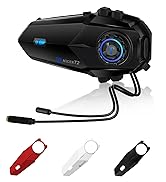
Image: All components included in the TNICER T4X package, laid out for identification.
4. නිෂ්පාදන අවසන්view
The TNICER T4X features a sleek design with intuitive controls. Familiarize yourself with the main unit's buttons and ports:
- Power/Intercom Button: Used for powering on/off, initiating/ending intercom calls.
- පරිමාව වැඩි කිරීමේ බොත්තම: Increases volume, navigates menus.
- Volume Down බොත්තම: Decreases volume, navigates menus.
- බහුකාර්ය බොත්තම: Controls music playback, phone calls, and voice assistant.
- ආරෝපණ වරාය: ආරෝපණය කිරීම සඳහා USB-C වරාය.
- හෙඩ්සෙට් වරාය: Connects speakers and microphone.

රූපය: ඉදිරිපස view of the TNICER T4X main unit, highlighting its buttons and indicator light.
5. පිහිටුවීම
5.1. උපාංගය ආරෝපණය කිරීම
Before first use, fully charge the T4X unit.
- Connect the provided USB-C charging cable to the T4X charging port.
- කේබලයේ අනෙක් කෙළවර USB බල ඇඩැප්ටරයකට (ඇතුළත් කර නැත) හෝ පරිගණක USB පෝට් එකකට සම්බන්ධ කරන්න.
- LED දර්ශකය ආරෝපණ තත්ත්වය පෙන්වනු ඇත (උදා: ආරෝපණය කිරීම සඳහා රතු, සම්පූර්ණයෙන්ම ආරෝපණය කිරීම සඳහා නිල්).
- සම්පූර්ණ ආරෝපණය සඳහා ආසන්න වශයෙන් පැය 1.5 ක් ගතවේ.

Image: The TNICER T4X unit connected to a USB-C charging cable, illustrating its 1000mAh battery capacity and usage times (40 hours talk/music, 1.5 hours charge, 600 hours standby).
5.2. හිස්වැසුම් සවි කිරීම
Choose between the metal clip or adhesive mount for securing the T4X to your helmet.
- ඉන්ටර්කොම් ඒකකය සවි කිරීම:
- ලෝහ පසුරු: Slide the metal clip between the helmet shell and inner padding. Secure the T4X main unit to the clip.
- ඇලවුම් සවිකිරීම: Clean the desired area on the helmet surface. Attach the 3M adhesive pad to the mounting bracket base, then firmly press the base onto the helmet. Secure the T4X main unit to the bracket.
- ස්පීකර් ස්ථාපනය:
- Attach the round Velcro pads to the inside of your helmet, aligning them with your ears.
- Attach the speakers to the Velcro pads. Ensure speakers are positioned directly over your ears for optimal sound.
- මයික්රෆෝන ස්ථාපනය:
- දෘඪ මයික්රෆෝනය: Suitable for open-face or modular helmets. Attach the hard mic to the helmet's chin bar using the rigid mic fixed Velcro. Position it close to your mouth.
- මෘදු මයික්රෆෝනය: Suitable for full-face helmets. Route the soft mic inside the helmet, positioning it near your mouth.
- හෙඩ්සෙට් එක සම්බන්ධ කරන්න: Plug the speaker and microphone cable into the headset port on the T4X main unit. Ensure it is firmly inserted.
6. මෙහෙයුම් උපදෙස්
6.1. බලය සක්රිය / අක්රිය කරන්න
- බල ගැන්වීම: Press and hold the Power/Intercom Button for approximately 3 seconds until the LED indicator lights up and you hear a voice prompt.
- විදුලිය විසන්ධි කිරීම: Press and hold the Power/Intercom Button for approximately 3 seconds until the LED indicator turns off and you hear a voice prompt.
6.2. වෙළුම් පාලනය
- පරිමාව වැඩි කරන්න: Press the Volume Up Button.
- ශබ්දය අඩු කරන්න: Press the Volume Down Button.
6.3. Bluetooth Pairing (Smartphone)
- Ensure the T4X is powered off.
- Press and hold the Power/Intercom Button for approximately 5-7 seconds until the LED indicator flashes red and blue alternately, indicating pairing mode.
- ඔබගේ ස්මාර්ට් ජංගම දුරකථනයේ, බ්ලූටූත් සක්රීය කර නව උපාංග සොයන්න.
- Select "TNICER T4X" from the list of available devices.
- Once paired, the LED indicator will flash blue slowly, and you will hear a confirmation voice prompt.
6.4. Intercom Pairing (Multi-Unit)
The T4X supports one-touch automatic pairing for up to 8 riders within a 1000m range.

Image: A visual representation of multiple T4X units automatically pairing for group communication over a bridge, illustrating the one-touch pairing feature for up to 8 devices.
- Ensure all T4X units are powered off.
- On the first unit (Unit A), press and hold the Power/Intercom Button for 5-7 seconds to enter pairing mode (red and blue flashing).
- On the second unit (Unit B), press and hold the Power/Intercom Button for 5-7 seconds to enter pairing mode.
- Briefly press the Power/Intercom Button on Unit A. It will search for Unit B. Once connected, both units will flash blue slowly.
- To add more units (Unit C, D, etc.), repeat steps 2-4, pairing each new unit to an already connected unit.
- ස්වයංක්රීය නැවත සම්බන්ධ කිරීම: If communication is interrupted due to distance or obstacles, the T4X will automatically reconnect when units are back within range.
6.5. ඉන්ටර්කොම් සන්නිවේදනය
- ඉන්ටර්කොම් ආරම්භ කරන්න: Briefly press the Power/Intercom Button on any paired unit.
- ඉන්ටර්කොම් අවසන් කරන්න: Briefly press the Power/Intercom Button again.
6.6. දුරකථන කාර්යයන්
- පිළිතුරු ඇමතුම: Briefly press the Multi-function Button.
- ඇමතුම අවසන් කරන්න: Briefly press the Multi-function Button during a call.
- ඇමතුම ප්රතික්ෂේප කරන්න: Press and hold the Multi-function Button for 2 seconds when a call comes in.
- අවසාන අංකය නැවත අමතන්න: බහුකාර්ය බොත්තම දෙවරක් ඔබන්න.
6.7. සංගීතය නැවත ධාවනය
- වාදනය/විරාමය: Briefly press the Multi-function Button.
- ඊළඟ ධාවන පථය: Press the Volume Up Button for 2 seconds.
- පෙර ධාවන පථය: Press the Volume Down Button for 2 seconds.
- සංගීත බෙදාගැනීම: While playing music, briefly press the Multi-function Button and Volume Up Button simultaneously to share music with a connected intercom unit.
6.8. එෆ්එම් රේඩියෝව

Image: A rider on a motorcycle, with graphics indicating FM radio functionality (76.0MHz to 108.0MHz) and voice command support (Siri, Google Assistant).
- FM සක්රිය/අක්රිය කරන්න: Press and hold the Volume Down Button for 2 seconds.
- නාලිකා පරිලෝකනය කරන්න: Briefly press the Multi-function Button while FM is on.
- නාලිකාව වෙනස් කරන්න: Press the Volume Up or Volume Down Button briefly.
6.9. හඬ සහායක
- හ oice සහකාර සක්රිය කරන්න: Double-press the Volume Up Button. This will activate your smartphone's voice assistant (e.g., Siri, Google Assistant).
6.10. Sound Adjustment (Equalizer)
The T4X offers three sound profiles:

Image: A motorcycle rider with a helmet, overlaid with a graphic showing three distinct sound profiles: Bass Boost, Mid-range Boost, and Treble Boost, indicating customizable audio experience.
- Switch Sound Modes: Triple-press the Multi-function Button to cycle through Bass Boost, Mid-range Boost, and Treble Boost.
6.11. Ambient Sound Reception
This feature allows you to hear your surroundings without removing your helmet.
- Activate/Deactivate Ambient Sound: Press and hold the Volume Up Button for 2 seconds.
7. නඩත්තු කිරීම
- පිරිසිදු කිරීම: උපාංගය මෘදු, ඩී සමඟ පිස දමන්නamp රෙදි. දරුණු රසායනික ද්රව්ය හෝ උල්ෙල්ඛ පිරිසිදු කරන්නන් භාවිතා නොකරන්න.
- ගබඩා: භාවිතයේ නොමැති විට උපාංගය සිසිල් වියළි ස්ථානයක ගබඩා කරන්න. සෘජු හිරු එළිය සහ අධික උෂ්ණත්වයන්ගෙන් වළකින්න.
- බැටරි සත්කාර: ප්රශස්ත බැටරි ආයු කාලයක් සඳහා, නිතිපතා භාවිතා නොකරන්නේ නම්, අවම වශයෙන් මාස තුනකට වරක් උපාංගය ආරෝපණය කරන්න.
8. දෝශ නිරාකරණය
8.1. No Sound from Earphones or Microphone
If you experience issues with audio output or input:
- විසඳුම 1: Ensure the cable connector is fully inserted into the main unit's jack. The earphone jack may be tight, requiring firm insertion.
- විසඳුම 2: Try unplugging and re-plugging the earphone cable several times to ensure a secure connection.
- විසඳුම 3: Check if the volume is turned up on both the intercom and your connected smartphone.
- විසඳුම 4: Test with another headset if available to rule out a faulty headset.
8.2. ඉන්ටර්කොම් සම්බන්ධ නොවීම
- Ensure both units are in pairing mode (red and blue flashing) before initiating pairing.
- Make sure units are within the 1000m communication range.
- Try resetting both units to factory settings (refer to the full manual for specific steps) and re-pairing.
8.3. උපාංගය ක්රියාත්මක නොවේ
- බැටරිය ආරෝපණය වී ඇති බවට වග බලා ගන්න. චාජරයකට සම්බන්ධ කර LED දර්ශකය පරීක්ෂා කරන්න.
- If the device is completely unresponsive, try a hard reset by holding the Power/Intercom button for an extended period (e.g., 10-15 seconds).
9. පිරිවිතර
| විශේෂාංගය | විස්තර |
|---|---|
| ආදර්ශ අංකය | T4X |
| බ්ලූටූත් අනුවාදය | 5.2 |
| ශබ්දය අවලංගු කිරීම | ENC (පාරිසරික ශබ්ද අවලංගු කිරීම) |
| Max Intercom Users | ධාවකයින් 8ක් |
| Max Intercom Range | මීටර් 1000 කි |
| බැටරි ධාරිතාව | 1000mAh ලිතියම් පොලිමර් |
| සංගීත ධාවන කාලය | පැය 40 දක්වා |
| කතා කාලය | පැය 40 දක්වා |
| පොරොත්තු කාලය | පැය 700 දක්වා |
| ආරෝපණ කාලය | ආසන්න වශයෙන්. පැය 1.5 යි |
| ජල ආරක්ෂිත ශ්රේණිගත කිරීම | IP67 |
| බර | ග්රෑම් 44 කි |
| මානයන් (පැකේජය) | 20.5 x 10.9 x 8.9 සෙ.මී |
| හෙඩ්ෆෝන් ජැක් | කුඩා USB |
| වර්ණය | සුදු/කළු |
10. වගකීම් සහ සහාය
10.1. වගකීම් තොරතුරු
The TNICER T4X comes with a standard manufacturer's warranty. Please retain your proof of purchase for warranty claims. The warranty covers defects in materials and workmanship under normal use. It does not cover damage caused by misuse, accidents, unauthorized modifications, or natural disasters.
10.2. පාරිභෝගික සහාය
For any questions, issues, or support needs regarding your TNICER T4X intercom, please contact our customer service team. You can typically find contact information on the product packaging or the official TNICER webඅඩවිය.
If purchased through Amazon, you can also contact the seller directly:
- Go to "Your Account" > "Your Orders".
- Find your order for the TNICER T4X.
- Click "Contact Seller" to send a message.
Alternatively, you may contact us via email at: tnicerservice@tognicer.com (Please include your order number in the email).