හැඳින්වීම
This manual provides essential information for the safe and effective operation, setup, and maintenance of your Roban RC Helicopter EC135 X2 Model. Please read this manual thoroughly before operating the helicopter to ensure proper function and to prevent damage or injury.
ආරක්ෂිත පූර්වාරක්ෂාවන්
Operating a remote-controlled helicopter requires caution and responsibility. Failure to operate this product in a safe manner may result in injury or property damage. Always adhere to the following safety guidelines:
- Always operate in open areas: ඇති බවට සහතික වන්න ample space free from people, animals, and obstacles.
- Maintain visual contact: Never fly the helicopter out of your line of sight.
- කාලගුණික තත්ත්වයන් පරීක්ෂා කරන්න: Avoid flying in strong winds, rain, or other adverse weather.
- Inspect before each flight: Verify all components are securely attached and undamaged.
- බැටරි ආරක්ෂාව: Use only the recommended battery and charger. Follow all charging instructions carefully.
- වයස නිර්දේශය: This product is recommended for users 14 years and up.
පෙට්ටියේ ඇති දේ
Your Roban RC Helicopter EC135 X2 Model package includes the following items:
- Roban RC Helicopter RTF 450Size EC135 Yellow 4 Blades X2 Model (Ready-To-Fly)
- 10-channel Radio Control Transmitter
- 14.8V 3300mAh 35C Flight Battery
- නිෂ්පාදන අත්පොත (මෙම ලේඛනය)
- Necessary accessories for operation
නිෂ්පාදනය අවසන්view සහ මානයන්
The Roban RC Helicopter EC135 X2 Model is a 450-size, four-blade, Ready-To-Fly (RTF) remote-controlled helicopter. It features an X2 Roban (ardupilot F407) flight stabilization system for enhanced control.

පැත්තක් view of the Roban RC Helicopter EC135 X2 Model, showcasing its yellow body, four-blade main rotor, and red-striped tail.
Key dimensions and components are detailed below:
- සිරුරේ දිග: 850 මි.මී.
- Length including rotors: 1000mm
- පළල: 210 මි.මී
- උස: 270 මි.මී
- ප්රධාන ෙරොටර් විෂ්කම්භය: 720mm
- Main blade length: 325mm
- වලිගය විෂ්කම්භය: 130 මි.මී
- Tail blade length: 130mm
- Main shaft diameter: 6mm
- Tail shaft diameter: 5mm
- Spindle diameter: 6mm
- Main Motor: 1x 2820 1300KV brushless outrunner
- Tail Motor: 1x 2205 2450KV brushless outrunner
- Speed controller: 1x Dual 60A brushless, 6S capable
- Servo: 3x digital metal gear cyclic
- Flight Stabilization: X2 Roban (ardupilot F407)

This image illustrates the key external dimensions of the helicopter, including overall length (75cm), height (26.5cm), and width (16.5cm), excluding paddle length.
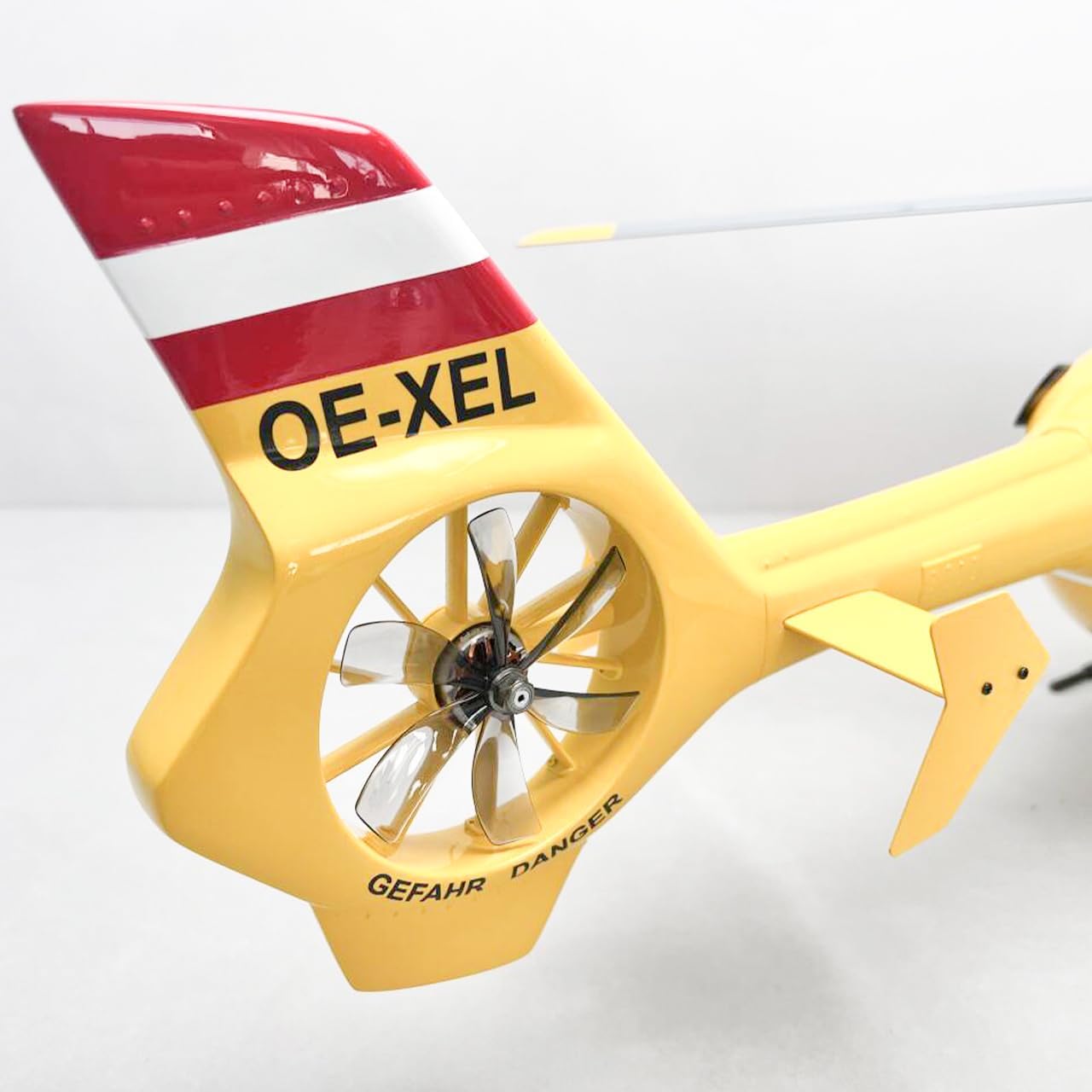
මෙම රූපය සවිස්තරාත්මකව සපයයි view of the enclosed tail rotor system and the distinctive red and white striped tail fin.
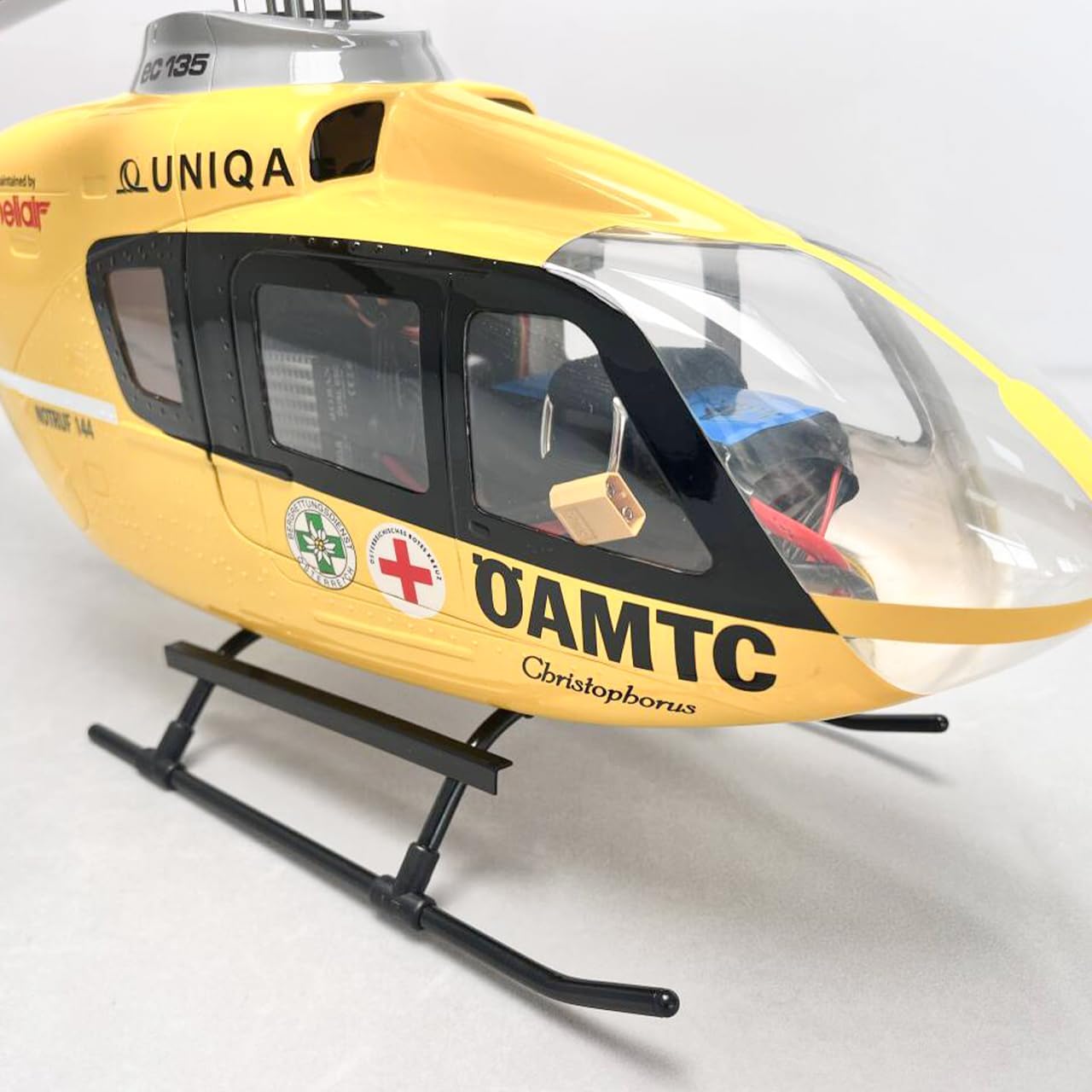
A detailed shot of the helicopter's front section, highlighting the clear canopy, internal components, and landing skids.
සැලසුම
Your Roban RC Helicopter is supplied as a Ready-To-Fly (RTF) model, meaning most assembly is complete. However, some initial setup steps are required before your first flight.
- බැටරි ආරෝපණය: Fully charge the included 14.8V 3300mAh 35C flight battery using a compatible LiPo charger (not specified if included, assume user has one or it's part of RTF package). Follow the charger's instructions carefully. Never leave charging batteries unattended.
- සම්ප්රේෂක බැටරි: Install fresh batteries into the 10-channel radio control transmitter.
- බැඳීම (අවශ්ය නම්): If the helicopter and transmitter are not already bound, follow the specific binding procedure outlined in the separate transmitter manual. Ensure the helicopter is powered off before initiating the binding process.
- ගුවන් ගමන් පූර්ව පරීක්ෂාව: Before connecting the flight battery, ensure the throttle stick on the transmitter is at its lowest position. Verify all control surfaces (swashplate, tail rotor) move freely and correctly in response to transmitter inputs.
- ආරක්ෂිත බැටරි: Once charged, carefully insert the flight battery into the helicopter's battery compartment and secure it to prevent movement during flight. Connect the battery to the helicopter's ESC.
මෙහෙයුම් උපදෙස්
Once setup is complete, you are ready for flight. Always prioritize safety and choose an appropriate flying environment.
- බල ගැන්වීම: With the throttle stick at its lowest position, power on your transmitter first, then connect the flight battery to the helicopter. Wait for the helicopter's flight stabilization system to initialize (indicated by LED lights).
- පෙර පියාසැරි පරීක්ෂාවන්: Confirm all controls respond correctly. Check rotor blades for any obstructions.
- ඉවත් කරන්න: Slowly and smoothly increase the throttle. The helicopter will begin to lift. Apply small, precise corrections with the cyclic (aileron/elevator) and rudder controls to maintain stability. Aim for a smooth, controlled ascent.
- පියාසැරි පාලන:
- Throttle (Left Stick, vertical): Controls main rotor speed and collective pitch, thus controlling altitude.
- Rudder (Left Stick, horizontal): Controls tail rotor pitch, causing the helicopter to yaw (rotate horizontally).
- Aileron (Right Stick, horizontal): හෙලිකොප්ටරය වමට හෝ දකුණට ඇල කර, එය පැත්තකට චලනය කරයි.
- Elevator (Right Stick, vertical): හෙලිකොප්ටරය ඉදිරියට හෝ පසුපසට ඇල කර, එම දිශාවලට චලනය කරයි.
- ගොඩබෑම: Slowly and smoothly reduce the throttle while maintaining a level attitude. Aim for a gentle descent. Once on the ground, immediately reduce throttle to zero.
- විදුලිය විසන්ධි කිරීම: Disconnect the flight battery from the helicopter first, then power off your transmitter.
නඩත්තු කිරීම
Regular maintenance ensures the longevity and safe operation of your helicopter.
- රොටර් තල: Inspect main and tail rotor blades for cracks, chips, or damage before and after each flight. Replace damaged blades immediately.
- යාන්ත්රික සංරචක: Check all screws, linkages, and moving parts for looseness or wear. Tighten or replace as needed.
- Motors and ESC: Ensure motors are free of debris and spin smoothly. Check the Electronic Speed Controller (ESC) for any signs of overheating or damage.
- බැටරි සත්කාර: LiPo බැටරි ගබඩා පරිමාවේ සිසිල් වියළි ස්ථානයක ගබඩා කරන්න.tage. Do not overcharge or over-discharge. Discontinue use if a battery shows signs of swelling or damage.
- පිරිසිදු කිරීම: Gently clean the helicopter body and components with a soft, dry cloth. Avoid using solvents or harsh chemicals.
දෝෂගවේෂණය
මෙම කොටසින් ඔබට මුහුණ දීමට සිදුවිය හැකි පොදු ගැටළු සාකච්ඡා කෙරේ.
| ගැටලුව | විය හැකි හේතුව | විසඳුම |
|---|---|---|
| Helicopter does not power on | Battery not charged or connected; Transmitter not powered on; Loose wiring. | Charge battery; Power on transmitter first; Check all connections. |
| අස්ථායී පියාසැරිය / පාවීම | Improper trim settings; Damaged rotor blades; Wind interference; Flight stabilization issue. | Adjust transmitter trims; Inspect and replace blades; Fly in calm conditions; Consult flight stabilization manual. |
| Loss of control range | Low transmitter battery; Interference; Antenna obstruction. | Replace transmitter batteries; Fly away from sources of interference; Ensure antennas are clear. |
| මෝටරය කැරකෙන්නේ නැත | ESC not armed; Motor or ESC damage; Loose motor wires. | Ensure throttle is at zero and then advanced; Check connections; Inspect for damage. |
පිරිවිතර
Detailed technical specifications for the Roban RC Helicopter EC135 X2 Model:
- ශරීර දිග: 850 මි.මී
- Length (incl. rotors): 1000 මි.මී
- පළල: 210 මි.මී
- උස: 270 මි.මී
- ප්රධාන රොටර් විෂ්කම්භය: 720 මි.මී
- Main Blade Length: 325 මි.මී
- වලිගය විෂ්කම්භය: 130 මි.මී
- Tail Blade Length: 130 මි.මී
- Main Shaft Diameter: 6 මි.මී
- Tail Shaft Diameter: 5 මි.මී
- ස්පින්ඩල් විෂ්කම්භය: 6 මි.මී
- ප්රධාන මෝටරය: 1x 2820 1300KV brushless outrunner
- ටේල් මෝටරය: 1x 2205 2450KV brushless outrunner
- වේග පාලකය: 1x Dual 60A brushless, 6S capable
- සර්වෝ: 3x digital metal gear cyclic
- බැටරි: 14.8V 3300mAh 35 සී
- පියාසැරි වේලාව: ආසන්න වශයෙන් විනාඩි 15 යි
- ගුවන්ගත කිරීමේ බර: ග්රෑම් 1800
- Flight Stabilization: X2 Roban (ardupilot F407)
- ගුවන්විදුලි පාලනය: 10 channel (included)
- නිෂ්පාදන මානයන් (ඇසුරුම්කරණය): අඟල් 14 x 9 x 32
- නිෂ්පාදකයා නිර්දේශිත වයස: අවුරුදු 14 සහ ඊට වැඩි
- නිෂ්පාදකයා: FLTHOBBY
වගකීම් සහ සහාය
For warranty information and technical support, please refer to the documentation provided by the manufacturer or contact your retailer. Keep your proof of purchase for any warranty claims.


