
1. හැඳින්වීම
This manual provides detailed instructions for the proper use and maintenance of your SKIUDCT N19 Bluetooth Headset. Please read this manual thoroughly before using the product to ensure optimal performance and longevity.
The SKIUDCT N19 is a wireless single-ear Bluetooth headset designed for clear communication and audio playback, featuring Bluetooth 5.3 connectivity, dual ENC noise-canceling microphones, and an IP7 waterproof rating.

රූපය: අවසන්view of the SKIUDCT N19 Bluetooth Headset highlighting its key features such as Bluetooth 5.3, ENC Noise Cancellation, 120H Playtime, IP7 Waterproof, Ergonomic Design, HiFi Sound, Type-C Fast Charge, and LED Display.
2. පැකේජ අන්තර්ගතය
සියලුම අයිතම පැකේජයේ ඇති බව තහවුරු කරගන්න:
- 1 x SKIUDCT N19 Bluetooth Earpiece
- 1 x රැහැන් රහිත ආරෝපණ නඩුව
- 1 x USB-C ආරෝපණ කේබලය
- කන් ඉඟි යුගල 3ක් (S/M/L)
- 1 x පරිශීලක අත්පොත (මෙම ලේඛනය)

Image: Visual representation of the items included in the product box: charging case, N19 wireless headset, three pairs of eartips, packing case, user manual, and USB charging cable.
3. නිෂ්පාදන අවසන්view
3.1 හෙඩ්සෙට් සංරචක
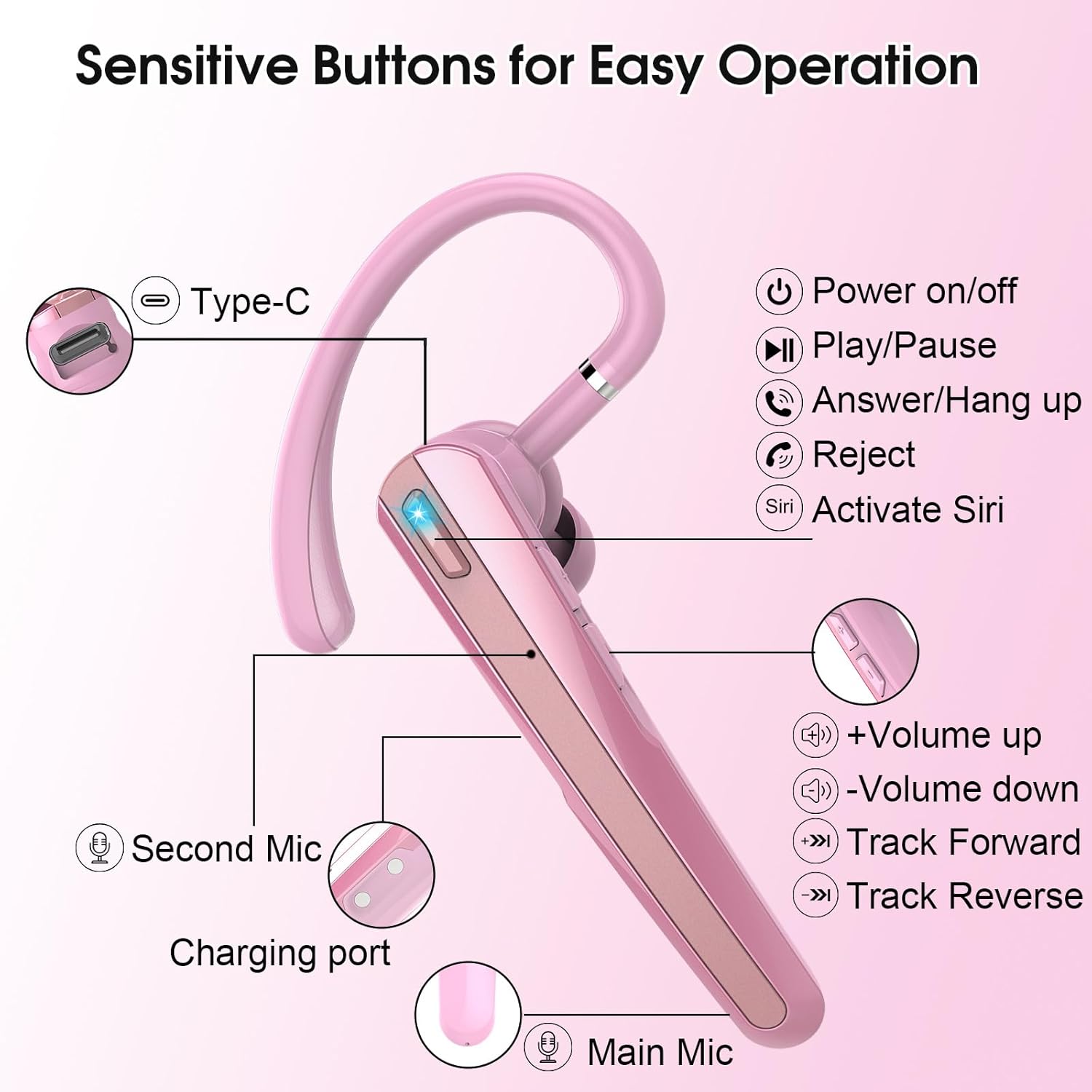
Image: Detailed diagram of the SKIUDCT N19 headset showing the Type-C port, Power on/off button, Play/Pause, Answer/Hang up, Reject, Activate Siri, Volume Up/Down, Track Forward/Reverse buttons, Second Mic, Charging port, and Main Mic.
- බල බොත්තම: Controls power on/off, play/pause, answer/hang up calls, reject calls, and activate voice assistant.
- වෙළුම් බොත්තම්: Adjusts volume, skips tracks.
- Main Microphone: Primary microphone for vocal voice collection.
- දෙවන මයික්රෆෝනය: Assists in noise reduction.
- ආරෝපණ වරාය: USB Type-C port for charging the headset.
- LED දර්ශකය: Displays connection status and battery level.
3.2 ප්රධාන ලක්ෂණ
- Ultra-Clear Call Technology: Features a 13mm composite dynamic unit for balanced sound and a high-performance audio decoding chip compatible with AAC and SBC formats.
- Dual ENC and CVC 8.0 Noise Cancellation: Effectively reduces ambient noise for clearer calls.
- බ්ලූටූත් 5.3: Provides a faster, more stable connection with lower power consumption.
- LED Display Charging Case: Shows real-time battery status of the charging box.
- දිගු බැටරි ආයු කාලය: ආරෝපණ පෙට්ටිය සමඟ පැය 120ක් දක්වා පොරොත්තු කාලය.
- Ergonomic Design: 180° rotating ear hooks and 270° adjustable cantilever for comfortable fit, suitable for left or right ear. Includes three sizes of earplugs.
- IP7 ජල ආරක්ෂිත ශ්රේණිගත කිරීම: Resists sweat, rain, and other liquids.

Image: A visual explanation of the dual ENC noise-canceling microphones, showing how the main mic collects vocal voice and the second mic performs noise reduction, with a waveform comparison of sound before and after noise cancellation.
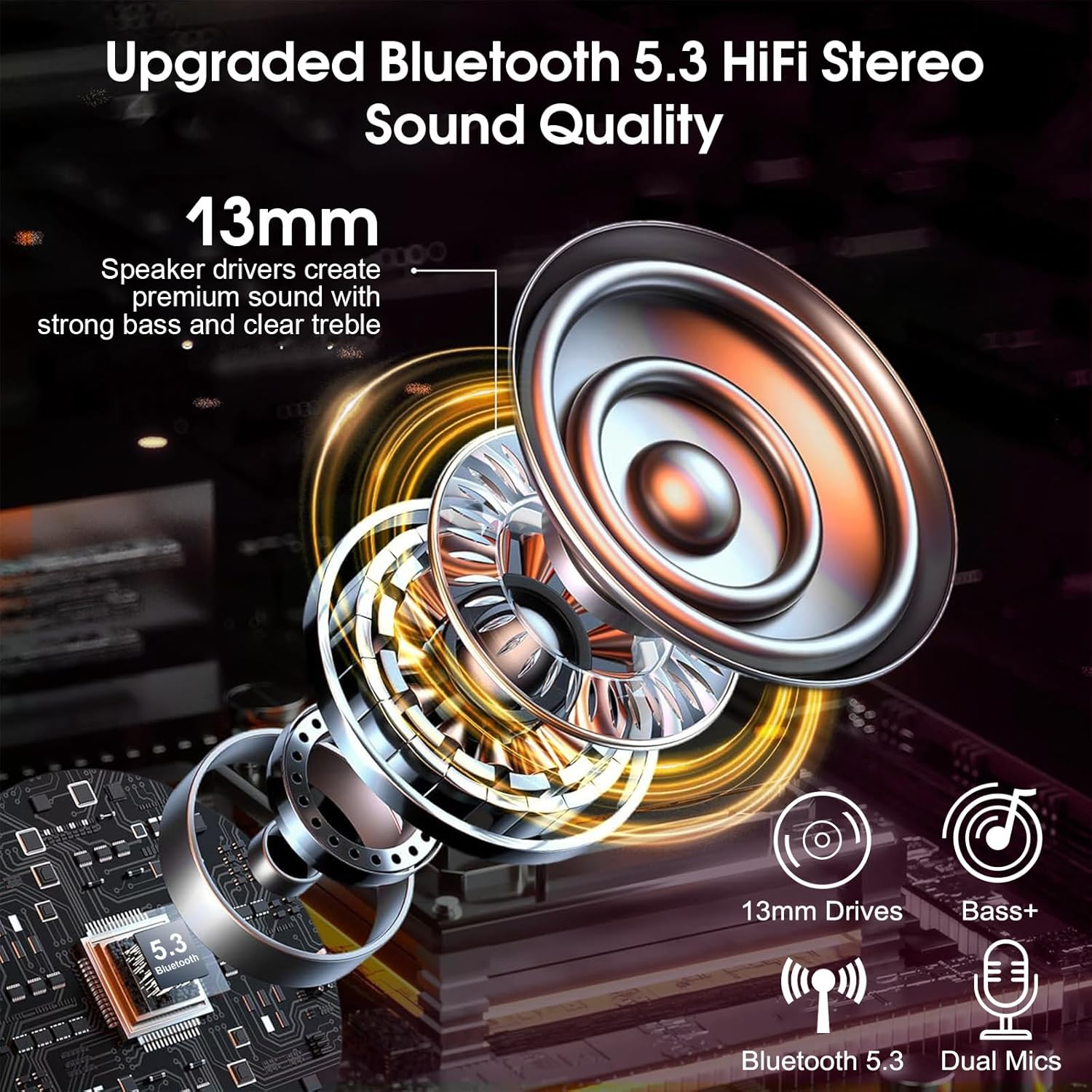
රූපය: පුපුරා ගිය එකක් view diagram illustrating the 13mm speaker drivers and internal components responsible for upgraded Bluetooth 5.3 HiFi stereo sound quality, emphasizing strong bass and clear treble.
4. පිහිටුවීම
4.1 හෙඩ්සෙට් එක සහ කේස් එක ආරෝපණය කිරීම
Before first use, fully charge the headset and charging case.
- Place the headset into the charging case.
- USB-C ආරෝපණ කේබලය නඩුවේ ආරෝපණ වරායට සහ බල ප්රභවයකට සම්බන්ධ කරන්න.
- The LED display on the charging case will show the current battery percentage. The headset will fully charge in approximately 1.5 hours.

Image: The SKIUDCT N19 headset inside its charging case, displaying a 100% charge on the LED screen, along with battery life indicators for the case and single headset, and charging time.

රූපය: සමීප ඡායාරූපයක් view of the USB-C charging port on the headset, indicating its charging capability.
4.2 බ්ලූටූත් යුගල කිරීම
- හෙඩ්සෙට් එක ආරෝපණය කර ඇති බව සහතික කර ගන්න.
- Take the headset out of the charging case. It will automatically power on and enter pairing mode (the LED indicator will flash).
- ඔබගේ උපාංගයේ (ස්මාර්ට්ෆෝන්, ලැප්ටොප්, ආදිය), බ්ලූටූත් සක්රීය කර පවතින උපාංග සොයන්න.
- Select "N19" from the list of devices.
- Once connected, the LED indicator on the headset will stop flashing, and a voice prompt will confirm the connection.

Image: A smartphone screen displaying the Bluetooth pairing process, showing "N19" as a discoverable device and indicating a successful connection for calls and media audio, with the headset and charging case in the background.
5. මෙහෙයුම් උපදෙස්
5.1 Multi-function Button Controls

Image: A detailed diagram illustrating the various functions of the multi-functional buttons on the SKIUDCT N19 headset, including power on/off, volume adjustment, track switching, answering/rejecting calls, and activating Siri.
- බල ගැන්වීම: තත්පර 2ක් සඳහා බල බොත්තම ඔබාගෙන සිටින්න.
- විදුලිය විසන්ධි කිරීම: තත්පර 5ක් සඳහා බල බොත්තම ඔබාගෙන සිටින්න.
- වාදනය/විරාමය: Tap the Power button twice.
- පිළිතුරු ඇමතුම: බල බොත්තම වරක් තට්ටු කරන්න.
- ඇමතුම ප්රතික්ෂේප කරන්න / රැඳී සිටින්න: තත්පර 2ක් සඳහා බල බොත්තම ඔබාගෙන සිටින්න.
- පරිමාව: Tap the '+' button once.
- ශබ්දය පහළට: Tap the '-' button once.
- ඊළඟ ධාවන පථය: තත්පර 2ක් සඳහා '+' බොත්තම ඔබන්න.
- පෙර ධාවන පථය: තත්පර 2ක් සඳහා '-' බොත්තම ඔබන්න.
- හඬ සහායක (සිරි/ගූගල් සහායක) සක්රිය කරන්න: Tap the Power button three times.
6. උපදෙස් පැළඳීම
For optimal comfort and sound quality, adjust the headset to fit your ear properly.
- Insert the ear tip into your ear canal.
- Position the ear hook over the back of your ear.
- Adjust the ear hook (180° rotation) and cantilever (270° adjustment) for a secure and comfortable fit. The headset can be worn on either the left or right ear.
- Experiment with the three different sizes of ear tips (S/M/L) to find the best fit for your ear canals.

Image: A three-step visual guide demonstrating how to properly wear the wireless headset: inserting the ear tip, positioning the ear hook, and making final adjustments for comfort, including 360° and 180° rotation options.

Image: Illustration of the three different ear tip sizes (S, M, L) provided with the headset, emphasizing the ability to choose the best fit for individual ear canals for comfortable wear.

Image: Two individuals demonstrating that the headset can be comfortably worn on either the left or right ear.
7. නඩත්තු කිරීම
7.1 පිරිසිදු කිරීම
- Regularly clean the ear tips and headset with a soft, dry, lint-free cloth.
- දරුණු රසායනික ද්රව්ය හෝ උල්ෙල්ඛ ද්රව්ය භාවිතා නොකරන්න.
- Ensure the charging contacts are clean and dry before placing the headset in the charging case.
7.2 ජල ආරක්ෂිත ශ්රේණිගත කිරීම
The SKIUDCT N19 headset has an IP7 waterproof rating, meaning it can withstand immersion in water up to 1 meter for 30 minutes. It is resistant to sweat and rain, but it is not recommended for swimming or prolonged submersion.

Image: The SKIUDCT N19 headset partially submerged in water, visually confirming its IP7 waterproof capability.
7.3 ගබඩා කිරීම
When not in use, store the headset in its charging case to protect it from dust and damage, and to keep it charged.
8. දෝශ නිරාකරණය
| ගැටලුව | විය හැකි හේතුව | විසඳුම |
|---|---|---|
| හෙඩ්සෙට් එක ක්රියාත්මක නොවේ. | අඩු බැටරි. | Charge the headset and charging case. |
| උපාංගය සමඟ යුගල කළ නොහැක. | උපාංගයේ බ්ලූටූත් ක්රියාවිරහිතයි; හෙඩ්සෙට් එක යුගල කිරීමේ ප්රකාරයේ නැත; උපාංගයෙන් බොහෝ දුරයි. | Ensure Bluetooth is enabled on your device. Take headset out of case to enter pairing mode. Move headset closer to device (within 10 meters). |
| ශබ්දයක් නැත හෝ අඩු පරිමාවක් නැත. | Volume too low; headset not connected; incorrect audio output selected. | Adjust volume on headset and device. Re-pair the headset. Check audio output settings on your device. |
| ඇමතුම් ගුණාත්මකභාවය දුර්වලයි. | Weak signal; environmental noise; microphone obstruction. | Move to an area with better signal. Ensure microphone is not covered. |
| Charging case LED display is off. | Charging case battery is depleted. | USB-C කේබලය භාවිතයෙන් ආරෝපණ පෙට්ටිය බල ප්රභවයකට සම්බන්ධ කරන්න. |
9. පිරිවිතර
| විශේෂාංගය | විස්තර |
|---|---|
| මාදිලියේ නම | N19 |
| සම්බන්ධතා තාක්ෂණය | රැහැන් රහිත (බ්ලූටූත්) |
| බ්ලූටූත් අනුවාදය | 5.3 |
| ශ්රව්ය ධාවක වර්ගය | 13mm ගතික ධාවකය |
| ශබ්ද පාලනය | Dual ENC & CVC 8.0 Noise Cancellation |
| බැටරි ආයු කාලය (ආරෝපණ ආවරණයක් සහිතව) | Up to 120 Hours (standby) |
| ආරෝපණ කාලය | ආසන්න වශයෙන්. පැය 1.5 යි |
| ආරෝපණ වරාය | USB Type-C |
| ජල ප්රතිරෝධක මට්ටම | IP7 ජල ආරක්ෂිත |
| සංඛ්යාත පරාසය | 20Hz - 20,000Hz |
| පාලන ක්රමය | තල්ලු බොත්තම, හඬ |
| ගැළපෙන උපාංග | Smartphones, Laptops, Desktops, Tablets, Smart Speakers, Cars (with Bluetooth support) |
| අයිතමයේ බර | අවුන්ස 3.84 කි |
10 ආරක්ෂිත තොරතුරු
- නිෂ්පාදිතය විසුරුවා හැරීම හෝ වෙනස් කිරීම නොකරන්න.
- Keep the headset away from extreme temperatures, direct sunlight, and open flames.
- Avoid exposing the headset to strong magnetic fields.
- ශ්රවණාබාධ වළක්වා ගැනීම සඳහා දීර්ඝ කාලයක් තිස්සේ අධික ශබ්දයකින් හෙඩ්සෙට් එක භාවිතා නොකරන්න.
- දේශීය රෙගුලාසිවලට අනුව නිෂ්පාදනය සහ එහි බැටරිය වගකීමෙන් යුතුව බැහැර කරන්න.
11. වගකීම් සහ සහාය
For warranty information or technical support, please refer to the contact details provided with your purchase or visit the official SKIUDCT webවෙබ් අඩවිය. වගකීම් හිමිකම් සඳහා ඔබේ මිලදී ගැනීමේ සාක්ෂි තබා ගන්න.