
1. හැඳින්වීම
ස්තූතියි, උදව් කළාටasing the SENCOR SPT 3907 Bluetooth Radio Player. This compact and versatile device offers multiple audio playback options, including CD, Bluetooth, USB, and FM radio. This manual provides essential information for safe and efficient use of your new player. Please read it thoroughly before operation and retain it for future reference.
2. ආරක්ෂිත උපදෙස්
- බලශක්ති ප්රභවය: බල සැපයුම් පරිමාව සහතික කරන්නtage matches the rating indicated on the unit. Use only the provided power cable.
- ජලය සහ තෙතමනය: ඒකකය වැසි, තෙතමනය හෝ බිංදු/ඉසින ද්රව වලට නිරාවරණය නොකරන්න. බඳුන් වැනි ද්රව වලින් පිරුණු වස්තූන් ඒකකය මත තබන්න එපා.
- වාතාශ්රය: කිසිදු වාතාශ්රය විවරයක් අවහිර නොකරන්න. නිසි වායු ප්රවාහය සඳහා ඒකකය වටා ප්රමාණවත් ඉඩක් සහතික කරන්න.
- තාපය: ඒකකය රේඩියේටර්, තාප රෙජිස්ටර්, උදුන් හෝ වෙනත් උපකරණ (ඇතුළුව) වැනි තාප ප්රභවයන්ගෙන් ඈත් කර තබන්න. ampලිෆයර්) තාපය නිපදවන.
- පිරිසිදු කිරීම: පිරිසිදු කිරීමට පෙර ඒකකය බිත්ති පිටවානෙන් විසන්ධි කරන්න. මෘදු, වියළි රෙද්දක් භාවිතා කරන්න. දියර පිරිසිදු කරන්නන් හෝ එයරොසෝල් පිරිසිදු කරන්නන් භාවිතා නොකරන්න.
- සේවා: මෙම නිෂ්පාදනය ඔබම සේවය කිරීමට උත්සාහ නොකරන්න. සියලුම සේවා සුදුසුකම් ලත් සේවකයින් වෙත යොමු කරන්න.
- බැටරි: When using batteries, ensure correct polarity. Do not mix old and new batteries, or different types of batteries. Remove batteries if the unit is not used for extended periods.
3. පැකේජ අන්තර්ගතය
සියලුම අයිතම පැකේජයේ ඇති බව තහවුරු කරගන්න:
- SENCOR SPT 3907 Radio Player
- දුරස්ථ පාලකය
- AC බල කේබලය
- ලේඛන (මෙම අත්පොත)
4. නිෂ්පාදන ලක්ෂණ
The SENCOR SPT 3907 is designed for versatile audio entertainment:
- ප්රතිදාන බලය: 4W RMS for clear sound.
- සීඩි ධාවකය: Supports CD-R/RW discs with programmable playback for up to 20 songs.
- බ්ලූටූත් සම්බන්ධතාව: Bluetooth V2.1 + EDR for wireless audio streaming from compatible devices.
- USB ප්ලේබැක්: USB connection for MP3 file playback with programmable playback for up to 99 songs.
- එෆ්එම් රේඩියෝ: Stereo FM radio receiver with digital tuning and 30 station presets.
- AUX-IN: 3.5mm auxiliary input for connecting external audio sources.
- සංදර්ශකය: Backlight LCD display for easy navigation.
- දුරස්ථ පාලක: පහසු ක්රියාකාරිත්වය සඳහා සම්පූර්ණ ක්රියාකාරී දුරස්ථ පාලකය.
- බල විකල්ප: Operates on AC 100-240V or D/LR20 batteries for portability.
- අතිරේක කාර්යයන්: Repeat and random playback modes.
5. පාලන සහ කාර්යයන්
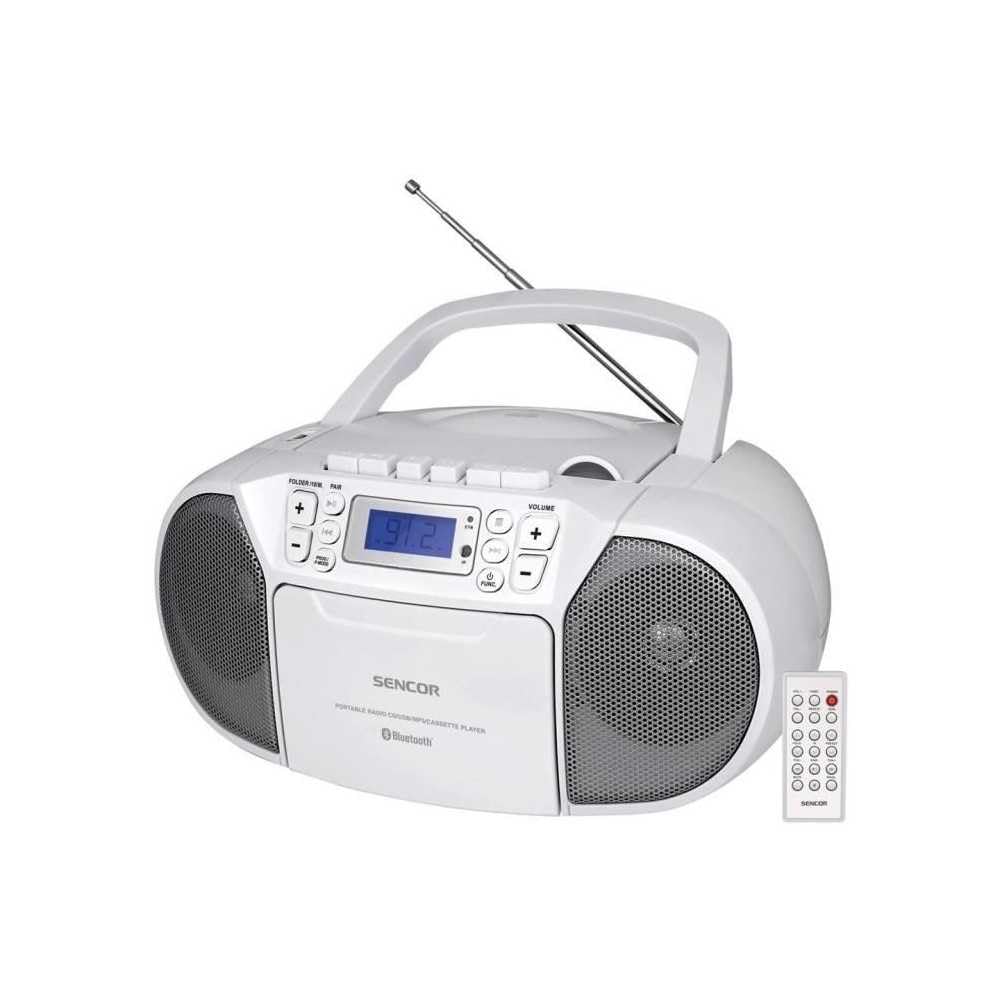
ඉදිරිපස view of the SENCOR SPT 3907 unit, highlighting the control buttons, LCD screen, CD tray, and speakers. The remote control is also visible.
ඉදිරිපස පැනල් පාලන:
- බල බොත්තම: ඒකකය සක්රිය හෝ අක්රිය කරයි.
- මාදිලි බොත්තම: Switches between CD, Bluetooth, USB, FM Radio, and AUX-IN modes.
- VOLUME +/- බොත්තම්: ශ්රව්ය ප්රතිදාන මට්ටම සීරුමාරු කරයි.
- PLAY/PAUSE (►/▮▮) Button: Starts or pauses playback in CD, Bluetooth, or USB mode.
- SKIP (◀◀ / ►►) Buttons: පෙර හෝ ඊළඟ ධාවන පථයට/ස්ථානයට යයි.
- STOP (■) Button: නැවත ධාවනය නතර කරයි.
- FOLDER / PAIR Button: Navigates folders in USB mode; initiates Bluetooth pairing.
- FUNC බොත්තම: Accesses additional functions (e.g., program, repeat, random).
- LCD සංදර්ශකය: Shows current mode, track number, frequency, and other information.
- සීඩී මැදිරිය: ශ්රව්ය සංයුක්ත තැටි ඇතුළු කිරීම සඳහා.
- USB Port: USB ගබඩා උපාංග සම්බන්ධ කිරීම සඳහා.
- AUX-IN ජැක්: බාහිර ශ්රව්ය උපාංග සම්බන්ධ කිරීම සඳහා.
- හෙඩ්ෆෝන් ප්රතිදානය: පුද්ගලික සවන්දීම සඳහා.
පසුපස පැනල් පාලන:
- AC බල ආදානය: Connects the AC power cable.
- එෆ්එම් ඇන්ටෙනා: FM පිළිගැනීම සඳහා දිගු කළ හැකි දුරේක්ෂ ඇන්ටෙනාව.
දුරස්ථ පාලක:
The remote control duplicates most of the front panel functions for convenient operation from a distance. Refer to the remote control diagram in the included documentation for specific button layouts.
6. පිහිටුවීම
6.1 බල සම්බන්ධතාවය
The SENCOR SPT 3907 can be powered by AC mains or batteries.
AC බලය:
- ඒකකය ක්රියා විරහිත කර ඇති බවට වග බලා ගන්න.
- Connect the supplied AC power cable to the AC input jack on the rear of the unit.
- Plug the other end of the AC power cable into a standard wall outlet (AC 100-240V, 50/60Hz).
බැටරි බලය:
- ඒකකයේ පතුලේ පිහිටා ඇති බැටරි මැදිරි කවරය විවෘත කරන්න.
- Insert 6 x D/LR20 size batteries (not included), ensuring correct polarity (+/-) as indicated inside the compartment.
- බැටරි මැදිරි කවරය ආරක්ෂිතව වසා දමන්න.
Note: When the AC power cable is connected, battery power is automatically disconnected. Remove batteries if the unit will not be used for an extended period to prevent leakage.
6.2 ඇන්ටෙනා සැකසුම
For optimal FM radio reception, fully extend the telescopic FM antenna located on the rear of the unit. Adjust its position for the best signal.
7. මෙහෙයුම් උපදෙස්
7.1 බලය සක්රිය/අක්රිය කිරීම සහ මාදිලි තේරීම
- ඔබන්න බලය button to turn the unit on. The LCD display will light up.
- ඔබන්න මාදිලිය button repeatedly to cycle through available modes: CD, Bluetooth, USB, FM Radio, AUX-IN. The selected mode will be shown on the LCD display.
- ඔබන්න බලය ඒකකය අක්රිය කිරීමට නැවත බොත්තම.
7.2 සීඩී නැවත ධාවනය
- ඔබන්න මාදිලිය සීඩී ප්රකාරය තෝරා ගැනීමට බොත්තම.
- සීඩී මැදිරි කවරය විවෘත කරන්න.
- Place a CD (CD-R/RW compatible) with the label side facing up onto the spindle.
- සීඩී මැදිරි කවරය වසා දමන්න. ඒකකය තැටිය කියවන අතර මුළු ධාවන පථ ගණන සංදර්ශකය මත දිස්වනු ඇත.
- ඔබන්න වාදනය / විරාමය නැවත ධාවනය ආරම්භ කිරීමට බොත්තම.
- භාවිතා කරන්න මඟ හරින්න (◀◀ / ►►) ධාවන පථ මඟ හැරීමට බොත්තම්.
- ඔබන්න නවත්වන්න (■) නැවත ධාවනය නැවැත්වීමට බොත්තම.
- වැඩසටහන් නැවත ධාවනය: While in STOP mode, press the විනෝදය button to enter program mode. Use මඟ හරින්න buttons to select tracks and විනෝදය again to confirm. Up to 20 CD songs can be programmed.
7.3 බ්ලූටූත් මෙහෙයුම
- ඔබන්න මාදිලිය button to select Bluetooth mode. The display will show 'BT' and flash, indicating it's in pairing mode.
- ඔබගේ බ්ලූටූත්-සක්රීය උපාංගයේ (උදා: ස්මාර්ට් ජංගම දුරකථනය, ටැබ්ලටය), බ්ලූටූත් සක්රීය කර පවතින උපාංග සොයන්න.
- Select 'SPT 3907' from the list of devices. Once paired, the 'BT' indicator on the display will stop flashing and remain solid.
- Start playing audio on your connected device. The sound will be streamed through the SENCOR SPT 3907.
- භාවිතා කරන්න වාදනය / විරාමය සහ මඟ හරින්න නැවත ධාවනය කළමනාකරණය කිරීමට ඒකකයේ හෝ දුරස්ථ පාලකයේ බොත්තම්.
7.4 USB නැවත ධාවනය
- Insert a USB flash drive (containing MP3 files) USB පෝට් එකට.
- ඔබන්න මාදිලිය button to select USB mode. The unit will automatically read the files.
- ඔබන්න වාදනය / විරාමය නැවත ධාවනය ආරම්භ කිරීමට බොත්තම.
- භාවිතා කරන්න මඟ හරින්න (◀◀ / ►►) ධාවන පථ මඟ හැරීමට බොත්තම්.
- ඔබන්න ෆෝල්ඩරය button to navigate between folders on the USB drive.
- වැඩසටහන් නැවත ධාවනය: While in STOP mode, press the විනෝදය button to enter program mode. Use මඟ හරින්න buttons to select tracks and විනෝදය again to confirm. Up to 99 MP3 songs can be programmed.
7.5 FM රේඩියෝ ක්රියාකාරිත්වය
- ඔබන්න මාදිලිය button to select FM Radio mode. The current frequency will appear on the display.
- වඩා හොඳ පිළිගැනීමක් සඳහා දුරේක්ෂ ඇන්ටෙනාව දිගු කරන්න.
- ස්වයංක්රීය සුසර කිරීම: ඔබා අල්ලාගෙන සිටින්න මඟ හරින්න (◀◀ / ►►) ඊළඟ ලබා ගත හැකි ස්ථානය සඳහා ස්වයංක්රීයව පරිලෝකනය කිරීමට තත්පර කිහිපයක් සඳහා බොත්තම් ඔබාගෙන සිටින්න.
- අත්පොත සුසර කිරීම: කෙටියෙන් ඔබන්න මඟ හරින්න (◀◀ / ►►) buttons to fine-tune the frequency step-by-step.
- පෙර සැකසූ ස්ථාන: නැවතුම්පළක් සුරැකීමට, අපේක්ෂිත සංඛ්යාතයට සුසර කරන්න, ඉන්පසු බොත්තම ඔබන්න. විනෝදය බොත්තම. භාවිත මඟ හරින්න පෙර සැකසූ අංකයක් (P01-P30) තේරීමට බොත්තම්, ඉන්පසු ඔබන්න විනෝදය තහවුරු කිරීමට නැවතත්.
- පෙර සැකසූ ස්ථානයක් නැවත කැඳවීමට, ඔබන්න විනෝදය සුරකින ලද ස්ථාන හරහා චක්රීය කිරීමට බොත්තම නැවත නැවතත් ඔබන්න.
7.6 AUX-IN සම්බන්ධතාවය
- Connect one end of a 3.5mm audio cable (not included) to the AUX-IN jack on the SENCOR SPT 3907.
- කේබලයේ අනෙක් කෙළවර හෙඩ්ෆෝන් ජැක් එකට හෝ ඔබේ බාහිර ශ්රව්ය උපාංගයේ (උදා: MP3 වාදකය, ස්මාර්ට් ජංගම දුරකථනය) ශ්රව්ය ප්රතිදානයට සම්බන්ධ කරන්න.
- ඔබන්න මාදිලිය AUX-IN මාදිලිය තේරීමට බොත්තම.
- Start playback on your external device. The audio will be played through the SENCOR SPT 3907.
- භාවිතා කරමින් පරිමාව සකසන්න වෙළුම +/- buttons on the unit or remote control, and also on your external device.
8. නඩත්තු කිරීම
8.1 ඒකකය පිරිසිදු කිරීම
Wipe the exterior of the unit with a soft, dry cloth. Do not use abrasive cleaners, waxes, or solvents as they may damage the finish. Ensure the unit is unplugged from the power source before cleaning.
8.2 CD කාච සත්කාරය
If the CD player experiences reading errors, the lens may need cleaning. Use a commercially available CD lens cleaner disc. Do not touch the lens directly.
8.3 බැටරි ප්රතිස්ථාපනය
When the unit operates on batteries and the sound becomes distorted or the unit stops functioning, replace all batteries with new D/LR20 batteries, ensuring correct polarity.
9. දෝශ නිරාකරණය
| ගැටලුව | විය හැකි හේතුව | විසඳුම |
|---|---|---|
| බලය නැත | බල කේබලය සම්බන්ධ කර නැත; බැටරි අවසන් වී හෝ වැරදි ලෙස ඇතුළත් කර ඇත. | Check AC power connection; Replace batteries, ensuring correct polarity. |
| ශබ්දයක් නැත | ශබ්දය ඉතා අඩුයි; වැරදි ප්රකාරය තෝරා ඇත; හෙඩ්ෆෝන් සම්බන්ධ කර ඇත. | Increase volume; Select correct mode (CD, BT, USB, FM, AUX); Disconnect headphones. |
| සීඩී එක වාදනය නොවේ / මඟ හැරේ | CD dirty or scratched; CD inserted incorrectly; CD lens dirty. | Clean or replace CD; Insert CD with label side up; Use a CD lens cleaner. |
| බ්ලූටූත් සම්බන්ධ නොවේ | Unit not in pairing mode; Device too far; Bluetooth not enabled on external device. | Ensure unit is in BT pairing mode; Move device closer; Enable Bluetooth on your device. |
| දුර්වල එෆ්එම් පිළිගැනීම | ඇන්ටනාව දිගු කර හෝ නිවැරදිව ස්ථානගත කර නොමැත; දුර්වල සංඥාවක්. | දුරේක්ෂ ඇන්ටෙනාව සම්පූර්ණයෙන්ම දිගු කර සකස් කරන්න; ඒකකය වෙනත් ස්ථානයකට ගෙන යාමට උත්සාහ කරන්න. |
10. පිරිවිතර
| විශේෂාංගය | පිරිවිතර |
|---|---|
| ආකෘතිය | SPT 3907 |
| ප්රතිදාන බලය | 4W RMS |
| සහාය දක්වන මාධ්ය | CD-R, CD-RW, Bluetooth, MP3, USB |
| බ්ලූටූත් අනුවාදය | V2.1 + EDR |
| එෆ්එම් රේඩියෝ පෙරසිටුවීම් | ස්ථාන 30 ක් |
| සම්බන්ධතාවය | Auxiliary (3.5mm), USB |
| බලශක්ති ප්රභවය | AC 100-240V, 50/60Hz; 6 x D/LR20 batteries |
| අයිතමයේ බර | 1 kg 960 ග්රෑම් |
| මානයන් | (Not specified in provided data) |
11. වගකීම් සහ සහාය
SENCOR products are manufactured to high-quality standards and are warranted against manufacturing defects. For specific warranty terms and conditions, please refer to the warranty card included with your purchase or visit the official SENCOR website. For technical support, service, or inquiries, please contact your local SENCOR distributor or authorized service center.