1. හැඳින්වීම
Thank you for choosing the Generic S10 Bone Conduction Swimming Waterproof Headphones. These headphones are designed to provide a unique audio experience, allowing you to enjoy sound while remaining aware of your surroundings, even during water activities. This manual provides essential information on how to set up, operate, maintain, and troubleshoot your device to ensure optimal performance and longevity.
2. පැකේජ අන්තර්ගතය
කරුණාකර පහත අයිතම සඳහා කොටුව සලකුණු කරන්න:
- Openrun Pro2 Wireless Stereo Bone Conduction Headphones
- ආරෝපණ කේබලය
- Hard Shell රැගෙන යන නඩුව
- Silver Glowing Stickers
- පරිශීලක අත්පොත (මෙම ලේඛනය)
3. නිෂ්පාදන අවසන්view
ප්රධාන ලක්ෂණ
- Dual Audio Technology: Combines bone conduction for clear highs and air conduction for deep bass, delivering powerful 3D audio.
- විවෘත කන් නිර්මාණය: Ensures situational awareness, making them suitable for outdoor activities.
- Stable and Comfortable Fit: Features a weight-optimized unibody frame with ergonomic ear hooks and Ni-Ti alloy memory wire for a secure fit.
- Customizable EQ Modes: Allows for audio experience customization.
- ඇමතුම් හිස් කරන්න: Equipped with dual wind-resistant microphones and AI noise reduction to filter out background noise.
නිෂ්පාදන රූප සටහන
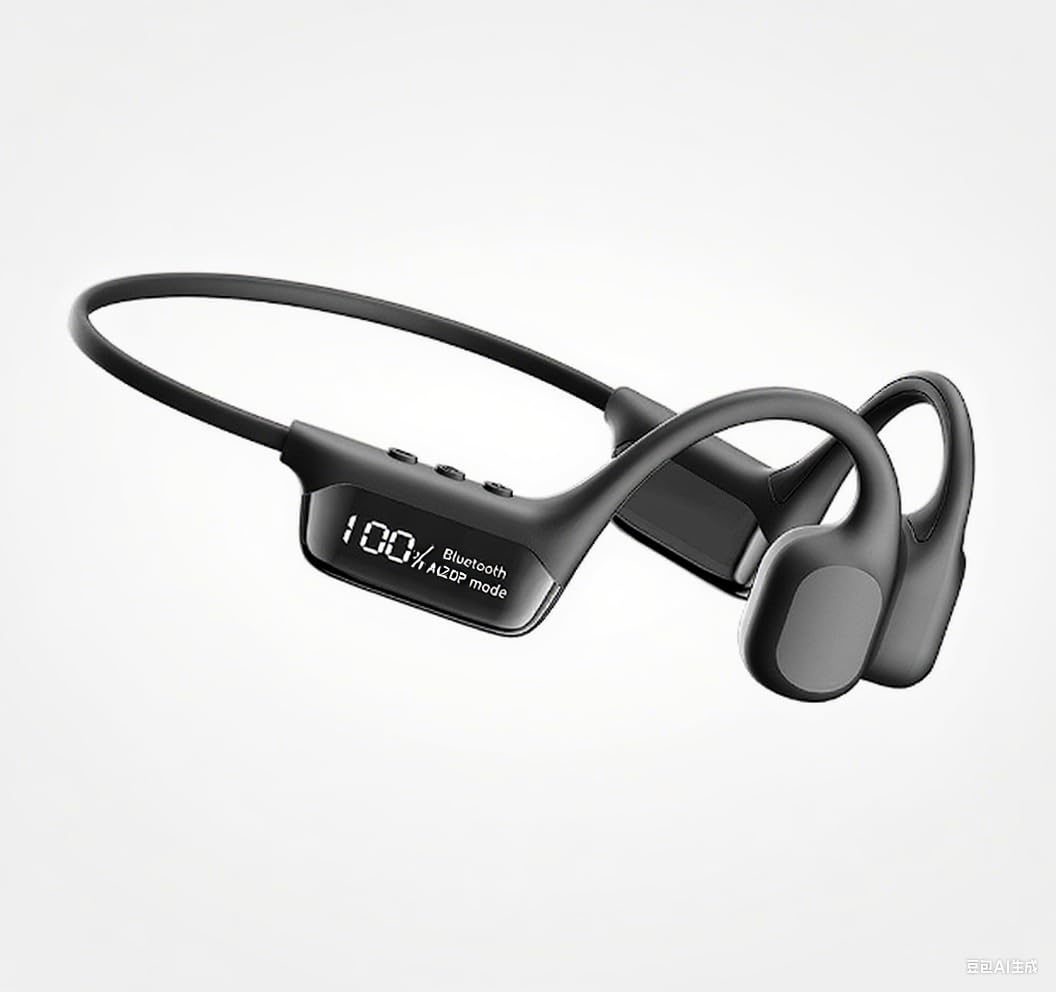
Image: Generic S10 Bone Conduction Swimming Waterproof Headphones, illustrating the overall design and placement of controls.
4. පිහිටුවීම
4.1 හෙඩ්ෆෝන් ආරෝපණය කිරීම
- හෙඩ්ෆෝන්වල ආරෝපණ වරායට ආරෝපණ කේබලය සම්බන්ධ කරන්න.
- Plug the other end of the cable into a USB power adapter (not included) or a computer's USB port.
- The LED indicator will show the charging status. A full charge takes approximately පැය 1 යි.
4.2 බ්ලූටූත් යුගල කිරීම
- හෙඩ්ෆෝන් ක්රියා විරහිත කර ඇති බවට සහතික වන්න.
- Press and hold the power button until the LED indicator flashes red and blue, indicating pairing mode.
- On your device (smartphone, tablet, PC, watch), go to Bluetooth settings and enable Bluetooth.
- ඒ සඳහා සොයන්න available devices and select "S10" (or similar name) from the list.
- Once connected, the LED indicator will turn solid blue or off, depending on the model. The headphones use Bluetooth Version 5.3 and have a range of up to 33 feet (10 meters).
5. මෙහෙයුම් උපදෙස්
5.1 හෙඩ්ෆෝන් පැළඳීම
Place the headphones with the transducers resting on your cheekbones, just in front of your ears. The band should wrap around the back of your head. Adjust for a comfortable and secure fit.
5.2 මූලික පාලන
The headphones feature button controls for various functions:
- බලය සක්රිය / අක්රිය: බල බොත්තම ඔබාගෙන සිටින්න.
- වාදනය/විරාමය: බහුකාර්ය බොත්තම එක් වරක් ඔබන්න.
- ශබ්දය වැඩි/පහළ: කැපවූ ශබ්ද පාලන බොත්තම් භාවිතා කරන්න.
- ඊළඟ ධාවන පථය: බහුකාර්ය බොත්තම දෙවරක් ඔබන්න.
- පෙර ධාවන පථය: බහුකාර්ය බොත්තම තුන් වරක් ඔබන්න.
5.3 EQ මාදිලි
Some models may offer dedicated EQ modes to customize your audio experience. Refer to the specific product documentation or accompanying app (if applicable) for instructions on how to switch between modes, such as a 'Classic Mode' for pure bone conduction sound.
5.4 ඇමතුම් ලබා ගැනීම සහ ලබා ගැනීම
When connected to your phone, you can use the headphones for calls:
- පිළිතුර/අවසන් ඇමතුම: බහුකාර්ය බොත්තම එක් වරක් ඔබන්න.
- ඇමතුම ප්රතික්ෂේප කරන්න: බහුකාර්ය බොත්තම ඔබා අල්ලාගෙන සිටින්න.
- The dual wind-resistant microphones and AI noise reduction algorithm help ensure clear communication.
6. නඩත්තු කිරීම
6.1 පිරිසිදු කිරීම
- මෘදු, d තුණ්ඩයකින් හෙඩ්ෆෝන් පිස දමන්න.amp cloth after each use, especially after swimming or intense workouts.
- උල්ෙල්ඛ පිරිසිදු කරන්නන් හෝ ද්රාවණ භාවිතා නොකරන්න.
- ආරෝපණය කිරීමට පෙර ආරෝපණ වරාය වියළි බව සහතික කර ගන්න.
6.2 ගබඩා කිරීම
- Store the headphones in the provided hard shell carrying case when not in use to protect them from damage.
- ඒවා සිසිල්, වියළි ස්ථානයක, සෘජු හිරු එළියෙන් සහ අධික උෂ්ණත්වයන්ගෙන් ඈත්ව තබා ගන්න.
7. දෝශ නිරාකරණය
- බලය නැත: හෙඩ්ෆෝන් සම්පූර්ණයෙන්ම ආරෝපණය වී ඇති බවට වග බලා ගන්න. බල ප්රභවයකට සම්බන්ධ කර LED දර්ශකය පරීක්ෂා කරන්න.
- යුගල කළ නොහැක: Make sure the headphones are in pairing mode (flashing red/blue LED). Turn off and on your device's Bluetooth. Try unpairing and re-pairing.
- ශබ්දයක් නැත: Check the volume level on both the headphones and your connected device. Ensure the headphones are properly paired and connected.
- දුර්වල ශබ්ද තත්ත්වය: Ensure the transducers are correctly positioned on your cheekbones. Check for interference from other wireless devices.
- ජල හානිය: While waterproof, ensure all ports are sealed before submersion. If water enters, allow to dry completely before use or charging.
8. පිරිවිතර
| විශේෂාංගය | පිරිවිතර |
|---|---|
| මාදිලියේ නම | S10 (also referred to as 001) |
| අයිතම ආදර්ශ අංකය | 00 |
| සම්බන්ධතා තාක්ෂණය | රැහැන් රහිත |
| රැහැන් රහිත සන්නිවේදනය | බ්ලූටූත් 5.3 |
| බ්ලූටූත් පරාසය | අඩි 33 (මීටර් 10) |
| බැටරි ආයු කාලය | පැය 12 දක්වා |
| ආරෝපණ කාලය | පැය 1 යි |
| ජල ප්රතිරෝධක මට්ටම | වතුර කාන්දු නොවන |
| අයිතමයේ බර | ග්රෑම් 30.3 (අවුන්ස 1.07) |
| කන් ස්ථානගත කිරීම | කන් විවෘත කරන්න |
| ආකෘති සාධකය | කන් විවෘත කරන්න |
| ද්රව්ය | Nickel-Titanium Alloy, Plastic, Silicone |
| නිෂ්පාදන මානයන් | අඟල් 4.88 x 1.78 x 3.94 |
| පාලන වර්ගය | Volume Control, Button |
| ශ්රව්ය ධාවක වර්ගය | අස්ථි සන්නායක ධාවකය |
| ඇතුළත් සංරචක | Headphones, Cable, Hard Shell Carrying Case, Stickers, User Manual |
9. වගකීම් සහ සහාය
This product comes with a standard manufacturer's warranty. For specific warranty details, please refer to the warranty card included in your package or contact the retailer where you purchased the product. For technical support or service inquiries, please reach out to the customer service contact provided by your seller.


