
1. හැඳින්වීම
This manual provides detailed instructions for the Loutoc SRC4526 Universal Remote Control, designed for seamless compatibility with Philips Ambilight Smart TVs. Please read this guide thoroughly to ensure optimal use and longevity of your remote control.
1.1 නිෂ්පාදනය අවසන්view
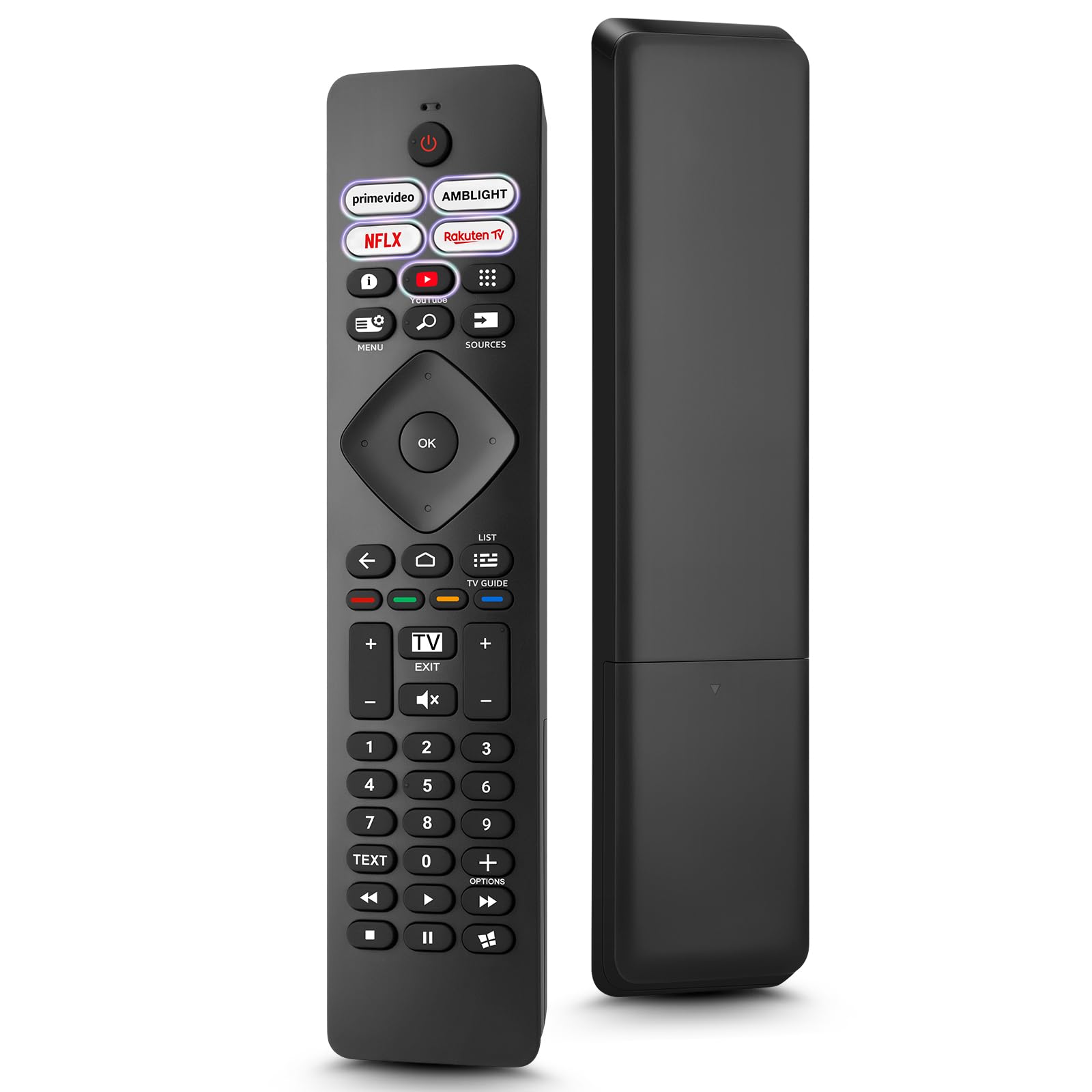
Image: The Loutoc SRC4526 Universal Remote Control, showcasing එහි ergonomic නිර්මාණය සහ බොත්තම් පිරිසැලසුම.
1.2 ප්රධාන ලක්ෂණ
- Convenient Plug-and-Play: No complex setup or programming required. Simply insert batteries and the remote is ready for use.
- පුළුල් රූපවාහිනී අනුකූලතාව: Fully compatible with Philips Ambilight TVs, including 4K Ambilight LED, OLED, FHD, and Full Ultra HD models.
- Dedicated Shortcut Buttons: Features 5 direct access buttons for popular streaming platforms: Ambilight, Video, NFLX (Netflix), Rakuten TV, and YouTube.
- විශ්වසනීය කාර්ය සාධනය: Offers an effective operating range of 8 meters (26 feet) and an ultra-fast response time of 0.2 seconds.
2. පිහිටුවීම
2.1 බැටරි ස්ථාපනය
The Loutoc SRC4526 remote control requires two AAA batteries (not included) for operation.
- දුරස්ථ පාලකයේ පිටුපස බැටරි මැදිරිය සොයා ගන්න.
- ස්ලයිඩයෙන් බැටරි මැදිරියේ කවරය විවෘත කරන්න.
- ධනාත්මක (+) සහ සෘණ (-) පර්යන්ත මැදිරිය තුළ ඇති දර්ශක සමඟ නිවැරදිව පෙළගස්වා ඇති බව සහතික කරමින් AAA බැටරි දෙකක් ඇතුළු කරන්න.
- බැටරි මැදිරි කවරය ආරක්ෂිතව වසා දමන්න.
2.2 මූලික භාවිතය
This remote control is designed for immediate use with compatible Philips Ambilight TVs. No programming or pairing is required. Once batteries are installed, point the remote at your TV and begin operation.
3. මෙහෙයුම් උපදෙස්
3.1 බොත්තම් ක්රියා අවසන්view
Refer to the image below for a visual guide to the remote control's buttons and their corresponding functions.

Image: Detailed diagram of the Loutoc SRC4526 remote control, illustrating each button and its primary function.
| බොත්තම | කාර්යය |
|---|---|
| බලය | Switches the TV on or off (Standby mode). |
| Prime Video, Ambilight, Netflix, Rakuten TV | Quickly launches the corresponding application. |
| මෙනුව | Opens the Quick Menu with typical TV functions. Hold to show Gaming control bar. |
| සෙවීම | Opens the Search tab on the Home screen. |
| මූලාශ්ර | Opens or closes the TV's input sources menu. |
| OK | Confirms a selection or setting. |
| Arrow/Navigation Keys | Navigates up, down, left, or right through menus and options. |
| ආපසු | පෙර තිරයට හෝ නාලිකාවට නැවත පැමිණේ. |
| නිවස | Opens the TV's Home menu. |
| රූපවාහිනී මාර්ගෝපදේශය | Opens or closes the TV Guide. Long press to open the channel list. |
| Color Keys (Red, Green, Yellow, Blue) | Provides direct selection of on-screen options. The blue key typically opens Help. |
| පරිමාව (+/-) | රූපවාහිනියේ ශබ්ද මට්ටම සීරුමාරු කරයි. |
| නාලිකාව (+/-) | Switches to the next or previous channel. |
| පිටවෙන්න | Exits current menu/application or returns to live TV. From standby, goes to last viewed source. |
| නිහඬ කරන්න | රූපවාහිනී ශබ්දය නිශ්ශබ්ද කරයි හෝ නිශ්ශබ්ද කරයි. |
| අංක යතුරු (0-9) | රූපවාහිනී නාලිකා කෙලින්ම තෝරා ගනී. |
| TEXT | Opens or closes Text/Teletext. |
| පසුධාවන පාලන | Controls media playback: Play, Pause, Stop, Rewind, Fast Forward. |
| යෙදුම් | Opens the Apps tab on the Home screen. |
3.2 Ambilight Functionality
For Philips TVs equipped with Ambilight functionality, the dedicated Ambilight button on your remote allows you to control the lighting effects.
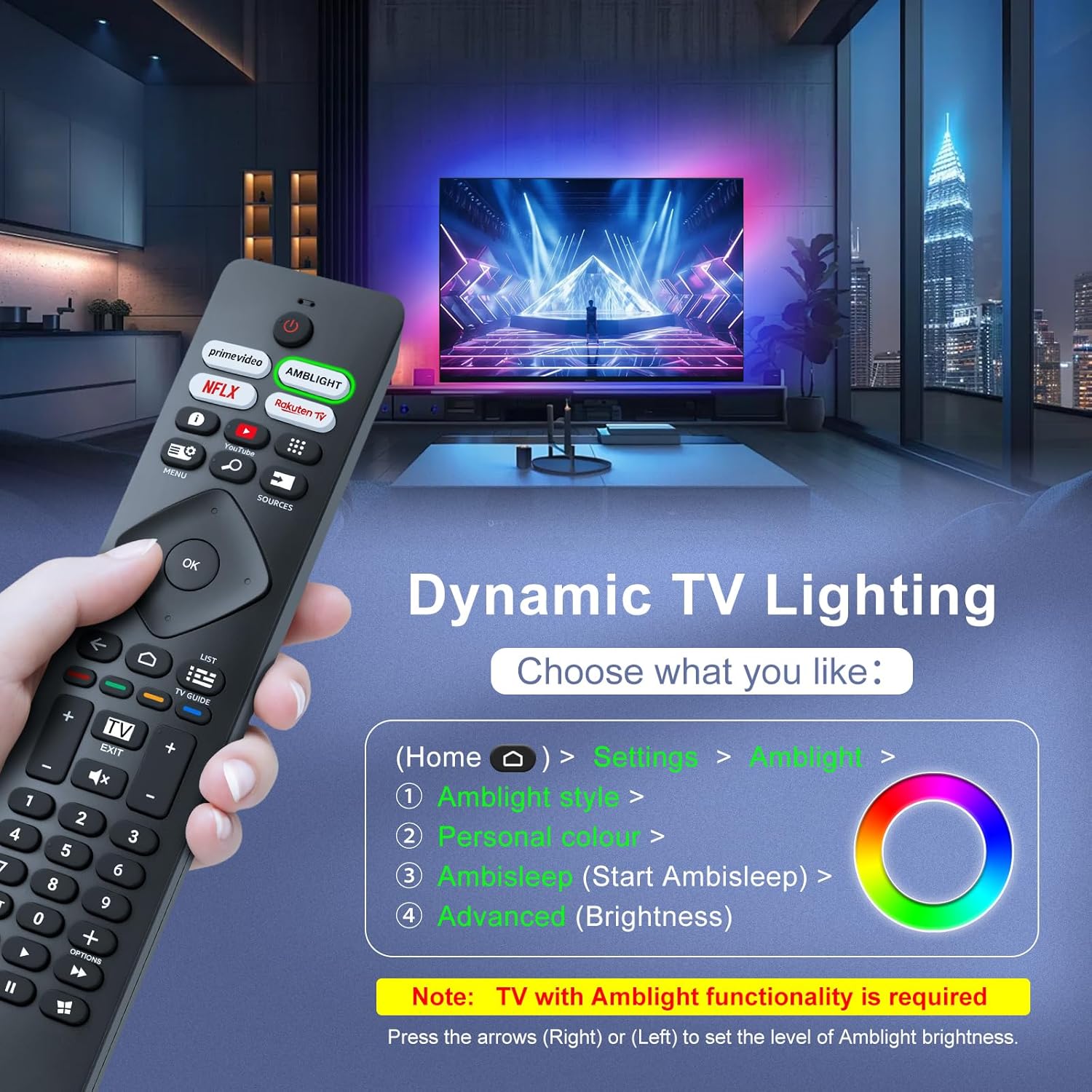
Image: A hand holding the remote control, with an overlay showing Ambilight settings on a TV screen.
After pressing the Ambilight button, you can navigate through the TV's menu to:
- Select different Ambilight display styles.
- Adjust personal color preferences.
- Initiate AmbiSleep mode.
- Adjust Ambilight brightness levels (using the right or left arrow keys).
Note: This feature requires a Philips TV with built-in Ambilight functionality.
4. නඩත්තු කිරීම
4.1 පිරිසිදු කිරීම
To clean your remote control, gently wipe it with a soft, dry cloth. Avoid using liquid cleaners, aerosols, or harsh chemicals, as these can damage the remote's surface or internal components.
4.2 ගබඩා කිරීම
දුරස්ථ පාලකය සෘජු හිරු එළියෙන් සහ අධික උෂ්ණත්වයන්ගෙන් ඈත්ව සිසිල් වියළි ස්ථානයක ගබඩා කරන්න. දුරස්ථ පාලකය දිගු කාලයක් භාවිතා නොකරන්නේ නම්, කාන්දු වීම වැළැක්වීම සඳහා බැටරි ඉවත් කිරීම රෙකමදාරු කරනු ලැබේ.
4.3 බැටරි සත්කාර
- සියලුම බැටරි එකම අවස්ථාවේදීම ප්රතිස්ථාපනය කරන්න; පැරණි සහ නව බැටරි මිශ්ර නොකරන්න.
- විවිධ වර්ගයේ බැටරි (උදා: ක්ෂාරීය සහ නැවත ආරෝපණය කළ හැකි) මිශ්ර නොකරන්න.
- භාවිතා කරන ලද බැටරි දේශීය රෙගුලාසිවලට අනුව වගකීමෙන් යුතුව බැහැර කරන්න.
5. දෝශ නිරාකරණය
5.1 පොදු ගැටළු සහ විසඳුම්
- දුරස්ථ පාලකය ප්රතිචාර නොදක්වයි:
- නිවැරදි ධ්රැවීයතාවයෙන් බැටරි නිවැරදිව ඇතුළු කර ඇත්දැයි පරීක්ෂා කරන්න.
- බැටරි නව AAA බැටරි සමඟ ප්රතිස්ථාපනය කරන්න.
- දුරස්ථ පාලකය සහ රූපවාහිනියේ අධෝරක්ත ග්රාහකය අතර කිසිදු බාධාවක් නොමැති බවට වග බලා ගන්න.
- Make sure you are within the effective operating range (up to 8 meters).
- නිශ්චිත බොත්තම් ක්රියා නොකරයි:
- Clean the remote control, especially around the non-functioning buttons, to remove any dirt or debris.
- If only Ambilight functions are not working, ensure your Philips TV model supports Ambilight.
5.2 සහාය අමතන්න
If you encounter persistent issues that cannot be resolved with the troubleshooting steps above, please contact Loutoc customer support directly. We aim to respond to all inquiries within 12 working hours.
6. පිරිවිතර
| විශේෂාංගය | විස්තර |
|---|---|
| වෙළඳ නාමය | Loutoc |
| මාදිලියේ නම | SRC4526-FBA |
| අයිතම ආදර්ශ අංකය | SRC4526 |
| වර්ණය | කළු |
| සම්බන්ධතා තාක්ෂණය | අධෝරක්ත කිරණ |
| විශේෂ ලක්ෂණ | No programming required, Ergonomic, Lightweight |
| ගැළපෙන උපාංග | Television (Philips Ambilight TVs) |
| Maximum Number of Supported Devices | 1 |
| පාලක වර්ගය | බොත්තම් පාලනය |
| උපරිම පරාසය | මීටර් 8 (අඩි 26) |
| බැටරි විස්තරය | AAA (2 required, not included) |
| නිෂ්පාදකයා | Loutoc |
| මුල් රට | චීනය |
| පළමු දිනය Amazon.com.be හි ලබා ගත හැකිය. | 31 අගෝස්තු 2025 |
7. වගකීම් සහ සහාය
7.1 වගකීම් තොරතුරු
This Loutoc remote control comes with a manufacturer's warranty of 30 days from the date of purchase. Please retain your proof of purchase for any warranty claims.
7.2 පාරිභෝගික සහාය
For any questions, technical assistance, or warranty inquiries, please contact Loutoc customer support. We are committed to providing timely assistance and will respond to your queries within 12 working hours.