හැඳින්වීම
This manual provides essential information for the setup, operation, and maintenance of your Generic 2026 Smartwatch T800 T900 Ultra. Designed for both men and women, this smartwatch features an HD display, heart rate monitor, notification capabilities, and sport tracking. Please read this manual thoroughly to ensure proper use and to maximize the functionality of your device.
සැලසුම
පෙට්ටියේ ඇති දේ
Carefully unpack your smartwatch and ensure all components are present:
- Smartwatch unit (with pre-installed silicone band)
- Additional mesh band
- චුම්බක ආරෝපණ කේබලය
- පරිශීලක අත්පොත (මෙම ලේඛනය)
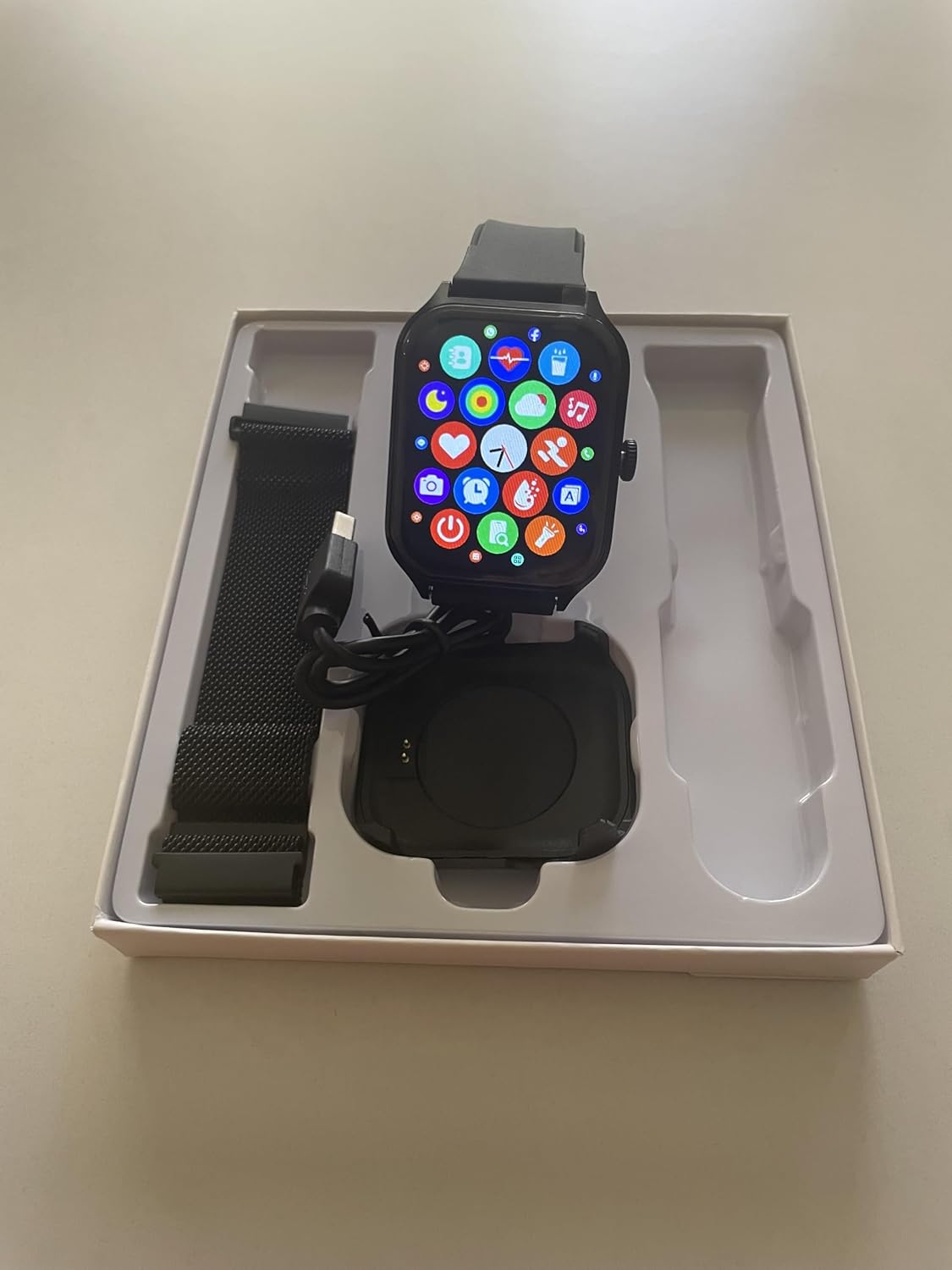
Figure 1: Smartwatch and accessories as packaged.
ස්මාර්ට් ඔරලෝසුව ආරෝපණය කිරීම
Before initial use, fully charge your smartwatch. The device uses a custom magnetic charging cable.
- Connect the USB end of the magnetic charging cable to a compatible USB power adapter (not included) or a computer's USB port.
- Align the magnetic end of the charging cable with the charging pins on the back of the smartwatch. The magnets will snap into place.
- The watch display will indicate charging status. Allow approximately 2.5 hours for a full charge. A full charge provides up to 14 days of use or 20 days on standby.

Figure 2: Close-up of the smartwatch's rear, highlighting the charging pins.
Attaching/Changing Wristbands
The smartwatch comes with a pre-installed silicone band and an additional mesh band. Both bands feature a quick-release design for easy interchangeability.
- To remove a band, locate the small pin on the underside of the band where it connects to the watch body. Slide the pin inwards to release the band.
- To attach a new band, align one end of the pin with the corresponding hole on the watch body. Slide the other end of the pin inwards and guide it into the remaining hole. Release the pin to secure the band.
- Gently tug on the band to ensure it is securely attached before wearing.

Figure 3: Smartwatch with interchangeable bands.
බල ගැන්වීම / අක්රිය කිරීම
- බල ගැන්වීමට: තිරය ආලෝකමත් වන තුරු පැති බොත්තම ඔබාගෙන සිටින්න.
- බලය අක්රිය කිරීමට: පැති බොත්තම ඔබා අල්ලාගෙන සිටින්න, ඉන්පසු තිරයේ ඇති 'පවර් ඕෆ්' විකල්පය තෝරන්න.
Connecting to the Companion App
To unlock the full potential of your smartwatch, download and connect to the dedicated companion app on your Android device.
- Scan the QR code provided in the quick start guide (or search for the app name in your device's app store) to download the app.
- ඔබගේ ස්මාර්ට් ජංගම දුරකතනයේ බ්ලූටූත් සබල කර ඇති බව සහතික කර ගන්න.
- Open the companion app and follow the on-screen instructions to pair your smartwatch.
- Once paired, the app will synchronize data and allow for further customization of watch faces and settings.
මෙහෙයුම් උපදෙස්
මූලික සංචාලනය
- ස්පර්ශ තිරය: මෙනු සහ විශේෂාංග හරහා සංචාලනය කිරීමට වමට, දකුණට, ඉහළට හෝ පහළට ස්වයිප් කරන්න. විකල්පයක් තේරීමට තට්ටු කරන්න.
- Side Button/Digital Crown: Use the side-mounted digital crown for quick and precise navigation through watch functions, or to return to the home screen.
ඔරලෝසු මුහුණු අභිරුචිකරණය කිරීම
සහකාර යෙදුම හරහා ලබා ගත හැකි විවිධාකාර ඔරලෝසු මුහුණු සමඟින් ඔබේ ස්මාර්ට් ඔරලෝසුව පුද්ගලීකරණය කරන්න.
- ඔබගේ ස්මාර්ට් ජංගම දුරකථනයේ සහකාර යෙදුම විවෘත කරන්න.
- Navigate to the 'Watch Face Gallery' or 'Customization' section.
- Browse through the available designs and select your preferred watch face.
- Follow the app's instructions to sync the new watch face to your smartwatch.
සෞඛ්ය නිරීක්ෂණ
Your smartwatch is equipped with various health monitoring features:
- හෘද ස්පන්දන වේගය නිරීක්ෂණය: Access the heart rate feature on your watch to measure your current heart rate. Data is recorded and viewසහකාර යෙදුම තුළ හැකි.
- නින්ද ලුහුබැඳීම: Wear your smartwatch to bed to track your sleep patterns. Detailed sleep data can be viewසහකාර යෙදුමේ ලියාපදිංචි කර ඇත.
- ක්රියාකාරකම් ලුහුබැඳීම: The watch tracks your daily steps, distance, and calories burned. This data is synchronized with the companion app.
- රුධිර පීඩනය සහ රුධිර ඔක්සිජන්: The smartwatch can measure blood pressure and blood oxygen levels. These measurements are for reference only and should not be used for medical diagnosis.
Notifications & Calls
Stay connected by receiving notifications and managing calls directly from your wrist.
- දැනුම්දීම්: Once paired with your smartphone, the smartwatch will display incoming call alerts, text messages, and app notifications. Manage notification settings via the companion app.
- ඇමතුම් ලබා ගැනීම/ලබා ගැනීම: Use the built-in microphone and speaker to make and receive calls directly from your smartwatch when connected to your phone via Bluetooth.
ක්රීඩා ලුහුබැඳීම
The smartwatch supports over 100 different sports modes to help you track your workouts.
- Navigate to the 'Workout' or 'Sport' section on your smartwatch.
- ඔබට අවශ්ය ක්රියාකාරකම තෝරන්න (උදා: දිවීම, බයිසිකල් පැදීම, ඇවිදීම).
- The watch will begin tracking relevant metrics such as duration, heart rate, and calories.
- End your workout session on the watch, and the data will synchronize with the companion app for detailed analysis.
නඩත්තු කිරීම
ඔබේ ස්මාර්ට් ඔරලෝසුව පිරිසිදු කිරීම
ඔබේ ස්මාර්ට් ඔරලෝසුවේ පෙනුම සහ ක්රියාකාරීත්වය පවත්වා ගැනීමට:
- තිරය සහ ඔරලෝසු බඳ මෘදු, ලින්ට් රහිත රෙද්දකින් පිස දමන්න.
- මුරණ්ඩු පැල්ලම් සඳහා, සැහැල්ලුවෙන් dampen රෙදි කැබැල්ල වතුරෙන් සෝදන්න. සැර රසායනික ද්රව්ය හෝ උල්ෙල්ඛ ද්රව්ය භාවිතා කිරීමෙන් වළකින්න.
- Clean the wristbands regularly, especially after workouts, to prevent skin irritation.
ජල ප්රතිරෝධය
The smartwatch has an IP68 rating, indicating it is resistant to dust and can withstand immersion in water up to 1.5 meters for 30 minutes. It is suitable for daily use, including hand washing and light rain.
වැදගත්: While water-resistant, avoid prolonged immersion, hot water, or exposure to steam, as this may compromise the seal and cause damage. Do not press buttons underwater.
දෝෂගවේෂණය
ඔබගේ ස්මාර්ට් ඔරලෝසුව සමඟ ගැටළු ඇති වුවහොත්, පහත පියවර උත්සාහ කරන්න:
- ඔරලෝසුව ක්රියාත්මක නොවීම: ඔරලෝසුව සම්පූර්ණයෙන්ම ආරෝපණය වී ඇති බවට වග බලා ගන්න.
- ස්මාර්ට් ජංගම දුරකථනය සමඟ යුගල කළ නොහැක: Ensure Bluetooth is enabled on your phone and the smartwatch is within range. Try restarting both devices.
- සාවද්ය සෞඛ්ය දත්ත: ඔරලෝසුව ඔබේ මැණික් කටුවෙහි හොඳින් පැළඳ සිටින බවටත්, ඕනෑවට වඩා තද හෝ ලිහිල් නොවන බවටත් සහතික වන්න. ඔරලෝසුවේ පිටුපස ඇති සංවේදක පිරිසිදු කරන්න.
- දැනුම්දීම් නොපෙන්වයි: Check notification settings in the companion app and your smartphone's system settings to ensure permissions are granted.
- තිරය ප්රතිචාර නොදක්වයි: Try restarting the smartwatch by holding down the side button.
If problems persist, refer to the companion app's help section or contact customer support.
පිරිවිතර
| විශේෂාංගය | විස්තර |
|---|---|
| ආදර්ශ අංකය | T800 |
| තිර ප්රමාණය | අඟල් 1.5 |
| විභේදනය | 240 x 240 |
| අයිතමයේ බර | අවුන්ස 5.5 කි |
| මතක ගබඩා ධාරිතාව | 32 GB |
| රැහැන් රහිත සන්නිවේදන ප්රමිතිය | බ්ලූටූත් |
| ගැලපෙන දුරකථන මාදිලි | Android උපාංග |
| මානව අතුරු මුහුණත් ආදානය | බොත්තම්, ස්පර්ශ තිරය |
| කලාප පළල | අඟල් 0.8 |
| නිෂ්පාදකයා | Mianyang yiamier electronic ltd. |
වගකීම් සහ සහාය
For warranty information, technical support, or further assistance, please refer to the manufacturer's official website or contact their customer service directly. Details can typically be found on the product packaging or within the companion app's 'About' section.


