
හැඳින්වීම
Thank you for choosing the VANIR Smartwatch. This manual provides detailed instructions on how to set up, operate, and maintain your device. Please read this manual thoroughly before using the smartwatch to ensure proper function and to maximize your user experience.
The VANIR Smartwatch features a 2.01-inch HD touchscreen, Bluetooth call support, comprehensive health monitoring (heart rate, sleep), fitness tracking with over 100 sports modes, and smart notifications.
පෙට්ටියේ ඇති දේ
Upon opening your VANIR Smartwatch package, please verify that all components are present:
- VANIR Smartwatch (Model VANIR-1)
- ආරෝපණ කේබලය
- පරිශීලක අත්පොත (මෙම ලේඛනය)
- සංගීත කණ්ඩායම නරඹන්න
සැකසුම් මාර්ගෝපදේශය
1. ස්මාර්ට් ඔරලෝසුව ආරෝපණය කිරීම
Before initial use, fully charge your smartwatch. Connect the provided charging cable to the charging port on the back of the watch and to a standard USB power adapter (not included). A full charge typically takes approximately 2 hours.
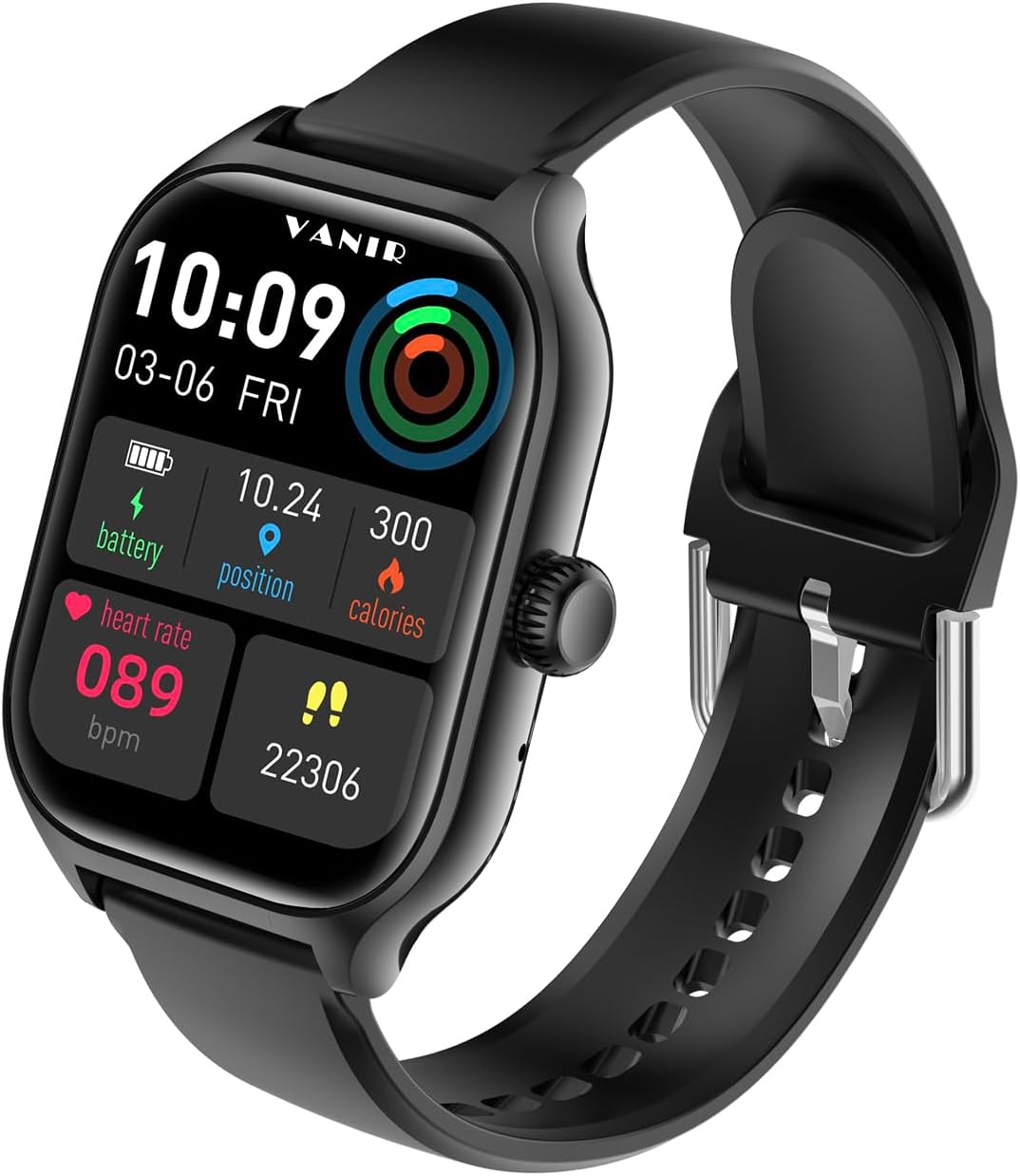
Image: The VANIR Smartwatch displaying its main interface with time, date, battery, heart rate, position, and calories. This image illustrates the watch's display during normal operation, which is relevant for understanding its charged state and readiness for use.
2. යෙදුම් ස්ථාපනය සහ යුගල කිරීම
To unlock the full functionality of your VANIR Smartwatch, you need to install the companion application on your smartphone. The app is compatible with Android 5.0 and iOS operating systems.
- Scan the QR code in the quick start guide (if provided) or search for the "VANIR Smartwatch" app in your phone's app store (Google Play Store for Android, Apple App Store for iOS).
- යෙදුම බාගත කර ස්ථාපනය කරන්න.
- යෙදුම විවෘත කර ගිණුමක් සෑදීමට හෝ පුරනය වීමට තිරයේ ඇති උපදෙස් අනුගමනය කරන්න.
- ඔබගේ ස්මාර්ට් ජංගම දුරකතනයේ බ්ලූටූත් සබල කර ඇති බව සහතික කර ගන්න.
- In the app, navigate to the device pairing section and select your VANIR Smartwatch from the list of available devices.
- ඔබගේ ස්මාර්ට් ජංගම දුරකථනයේ සහ ස්මාර්ට් ඔරලෝසුවේ යුගල කිරීමේ ඉල්ලීම තහවුරු කරන්න.

Image: A visual representation of the VANIR Smartwatch's key features, including pedometer, calorie amount, distance, type of movement, message notification, sleep tracking, smart alarm clock, raise to wake, incoming call notification, heart rate monitor, BP monitor, oxygen level monitor, remote capture, watch finder, sitting reminder, find my phone, social media message notification, and weather. This image helps users understand the range of functions available after successful pairing.
මෙහෙයුම් උපදෙස්
මූලික සංචාලනය
- ස්පර්ශ තිරය: මෙනු සහ විශේෂාංග හරහා සංචාලනය කිරීමට වමට/දකුණට, ඉහළට/පහළට ස්වයිප් කරන්න. විකල්පයක් තේරීමට තට්ටු කරන්න.
- පැති බොත්තම: මුල් තිරයට ආපසු යාමට හෝ සංදර්ශකය අවදි කිරීමට ඔබන්න. බල විකල්ප සඳහා දිගු වේලාවක් ඔබන්න.
Bluetooth Calling and Music Control
Once paired with your smartphone, you can make and receive calls directly from your smartwatch. You can also control music playback on your phone.
- ඇමතුම් ලබා ගැනීම: ඇමතුමක් ආරම්භ කිරීමට ඔබගේ ඔරලෝසුවේ ඩයලර් හෝ සම්බන්ධතා ලැයිස්තුවට ප්රවේශ වන්න.
- ඇමතුම් ලැබීම: ඇමතුමක් පැමිණි විට, ඔරලෝසුව ඇමතුම්කරුගේ හැඳුනුම්පත පෙන්වනු ඇත. පිළිතුරු දීමට කොළ පැහැති නිරූපකය හෝ ප්රතික්ෂේප කිරීමට රතු පැහැති නිරූපකය තට්ටු කරන්න.
- සංගීත පාලනය: Navigate to the music control interface on your watch to play, pause, skip tracks, or adjust volume.

Image: The VANIR Smartwatch on a user's wrist displaying an incoming call notification with the caller's number, alongside a smartphone showing the same call. This demonstrates the Bluetooth calling feature, allowing users to manage calls directly from their wrist.
සෞඛ්ය නිරීක්ෂණ
The smartwatch is equipped with sensors to monitor various health metrics.
- හෘද ස්පන්දන වේගය: Access the heart rate monitor feature on the watch or through the app to measure your heart rate in real-time.
- නින්ද නිරීක්ෂණය: Wear the watch while sleeping to track your sleep patterns, including deep sleep, light sleep, and wake times. Data is synchronized with the app for detailed analysis.
- රුධිර ඔක්සිජන්: ඉල්ලුම මත ඔබේ රුධිර ඔක්සිජන් සන්තෘප්ත මට්ටම් මැන බලන්න.

Image: A person sleeping with the VANIR Smartwatch on their wrist, accompanied by an infographic illustrating sleep data such as 8 hours 30 minutes total sleep, 3 hours 10 minutes deep sleep, 4 hours 5 minutes light sleep, and a 1 hour 15 minute alarm. This image highlights the smartwatch's sleep tracking capabilities and how it helps users understand their sleep quality.
ක්රීඩා මාතයන්
The smartwatch supports over 100 sports modes to track your physical activities. Select the appropriate mode before starting your workout to record specific data such as distance, calories burned, and exercise duration.

Image: Two individuals engaged in a basketball activity, with one wearing the VANIR Smartwatch. The watch screen shows "Running" mode with details like total time (00:07:20), total steps (22306), and total heat (226 kcal). This image demonstrates the smartwatch's multi-sport tracking feature during physical activity.
දැනුම්දීම් සහ ඇඟවීම්
Receive real-time notifications from your smartphone directly on your wrist. Ensure notification permissions are enabled in the companion app and your phone settings.
- Supported apps include WhatsApp, Facebook, Instagram, WeChat, QQ, and more.
- The watch will vibrate and display the notification content.
දුරස්ථ කැමරා පාලනය
Use your smartwatch as a remote shutter for your smartphone camera. Open the camera function in the companion app, then activate the remote control feature on your watch to take photos.
දුරකථනය/ඔරලෝසුව සොයා ගන්න
If you misplace your phone or watch, use the "Find Device" feature. From the watch, you can make your phone ring. From the app, you can locate your watch.

Image: The VANIR Smartwatch screen showing "Looking for" a phone, with a green phone icon, next to a smartphone displaying a magnifying glass icon. This visual illustrates the "Find Phone/Watch" feature, helping users locate their paired devices.
නඩත්තු කිරීම
පිරිසිදු කිරීම
Regularly clean your smartwatch and watch band with a soft, dry cloth. If necessary, use a slightly damp cloth with mild soap, then wipe dry. Avoid harsh chemicals or abrasive materials.
ජල ප්රතිරෝධය
The VANIR Smartwatch has an IPX5 water resistance rating. This means it is resistant to splashes and sweat, making it suitable for workouts and light rain. It is not recommended for swimming, showering, or submersion in water.
බැටරි ආයු කාලය සහ ආරෝපණය
The 400mAh battery provides up to 7 days of continuous use and 30 days of standby time. To prolong battery life, avoid extreme temperatures and fully charge the device when the battery is low.
දෝෂගවේෂණය
If you encounter issues with your VANIR Smartwatch, refer to the following common solutions:
- ඔරලෝසුව ක්රියාත්මක නොවීම: ඔරලෝසුව සම්පූර්ණයෙන්ම ආරෝපණය කර ඇති බවට වග බලා ගන්න. එය ආරෝපණ කේබලයට සහ බල ප්රභවයකට අවම වශයෙන් විනාඩි 30ක් සම්බන්ධ කරන්න.
- ස්මාර්ට් ජංගම දුරකථනය සමඟ යුගල කළ නොහැක:
- ඔබගේ දුරකථනයේ සහ ඔරලෝසුවේ බ්ලූටූත් සක්රීය කර ඇති බව සහතික කර ගන්න.
- ඔරලෝසුව ඔබගේ දුරකථනයේ පරාසය තුළ ඇති බවට වග බලා ගන්න.
- ඔබගේ දුරකථනය සහ ස්මාර්ට් ඔරලෝසුව නැවත ආරම්භ කරන්න.
- Check if the app has necessary permissions on your phone.
- සාවද්ය සෞඛ්ය දත්ත: ඔරලෝසුව ඔබේ මැණික් කටුවේ හොඳින් පැළඳ සිටින බවට වග බලා ගන්න, එය ඔබේ මැණික් කටුවේ අස්ථියට ඉහළින් එක් ඇඟිල්ලක පළලක් පමණ වේ. සංවේදක නිතිපතා පිරිසිදු කරන්න.
- දැනුම්දීම් නොපෙන්වයි: Verify that notification permissions are granted to the companion app in your phone's settings. Also, check the app's settings to ensure notifications for specific applications are enabled.
- තිරය ප්රතිචාර නොදක්වයි: Try restarting the watch by long-pressing the side button. If unresponsive, allow the battery to fully drain and then recharge.
පිරිවිතර
| විශේෂාංගය | විස්තර |
|---|---|
| ආදර්ශ අංකය | VANIR-1 |
| සංදර්ශක ප්රමාණය | අඟල් 2.01 |
| බැටරි ධාරිතාව | 400 mAh |
| බැටරි වර්ගය | ලිතියම් අයන |
| ජල ප්රතිරෝධය | IPX5 |
| සම්බන්ධතාවය | බ්ලූටූත් 5.0 |
| මෙහෙයුම් පද්ධති අනුකූලතාව | Android 5.0 & iOS (and above) |
| මතක ගබඩා ධාරිතාව | 256 MB |
| අයිතමයේ බර | අවුන්ස 3.52 (කිලෝග්රෑම් 0.1) |
| හැඩය | චතුරස්රය |
| විශේෂ ලක්ෂණ | Activity Tracker, Multisport Tracker, Heart Rate Monitor, Sleep Monitor, Bluetooth Call Support |
වගකීම් සහ සහාය
Your VANIR Smartwatch is covered by a standard manufacturer's warranty. For specific warranty terms and conditions, please refer to the warranty card included in your product packaging or contact VANIR customer support.
For technical support, troubleshooting assistance, or warranty claims, please contact VANIR customer service through the contact information provided on the official VANIR website or within the companion application.