
1. හැඳින්වීම
කළුview D1 Smart Glasses are polarized Bluetooth sunglasses designed to integrate audio and voice control features into your eyewear. They offer UV protection and anti-blue light lenses, making them suitable for various outdoor and daily activities. This manual provides instructions for setup, operation, maintenance, and troubleshooting to ensure optimal use of your smart glasses.
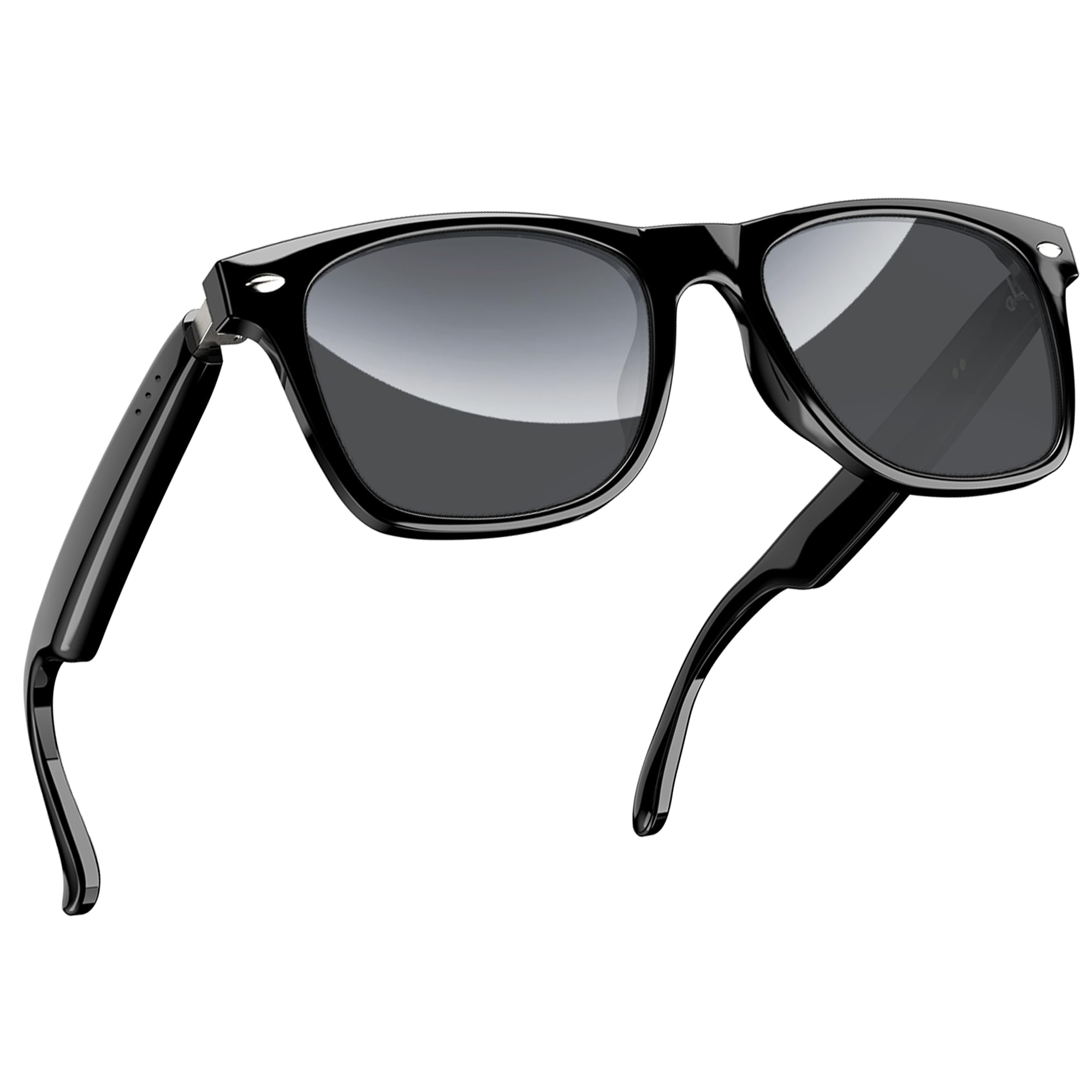
රූපය 1: කළුview D1 Smart Glasses, front view.
2. පිහිටුවීම
2.1 කණ්නාඩි ආරෝපණය කිරීම
Before first use, fully charge the smart glasses for at least 2 hours. The glasses are equipped with an 80mAh+80mAh rechargeable battery. Charging is performed via magnetic connection. A full charge typically takes approximately 90 minutes.

Figure 2: Magnetic charging connection for the smart glasses.
2.2 බ්ලූටූත් යුගල කිරීම
- Ensure the smart glasses are charged.
- Open the case of the smart glasses to power them on. They will automatically enter pairing mode.
- On your smartphone or compatible device, enable Bluetooth and search for available devices.
- "කළු" තෝරන්නview D1" (or similar name) from the list of devices to connect.
- Once paired, the glasses will automatically reconnect to the last paired device when powered on.
The glasses utilize Bluetooth 5.3 technology for stable and low-latency connections. They are compatible with both iOS and Android devices, as well as other Bluetooth-enabled devices like computers and tablets.

Figure 3: Compatibility of Blackview D1 Smart Glasses with various devices.
3. මෙහෙයුම් උපදෙස්
3.1 ස්පර්ශ පාලන
කළුview D1 Smart Glasses feature intuitive touch controls located on the temples. The convex touch range indicator helps in locating the touch points easily.
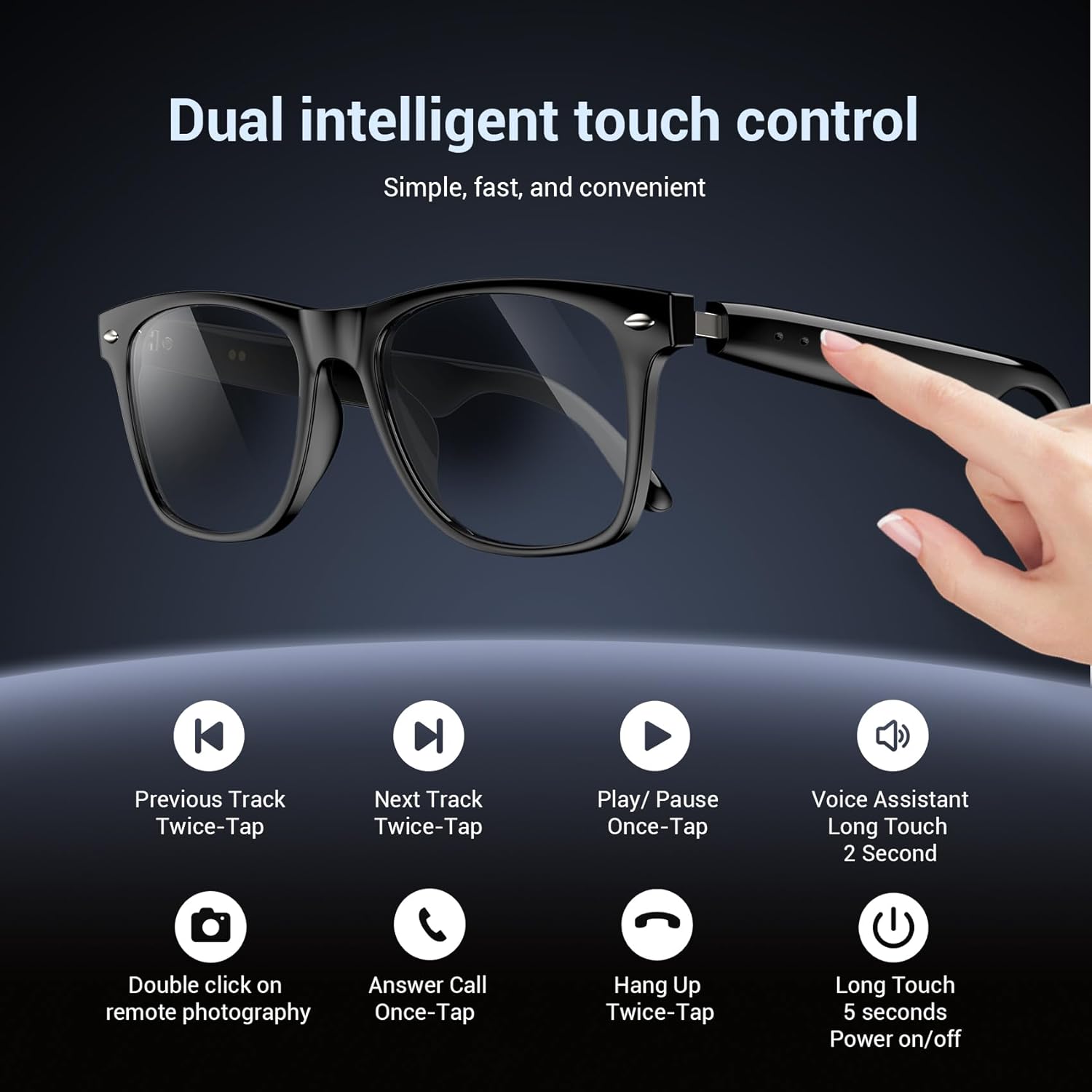
Figure 4: Touch control functions for Blackview D1 Smart Glasses.
- බලය සක්රිය / අක්රිය: Long touch for 5 seconds.
- සංගීතය වාදනය/විරාම කරන්න: Once-tap.
- ඊළඟ ධාවන පථය: Twice-tap.
- පෙර ධාවන පථය: Twice-tap.
- පිළිතුරු ඇමතුම: Once-tap.
- ඇමතුම විසන්ධි කරන්න: Twice-tap.
- හ oice සහකාර සක්රිය කරන්න: Long touch for 2 seconds.
- දුරස්ථ ඡායාරූපකරණය: Double click (if supported by connected device).
3.2 ශ්රව්ය අත්දැකීම
The open-ear speaker design, combined with a dynamic driver and ultra-sensitive polymer diaphragm, delivers clear audio. The balanced three-channel audio framework emphasizes vocals, allowing for an immersive listening experience while remaining aware of your surroundings.

Figure 5: Open-ear audio feature of the smart glasses.
3.3 Call Clarity
Advanced microphone design and noise reduction technology suppress up to 90% of background noise during calls, ensuring clear communication.
3.4 හ oice සහකාර
Activate your mobile device's voice assistant by long-touching the control area for 2 seconds. This allows for hands-free commands and queries.

Figure 6: Using the voice assistant feature while wearing the smart glasses.
4. විශේෂාංග අවසන්view
- බ්ලූටූත් 5.3: Provides fast, stable, and low-latency wireless connectivity.
- IP65 ජල ආරක්ෂිත ශ්රේණිගත කිරීම: Protects against sweat and light raindrops, ensuring durability during outdoor activities.
- බැටරි ආයු කාලය: Approximately 7 hours for calls, 6 hours for music playback, and 160 hours standby time.
- ධ්රැවීකරණය වූ කාච: 100% UV400 protection, filtering UVA, UVB, UVC, and harmful blue light.
- කල් පවතින රාමුව: Constructed with high-quality PC material and light steel frame for ergonomic fit and comfort.

Figure 7: Features of the smart glasses, including polarized lenses and IP64 waterproof rating.

Figure 8: Smart glasses with water droplets, illustrating the waterproof design.
5. නඩත්තු කිරීම
- පිරිසිදු කිරීම: Wipe the lenses and frame with a soft, clean cloth. For stubborn smudges, use a lens cleaning solution. Avoid harsh chemicals.
- ජල නිරාවරණය: While the glasses are IP65 rated for water and dust resistance, avoid submerging them in water. Dry them thoroughly if exposed to rain or sweat.
- ගබඩා: Store the glasses in their protective case when not in use to prevent scratches and damage. Avoid extreme temperatures.
- ආරෝපණ වරාය: Keep the magnetic charging contacts clean and dry to ensure efficient charging.
6. දෝශ නිරාකරණය
- කණ්නාඩි ක්රියාත්මක නොවේ: Ensure the glasses are fully charged. Connect them to the magnetic charger and check the charging indicator light.
- බ්ලූටූත් හරහා යුගල කළ නොහැක:
- ඔබගේ උපාංගයේ බ්ලූටූත් සබල කර ඇති බව සහතික කර ගන්න.
- Make sure the glasses are in pairing mode (usually indicated by a flashing light).
- ඔබගේ දුරකථනයේ බ්ලූටූත් සැකසුම් වලින් උපාංගය අමතක කර නැවත යුගල කිරීමට උත්සාහ කරන්න.
- Ensure the glasses are within the Bluetooth range of your device.
- ශ්රව්ය නොමැතිකම හෝ දුර්වල ශබ්ද ගුණාත්මකභාවය:
- කණ්නාඩි දෙකෙහිම සහ ඔබේ සම්බන්ධිත උපාංගයේ ශබ්ද මට්ටම පරීක්ෂා කරන්න.
- කණ්නාඩි බ්ලූටූත් හරහා නිසි ලෙස සම්බන්ධ කර ඇති බවට වග බලා ගන්න.
- කණ්නාඩි සහ ඔබේ සම්බන්ධිත උපාංගය දෙකම නැවත ආරම්භ කරන්න.
- ස්පර්ශ පාලන ප්රතිචාර නොදක්වයි:
- ඔබේ ඇඟිලි පිරිසිදුව හා වියලිව තබා ගන්න.
- කණ්නාඩි නැවත ආරම්භ කරන්න.
7. පිරිවිතර
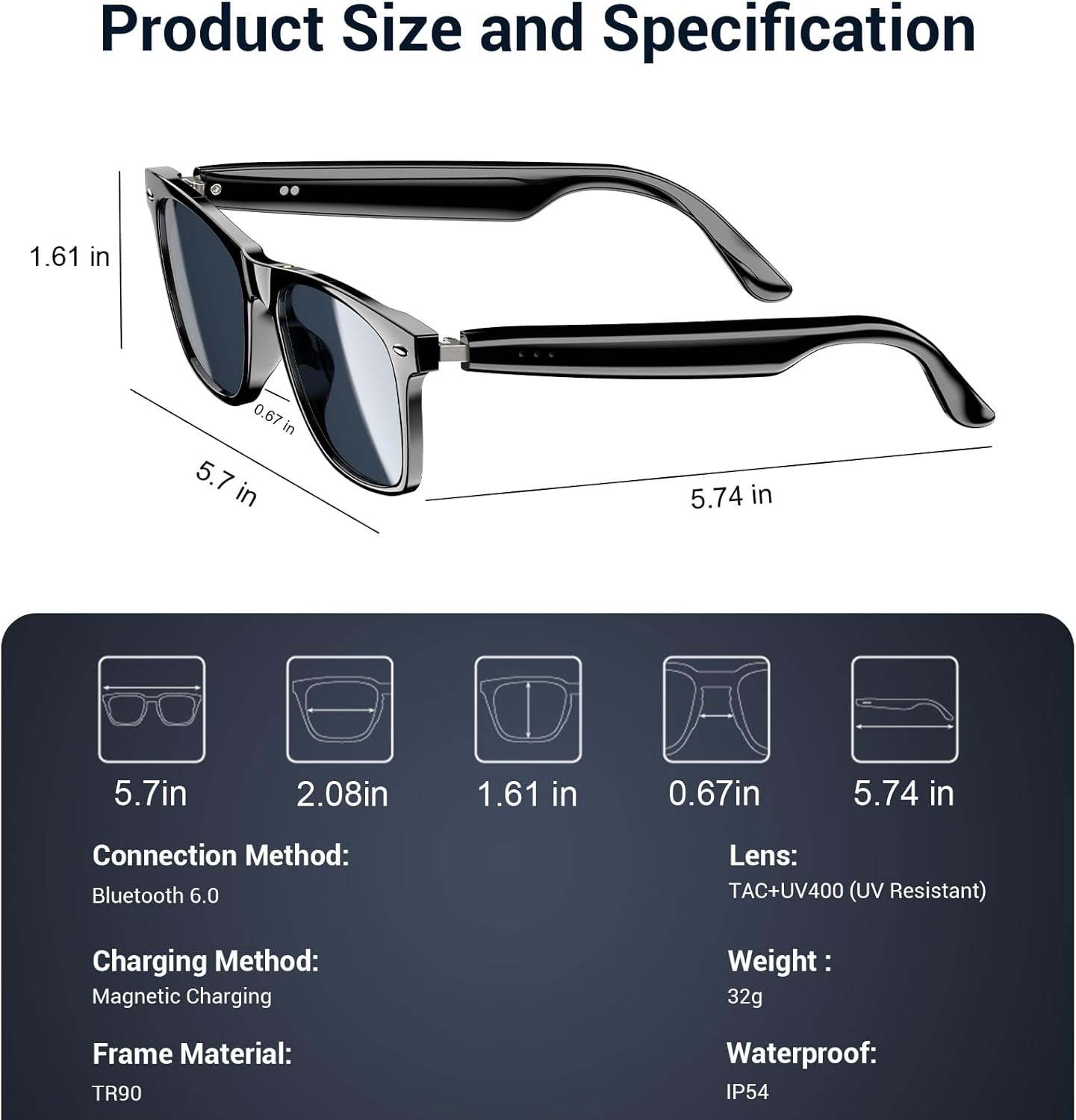
Figure 9: Product size and specification diagram.
| විශේෂාංගය | පිරිවිතර |
|---|---|
| මාදිලියේ නම | D1 කළු |
| වෙළඳ නාමය | කළුview |
| සම්බන්ධතා තාක්ෂණය | බ්ලූටූත් 5.3 |
| බැටරි ධාරිතාව | 160 mAh (80mAh+80mAh) |
| බැටරි ආරෝපණ කාලය | 90 විනාඩි |
| සංගීත ධාවන කාලය | ආසන්න වශයෙන්. පැය 6 යි |
| ඇමතුම් වේලාව | ආසන්න වශයෙන්. පැය 7 යි |
| පොරොත්තු කාලය | ආසන්න වශයෙන්. පැය 160 යි |
| ජල ප්රතිරෝධක මට්ටම | IP65 |
| කාච වර්ගය | Polarized, UV400 Protection, Anti Blue Light |
| රාමු ද්රව්ය | PC & Light Steel |
| බර | කිලෝ ග්රෑම් 0.13 යි |
| මානව අතුරු මුහුණත් ආදානය | මයික්රෆෝනය, ස්පර්ශ තිරය |
| සහාය දක්වන යෙදුම | Voice Control, Voice Assistant |
8. වගකීම් සහ සහාය
කළුview offers a 2-year warranty for the D1 Smart Glasses. For any product-related questions or support, please contact our customer service. We provide 24/7 product support for your peace of mind.
9. නිල නිෂ්පාදන වීඩියෝව
වීඩියෝ 1: නිල නිෂ්පාදනය අවසන්view කළුview Polarized Sport Smart Sunglasses. This video demonstrates key features and usage scenarios.