
හැඳින්වීම
The Rapoo M308 is a versatile multi-mode wireless mouse designed for efficiency and comfort. It features an ambidextrous design, allowing comfortable use for both right-handed and left-handed individuals. With its dual connectivity options, Bluetooth 5.0 and 2.4 GHz wireless, you can seamlessly connect to up to three devices and switch between them with ease. The mouse is engineered for long-lasting performance, offering a battery life of up to 12 months.
පැකේජයේ අන්තර්ගතය
- Rapoo M308 Multi-mode Wireless Mouse
- USB ලබන්නා (මූසිකය තුළ ගබඩා කර ඇත)
- 2 AA බැටරි
- ඉක්මන් ආරම්භක මාර්ගෝපදේශය (මෙම අත්පොත)
නිෂ්පාදනය අවසන්view
Familiarize yourself with the components of your Rapoo M308 mouse.
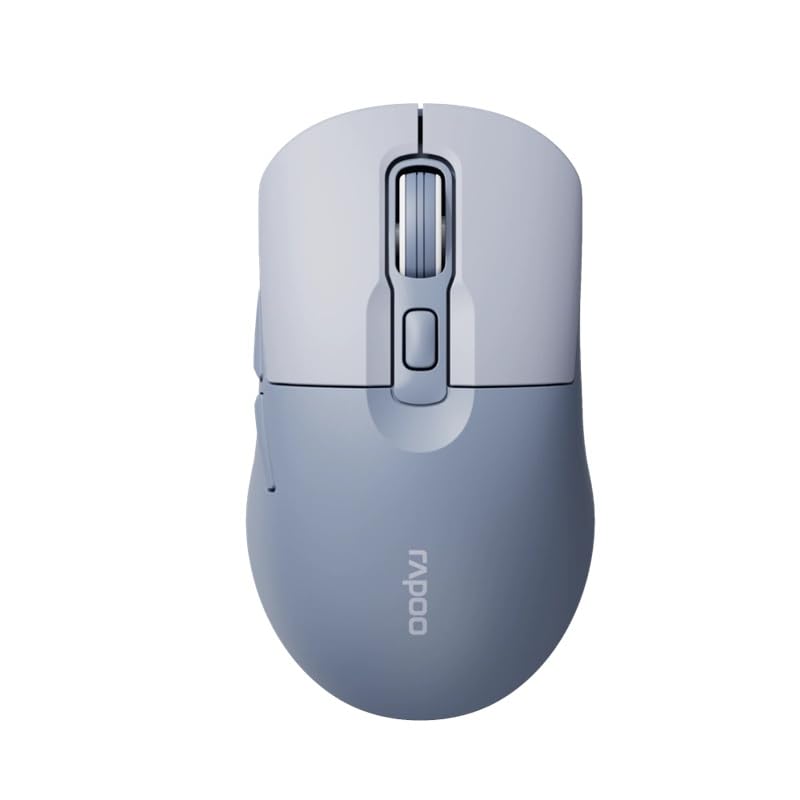
Image: The Rapoo M308 Multi-mode Wireless Mouse in blue, showcasing its ergonomic, ambidextrous design with a scroll wheel and multiple buttons.
- වම් බොත්තම: සම්මත වම්-ක්ලික් ශ්රිතය.
- දකුණු බොත්තම: සම්මත දකුණු-ක්ලික් ශ්රිතය.
- අනුචලන රෝදය: අනුචලනය සහ මැද-ක්ලික් කිරීමේ කාර්යය සඳහා.
- DPI බොත්තම: කර්සර සංවේදීතාව (DPI) සීරුමාරු කරයි.
- Mode Switch Button/Indicator: Switches between connected devices (2.4G, Bluetooth 1, Bluetooth 2) and indicates current mode.
- පැති බොත්තම්: Forward/Backward navigation (programmable).
- බැටරි මැදිරිය: Located on the underside, holds 2 AA batteries.
- USB Receiver Slot: Located inside the battery compartment for storage.
සැලසුම
1. බැටරි ස්ථාපනය
- මූසිකයේ යටි පැත්තේ බැටරි මැදිරි කවරය විවෘත කරන්න.
- නිවැරදි ධ්රැවීයතාව (+/-) සහතික කරමින්, AA බැටරි දෙක ඇතුළු කරන්න.
- බැටරි මැදිරි කවරය වසා දමන්න.
2. Connecting via 2.4 GHz Wireless
- Remove the USB receiver from its storage slot inside the battery compartment.
- USB ග්රාහකය ඔබේ පරිගණකයේ තිබෙන USB පෝට් එකකට සම්බන්ධ කරන්න.
- Turn on the mouse. The mouse should automatically connect to your computer. The mode indicator light will show a steady green light for a few seconds.
3. බ්ලූටූත් හරහා සම්බන්ධ වීම
The M308 mouse supports two Bluetooth connections (BT1 and BT2).
- මූසිකය සක්රිය කරන්න.
- Press the mode switch button to select either Bluetooth 1 (blue light flashes slowly) or Bluetooth 2 (blue light flashes slowly).
- Press and hold the mode switch button for 3 seconds until the blue light starts flashing rapidly. This indicates the mouse is in pairing mode.
- ඔබේ පරිගණකයේ හෝ උපාංගයේ, බ්ලූටූත් සැකසුම් වෙත ගොස් නව උපාංග සොයන්න.
- Select "Rapoo M308" from the list of available devices to pair.
- Once paired, the blue light will become steady for a few seconds and then turn off.
මෙහෙයුම් උපදෙස්
උපාංග අතර මාරු වීම
The Rapoo M308 allows you to connect to up to three devices (one 2.4G wireless and two Bluetooth devices) and switch between them.
- Briefly press the mode switch button to cycle through the connected devices: 2.4G (green light), Bluetooth 1 (blue light), Bluetooth 2 (blue light).
- The indicator light will briefly illuminate in the corresponding color to confirm the selected mode.
DPI ගැලපීම
Press the DPI button (usually located behind the scroll wheel) to cycle through different DPI settings. This changes the cursor speed and sensitivity. The indicator light may flash to show the current DPI level (e.g., one flash for low DPI, two for medium, etc.).
නඩත්තු කිරීම
- පිරිසිදු කිරීම: මූසිකය පිරිසිදු කිරීම සඳහා මෘදු වියළි රෙද්දක් භාවිතා කරන්න. මුරණ්ඩු අපිරිසිදුකම සඳහා, තරමක් damp රෙදි භාවිතා කළ හැකි නමුත් තෙතමනය උපාංගයට ඇතුළු නොවන බවට වග බලා ගන්න.
- බැටරි ආදේශනය: When the mouse performance degrades or the indicator light signals low battery, replace the two AA batteries following the installation steps.
- ගබඩා: When not in use for extended periods, turn off the mouse to conserve battery life. Store the USB receiver inside the mouse to prevent loss.
දෝෂගවේෂණය
- මූසිකය ප්රතිචාර නොදක්වයි:
- මූසිකය ක්රියාත්මක කර ඇත්දැයි පරීක්ෂා කරන්න.
- බැටරි නිවැරදිව ස්ථාපනය කර ඇති බවත් ඒවා ක්ෂය නොවන බවත් සහතික කර ගන්න. අවශ්ය නම් ප්රතිස්ථාපනය කරන්න.
- 2.4G සම්බන්ධතාවය සඳහා, USB ග්රාහකය ක්රියාකාරී USB පෝට් එකකට ආරක්ෂිතව සම්බන්ධ කර ඇති බවට වග බලා ගන්න. වෙනත් USB පෝට් එකක් උත්සාහ කරන්න.
- For Bluetooth connection, ensure the mouse is in the correct Bluetooth mode (BT1 or BT2) and successfully paired with your device. Re-pair if needed.
- කර්සර චලනය අක්රමවත් හෝ මන්දගාමී වේ:
- මූසිකයේ යටි පැත්තේ ඇති දෘශ්ය සංවේදකය පිරිසිදු කරන්න.
- ඔබ මූසිකය සුදුසු මතුපිටක් මත භාවිතා කරන බවට වග බලා ගන්න (පරාවර්තනය නොවන, විනිවිද නොපෙනෙන).
- DPI බොත්තම භාවිතයෙන් DPI සැකසුම සකසන්න.
- Cannot switch between devices:
- Ensure all devices are properly connected (2.4G receiver plugged in, Bluetooth devices paired).
- Briefly press the mode switch button to cycle through modes. A long press will initiate Bluetooth pairing mode.
පිරිවිතර
| වෙළඳ නාමය | රපූ |
| ආකෘතිය | M308 |
| සම්බන්ධතා තාක්ෂණය | බ්ලූටූත් 5.0, 2.4 GHz රේඩියෝ සංඛ්යාතය |
| විශේෂ ලක්ෂණ | සැහැල්ලුයි |
| චලන හඳුනාගැනීම | ඔප්ටිකල් |
| බොත්තම් ප්රමාණය | 4 |
| අත් දිශානතිය | උභයජීවී |
| නිර්දේශිත භාවිතයන් | කාර්යාලය |
| ගැළපෙන උපාංග | පුද්ගලික පරිගණකය, ලැප්ටොප් |
| අයිතමයේ බර | ග්රෑම් 50 කි |
| මෙහෙයුම් පද්ධතිය | ලිනක්ස්, මැක්, වින්ඩෝස් |
| බැටරි ආයු කාලය | මාස 12 යි |
| බැටරි ගණන | 2 AA (ඇතුළත්) |
| බලශක්ති ප්රභවය | බැටරි බලයෙන් |
| අවම මෙහෙයුම් පද්ධතියක් අවශ්යයි | Mac OS 14 Sonoma, Windows 11 |
| ද්රව්ය | ප්ලාස්ටික් |
| මුල් රට | චීනය |
| ඇතුළත් සංරචක | මූසිකය |
වගකීම් සහ සහාය
The Rapoo M308 Multi-mode Wireless Mouse comes with a වසර 2ක වගකීමක් මිලදී ගත් දින සිට. මෙම වගකීම් සහතිකය සාමාන්ය භාවිතය යටතේ නිෂ්පාදන දෝෂ සහ අක්රමිකතා ආවරණය කරයි.
For technical support, warranty claims, or further assistance, please refer to the contact information provided on the Rapoo official website or your local distributor's support channels. Please retain your proof of purchase for warranty validation.


