හැඳින්වීම
This manual provides instructions for the Generic replacement remote control designed for the Excelvan RD-802 LED Mini Portable Pocket Projector. This remote control offers a convenient way to operate your projector. Please note that as a replacement unit, some functions may differ from your original remote control.
නිෂ්පාදනය අවසන්view
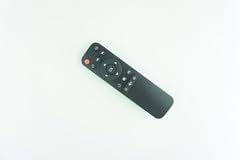
Image: Generic replacement remote control. This image displays the black remote control with various buttons for power, navigation, and other functions, designed for ease of use.
The remote control is designed for simple operation and features a compact size. It is constructed from durable ABS material for comfortable handling and longevity.
සැලසුම
- බැටරි ස්ථාපනය: දුරස්ථ පාලකයේ පිටුපස ඇති බැටරි මැදිරි කවරය විවෘත කරන්න. නිවැරදි ධ්රැවීයතාව (+/-) සහතික කරමින් AAA බැටරි දෙකක් (ඇතුළත් කර නැත) ඇතුළු කරන්න. බැටරි මැදිරි කවරය ආරක්ෂිතව වසා දමන්න.
- ක්රමලේඛනය අවශ්ය නොවේ: This replacement remote control does not require any programming or setup. Once batteries are installed, it is ready for use with your Excelvan RD-802 LED Mini Projector.
- අනුකූලතා සටහන: As a replacement remote, some advanced or specific functions of your original projector remote may not be supported. This is not indicative of a defective product.
මෙහෙයුම් උපදෙස්
Point the remote control directly at the infrared receiver on your Excelvan RD-802 LED Mini Projector. Ensure there are no obstructions between the remote and the projector. The remote offers stable performance and a farther transmitting distance compared to some standard remotes.
- බල බොත්තම: Press the power button (usually red) to turn the projector on or off.
- සංචාලන බොත්තම්: Use the directional arrow buttons (Up, Down, Left, Right) to navigate through menus and options.
- හරි/ඇතුළු කරන්න බොත්තම: Press the 'OK' or 'Enter' button in the center of the navigation pad to confirm selections.
- ශබ්ද පාලනය: If available, use the volume buttons to adjust the audio output of the projector.
- Menu/Source Buttons: Use dedicated buttons to access the projector's menu or switch input sources.
Refer to your projector's user manual for specific functions and menu navigation details.
නඩත්තු කිරීම
- බැටරි ආදේශනය: Replace batteries when the remote's performance degrades or it stops responding. Always use new batteries of the specified type (AAA).
- පිරිසිදු කිරීම: Clean the remote control with a soft, dry cloth. Do not use liquid cleaners or abrasive materials.
- ගබඩා: Store the remote control in a cool, dry place away from direct sunlight and extreme temperatures. If not used for extended periods, remove the batteries to prevent leakage.
දෝෂගවේෂණය
- දුරස්ථ පාලකය ප්රතිචාර නොදක්වයි:
- නිවැරදි ධ්රැවීයතාව සමඟ බැටරි නිවැරදිව ඇතුළු කර ඇත්දැයි පරීක්ෂා කරන්න.
- පැරණි බැටරි නව ඒවා සමඟ ප්රතිස්ථාපනය කරන්න.
- Ensure there is a clear line of sight between the remote control and the projector's infrared receiver.
- Confirm the remote is pointed directly at the projector.
- සමහර කාර්යයන් ක්රියා නොකරයි: This remote is a replacement unit. It may not support all functions of the original projector remote. This is expected behavior and not a defect.
- වැඩිදුර සහය: If you encounter persistent issues, it is helpful to provide your original remote's part number or your projector's exact model number when seeking support.
පිරිවිතර
| වෙළඳ නාමය | සාමාන්ය |
| ගැළපෙන උපාංග | Excelvan RD-802 LED Mini Projector |
| ද්රව්ය | ABS/ප්ලාස්ටික් |
| වර්ණය | කළු හෝ සුදු (වර්ණය වෙනස් විය හැක) |
| විශේෂ ලක්ෂණය | Digital Display (if applicable to specific variants) |
| උපරිම සහාය දක්වන උපාංග ගණන | 2 |
| ASIN | B0FYHT81K2 |
| නිෂ්පාදකයා | Hoanganh542543 |
වගකීම් සහ සහාය
Specific warranty information for this Generic replacement remote control is not provided in the product details. For any warranty claims or technical support, please contact the seller or retailer from whom you purchased the product directly. Providing your original remote part number or projector model may assist in resolving inquiries more efficiently.


