1. හැඳින්වීම
The Generic LMD-998 Portable HD DVD Player is a versatile entertainment device designed for on-the-go use. This manual provides detailed instructions for setting up, operating, and maintaining your device to ensure optimal performance and longevity. Please read this manual thoroughly before using the product.
2. නිෂ්පාදන ලක්ෂණ
- බහුකාර්ය ක්රියාකාරිත්වය: Combines a DVD player, TV player, FM radio, card reader, and gaming device into one compact unit.
- නැවත ආරෝපණය කළ හැකි සහ අතේ ගෙන යා හැකි: Features a long-lasting lithium battery for home, office, or car use; includes an on-board power source for in-car entertainment.
- උසස් තත්ත්වයේ සංදර්ශකය: HD LCD widescreen with 270° rotation delivers crisp visuals and adaptable viewing කෝණ.
- ස්මාර්ට් විශේෂාංග: Intelligent power-off memory resumes playback where you left off; built-in stereo speakers provide loud, clear sound.
- බහු සම්බන්ධතා විකල්ප: High-speed USB interface supports hard disks and U-disks; built-in card reader plays videos, music, and photos directly.
- Entertainment On-the-Go: Supports 300 built-in games, FM radio, and cable/wireless TV channels (signal-dependent).
3. පැකේජ අන්තර්ගතය
කරුණාකර පහත අයිතම සඳහා පැකේජය පරීක්ෂා කරන්න:
- 1 x LMD-998 Portable HD DVD Player
- 1 x කාර් චාජර්
- 1 x AC චාජර්
- 1 x ක්රීඩා පාලකය
- 1 x දුරස්ථ පාලකය
- 1 x AV කේබලය
- 1 x පරිශීලක අත්පොත (මෙම ලේඛනය)
4. පිහිටුවීම
4.1 මූලික ආරෝපණය
- Connect the AC charger to the DC IN port on the player.
- AC චාජරය සම්මත බිත්ති අලෙවිසැලකට සම්බන්ධ කරන්න.
- Allow the device to charge fully before first use. The charging indicator light will typically change color or turn off when charging is complete.
4.2 බල ගැන්වීම සක්රිය / අක්රිය කිරීම
- බලය සක්රිය කිරීමට, POWER ස්විචය 'ON' ස්ථානයට තල්ලු කරන්න.
- බලය අක්රිය කිරීමට, POWER ස්විචය 'OFF' ස්ථානයට තල්ලු කරන්න.
4.3 තිර ගැලපීම
The HD LCD screen can rotate 270 degrees for optimal viewing angles. Gently pivot the screen to your desired position. Avoid excessive force to prevent damage.
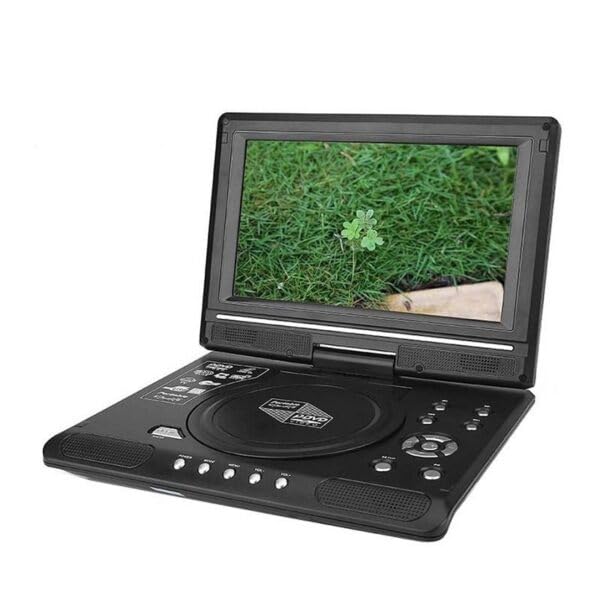
This image illustrates the LMD-998 Portable DVD Player with its HD LCD screen rotated 270 degrees, allowing for versatile viewing positions. The screen can be adjusted to suit various environments, whether for personal viewing or sharing with others.
5. මෙහෙයුම් උපදෙස්
5.1 DVD නැවත ධාවනය
- තැටි කවරය විවෘත කරන්න.
- Place a DVD or CD disc onto the spindle with the label side facing up.
- තැටි කවරය ආරක්ෂිතව වසා දමන්න.
- The player will automatically detect and begin playback. Use the remote control or front panel buttons for playback controls (Play, Pause, Stop, Skip, Volume).
5.2 TV Tuner
- Connect an external antenna (not included) to the ANT IN port for better signal reception.
- Switch the input mode to 'TV' using the MODE button on the player or remote.
- Perform an auto-scan for available channels in your area. Channel availability depends on local signal strength.
5.3 FM රේඩියෝව
- Switch the input mode to 'FM Radio' using the MODE button.
- Use the tuning buttons to scan for and select FM radio stations.
5.4 Card Reader / USB Playback
- Insert a compatible SD card into the card slot or a USB flash drive/hard disk into the USB port.
- Switch the input mode to 'CARD' or 'USB' using the MODE button.
- හරහා ගමන් කරන්න files using the directional buttons and select the desired video, music, or photo file නැවත ධාවනය සඳහා.
5.5 ක්රීඩා
- Connect the included game controller to the designated game port.
- Switch the input mode to 'GAME' using the MODE button.
- Select from the 300 built-in games using the controller.
6. නඩත්තු කිරීම
- පිරිසිදු කිරීම: Use a soft, dry cloth to clean the exterior of the player. For the screen, use a specialized screen cleaning cloth and solution. Do not use abrasive cleaners or solvents.
- තැටි රැකවරණය: Handle discs by their edges. Keep discs clean and free from scratches.
- ගබඩා: සෘජු හිරු එළියෙන් සහ අධික උෂ්ණත්වයන්ගෙන් ඈත්ව සිසිල් වියළි ස්ථානයක ක්රීඩකයා ගබඩා කරන්න.
- බැටරි: බැටරි ආයු කාලය දීර්ඝ කිරීම සඳහා, බැටරිය නිතර නිතර සම්පූර්ණයෙන්ම විසර්ජනය කිරීමෙන් වළකින්න. දිගු කාලයක් භාවිතයේ නොතිබුණත්, උපාංගය නිතිපතා ආරෝපණය කරන්න.
7. දෝශ නිරාකරණය
- බලය නැත: Ensure the device is charged or connected to a power source. Check the power switch position.
- No Disc Playback: Ensure the disc is inserted correctly (label side up) and is clean and unscratched. Verify the disc format is supported.
- No TV Signal: Ensure an external antenna is connected. Perform an auto-scan for channels. Signal strength varies by location.
- ශබ්දයක් නැත: Check the volume level. Ensure headphones are not connected if you expect sound from the speakers.
- දුරස්ථ පාලකය ක්රියා නොකරයි: Check the battery in the remote control. Ensure there are no obstructions between the remote and the player's IR sensor.
8. පිරිවිතර
| වෙළඳ නාමය | සාමාන්ය |
| ආකෘතිය | LMD-998 |
| ප්රදර්ශනය කරන්න | HD LCD Widescreen, 270° Rotation |
| බර | ග්රෑම් 1319 යි |
| සම්බන්ධතාවය | USB, Card Reader |
| ඇතුළත් සංරචක | 1 X Car Charger, 1 X Charger, 1 X Game Controller, 1 X Remote |
| නිෂ්පාදකයා | හුවායු |
9. වගකීම් සහ සහාය
9.1 වගකීම් තොරතුරු
මෙම නිෂ්පාදනය A සමඟ පැමිණේ 6-month Manufacturer's Warranty මිලදී ගත් දින සිට. මෙම වගකීම් සහතිකය සාමාන්ය භාවිතය යටතේ නිෂ්පාදන දෝෂ ආවරණය කරයි. අනිසි භාවිතය, අනතුරු, අනවසර වෙනස් කිරීම් හෝ සාමාන්ය ගෙවී යාම සහ ඉරීම හේතුවෙන් සිදුවන හානිය එය ආවරණය නොකරයි.
9.2 පාරිභෝගික සහාය
For technical support, warranty claims, or any questions regarding your LMD-998 Portable HD DVD Player, please contact your retailer or the manufacturer's customer service. Please have your purchase receipt and product model number ready when contacting support.


