
toocki Wi-Fi 6 USB Adapter
Toocki Wi-Fi 6 USB Adapter Instruction Manual
Model: Wi-Fi 6 USB Adapter
හැඳින්වීම
This manual provides detailed instructions for the installation, operation, and maintenance of your Toocki Wi-Fi 6 USB Adapter. This device is designed to provide high-speed wireless internet connectivity and Bluetooth 5.4 functionality to your desktop or laptop computer. Please read this manual thoroughly before using the product to ensure proper setup and optimal performance.
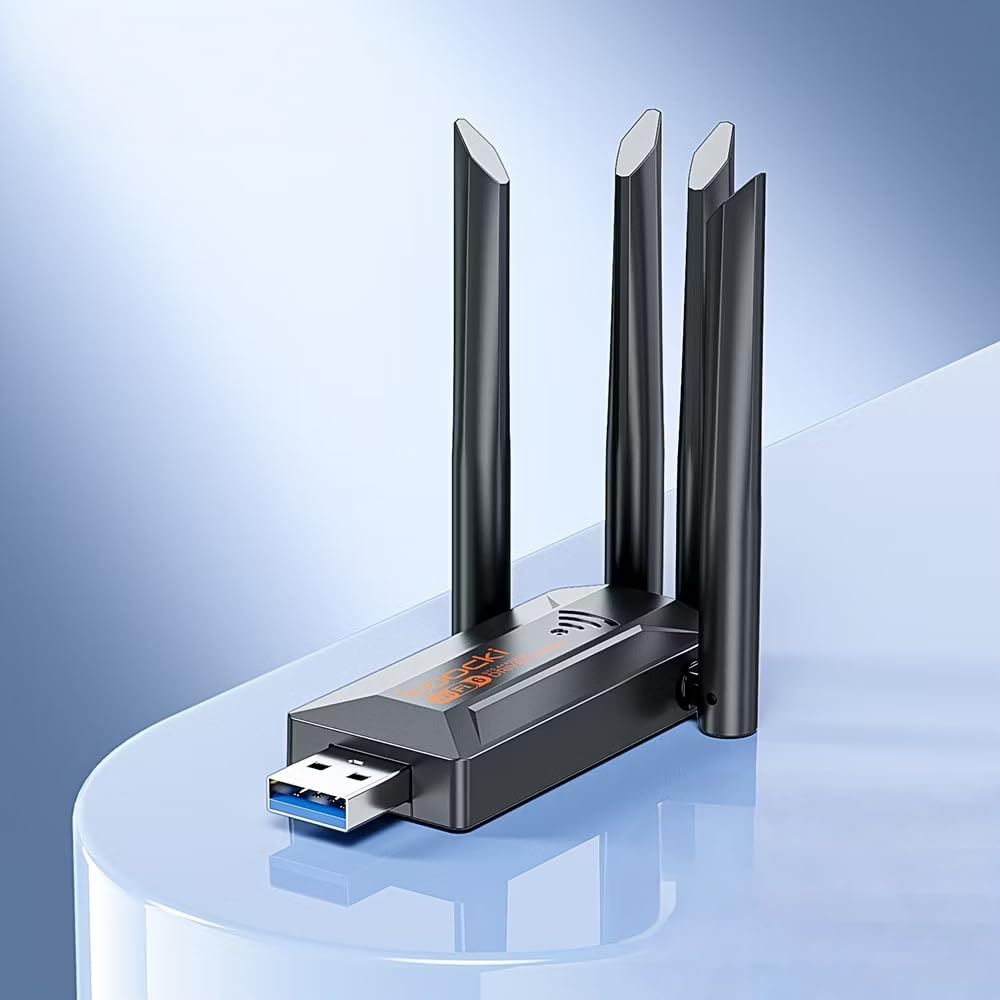
Image: The Toocki Wi-Fi 6 USB Adapter, showcasing its compact design and four adjustable antennas.
ආරක්ෂිත තොරතුරු
- Keep the device away from water, fire, high humidity, or hot environments.
- උපාංගය විසුරුවා හැරීමට, අලුත්වැඩියා කිරීමට හෝ වෙනස් කිරීමට උත්සාහ නොකරන්න.
- Avoid exposing the device to direct sunlight or heat sources.
- Use only with compatible USB ports (USB 3.0 recommended for optimal performance).
- දරුවන්ට ළඟා විය නොහැකි ලෙස තබා ගන්න.
පැකේජයේ අන්තර්ගතය
ඔබගේ පැකේජයේ සියලුම අයිතම ඇති බව තහවුරු කරගන්න:
- Toocki Wi-Fi 6 USB Adapter (1 unit)
- පරිශීලක අත්පොත (මෙම ලේඛනය)
Note: The product is designed for driver-free installation on Windows 10/11. No separate driver CD is included.
නිෂ්පාදනය අවසන්view
The Toocki Wi-Fi 6 USB Adapter integrates advanced Wi-Fi 6 technology and Bluetooth 5.4 into a compact USB device. It features four high-gain external antennas for improved signal reception and transmission.

රූපය: අභ්යන්තර view highlighting the Wi-Fi 6 smart algorithm chip, indicating enhanced signal stability and wider coverage.
ප්රධාන ලක්ෂණ:
- Wi-Fi 6 (802.11ax) සහාය: Provides stronger signal stability and wider coverage.
- ද්විත්ව කලාප සම්බන්ධතාව: Supports both 2.4GHz and 5GHz frequencies for flexible network options and speeds up to 900Mbps.
- බ්ලූටූත් 5.4: Enables stable, multi-device connections for peripherals like mice, keyboards, and headphones.
- Four High-Gain Antennas: Enhances signal strength and extends wireless range.
- USB 3.0 අතුරුමුහුණත: Ensures rapid data transfer speeds.
- Driver-Free Installation: Plug-and-play compatibility for Windows 10/11.
- ද්විත්ව ක්රියාකාරීත්වය: Acts as a Wi-Fi receiver and an AP/Hotspot.
සැකසුම් උපදෙස්
1. ඇඩැප්ටරය සම්බන්ධ කරන්න
- ඔබේ පරිගණකය ක්රියාත්මක කර ඇති බවට වග බලා ගන්න.
- Locate an available USB 3.0 port on your desktop or laptop. For optimal performance, use a USB 3.0 port (typically blue inside).
- Carefully insert the Toocki Wi-Fi 6 USB Adapter into the USB port.
- The operating system (Windows 10/11) should automatically detect and install the necessary drivers. A notification may appear indicating successful installation.
2. Adjust Antennas
The adapter features four adjustable antennas. For best signal reception and transmission, position the antennas vertically or at an angle that provides the strongest signal in your environment. Experiment with different orientations to find the optimal setup.

Image: The Toocki Wi-Fi 6 USB Adapter with its four antennas fully extended, ready for use.
මෙහෙයුම් උපදෙස්
1. Connecting to Wi-Fi (Receiver Mode)
- After successful driver installation, click on the Wi-Fi icon in your computer's system tray (usually bottom-right corner for Windows).
- පවතින රැහැන් රහිත ජාල ලැයිස්තුවක් දිස්වනු ඇත.
- Select your desired Wi-Fi network (either 2.4GHz or 5GHz band, if both are available).
- විමසන්නේ නම් ජාල ආරක්ෂක යතුර (මුරපදය) ඇතුළත් කරන්න.
- Click "Connect". Your computer should now be connected to the internet wirelessly.

Image: Illustration of the adapter functioning as a Wi-Fi receiver, enabling a desktop PC to connect to a wireless network without cables.
2. Using as an AP/Hotspot (Transmission Mode)
The adapter can also create a Wi-Fi hotspot, allowing other devices (phones, tablets) to connect to your computer's internet connection.
- Ensure your computer is connected to the internet via an Ethernet cable or another Wi-Fi adapter.
- On Windows 10/11, go to Settings > Network & Internet > Mobile hotspot.
- Toggle the "Share my Internet connection with other devices" switch to On.
- You can customize the network name (SSID) and password under "Edit".
- Other devices can now search for and connect to this hotspot.

Image: Illustration demonstrating the adapter's Wi-Fi transmission function, creating a hotspot from a connected PC to share internet with mobile devices.
3. බ්ලූටූත් 5.4 සම්බන්ධතාවය
The integrated Bluetooth 5.4 allows for stable connections with multiple Bluetooth-enabled devices.
- On Windows 10/11, go to සැකසීම් > උපාංග > බ්ලූටූත් සහ අනෙකුත් උපාංග.
- Ensure Bluetooth is toggled On.
- "බ්ලූටූත් හෝ වෙනත් උපාංගයක් එක් කරන්න" ක්ලික් කර "බ්ලූටූත්" තෝරන්න.
- ඔබගේ බ්ලූටූත් උපාංගය (උදා: හෙඩ්ෆෝන්, මූසිකය, යතුරුපුවරුව) යුගල කිරීමේ ප්රකාරයට දමන්න.
- ලැයිස්තුවෙන් ඔබගේ උපාංගය තෝරා යුගලනය සම්පූර්ණ කිරීමට තිරයේ ඇති ඕනෑම විමසීමක් අනුගමනය කරන්න.

Image: The Toocki Wi-Fi 6 USB Adapter connected to a laptop, symbolizing its Bluetooth 5.4 capability for multiple device connections.
නඩත්තු කිරීම
- මෘදු වියළි රෙද්දකින් පිස දැමීමෙන් ඇඩැප්ටරය පිරිසිදුව තබා ගන්න.
- දියර පිරිසිදු කරන්නන් හෝ ද්රාවක භාවිතා කිරීමෙන් වළකින්න.
- Ensure the adapter is not obstructed to allow for proper heat dissipation.
- දිගු කාලයක් භාවිතයේ නොමැති විට, USB පෝට් එකෙන් ඇඩැප්ටරය ආරක්ෂිතව ඉවත් කිරීම නිර්දේශ කෙරේ.
දෝෂගවේෂණය
Wi-Fi සම්බන්ධතාවයක් නැත:
- USB පෝට් එක පරීක්ෂා කරන්න: Ensure the adapter is firmly inserted into a working USB port. Try a different USB port, preferably a USB 3.0 port.
- ධාවක ස්ථාපනය: For Windows 10/11, the driver should install automatically. Verify in Device Manager (search "Device Manager" in Windows) under "Network adapters" that the Toocki adapter is listed and has no error symbols. If not, try restarting your computer.
- ඇන්ටෙනා ස්ථානය: Adjust the antennas for optimal signal reception.
- රවුටර් සැකසුම්: Ensure your Wi-Fi router is powered on and broadcasting a signal. Check if other devices can connect to the same network.
- Network Profile: ජාලය අමතක කර නැවත සම්බන්ධ වීමට උත්සාහ කරන්න.
මන්දගාමී Wi-Fi වේගය:
- USB 3.0 වරාය: Ensure the adapter is connected to a USB 3.0 port for maximum speed. USB 2.0 ports will limit performance.
- සංඥා ශක්තිය: Check your Wi-Fi signal strength. A weak signal can lead to slower speeds. Move closer to the router or adjust antennas.
- ජාල තදබදය: Too many devices on the same network or channel can cause slowdowns. Try switching to the 5GHz band if available and less congested.
- බාධා කිරීම්: Other electronic devices (microwaves, cordless phones) can interfere with Wi-Fi signals.
බ්ලූටූත් ක්රියා නොකරයි:
- බ්ලූටූත් ක්රියාත්මකයි: Verify Bluetooth is enabled in Windows Settings.
- උපාංග යුගල කිරීම: Ensure your Bluetooth device is in pairing mode and within range.
- බාධා කිරීම්: Reduce distance between devices and remove any obstructions.
- යළි අරඹන්න: Try restarting your computer and re-pairing the device.
පිරිවිතර

Image: Visual representation emphasizing the 900Mbps dual-band Wi-Fi 6 features for faster, more stable connections.
| විශේෂාංගය | විස්තර |
|---|---|
| වෙළඳ නාමය | ටූකී |
| ආකෘතිය | Wi-Fi 6 USB ඇඩැප්ටරය |
| දෘඩාංග අතුරුමුහුණත | USB 3.0 |
| රැහැන් රහිත ප්රමිතිය | Wi-Fi 6 (IEEE 802.11ax), IEEE 802.11ac, IEEE 802.11n, IEEE 802.11g, IEEE 802.11b, IEEE 802.11a |
| දත්ත හුවමාරු අනුපාතය | තත්පරයට මෙගාබිට් 900ක් දක්වා |
| සංඛ්යාත පටි | 2.4GHz, 5GHz |
| බ්ලූටූත් අනුවාදය | බ්ලූටූත් 5.4 |
| ඇන්ටනා | 4 High-Gain External Antennas |
| ගැළපෙන උපාංග | ඩෙස්ක්ටොප්, ලැප්ටොප් |
| මෙහෙයුම් පද්ධති සහාය | Windows 10/11 (Driver-Free) |
| නිෂ්පාදන මානයන් | 30L x 20W x 60H Millimeters (approx. 3 x 2 x 6 cm) |
| අයිතමයේ බර | ග්රෑම් 30 යි |
| වර්ණය | කළු |
වගකීම් තොරතුරු
This Toocki Wi-Fi 6 USB Adapter comes with a මාස 6ක වගකීමක් from the date of purchase. This warranty covers manufacturing defects and malfunctions under normal use. It does not cover damage caused by misuse, accidents, unauthorized modifications, or external factors. Please retain your proof of purchase for warranty claims.
පාරිභෝගික සහාය
If you encounter any issues or have questions regarding your Toocki Wi-Fi 6 USB Adapter that are not addressed in this manual, please contact your retailer or the manufacturer's customer support.
For support inquiries, please refer to the contact information provided with your purchase documentation or visit the official Toocki webඅඩවිය.
Ask a question about this manual
Ask about setup, troubleshooting, compatibility, parts, safety, or missing instructions. Manuals+ will review the question and use this page’s manual context to help answer it.