
1. හැඳින්වීම
This manual provides essential information for using your REDMI Note 15 Pro+ 5G smartphone. Please read it carefully to ensure proper operation and to maximize the device's features. Keep this manual for future reference.

Image: The REDMI Note 15 Pro+ 5G smartphone in Mirage Blue, showcasing එහි සිනිඳු නිර්මාණය.
2. පෙට්ටියේ ඇති දේ
ඔබේ නිෂ්පාදන ඇසුරුම්වල සියලුම අයිතම ඇති බව තහවුරු කරගන්න:
- REDMI Note 15 Pro+ 5G Smartphone
- චාජර්
- USB Type-C කේබලය
- SIM ඉවත් කිරීමේ මෙවලම
- වගකීම් කාඩ්පත
- පරිශීලක මාර්ගෝපදේශය (මෙම ලේඛනය)
- ආරක්ෂිත නඩුව
3. පිහිටුවීම
3.1. SIM කාඩ්පත ඇතුල් කිරීම
- ඔබගේ උපාංගයේ පැත්තේ SIM කාඩ්පත් තැටිය සොයා ගන්න.
- තැටිය අසල ඇති කුඩා සිදුරට SIM පිටකිරීමේ මෙවලම ඇතුළු කර තැටිය පිටතට එන තුරු මෘදු ලෙස ඔබන්න.
- රන් සම්බන්ධතා පහළට මුහුණලා ඇති පරිදි ඔබේ නැනෝ-සිම් කාඩ්පත(ය) තැටියේ තබන්න.
- තැටිය ක්ලික් කරන තුරු ප්රවේශමෙන් උපාංගය වෙතට තල්ලු කරන්න.

රූපය: පසුපස view of the REDMI Note 15 Pro+ 5G, indicating the location of the SIM card tray.
3.2. මූලික බල සක්රිය කිරීම සහ මූලික සැකසුම
- Press and hold the Power button until the REDMI logo appears.
- ඔබගේ භාෂාව, කලාපය තෝරා ගැනීමට, Wi-Fi වෙත සම්බන්ධ වීමට සහ ඔබගේ Google ගිණුම සැකසීමට තිරයේ ඇති උපදෙස් අනුගමනය කරන්න.

රූපය: ඉදිරිපස view of the REDMI Note 15 Pro+ 5G, displaying the screen during initial setup.
3.3. උපාංගය ආරෝපණය කිරීම
Connect the provided USB Type-C cable to the phone's charging port and the other end to the 100W HyperCharge adapter. Plug the adapter into a power outlet. The device supports 100W fast charging and 22.5W reverse charging.

Image: Visual representation of the 6500mAh Silicon-Carbon battery and 100W HyperCharge technology.
4. ඔබගේ උපාංගය ක්රියාත්මක කිරීම
4.1. සංදර්ශක විශේෂාංග
The REDMI Note 15 Pro+ 5G features a 6.83-inch Quad curved 1.5K CrystalRes AMOLED display with 3200 nits peak brightness. It supports a 120Hz adaptive refresh rate for smooth visuals and Eye Protect 2.0 with Triple TÜV Certifications to reduce eye strain.

Image: The vibrant 1.5K Quad-curved AMOLED display of the REDMI Note 15 Pro+ 5G, highlighting its brightness.

Image: Information on the advanced eye protection features, including TÜV triple certification, for comfortable viewing.
4.2. කැමරා පද්ධතිය
Capture stunning photos and videos with the advanced 200MP OIS camera system. It features a 1/1.4" sensor for exceptional detail and clarity, even in low light. The camera supports 4K video recording, ultra-sharp details, steady videos with OIS, and portraits with natural depth.

රූපය: අවසන්view of the 200MasterPixel OIS Camera system, emphasizing its clarity and capabilities.
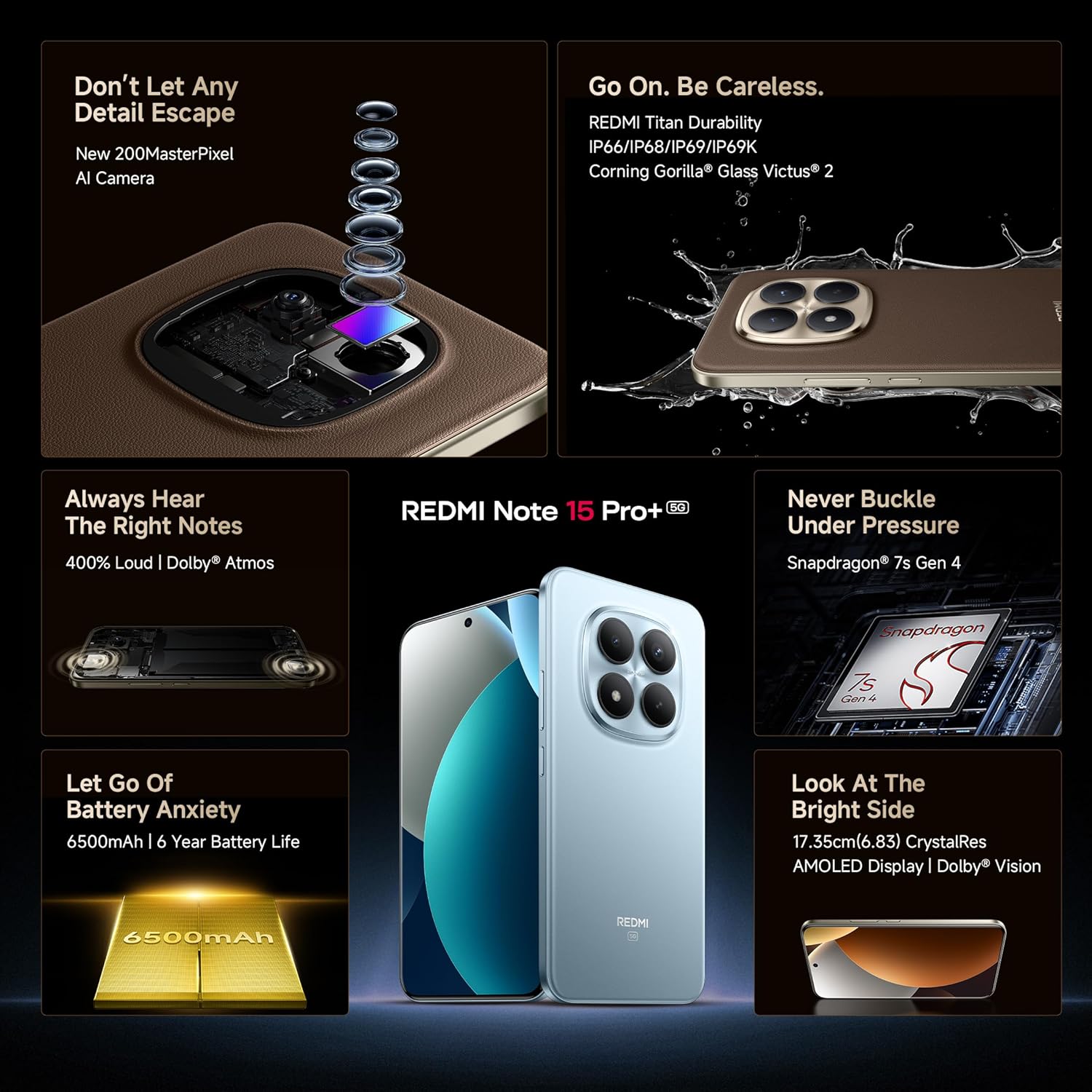
රූපය: සමීප ඡායාරූපයක් view of the 200MP camera module, showing its intricate lens arrangement.
4.3 කාර්ය සාධනය
Powered by the Snapdragon 7s Gen 4 processor, the device delivers smooth and efficient performance for gaming and multitasking. The IceLoop cooling technology helps maintain optimal temperatures during intensive use.

Image: Graphic illustrating the Snapdragon 7s Gen 4 processor, highlighting its advanced performance.
4.4. ශ්රව්ය උපකරණ
Experience immersive sound with symmetric stereo speakers and Dolby Atmos support, providing up to 400% louder and clearer audio for media consumption and calls.

Image: Diagram showing the symmetric stereo speakers and Dolby Atmos sound enhancement.
4.5. මෘදුකාංග සහ AI විශේෂාංග
The REDMI Note 15 Pro+ 5G runs on Android 15 with Xiaomi HyperOS 2, offering a seamless and intelligent cross-device experience. It includes AI features like Circle to Search, Gemini Assistance, and Xiaomi HyperAI Tools for enhanced user interaction. The device also supports Xiaomi Offline Communication for device-to-device calling without cellular or Wi-Fi in certain zones.

Image: The Xiaomi HyperOS 2 logo, representing the device's operating system.

Image: Visuals demonstrating AI features such as Circle to Search and Gemini Assistance on the smartphone.

Image: Illustration of the Xiaomi Offline Communication feature, showing device-to-device calling without network.
5. නඩත්තු කිරීම
5.1. ඔබගේ උපාංගය පිරිසිදු කිරීම
Use a soft, lint-free cloth to clean the screen and body of your phone. Avoid using harsh chemicals or abrasive materials that could damage the finish. For stubborn smudges, slightly dampen ජලය සහිත රෙදි හෝ ඉලෙක්ට්රොනික උපකරණ සඳහා නිර්මාණය කර ඇති තිර පිරිසිදු කරන්නා.
5.2. මෘදුකාංග යාවත්කාලීන
ඔබගේ උපාංගයේ නවතම විශේෂාංග, ආරක්ෂක පැච් සහ කාර්ය සාධන වැඩිදියුණු කිරීම් ඇති බව සහතික කර ගැනීම සඳහා මෘදුකාංග යාවත්කාලීන කිරීම් නිතිපතා පරීක්ෂා කර ස්ථාපනය කරන්න. වෙත සංචාලනය කරන්න සැකසීම් > දුරකථනය ගැන > MIUI අනුවාදය යාවත්කාලීන සඳහා පරීක්ෂා කිරීමට.
5.3. බැටරි රැකවරණය
The device is equipped with a 6500mAh Silicon-Carbon battery designed for long life, supporting 1600 charge cycles. To prolong battery health:
- අධික උෂ්ණත්වයෙන් වළකින්න.
- නැවත ආරෝපණය කිරීමට පෙර බැටරිය සම්පූර්ණයෙන්ම බැස යාමට ඉඩ නොදෙන්න.
- Use the original 100W HyperCharge adapter and cable for optimal charging.
5.4. කල්පැවැත්ම සහ ආරක්ෂාව
The REDMI Note 15 Pro+ 5G features a high-strength fiberglass back panel and Corning Gorilla Glass Victus 2 for enhanced durability. It boasts IP66/IP68/IP69/IP69K protection against dust and water, making it resistant to drops, splashes, and high-pressure water jets.
Image: Visual highlighting the durability features, including Corning Gorilla Glass Victus 2 and IP69K water resistance.
6. දෝශ නිරාකරණය
6.1. උපාංගය ක්රියාත්මක නොවේ
- බැටරිය ආරෝපණය කර ඇති බවට වග බලා ගන්න. චාජරය සම්බන්ධ කර බලය ක්රියාත්මක කිරීමට උත්සාහ කිරීමට පෙර මිනිත්තු කිහිපයක් රැඳී සිටින්න.
- නැවත ආරම්භ කිරීමට බල කිරීම සඳහා අවම වශයෙන් තත්පර 10-15ක් බල බොත්තම ඔබාගෙන සිටින්න.
6.2. යෙදුම් බිඳ වැටීම හෝ කැටි කිරීම
- ගැටළු සහගත යෙදුම වසා දමා නැවත විවෘත කරන්න.
- යෙදුමේ හැඹිලිය සහ දත්ත හිස් කරන්න (සැකසීම් > යෙදුම් > [යෙදුම් නම] > ගබඩාව > හැඹිලිය හිස් කරන්න/දත්ත හිස් කරන්න).
- ඔබගේ උපාංගය නැවත ආරම්භ කරන්න.
6.3. ජාල සම්බන්ධතා ගැටළු
- ගුවන් යානා ප්රකාරය සක්රිය සහ අක්රිය කරන්න.
- ඔබගේ SIM කාඩ්පත නිසි ලෙස ඇතුළත් කර ඇත්දැයි පරීක්ෂා කරන්න.
- ජාල සැකසුම් යළි පිහිටුවන්න (සැකසීම් > සම්බන්ධතාවය සහ බෙදාගැනීම > Wi-Fi, ජංගම ජාල සහ බ්ලූටූත් යළි පිහිටුවන්න).
6.4. කර්මාන්තශාලා යළි පිහිටුවීම
ගැටළු දිගටම පවතින්නේ නම්, ඔබට කර්මාන්තශාලා යළි පිහිටුවීමක් සිදු කිරීමට අවශ්ය විය හැකිය. අවවාදයයි: මෙය ඔබගේ උපාංගයේ ඇති සියලු දත්ත මකා දමනු ඇත. ඉදිරියට යාමට පෙර වැදගත් දත්ත උපස්ථ කරන්න.
- වෙත යන්න සැකසීම් > දුරකථනය ගැන > කර්මාන්තශාලා යළි පිහිටුවීම.
- යළි පිහිටුවීම තහවුරු කිරීමට තිරයේ ඇති උපදෙස් අනුගමනය කරන්න.
7. පිරිවිතර
| විශේෂාංගය | විස්තර |
|---|---|
| වෙළඳ නාමය | රෙඩ්මි |
| මාදිලියේ නම | REDMI Note 15 Pro+ 5G |
| මෙහෙයුම් පද්ධතිය | Android 15, Xiaomi HyperOS |
| RAM මතකය | 12 GB |
| ගබඩා ධාරිතාව | 256 GB |
| වර්ණය | Mirage Blue |
| සංදර්ශක වර්ගය | AMOLED, 1.5K Quad curved, 3200 nits peak brightness |
| ප්රොසෙසරය | ස්නැප්ඩ්රැගන් 7s ජෙනරල් 4 |
| බැටරි බලය | 6500 mAh |
| අයකිරීම | 100W HyperCharge, 22.5W Reverse Charging |
| කැමරාව | 200MP OIS Camera |
| ජල/දූවිලි ප්රතිරෝධය | IP66/IP68/IP69/IP69K |
| මානයන් | 16.3 x 7.8 x 0.8 සෙ.මී |
| බර | ග්රෑම් 207 යි |
| සම්බන්ධක වර්ගය | USB වර්ගය C |
| සෛලීය තාක්ෂණය | 5G |
8. වගකීම් සහ සහාය
8.1. වගකීම් තොරතුරු
Your REDMI Note 15 Pro+ 5G comes with a වසර 1ක නිෂ්පාදක වගකීම for the device and මාස 6ක නිෂ්පාදක වගකීම මිලදී ගත් දින සිට බැටරි ඇතුළු පෙට්ටියේ උපාංග සඳහා.
8.2. Manufacturer and Importer
නිෂ්පාදකයා: DBG Technology (India) Pvt Ltd, PLOT NO-2, BAWAL, SECTOR-8, Rewari, Haryana, 123501.
ආනයනකරු: Xiaomi Technology India Private Limited, Building Orchid. Block E, Embassy Tech Village, Marathahalli Outer Ring Road, Devarabisanahalli, Bengaluru 560103.
8.3. මාර්ගගත සහාය
For additional support, FAQs, and service center locations, please visit the official Redmi webඅඩවිය හෝ ඇමේසන් හි Redmi වෙළඳසැල.
9 ආරක්ෂිත තොරතුරු
ඔබගේ උපාංගයට හානි වීම හෝ ඔබටම තුවාල වීම වැළැක්වීම සඳහා කරුණාකර පහත ආරක්ෂක මාර්ගෝපදේශ නිරීක්ෂණය කරන්න:
- Do not expose the device to extreme temperatures, direct sunlight, or fire.
- උපාංගය බිම හෙළීමෙන් හෝ දැඩි බලපෑමකට ලක් කිරීමෙන් වළකින්න.
- අනුමත චාජර් සහ උපාංග පමණක් භාවිතා කරන්න.
- උපාංගය ඔබම විසුරුවා හැරීමට හෝ අලුත්වැඩියා කිරීමට උත්සාහ නොකරන්න. බලයලත් සේවා නිලධාරීන් වෙත යොමු වන්න.
- Keep the device away from water and liquids, despite its water resistance, to prevent potential damage.
- දේශීය රෙගුලාසි වලට අනුව උපාංගය සහ එහි බැටරිය වගකීමෙන් යුතුව බැහැර කරන්න.