
1. හැඳින්වීම
This manual provides essential information for setting up, operating, maintaining, and troubleshooting your Redmi A7 Pro 5G smartphone. Please read this guide thoroughly to ensure optimal performance and longevity of your device.
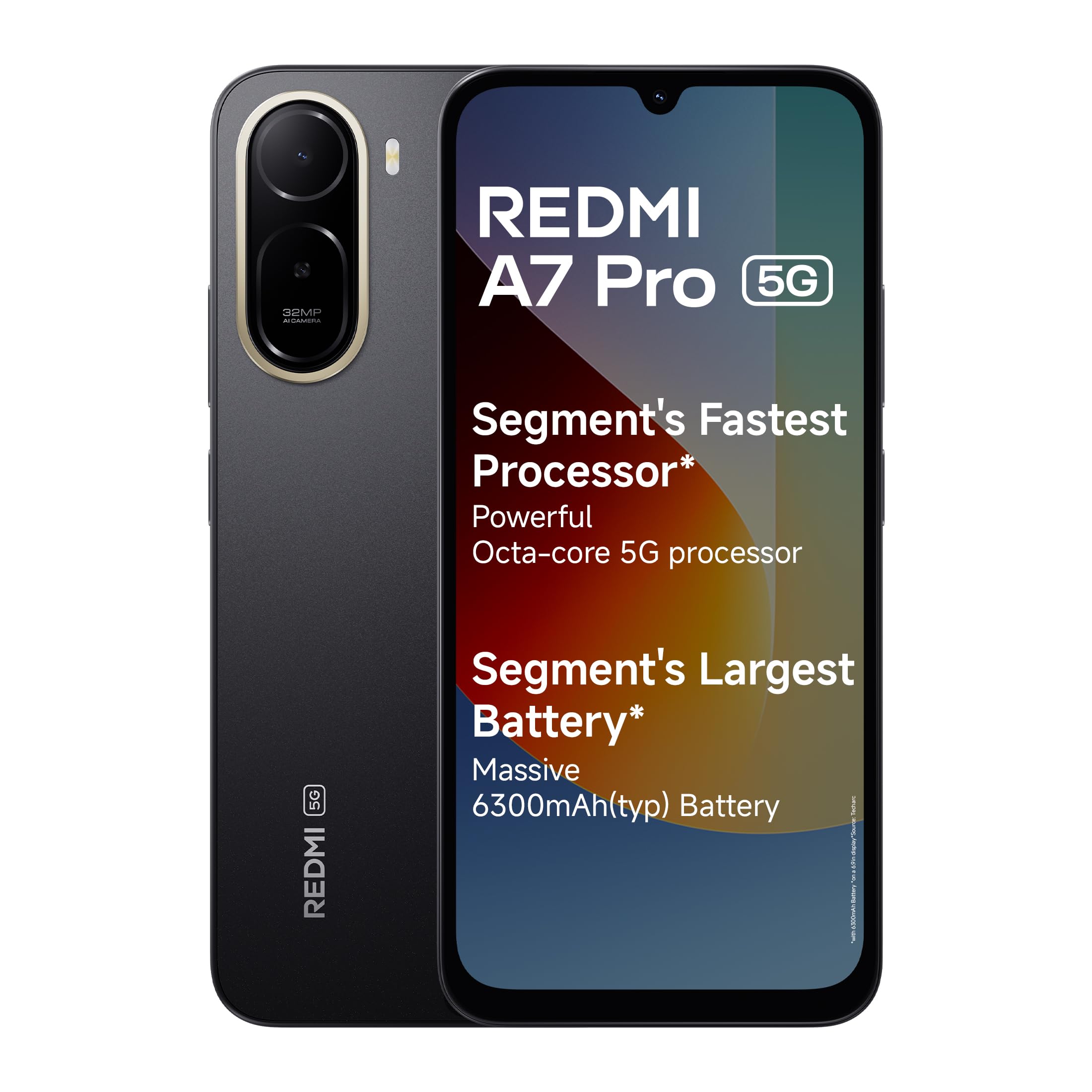
Image: Redmi A7 Pro 5G smartphone, showcasing its design and camera setup.
2. පෙට්ටියේ ඇති දේ
ඔබේ නිෂ්පාදන ඇසුරුම්වල සියලුම අයිතම ඇති බව තහවුරු කරගන්න:
- Redmi A7 Pro 5G Smartphone
- චාජර්
- USB Type-C කේබලය
- SIM ඉවත් කිරීමේ මෙවලම
- වගකීම් කාඩ්පත
- පරිශීලක මාර්ගෝපදේශය (මෙම ලේඛනය)
3. පිහිටුවීම
3.1 SIM කාඩ්පත ඇතුළු කිරීම
- ඔබගේ උපාංගයේ පැත්තේ SIM කාඩ්පත් තැටිය සොයා ගන්න.
- තැටිය අසල ඇති කුඩා සිදුරට SIM පිටකිරීමේ මෙවලම ඇතුළු කර තැටිය පිටතට එන තුරු තදින් ඔබන්න.
- Place your Nano-SIM card(s) and/or microSD card into the tray with the gold contacts facing down. Ensure they are correctly oriented.
- තැටිය එහි ස්ථානයට ක්ලික් කරන තෙක් උපාංගයට මෘදු ලෙස තල්ලු කරන්න.
3.2 මූලික බලය සක්රිය කිරීම සහ සැකසීම
- Redmi ලාංඡනය දිස්වන තුරු බල බොත්තම ඔබාගෙන සිටින්න.
- ඔබගේ භාෂාව, කලාපය තෝරා ගැනීමට සහ Wi-Fi ජාලයකට සම්බන්ධ වීමට තිරයේ ඇති උපදෙස් අනුගමනය කරන්න.
- ඔබගේ Google ගිණුම සමඟින් පුරනය වන්න හෝ අලුත් එකක් සාදන්න.
- Set up a screen lock (PIN, pattern, or password) and fingerprint recognition for enhanced security.
3.3 උපාංගය ආරෝපණය කිරීම
Connect the USB Type-C cable to the charging port at the bottom of the phone and the other end to the provided charger. Plug the charger into a power outlet. The device supports 15W quick charging.
4. ඔබගේ උපාංගය ක්රියාත්මක කිරීම
4.1 සංදර්ශකය
The Redmi A7 Pro 5G features a large 17.53cm (6.9-inch) display with a 120Hz adaptive refresh rate for smooth visuals. It is TUV certified for eye comfort.

Image: The Redmi A7 Pro 5G display, emphasizing its size and smooth refresh rate.
4.2 කාර්ය සාධනය
Powered by an Octa-core 5G processor, the device delivers stable performance for daily tasks and multitasking.

Image: Visual representation of the Octa-core 5G processor.
4.3 බැටරි
The Redmi A7 Pro 5G is equipped with a 6300mAh battery. It supports 15W quick charging and 7.5W wired reverse charging, allowing you to share power with other compatible devices.

Image: Illustration of the phone's large battery capacity and charging features.
4.4 කැමරාව
Capture moments with the 32MP AI Dual Camera on the rear and an 8MP selfie shooter. Features include:
- Ultra HD Mode: For clear, detailed shots.
- සිතුවම් ප්රකාරය: Creates natural background blur.
- AI Sky: Automatically adjusts sky colors and brightness.
- AI Beauty Selfie: Enhances facial features for selfies.

Image: Close-up of the Redmi A7 Pro 5G's dual AI camera system.
4.5 ශ්රව්ය උපකරණ
Experience enhanced audio with 200% Volume Boosted Speakers, designed to provide clear sound even in noisy environments.

රූපය: අභ්යන්තර view highlighting the phone's speaker system.
4.6 Software and Features
The device runs on Android 16 with Xiaomi HyperOS 3, offering a smooth and interconnected experience. Key software features include:
- HyperIsland: A dynamic notification and interaction area.
- ගූගල් මිථුන: Your AI assistant for various tasks.
- සෙවීමට කවය: ඒ සඳහා සොයන්න any image, video, or text on your screen by circling it.
- Call Sync: Seamlessly pick up calls on connected tablets or laptops.
- Network Sync: Automatically connect your tablet to your phone's hotspot.
- Shared Clipboard: Copy and paste content instantly across connected Xiaomi devices.

Image: Xiaomi HyperOS 3 overview.

Image: Demonstrating Google Gemini and Circle to Search functionalities.
4.7 ආරක්ෂාව සහ කල්පැවැත්ම
The Redmi A7 Pro 5G features IP52-rated protection against dust and splashes. A side-mounted fingerprint sensor provides quick and secure access to your device.

Image: Redmi A7 Pro 5G highlighting its durability features.
5. නඩත්තු කිරීම
5.1 ඔබගේ උපාංගය පිරිසිදු කිරීම
- තිරය සහ ශරීරය පිසදැමීමට මෘදු, ලින්ට් රහිත රෙද්දක් භාවිතා කරන්න.
- සැර රසායනික ද්රව්ය, උල්ෙල්ඛ ද්රව්ය හෝ එයරෙසෝල් ඉසින භාවිතා කිරීමෙන් වළකින්න.
- වරායන් දූවිලි හා සුන්බුන් වලින් තොරව තබා ගන්න.
5.2 මෘදුකාංග යාවත්කාලීන
ඔබගේ උපාංගයේ නවතම විශේෂාංග, ආරක්ෂක පැච් සහ කාර්ය සාධන වැඩිදියුණු කිරීම් ඇති බව සහතික කර ගැනීම සඳහා මෘදුකාංග යාවත්කාලීන කිරීම් නිතිපතා පරීක්ෂා කර ස්ථාපනය කරන්න. වෙත යන්න සැකසීම් > දුරකථනය ගැන > MIUI අනුවාදය යාවත්කාලීන සඳහා පරීක්ෂා කිරීමට.
5.3 බැටරි සත්කාර
- අධික උෂ්ණත්වයන් බැටරි ආයු කාලය අඩු කළ හැකි බැවින් ඒවායින් වළකින්න.
- 100% ක් ආරෝපණය වූ පසු දුරකථනය දිගු වේලාවක් ආරෝපණය කර තබන්න එපා.
- ප්රශස්ත බැටරි සෞඛ්යය සඳහා, ආරෝපණ මට්ටම 20% සහ 80% අතර තබා ගැනීමට උත්සාහ කරන්න.
5.4 ගබඩා කළමනාකරණය
අනවශ්ය දේ නිතිපතා ඉවත් කරන්න files, cache, and uninstall unused applications to maintain optimal storage and performance. You can expand storage using a microSD card.
6. දෝශ නිරාකරණය
If you encounter issues with your Redmi A7 Pro 5G, try the following steps:
6.1 උපාංගය ක්රියාත්මක නොවේ
- බැටරිය ආරෝපණය කර ඇති බවට වග බලා ගන්න. චාජරය සම්බන්ධ කර බලය ක්රියාත්මක කිරීමට උත්සාහ කිරීමට පෙර මිනිත්තු කිහිපයක් රැඳී සිටින්න.
- නැවත ආරම්භ කිරීමට බල කිරීම සඳහා අවම වශයෙන් තත්පර 10-15ක් බල බොත්තම ඔබාගෙන සිටින්න.
6.2 අයකිරීමේ ගැටළු
- Check if the charger and cable are securely connected.
- Try using a different charger and cable to rule out accessory malfunction.
- ආරෝපණ වරාය පිරිසිදු බව සහ සුන්බුන් වලින් තොර බව සහතික කර ගන්න.
6.3 App Performance and Lag
- පසුබිම් යෙදුම් වසන්න.
- Clear app cache (Settings > Apps > Manage apps > [App Name] > Clear cache).
- ඔබගේ උපාංග මෘදුකාංගය යාවත්කාලීන බව සහතික කර ගන්න.
- If issues persist, consider a factory reset (back up your data first).
6.4 ජාල සම්බන්ධතා ගැටළු
- ඔබගේ උපාංගය නැවත ආරම්භ කරන්න.
- ගුවන් යානා ප්රකාරය සක්රිය සහ අක්රිය කරන්න.
- SIM කාඩ්පත් ඇතුළත් කිරීම පරීක්ෂා කරන්න.
- Reset network settings (Settings > Connection & sharing > Reset Wi-Fi, mobile networks & Bluetooth).
7. පිරිවිතර
| විශේෂාංගය | පිරිවිතර |
|---|---|
| වෙළඳ නාමය | රෙඩ්මි |
| ආකෘතිය | A7 Pro 5G |
| මෙහෙයුම් පද්ධතිය | Android 16, Xiaomi HyperOS |
| RAM මතකය | 4 GB |
| ගබඩා ධාරිතාව | 128 GB (Expandable up to 128 GB) |
| තිර ප්රමාණය | 17.53 Centimetres (6.9 inches) |
| විභේදනය | 720 x 1600 |
| Refresh Rate | 120 Hz |
| සංදර්ශක වර්ගය | LCD |
| පසුපස කැමරාව | 32 MP (Dual Camera) |
| ඉදිරිපස කැමරාව | 8 MP |
| බැටරි ධාරිතාව | 6300 මිලිamp පැය |
| අයකිරීම | 15W Quick Charging, 7.5W Wired Reverse Charging |
| SIM කාඩ් පත | ද්විත්ව සිම් |
| සම්බන්ධක වර්ගය | USB වර්ගය C |
| ජෛවමිතික ආරක්ෂාව | ඇඟිලි සලකුණු හඳුනාගැනීම |
| ජාල සම්බන්ධතාවය | 5G, Bluetooth, Wi-Fi |
| අයිතමයේ බර | ග්රෑම් 210 යි |
| අයිතම මානයන් | 17.2 x 7.9 x 0.8 සෙ.මී |
| කල්පැවැත්ම | IP52-ශ්රේණිගත ආරක්ෂාව |
8. වගකීම් තොරතුරු
The Redmi A7 Pro 5G comes with a වසර 1ක නිෂ්පාදක වගකීම for the device from the date of purchase. In-box accessories, including batteries, are covered by a නිෂ්පාදකයාගේ මාස 6 වගකීම මිලදී ගත් දින සිට.
Please retain your proof of purchase for warranty claims. For detailed terms and conditions, refer to the warranty card included in your product box.
9. සහාය
For further assistance, technical support, or service inquiries, please contact Redmi customer service. You can find contact details on the official Redmi website or through the support section in your device settings.
Manufacturer Contact Information: BYD INDIA PRIVATE LIMITED, DEVELOPED PLOT NO.OZ-7,SIPCOT ORAGADAM, SRIPERUMBUDUR (TK) KANCHEEPURAM DISTRICT 602105 TAMIL NADU., Xiaomi Technology India Pvt Ltd.
Importer Contact Information: Xiaomi Technology India Private Limited, Building Orchid. Block E, Embassy Tech Village, Marathahalli Outer Ring Road, Devarabisanahalli, Bengaluru 560103.

Image: Information on Redmi's service and support.