
1. හැඳින්වීම
This manual provides essential information for setting up, operating, maintaining, and troubleshooting your Lenovo IdeaCentre AIO 27 All-in-One Desktop PC. Please read this manual thoroughly before using your device to ensure proper functionality and to maximize its lifespan.

Figure 1: Lenovo IdeaCentre AIO 27 All-in-One Desktop PC
2. පැකේජ අන්තර්ගතය
ඔබේ නිෂ්පාදන ඇසුරුම්වල සියලුම අයිතම ඇති බව තහවුරු කරගන්න:
- Lenovo IdeaCentre AIO 27 Desktop PC
- බල ඇඩැප්ටරය (90W)
- යතුරුපුවරුව (වින්යාසය අනුව රැහැන්ගත හෝ රැහැන් රහිත විය හැක)
- මූසිකය (වින්යාසය අනුව රැහැන්ගත හෝ රැහැන් රහිත විය හැක)
- ලියකියවිලි (ඉක්මන් ආරම්භක මාර්ගෝපදේශය, වගකීම් තොරතුරු)
3. නිෂ්පාදන අවසන්view
3.1 ප්රධාන සංරචක
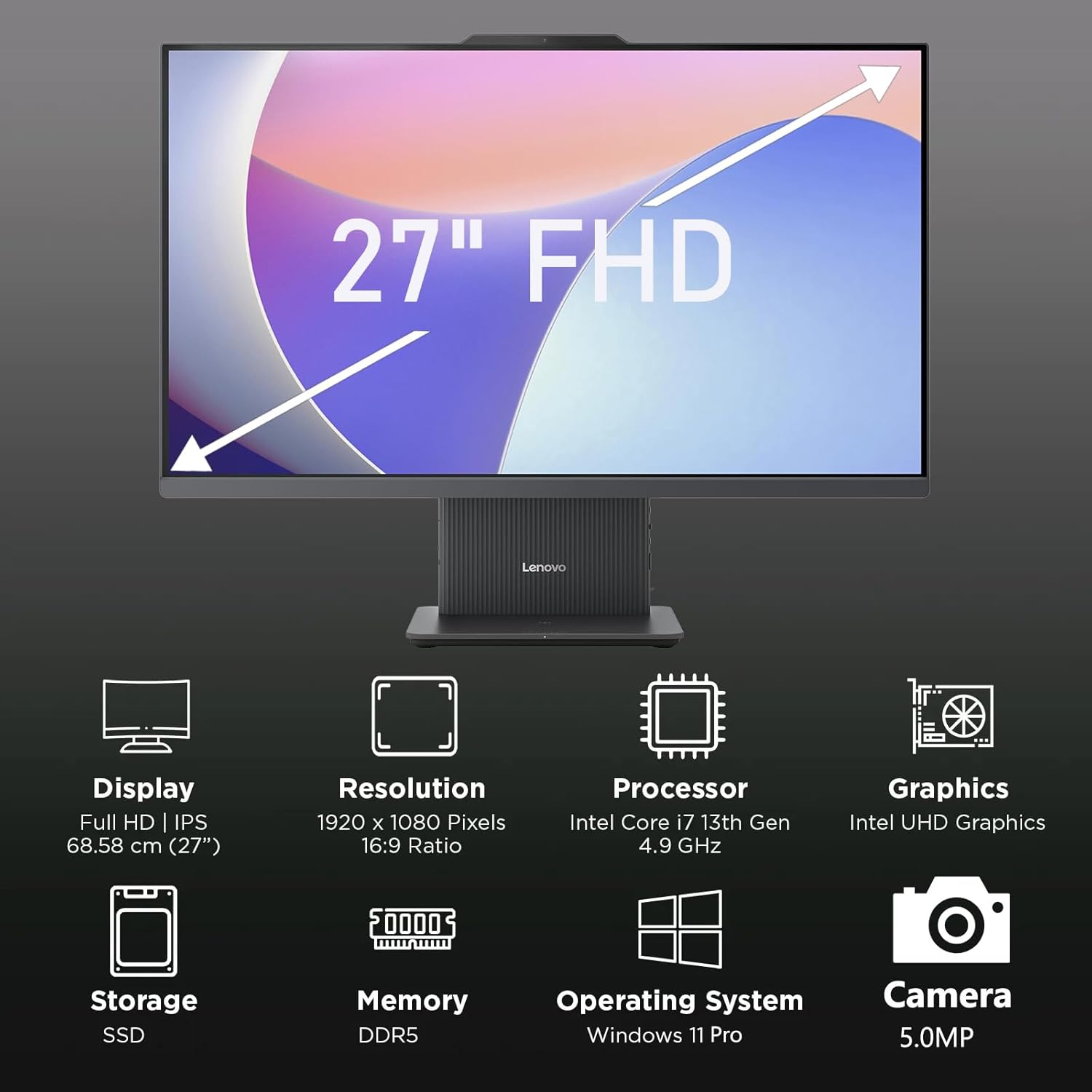
රූපය 2: අවසන්view of key features including Display, Resolution, Processor, Graphics, Storage, Memory, Operating System, and Camera.
- සංදර්ශකය: 27-inch Full HD (1920x1080) IPS, 300 nits, anti-glare.
- Webකැමරාව: Integrated 5.0MP webcam with dual microphones.
- කථිකයන්: Integrated 3W x2 HARMAN speakers.
- සකසනය: Intel Core i7-13620H.
- මතකය: DDR5 RAM එක.
- ගබඩා: PCIe NVMe SSD.
3.2 වරාය සහ සම්බන්ධක

Figure 3: Detailed diagram of ports and connectors on the Lenovo IdeaCentre AIO 27.
- E-shutter (for webcam privacy)
- බල බොත්තම
- HDMI-in 1.4
- බලය DC-in
- USB-A 480Mbps (USB 2.0)
- ඊතර්නෙට් (RJ-45)
- USB-A 480Mbps (USB 2.0)
- USB-A 10Gbps (USB 3.2 Gen 2)
- HDMI-අවුට් 2.1 TMDS
- USB-C 10Gbps (data transfer only)
- Headphone / microphone combo jack
4. පිහිටුවීම
4.1 පෙට්ටි ඉවත් කිරීම සහ ස්ථානගත කිරීම
- Carefully remove the AIO PC and all accessories from the packaging.
- Place the AIO PC on a stable, flat surface with adequate ventilation around the device.
4.2 සම්බන්ධක බලය
- Connect the power adapter cable to the DC-in port (4) on the rear of the AIO PC.
- බල ඇඩැප්ටරය භූගත විදුලි අලෙවිසැලකට සම්බන්ධ කරන්න.
4.3 සම්බන්ධක පර්යන්ත
- Connect your keyboard and mouse to the available USB-A ports (5, 7, 8) on the rear of the AIO PC.
- If using wired Ethernet, connect the cable to the RJ-45 port (6).
- For external displays, use the HDMI-out port (9). To use the AIO as a display for another device, use the HDMI-in port (3).
4.4 මූලික ආරම්භය සහ වින්ඩෝස් සැකසුම
- Press the power button (2) to turn on the PC.
- භාෂාව, කලාපය, ජාල සම්බන්ධතාවය සහ පරිශීලක ගිණුම් නිර්මාණය ඇතුළුව Windows 11 Pro මූලික සැකසුම සම්පූර්ණ කිරීමට තිරයේ ඇති උපදෙස් අනුගමනය කරන්න.
4.5 ස්ථාවරය සකස් කිරීම

Figure 4: The AIO stand allows for ergonomic tilt adjustment.
The integrated stand allows for tilt adjustment from -5° to 15° to optimize your viewing angle and posture. Gently adjust the display to your preferred position.
5. ඔබේ පරිගණකය ක්රියාත්මක කිරීම
5.1 මූලික මෙහෙයුම
- බලය සක්රිය / අක්රිය: Press the power button (2) to turn on. To shut down, click Start > Power > Shut down in Windows.
- නින්ද ප්රකාරය: Press the power button briefly or select Sleep from the Start menu.
5.2 භාවිතා කිරීම Webකැමරාව සහ ශ්රව්ය

Figure 5: The 5MP webcam and Harman audio enhance video conferencing.
- Webකැමරාව: The integrated 5.0MP webcam is ideal for video conferencing and online communication. Use the E-shutter (1) to physically block the camera for privacy.
- මයික්රෆෝන: Dual microphones provide clear audio input.
- කථිකයන්: HARMAN speakers deliver high-quality audio output.
5.3 සම්බන්ධතාවය
- Wi-Fi 6: අධිවේගී අන්තර්ජාල ප්රවේශය සඳහා රැහැන් රහිත ජාල වෙත සම්බන්ධ වන්න.
- බ්ලූටූත් 5.2: Pair with Bluetooth-enabled devices such as headphones, speakers, or mobile phones.
- USB Ports: Utilize the various USB-A and USB-C ports for connecting external drives, printers, and other peripherals.
5.4 Windows 11 Pro විශේෂාංග
Your AIO PC comes pre-installed with Windows 11 Pro, offering advanced features for productivity and security:
- බිට්ලොකර්: For advanced data encryption.
- දුරස්ථ ඩෙස්ක්ටොප්: Access your PC from another device.
- වසම් සම්බන්ධ වීම: Integrate into corporate networks.
- වින්ඩෝස් හෙලෝ: Secure and fast login using facial recognition (if IR camera is present) or PIN.
6. නඩත්තු කිරීම
6.1 ඔබේ පරිගණකය පිරිසිදු කිරීම
- සංදර්ශකය: මෘදු, ලින්ට් රහිත රෙදි තරමක් භාවිතා කරන්න dampජලය හෝ සීරීම් ඇති නොවන තිර පිරිසිදු කරන්නෙකු සමඟ ආලේප කර ඇත. තිරය මත කෙලින්ම දියර ඉසින්න එපා.
- චැසි: Wipe with a soft, dry cloth. Avoid harsh chemicals or abrasive materials.
- වාතාශ්රය: Ensure ventilation openings are clear of dust and obstructions to prevent overheating.
6.2 මෘදුකාංග යාවත්කාලීන
Regularly check for and install Windows updates and driver updates to ensure optimal performance and security. Go to Settings > Windows Update to check for updates.
6.3 දත්ත උපස්ථය
දත්ත නැතිවීම වැළැක්වීම සඳහා ඔබේ වැදගත් දත්ත වරින් වර බාහිර ධාවකයකට හෝ වලාකුළු ගබඩාවකට උපස්ථ කරන්න.
7. දෝශ නිරාකරණය
This section addresses common issues you might encounter with your IdeaCentre AIO 27.
| ගැටලුව | හැකි විසඳුම |
|---|---|
| පරිගණකය ක්රියාත්මක නොවේ | Ensure the power adapter is securely connected to both the PC and a working electrical outlet. Test the outlet with another device. |
| තිරය මත සංදර්ශකය නැත | Check power connection. Ensure the PC is powered on. If using HDMI-in, verify the external device is on and correctly connected. |
| අන්තර්ජාල සම්බන්ධතාවයක් නැත (Wi-Fi) | Check if Wi-Fi is enabled in Windows settings. Verify your router is working. Reconnect to the Wi-Fi network. |
| ශ්රව්ය නැත | Check volume levels in Windows. Ensure speakers are not muted. Verify audio drivers are up to date. |
| Webකැමරාව වැඩ කරන්නේ නැහැ. | Ensure the E-shutter (1) is open. Check privacy settings in Windows. Verify webcam drivers are installed and up to date. |
8. පිරිවිතර

Figure 6: Details of the Intel Core i7-13620H processor.

Figure 7: The 27-inch FHD display offers comfortable viewing.
| විශේෂාංගය | පිරිවිතර |
|---|---|
| වෙළඳ නාමය | ලෙනොවෝ |
| මාදිලියේ නම | අයිඩියා සෙන්ටර් ඒඅයිඕ 27 |
| මෙහෙයුම් පද්ධතිය | Windows 11 Pro |
| ප්රොසෙසරය | Intel Core i7-13620H (cores 10, නූල් 16, 4.9GHz දක්වා) |
| ග්රැෆික්ස් | Integrated Intel UHD Graphics |
| ප්රදර්ශනය කරන්න | 27-inch FHD (1920x1080) IPS, 300 nits, Anti-glare, 99% sRGB |
| මතකය | 32GB DDR5 RAM (5200 MT/s) |
| ගබඩා කිරීම | 1TB M.2 PCIe 4.0x4 NVMe SSD |
| ශ්රව්ය උපකරණ | High Definition (HD) Audio, Realtek ALC233-CG codec, 3W x2 HARMAN speakers |
| Webකැම් | 5.0MP with Dual Microphones |
| රැහැන් රහිත සම්බන්ධතාව | Wi-Fi 6 (802.11ax 2x2), Bluetooth 5.2 |
| තොටුපළ (පසුපස) | 1x USB-A 10Gbps, 2x USB-A 480Mbps, 1x HDMI-in 1.4, 1x HDMI-out 2.1 TMDS, 1x RJ-45, 1x Power Connector |
| Ports (Left) | 1x USB-C 10Gbps (data transfer only), 1x 3.5mm combo audio jack |
| ආරක්ෂක චිපය | ස්ථිරාංග TPM 2.0 |
| බල ඇඩැප්ටරය | 90W 89% adapter |
| මානයන් (W x D x H) | 611.72 x 192 x 473.16 mm (අඟල් 24.08 x 7.55 x 18.62) |
| බර | 7.1 kg (රාත්තල් 15.65) පමණ |
9. වගකීම් තොරතුරු
Your Lenovo IdeaCentre AIO 27 PC comes with a standard manufacturer's warranty. The specific terms and duration of your warranty may vary by region and purchase agreement. Please refer to the warranty documentation included in your product packaging or visit the official Lenovo support webසවිස්තරාත්මක තොරතුරු සඳහා අඩවිය.
Typically, the warranty covers defects in materials and workmanship under normal use. It does not cover damage caused by misuse, accidents, unauthorized modifications, or external factors.
10. සහාය සහ සම්බන්ධතා තොරතුරු
For technical support, service, or additional information, please contact Lenovo customer support through the following channels:
- ලෙනොවෝ සහාය Webඅඩවිය: පිවිසෙන්න support.lenovo.com ධාවක, අත්පොත් සහ දෝශ නිරාකරණ මාර්ගෝපදේශ සඳහා.
- දුරකථන සහාය: Refer to your warranty card or the Lenovo support webකලාපීය සම්බන්ධතා අංක සඳහා අඩවිය.
- මාර්ගගත කතාබස්: Available on the Lenovo support webතත්ය කාලීන සහාය සඳහා අඩවිය.
Please have your product's serial number ready when contacting support. The serial number is typically located on a label on the back or bottom of your AIO PC.


