හැඳින්වීම
This manual provides essential instructions for the safe and efficient operation of your Sharper Image SO226 Compact CD Stereo with AM/FM Digital Tuner. Please read this manual thoroughly before using the unit and retain it for future reference.
වැදගත් ආරක්ෂක උපදෙස්
- උපකරණය ක්රියාත්මක කිරීමට පෙර සියලු උපදෙස් කියවන්න.
- අනාගත යොමුව සඳහා මෙම අත්පොත තබා ගන්න.
- ජලය අසල මෙම උපකරණය භාවිතා නොකරන්න.
- වියළි රෙද්දකින් පමණක් පිරිසිදු කරන්න.
- කිසිදු වාතාශ්රය විවරයක් අවහිර නොකරන්න. නිෂ්පාදකයාගේ උපදෙස් අනුව ස්ථාපනය කරන්න.
- රේඩියේටර්, තාප රෙජිස්ටර්, ලිප, හෝ වෙනත් උපකරණ (ඇතුළුව) වැනි තාප ප්රභවයන් අසල ස්ථාපනය නොකරන්න. ampලිෆයර්) තාපය නිපදවන.
- විදුලි රැහැන ඇවිදීමෙන් හෝ ඇණ ගැසීමෙන්, විශේෂයෙන් ප්ලග්, පහසුව සඳහා භාජන සහ ඒවා උපකරණයෙන් පිටවන ස්ථානයේ ආරක්ෂා කරන්න.
- නිෂ්පාදකයා විසින් නිශ්චිතව දක්වා ඇති ඇමුණුම්/උපාංග පමණක් භාවිතා කරන්න.
- සියලුම සේවා සුදුසුකම් ලත් සේවා පුද්ගලයින් වෙත යොමු කරන්න. උපකරණයට කිසියම් ආකාරයකින් හානි වී ඇත්නම් සේවා සැපයීම අවශ්ය වේ.
පැකේජයේ අන්තර්ගතය
ඇසුරුම් ඉවත් කිරීමේදී සියලුම අයිතම තිබෙන බව තහවුරු කරගන්න:
- Sharper Image SO226 Compact CD Stereo Unit
- AC Power Adapter (if applicable, check packaging)
- පරිශීලක අත්පොත (මෙම ලේඛනය)
නිෂ්පාදනය අවසන්view
Familiarize yourself with the components and controls of your SO226 unit.
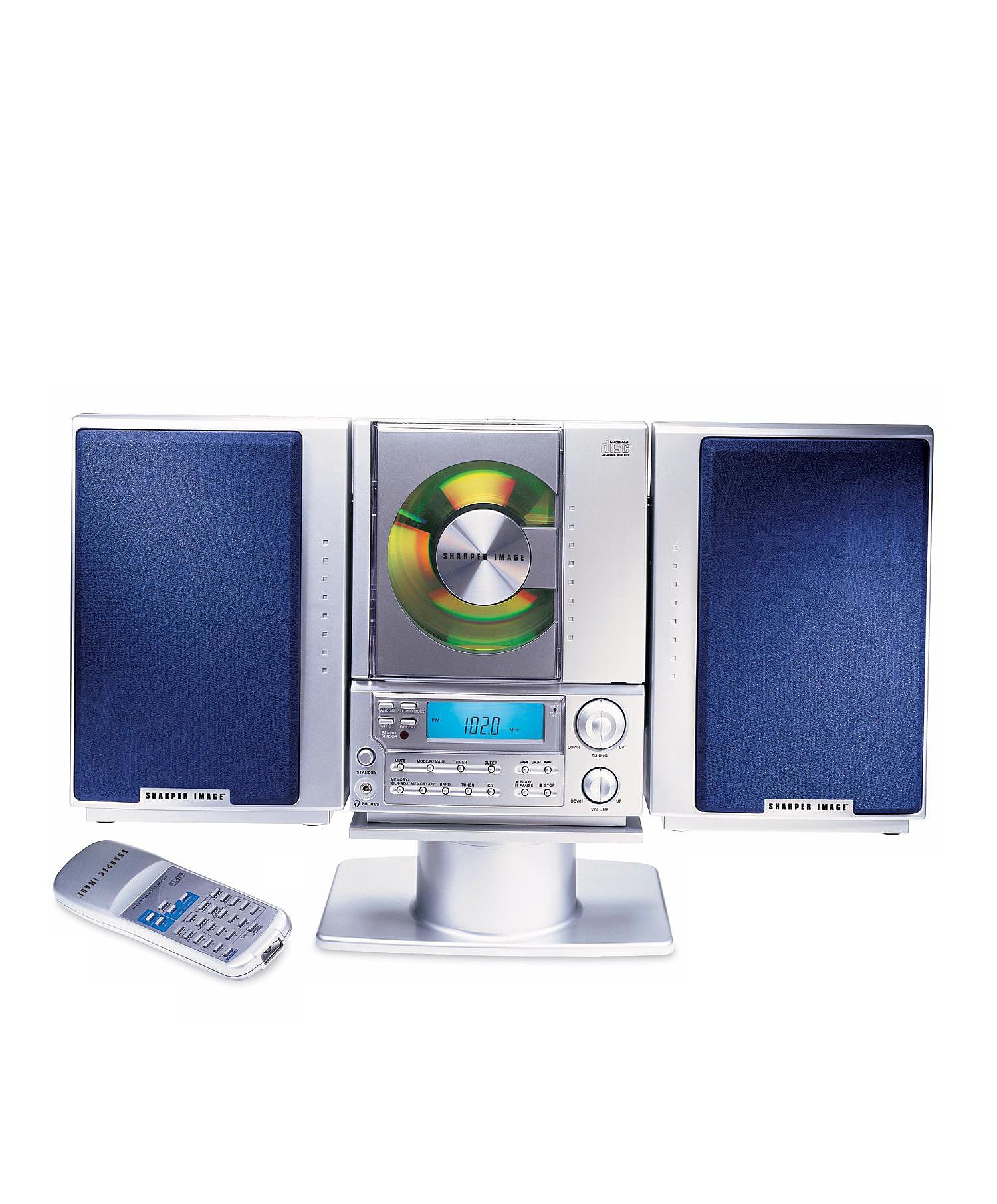
This image displays the front panel of the Sharper Image SO226 Compact CD Stereo. Visible features include the top-loading CD compartment, the digital display for radio frequencies and CD track information, and various control buttons for power, volume, CD playback, and radio tuning.
Control Panel (Typical Layout)
- බල බොත්තම: ඒකකය සක්රිය හෝ අක්රිය කරයි.
- FUNCTION/MODE Button: Switches between CD, AM, and FM modes.
- VOLUME +/- බොත්තම්: ශ්රව්ය ප්රතිදාන මට්ටම සීරුමාරු කරයි.
- PLAY/PAUSE බොත්තම: සීඩී නැවත ධාවනය ආරම්භ කරයි හෝ විරාම කරයි.
- STOP බොත්තම: CD නැවත ධාවනය නතර කරයි.
- මඟ හරින්න/සෙවුම් බොත්තම් (◀◀ / ▶▶): Skips tracks on CD or tunes radio frequencies.
- වැඩසටහන් බොත්තම: සීඩී පීලි ක්රමලේඛනය කිරීමට භාවිතා කරයි.
- නින්ද බොත්තම: නින්ද ටයිමර් ක්රියාකාරිත්වය සක්රිය කරයි.
- TUNING +/- Buttons: Fine-tunes radio frequencies.
- PRESET Buttons: ප්රියතම ගුවන් විදුලි මධ්යස්ථාන ගබඩා කර සිහිපත් කරයි.
- LCD සංදර්ශකය: වත්මන් මාදිලිය, ධාවන පථ අංකය, සංඛ්යාතය සහ වේලාව පෙන්වයි.
සැලසුම
බල සම්බන්ධතාවය
- ඒකකය ස්ථාවර, පැතලි මතුපිටක් මත තබා ඇති බවට වග බලා ගන්න.
- If using batteries (not included), open the battery compartment on the bottom or back of the unit and insert the required batteries, observing correct polarity.
- Alternatively, connect the AC power adapter (if supplied) to the DC IN jack on the unit and then plug the adapter into a standard wall outlet.
ඇන්ටෙනා සැකසුම
- FM පිළිගැනීම සඳහා, දුරේක්ෂ ඇන්ටනාව සම්පූර්ණයෙන්ම දිගු කරන්න. ප්රශස්ත පිළිගැනීම සඳහා එහි පිහිටීම සකසන්න.
- For AM reception, the unit has a built-in ferrite bar antenna. Rotate the entire unit for best AM reception.
මෙහෙයුම් උපදෙස්
CD Player මෙහෙයුම
- ඔබන්න බලය ඒකකය සක්රිය කිරීමට බොත්තම.
- ඔබන්න කාර්යය/ප්රකාරය button repeatedly until 'CD' appears on the display.
- සීඩී මැදිරි කවරය විවෘත කරන්න.
- ලේබලයේ පැත්ත ඉහළට මුහුණලා ඇති සීඩී තැටියක් මැදිරිය තුළට දමන්න.
- Close the CD compartment cover. The unit will read the CD, and the total number of tracks will be displayed.
- ඔබන්න වාදනය / විරාමය නැවත ධාවනය ආරම්භ කිරීමට බොත්තම.
- විරාම කිරීමට, ඔබන්න වාදනය / විරාමය නැවතත්. නැවත ආරම්භ කිරීමට එය නැවත වරක් ඔබන්න.
- නැවත ධාවනය නැවැත්වීමට, ඔබන්න නවත්වන්න බොත්තම.
- ඊළඟ ධාවන පථය වෙත යාමට, ඔබන්න SKIP/SEARCH ▶▶ බොත්තම.
- වත්මන් ධාවන පථයේ ආරම්භයට හෝ පෙර ධාවන පථයට ආපසු යාමට, ඔබන්න SKIP/SEARCH ◀◀ බොත්තම.
- ධාවන පථයක් තුළ වේගයෙන් ඉදිරියට යාමට හෝ ආපසු හැරවීමට, ඔබා අල්ලාගෙන සිටින්න SKIP/SEARCH ▶▶ or ◀◀ ◀◀ დარინ නැවත ධාවනය අතරතුර බොත්තම.
AM/FM ගුවන් විදුලි මෙහෙයුම
- ඔබන්න බලය ඒකකය සක්රිය කිරීමට බොත්තම.
- ඔබන්න කාර්යය/ප්රකාරය button repeatedly until 'AM' or 'FM' appears on the display.
- අත්පොත සුසර කිරීම: ඔබන්න සුසර කිරීම +/- සංඛ්යාතය පියවරෙන් පියවර සකස් කිරීමට බොත්තම්.
- ස්වයංක්රීය ස්කෑන්: ඔබා අල්ලාගෙන සිටින්න සුසර කිරීම +/- buttons for a few seconds. The tuner will scan and stop at the next strong station.
- පෙරසිටර ගබඩා කිරීම: Tune to your desired station. Press the වැඩසටහන button. The preset number will flash. Use the මඟ හැරීම/සෙවීම පෙර සැකසූ අංකයක් තේරීමට බොත්තම්, පසුව ඔබන්න වැඩසටහන තහවුරු කිරීමට නැවතත්.
- පෙරසිටුව සිහිපත් කිරීම: ගුවන්විදුලි මාදිලියේදී, ඔබන්න පෙරසැකසුම ඔබගේ ගබඩා කර ඇති ස්ථාන හරහා චක්රීය කිරීමට බොත්තම්.
නින්ද ටයිමර් ක්රියාකාරිත්වය
The unit features a convenient sleep timer that automatically turns off the sound after a set period.
- While the unit is playing (CD or Radio), press the නිදාගන්න බොත්තම.
- එක් එක් මුද්රණාලය නිදාගන්න button will cycle through available sleep times (e.g., 10, 20, 30, 60, 90 minutes, or OFF).
- Select your desired sleep duration. The unit will automatically power off after the selected time has elapsed.
නඩත්තු කිරීම
- ඒකකය පිරිසිදු කිරීම: මෘදු වියළි රෙද්දකින් ඒකකයේ බාහිර පෙනුම පිස දමන්න. උල්ෙල්ඛ පිරිසිදු කරන්නන් හෝ ද්රාවක භාවිතා නොකරන්න.
- CD Care: සීඩී තැටි ඒවායේ දාරවලින් හසුරුවන්න. ඒවා පිරිසිදුව හා සීරීම් වලින් තොරව තබා ගන්න. සීඩී තැටියක් අපිරිසිදු නම්, මැද සිට පිටතට මෘදු, ලින්ට් රහිත රෙද්දකින් මෘදු ලෙස පිස දමන්න.
- ගබඩා: When not in use for extended periods, disconnect the power adapter and remove batteries. Store the unit in a cool, dry place.
දෝෂගවේෂණය
ඔබට ගැටළු ඇති වුවහොත්, පහත පොදු ගැටළු සහ විසඳුම් වෙත යොමු වන්න:
- බලය නැත:
- Ensure the AC power adapter is securely plugged into both the unit and a working wall outlet.
- If using batteries, check if they are inserted correctly and are not depleted. - ශබ්දයක් නැත:
- Check the volume level and increase it if necessary.
- Ensure the correct function mode (CD/AM/FM) is selected. - CD Not Playing / Skipping:
- Ensure the CD is inserted correctly with the label side up.
- Clean the CD for any dirt or scratches.
- Try a different CD to rule out a faulty disc.
- Ensure the CD compartment cover is fully closed. - දුර්වල ගුවන් විදුලි පිළිගැනීම:
- For FM, fully extend and adjust the telescopic antenna.
- For AM, rotate the entire unit for better signal.
- Move the unit away from other electronic devices that may cause interference. - බොත්තම් ප්රතිචාර නොදක්වයි:
- Try turning the unit off and on again.
- Disconnect power for a few minutes, then reconnect.
පිරිවිතර
| ආදර්ශ අංකය | SO226 |
| නිෂ්පාදන මානයන් (L x W x H) | 1.3 x 19 x 5.5 අඟල් (3.3 x 48.3 x 14 cm) |
| අයිතමයේ බර | රාත්තල් 5 (කිලෝ ග්රෑම් 2.27) |
| ස්පීකර් වර්ගය | ස්ටීරියෝ |
| බලශක්ති ප්රභවය | Battery Powered (AC adapter typically included or sold separately) |
| Color (as per specific variant) | නිල් |
වගකීම් සහ සහාය
වගකීම් තොරතුරු සහ පාරිභෝගික සහාය සඳහා, කරුණාකර ඔබේ මිලදී ගැනීම සමඟ ඇතුළත් කර ඇති ලියකියවිලි බලන්න හෝ නිල Sharper Image වෙත පිවිසෙන්න. webවෙබ් අඩවිය. වගකීම් හිමිකම් සඳහා ඔබේ මිලදී ගැනීමේ සාක්ෂි තබා ගන්න.


