1. හැඳින්වීම
Thank you for choosing the NEC LCD4215 42-inch MultiSync LCD Monitor. This manual provides essential information for the safe and efficient use of your new display. Please read these instructions thoroughly before installation and operation, and retain them for future reference.
2 ආරක්ෂිත තොරතුරු
මොනිටරයට හානි වීම වැළැක්වීමට සහ පරිශීලක ආරක්ෂාව සහතික කිරීමට පහත ආරක්ෂක පියවරයන් නිරීක්ෂණය කරන්න:
- බලශක්ති ප්රභවය: Connect the monitor only to a grounded power outlet with the correct voltage නිෂ්පාදන ලේබලයේ දක්වා ඇති පරිදි.
- වාතාශ්රය: මොනිටරය වටා ප්රමාණවත් වාතාශ්රයක් සහතික කරන්න. වාතාශ්රය විවරයන් අවහිර නොකරන්න.
- දියර නිරාවරණය: Avoid exposing the monitor to rain, moisture, or excessive humidity. Do not place liquid-filled objects on or near the monitor.
- පිරිසිදු කිරීම: පිරිසිදු කිරීමට පෙර විදුලි රැහැන විසන්ධි කරන්න. මෘදු වියළි රෙද්දක් භාවිතා කරන්න. දියර හෝ එයරෙසෝල් පිරිසිදු කරන්නන්ගෙන් වළකින්න.
- සේවා: මෙම නිෂ්පාදනය ඔබම සේවය කිරීමට උත්සාහ නොකරන්න. සියලුම සේවා සුදුසුකම් ලත් සේවකයින් වෙත යොමු කරන්න.
- ස්ථානගත කිරීම: වැටීම වැළැක්වීම සඳහා මොනිටරය ස්ථාවර, සමතලා මතුපිටක් මත තබන්න.
3. පැකේජ අන්තර්ගතය
Verify that all items are present in the package. If any items are missing or damaged, contact your dealer immediately.
- NEC LCD4215 42-inch MultiSync LCD Monitor
- විදුලි රැහැන්
- VGA කේබලය
- බැටරි සමඟ දුරස්ථ පාලකය
- පරිශීලක අත්පොත (මෙම ලේඛනය)
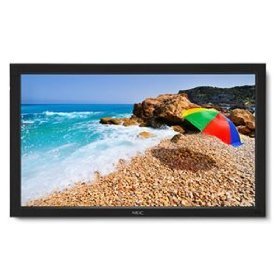
Image: The NEC LCD4215 42-inch MultiSync LCD Monitor, shown from the front with its stand. This image represents the primary display unit.
4. පිහිටුවීම
4.1 ඇසිරීම
- Carefully open the packaging and remove the monitor and accessories.
- Place the monitor face down on a soft, clean surface to avoid scratching the screen.
4.2 Stand/Mounting Installation
The monitor can be used with its included desktop stand or mounted using a VESA-compatible wall mount (sold separately).
4.2.1 Desktop Stand Installation
- සපයා ඇති ඉස්කුරුප්පු භාවිතයෙන් ස්ථාවර පාදය ස්ථාවර බෙල්ලට සවි කරන්න.
- Secure the assembled stand to the back of the monitor using the designated mounting points and screws.
- මොනිටරය ප්රවේශමෙන් ඔසවා ස්ථාවර, සමතලා මතුපිටක් මත තබන්න.
4.2.2 බිත්ති සවි කිරීම (විකල්ප)
If using a VESA-compatible wall mount, follow the instructions provided with your wall mount kit. Ensure the mount supports the weight and VESA pattern of the NEC LCD4215 monitor.
4.3 සම්බන්ධක කේබල්
Before connecting any cables, ensure the monitor and all connected devices are powered off.
- වීඩියෝ කේබලය: Connect one end of the appropriate video cable (VGA, DVI, HDMI, etc.) to the video output port of your computer or media device and the other end to the corresponding input port on the monitor.
- Audio Cable (Optional): If using the monitor's internal speakers or audio output, connect an audio cable from your source device to the monitor's audio input.
- බල කේබලය: මොනිටරයේ AC ආදානයට විදුලි රැහැන සම්බන්ධ කර අනෙක් කෙළවර භූගත විදුලි අලෙවිසැලකට සම්බන්ධ කරන්න.
5. මෙහෙයුම් උපදෙස්
5.1 බල ගැන්වීම සක්රිය / අක්රිය කිරීම
- Press the power button on the front panel of the monitor or on the remote control to turn the monitor on. The power indicator light will illuminate.
- මොනිටරය අක්රිය කිරීමට, බල බොත්තම නැවත ඔබන්න.
5.2 ආදාන තේරීම
The monitor can display content from multiple sources. To switch between inputs:
- Press the 'Input' or 'Source' button on the remote control or the monitor's control panel.
- Use the navigation buttons to select the desired input source (e.g., VGA, DVI, HDMI).
- Press 'Enter' or 'OK' to confirm your selection.
5.3 මූලික සංදර්ශක සැකසුම්
Access the On-Screen Display (OSD) menu to adjust various settings:
- Press the 'Menu' button on the remote control or the monitor's control panel.
- Use the navigation buttons (Up/Down/Left/Right) to browse through menu options such as 'Brightness', 'Contrast', 'Color Temperature', and 'Aspect Ratio'.
- Press 'Enter' or 'OK' to select an option and adjust its value.
- Press 'Menu' again to exit the OSD menu.
6. නඩත්තු කිරීම
6.1 සංදර්ශකය පිරිසිදු කිරීම
To maintain optimal display quality, clean the screen and casing regularly:
- පිරිසිදු කිරීමට පෙර සෑම විටම මොනිටරය විසන්ධි කර විසන්ධි කරන්න.
- මෘදු, ලින්ට් රහිත රෙදි තරමක් භාවිතා කරන්න dampened with water or a non-abrasive, ammonia-free, and alcohol-free screen cleaner.
- තිරය මෘදු ලෙස පිස දමා සී.asing. Do not apply excessive pressure.
- තිරය මතට හෝ ඕනෑම විවරයකට කෙලින්ම දියර ඉසීමෙන් වළකින්න.
6.2 ගබඩා කිරීම
If storing the monitor for an extended period, ensure it is powered off, unplugged, and stored in a cool, dry place away from direct sunlight and extreme temperatures. Use the original packaging if available for protection.
7. දෝශ නිරාකරණය
Before contacting customer support, refer to the following table for common issues and their solutions:
| ගැටලුව | විය හැකි හේතුව | විසඳුම |
|---|---|---|
| තිරයේ රූපයක් නොමැත | මොනිටරය ක්රියාත්මක කර නැත; වීඩියෝ කේබලය ලිහිල් වී හෝ විසන්ධි වී ඇත; වැරදි ආදාන මූලාශ්රය තෝරා ඇත. | Press the power button; Check video cable connections; Select the correct input source. |
| රූපය ඉතා අඳුරු/දීප්තිමත් | දීප්තිය/විභේදන සැකසුම් වැරදියි. | Adjust 'Brightness' and 'Contrast' in the OSD menu. |
| ශ්රව්ය නැත | ශ්රව්ය කේබලය විසන්ධි කර ඇත; ශබ්දය ඉතා අඩුය; නිහඬ කර ඇත. | ශ්රව්ය කේබල් සම්බන්ධතාවය පරීක්ෂා කරන්න; ශබ්දය වැඩි කරන්න; ශ්රව්ය නිහඬ නොකරන්න. |
| දිලිසෙන රූපය | Video cable faulty; Resolution/Refresh rate mismatch. | Replace video cable; Adjust display settings on your computer. |
8. පිරිවිතර
Detailed technical specifications for the NEC LCD4215 MultiSync LCD Monitor:
| විශේෂාංගය | පිරිවිතර |
|---|---|
| ආදර්ශ අංකය | LCD4215 |
| තිර ප්රමාණය | අඟල් 42 |
| උපරිම තිර විභේදනය | 1366 x 768 |
| දර්ශන අනුපාතය | 1.78:1 |
| අයිතමයේ බර | රාත්තල් 47 කි |
| නිෂ්පාදන මානයන් (LxWxH) | අඟල් 44 x 27.5 x 9.25 |
| වර්ණය | කළු |
| නිෂ්පාදකයා | Nec Computers |
| පළමු දිනය තිබේ | 31 ජූලි 2008 |
9. වගකීම් සහ සහාය
9.1 වගකීම් තොරතුරු
This NEC LCD4215 monitor comes with a standard manufacturer's warranty. Please refer to the separate warranty card included in your product packaging for specific terms, conditions, and duration of coverage. Keep your proof of purchase for warranty claims.
9.2 පාරිභෝගික සහාය
For technical assistance, troubleshooting beyond this manual, or warranty service, please contact NEC customer support. Visit the official NEC webදුරකථන අංක සහ මාර්ගගත සහාය සම්පත් ඇතුළුව වඩාත්ම යාවත්කාලීන සම්බන්ධතා තොරතුරු සඳහා අඩවිය.
Webඅඩවිය: www.nec.com වෙබ් අඩවිය


