1. හැඳින්වීම
This manual provides essential information for the safe and effective use of your Kodak Easyshare M530 Digital Camera. Please read it thoroughly before operating the device and retain it for future reference. The Kodak Easyshare M530 is a compact digital camera featuring a 12-megapixel sensor, 3x optical zoom, and a 2.7-inch LCD screen, designed for capturing high-quality photos and videos with ease.
2. පෙට්ටියේ ඇති දේ
- Kodak Easyshare M530 ඩිජිටල් කැමරාව
- USB කේබලය
- නැවත ආරෝපණය කළ හැකි ලිතියම්-අයන බැටරි
- මැණික් කටුව
- උපදෙස් අත්පොත (මෙම ලේඛනය)
3. කැමරා ඕවර්view
ඔබේ කැමරාවේ ප්රධාන කොටස් පිළිබඳව ඔබව හුරු කරවන්න.

රූපය 1: ඉදිරිපස view of the Kodak Easyshare M530 Digital Camera, showing the lens, flash, and brand logo.

රූපය 2: ආපසු view of the Kodak Easyshare M530 Digital Camera, displaying the 2.7-inch LCD screen and control buttons.

රූපය 3: ඉහළ view of the Kodak Easyshare M530 Digital Camera, highlighting the power button and shutter release.

රූපය 4: පැත්ත view of the Kodak Easyshare M530 Digital Camera, illustrating the USB port for connectivity.
4. පිහිටුවීම
4.1. බැටරිය ස්ථාපනය කිරීම
- කැමරාවේ පතුලේ ඇති බැටරි මැදිරි කවරය විවෘත කරන්න.
- Insert the rechargeable Lithium-Ion battery with the contacts facing the correct direction, as indicated inside the compartment.
- බැටරි මැදිරි කවරය නිසි තැනට ක්ලික් කරන තුරු ආරක්ෂිතව වසා දමන්න.
4.2. මතක කාඩ්පතක් ස්ථාපනය කිරීම
The camera supports SD/SDHC memory cards (not included).
- සාමාන්යයෙන් බැටරි මැදිරිය අසල පිහිටා ඇති මතක කාඩ්පත් තව් කවරය විවෘත කරන්න.
- කැමරාවේ ඉදිරිපසට මුහුණලා ඇති ලේබලය සහිතව SD/SDHC කාඩ්පත නිසි තැනට ක්ලික් වන තුරු ඇතුළු කරන්න.
- මතක කාඩ්පත් තව් කවරය වසන්න.
4.3. බැටරිය ආරෝපණය කිරීම
- Ensure the battery is correctly installed in the camera.
- Connect the supplied USB cable to the camera's USB port.
- Connect the other end of the USB cable to a compatible USB power adapter or a computer's USB port.
- The charging indicator light will illuminate. Charging is complete when the light turns off or changes color (refer to camera display for exact status).
5. කැමරාව ක්රියාත්මක කිරීම
5.1. බලය සක්රිය / අක්රිය කරන්න
- බලය ක්රියාත්මක කිරීමට: ඔබන්න බලය කැමරාවේ මුදුනේ පිහිටා ඇති බොත්තම.
- බලය අක්රිය කිරීමට: ඔබා අල්ලාගෙන සිටින්න බලය button until the camera shuts down.
5.2. ඡායාරූප ගැනීම
- කැමරාව සක්රිය කරන්න.
- අඟල් 2.7 LCD තිරය භාවිතයෙන් ඔබේ ඡායාරූපය රාමු කරන්න.
- ඔබන්න ෂටරය නාභිගත කිරීම සඳහා බොත්තම අඩක් පහළට. නාභිගත කිරීම සාක්ෂාත් කරගත් විට නාභිගත රාමුව කොළ පැහැයට හැරේ.
- ඔබන්න ෂටරය button all the way down to capture the photo.
5.3. වීඩියෝ පටිගත කිරීම
- Switch the camera to video mode (refer to your camera's specific mode dial or menu for this option).
- ඔබන්න ෂටරය button to start recording. A red indicator will typically appear on the screen.
- ඔබන්න ෂටරය පටිගත කිරීම නැවැත්වීමට නැවත බොත්තම.
5.4. විශාලන කාර්යය
Use the zoom lever (often labeled W for Wide and T for Telephoto) to adjust the 3x optical zoom.
- ලීවරය දෙසට තල්ලු කරන්න T විශාලනය කිරීමට (ටෙලිෆොටෝ).
- ලීවරය දෙසට තල්ලු කරන්න W විශාලනය අඩු කිරීමට (පුළුල් කෝණය).
5.5. ෆ්ලෑෂ් මාදිලි
ඔබන්න ෆ්ලෑෂ් button (often indicated by a lightning bolt icon) to cycle through available flash modes:
- ස්වයංක්රීය ෆ්ලෑෂ්: Camera automatically determines if flash is needed.
- Fill Flash: සෑම වෙඩි පහරකටම ෆ්ලෑෂ් ෆයර්.
- රතු-ඇස් අඩු කිරීම: Fires a pre-flash to reduce red-eye effect.
- ෆ්ලෑෂ් අක්රිය: ෆ්ලෑෂ් අක්රිය කර ඇත.
5.6. නැවතviewඡායාරූප සහ වීඩියෝ දර්ශන
- ඔබන්න Review බොත්තම (බොහෝ විට ක්රීඩා නිරූපකයකින් දැක්වේ).
- ඔබ අල්ලා ගත් රූප සහ වීඩියෝ හරහා සැරිසැරීමට දිශානුගත පෑඩය භාවිතා කරන්න.
- ඔබන්න OK or තෝරන්න බොත්තම view තෝරාගත් අයිතමයක්.
5.7. Smart Capture and Face Recognition
The Kodak Easyshare M530 features Smart Capture, which automatically adjusts camera settings for optimal results, and Face Recognition, which detects and optimizes settings for faces in your shots.
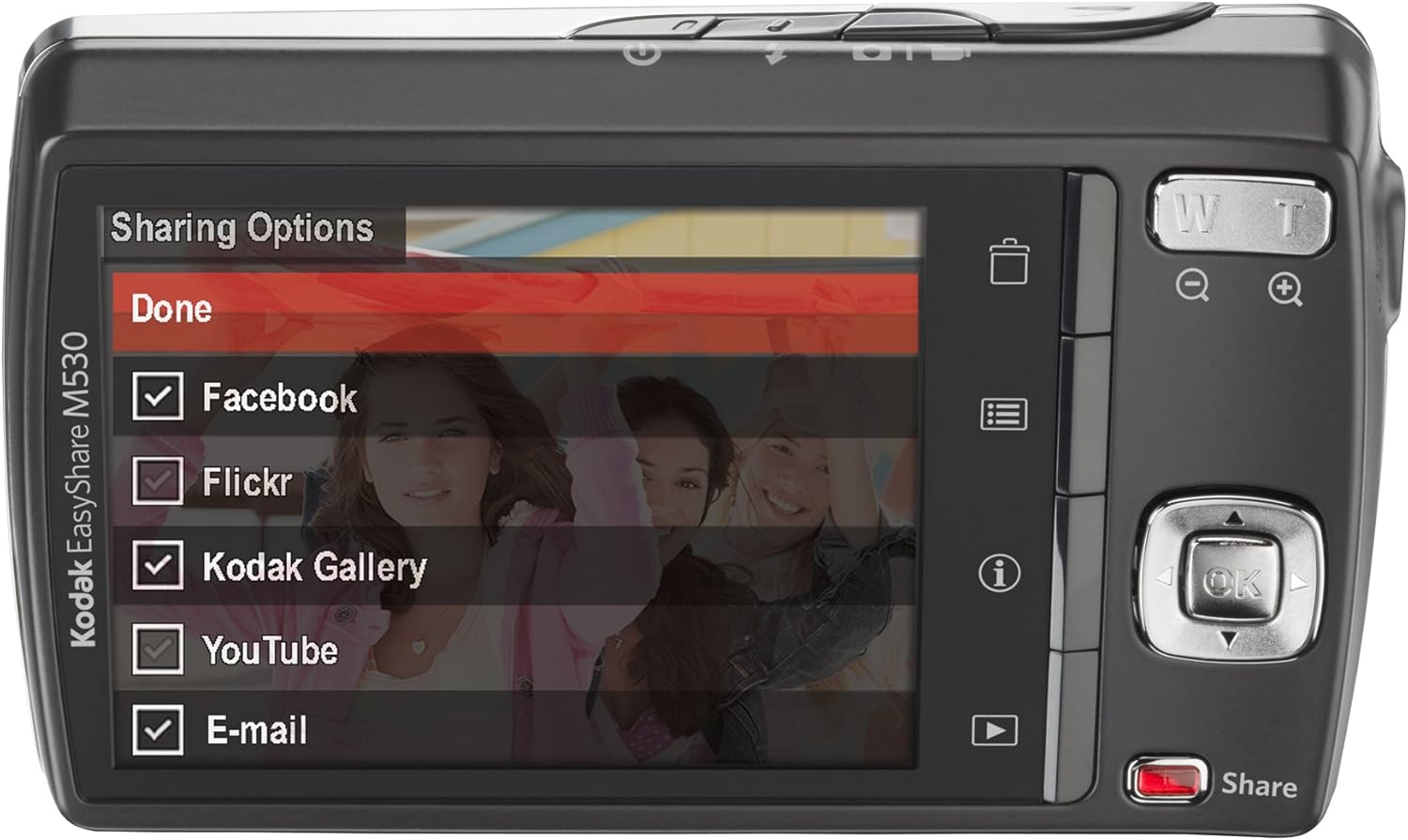
රූපය 5: The camera's LCD screen displaying sharing options, including Facebook, Flickr, Kodak Gallery, YouTube, and Email.
5.8. Sharing Your Content
Utilize the dedicated Share button for easy uploading of your photos and videos to various platforms when connected to a computer with Kodak's EasyShare software.
6. නඩත්තු කිරීම
6.1. කැමරාව පිරිසිදු කිරීම
- කැමරා ශරීරය පිරිසිදු කිරීම සඳහා මෘදු, ලින්ට් රහිත රෙද්දක් භාවිතා කරන්න.
- කාච සහ LCD තිරය සඳහා, විශේෂිත කාච පිරිසිදු කිරීමේ රෙදි සහ ද්රාවණයක් භාවිතා කරන්න. රළු රසායනික ද්රව්යවලින් වළකින්න.
6.2. බැටරි රැකවරණය
- භාවිතයේ නොමැති විට සිසිල් වියළි ස්ථානයක බැටරි ගබඩා කරන්න.
- බැටරි අධික උෂ්ණත්වයකට නිරාවරණය වීමෙන් වළකින්න.
- දීර්ඝ ගබඩා කිරීමට පෙර බැටරිය සම්පූර්ණයෙන්ම ආරෝපණය කරන්න.
6.3. ගබඩා කිරීම
When storing the camera for long periods, remove the battery and memory card. Store the camera in a dry, dust-free environment, preferably in a camera bag.
7. දෝශ නිරාකරණය
| ගැටලුව | විය හැකි හේතුව | විසඳුම |
|---|---|---|
| කැමරාව ක්රියාත්මක නොවේ | අඩු හෝ ක්ෂය වූ බැටරි | බැටරිය සම්පූර්ණයෙන්ම ආරෝපණය කරන්න. |
| Battery incorrectly inserted | Reinsert the battery correctly. | |
| නොපැහැදිලි රූප | කැමරා සෙලවීම | කැමරාව ස්ථාවරව තබා ගන්න හෝ ත්රිපාදයක් භාවිතා කරන්න. |
| Subject out of focus | Ensure the camera focuses before fully pressing the shutter. | |
| මතක කාඩ්පත් දෝෂයකි | Card not inserted correctly or corrupted | Reinsert the card. If the problem persists, try formatting the card (this will erase all data) or use a different card. |
| ෆ්ලෑෂ් එක පත්තු වෙන්නේ නැහැ | Flash mode set to 'Off' | Change the flash mode to Auto or Fill Flash. |
8. පිරිවිතර
- ඡායාරූප සංවේදක විභේදනය: 12 MP
- දෘශ්ය විශාලනය: 3x
- තිර ප්රමාණය: අඟල් 2.7 (LCD)
- වීඩියෝ විභේදනය: 640 x 480 (30 රාමු)
- බැටරි වර්ගය: ලිතියම් අයන
- රූප ස්ථායීකරණය: කිසිවක් නැත
- සහාය දුන්නා File ආකෘතිය: RAW
- සම්බන්ධතා තාක්ෂණය: USB
- අයිතමයේ බර: පවුම් 0.33ක්
- වර්ණය: Blue (for this specific model variant)
9. වගකීම් සහ සහාය
Your Kodak Easyshare M530 Digital Camera comes with a 30-day warranty from the manufacturer, Eastman Kodak Company. This warranty covers defects in materials and workmanship under normal use. For warranty claims or technical support, please refer to the contact information provided with your purchase documentation or visit the official Kodak support webඅඩවිය.
අමතර සහාය සහ සම්පත් සඳහා, ඔබට පිවිසිය හැකිය KODAK Store on Amazon.


