හැඳින්වීම
ස්තූතියි, උදව් කළාටasing the Muse M-10 CR Clock Radio. This manual provides important information regarding the setup, operation, and maintenance of your new device. Please read it thoroughly before use and retain it for future reference.
වැදගත් ආරක්ෂක තොරතුරු
- මෙම උපකරණය ජල බිංදු හෝ ඉසීමට නිරාවරණය නොකරන්න.
- බඳුන් වැනි ද්රව වලින් පිරුණු වස්තූන් උපකරණය මත තබන්න එපා.
- ඒකකය වටා නිසි වාතාශ්රය සහතික කරන්න. වාතාශ්රය විවරයන් අවහිර නොකරන්න.
- ඒකකය සමඟ සපයා ඇති බල ඇඩැප්ටරය පමණක් භාවිතා කරන්න.
- ඒකකය විසුරුවා හැරීමට හෝ වෙනස් කිරීමට උත්සාහ නොකරන්න. සියලුම සේවා සුදුසුකම් ලත් පුද්ගලයින් වෙත යොමු කරන්න.
- ඒකකය සෘජු හිරු එළිය, තාප ප්රභවයන් සහ ශක්තිමත් චුම්භක ක්ෂේත්ර වලින් ඈත් කර තබන්න.
- මෘදු වියළි රෙද්දකින් පමණක් ඒකකය පිරිසිදු කරන්න.
පැකේජයේ අන්තර්ගතය
කරුණාකර සියලුම අයිතම තිබේදැයි පරීක්ෂා කරන්න:
- Muse M-10 CR Clock Radio
- බල ඇඩැප්ටරය
- පරිශීලක අත්පොත
නිෂ්පාදනය අවසන්view
Familiarize yourself with the controls and display of your Muse M-10 CR.

රූපය: ඉදිරිපස view of the Muse M-10 CR Clock Radio, showing the large white LED display and control buttons on top.

රූපය: ඉහළ view of the Muse M-10 CR Clock Radio, highlighting the control buttons for power, alarm settings, hour/minute adjustment, radio tuning, and the large snooze button.
පාලන සහ දර්ශක:
- බල බොත්තම: ඒකකය සක්රිය/අක්රිය කරයි.
- එලාම් 1 / එලාම් 2 බොත්තම්: Set and activate individual alarms.
- HR (Hour) Button: පැය සකස් කරයි.
- MIN (Minute) Button: මිනිත්තුව සකස් කරයි.
- Tuning Buttons (<< / >>): රේඩියෝ සංඛ්යාතය සකස් කරයි.
- ස්නූස් බොත්තම: Temporarily silences the alarm and dims the display.
- නායකත්වය විදහා: වේලාව, අනතුරු ඇඟවීමේ තත්ත්වය සහ ගුවන් විදුලි සංඛ්යාතය පෙන්වයි.
සැලසුම
1. බලය සම්බන්ධ කිරීම
- Insert the DC plug of the power adapter into the DC IN jack on the back of the unit.
- Plug the power adapter into a standard wall outlet (AC 220V, 50Hz).
- The LED display will light up, indicating the unit is powered.
2. කාලය නියම කිරීම
- වේලාව සැකසීමට, ඔබා අල්ලාගෙන සිටින්න HR පැය සකස් කිරීමට බොත්තම.
- ඔබන්න MIN මිනිත්තුව සකස් කිරීමට බොත්තම.
- Release the buttons to confirm the time. The time will be set in 24-hour format.
මෙහෙයුම් උපදෙස්
ගුවන්විදුලි මෙහෙයුම (FM)
- ඔබන්න බලය රේඩියෝව සක්රිය කිරීමට බොත්තම.
- ඔබන්න Tuning (<< / >>) buttons briefly to manually tune to your desired FM frequency.
- To auto-scan and store presets: Press and hold the Tuning (<< / >>) button for a few seconds. The radio will scan for available stations and store them automatically. The unit supports 20 preset FM stations.
- To recall a preset station: After auto-scanning, use the Tuning (<< / >>) buttons to cycle through the stored preset stations.
සටහන: For optimal reception, ensure the FM wire antenna (located at the back of the unit) is fully extended.
Setting Alarms (Dual Alarm)
The Muse M-10 CR features a dual alarm system, allowing you to set two separate alarm times.
- ඔබන්න එලාම් 1 or එලාම් 2 button once. The alarm time will flash on the display.
- While the alarm time is flashing, press the HR අනතුරු ඇඟවීමේ වේලාව සැකසීමට බොත්තම.
- ඔබන්න MIN අනතුරු ඇඟවීමේ මිනිත්තුව සැකසීමට බොත්තම.
- ඔබන්න එලාම් 1 or එලාම් 2 අනතුරු ඇඟවීමේ වේලාව තහවුරු කිරීමට නැවත බොත්තම ඔබන්න.
- To select the alarm source (Buzzer or Radio), press the respective එලාම් 1 or එලාම් 2 button repeatedly until the desired icon (buzzer or radio wave) appears next to the alarm indicator on the display.
- අනතුරු ඇඟවීමක් අක්රිය කිරීමට, අනුරූප ඔබන්න එලාම් 1 or එලාම් 2 අනතුරු ඇඟවීමේ දර්ශකය සංදර්ශකයෙන් අතුරුදහන් වන තුරු බොත්තම.
ස්නූස් කාර්යය
අනතුරු ඇඟවීමක් ඇසෙන විට, විශාල බොත්තම ඔබන්න ස්නූස් කරන්න button on top of the unit. The alarm will be temporarily silenced for approximately 9 minutes and will sound again after this period. The snooze function can be used multiple times.
ඩිමර් පෙන්වන්න
The 0.6-inch white LED display has adjustable intensity. Press the ස්නූස් කරන්න button while the unit is in standby mode to cycle through different brightness levels (High, Low, Off). This allows you to adjust the display brightness to your preference, especially for nighttime use.
නඩත්තු කිරීම
පිරිසිදු කිරීම
- පිරිසිදු කිරීමට පෙර සෑම විටම විදුලිබලාගාරයෙන් ඒකකය විසන්ධි කරන්න.
- Use a soft, dry cloth to wipe the exterior surfaces of the clock radio.
- උල්ෙල්ඛ පිරිසිදු කරන්නන්, ඉටි හෝ ද්රාවක භාවිතා නොකරන්න, මන්ද ඒවා නිමාවට හානි කළ හැකිය.
ගබඩා කිරීම
If you plan to store the unit for an extended period, unplug it from the power source and store it in a cool, dry place, away from direct sunlight and extreme temperatures.
දෝෂගවේෂණය
| ගැටලුව | විය හැකි හේතුව | විසඳුම |
|---|---|---|
| ඒකකය බලය සක්රිය නොවේ. | බල ඇඩැප්ටරය සම්බන්ධ වී නැත හෝ දෝෂ සහිතයි. | Ensure the power adapter is securely plugged into the unit and a working wall outlet. Try a different outlet. |
| දුර්වල ගුවන්විදුලි පිළිගැනීම. | Weak signal; antenna not properly extended. | FM වයර් ඇන්ටනාව සම්පූර්ණයෙන්ම දිගු කරන්න. වඩා හොඳ පිළිගැනීමක් සඳහා ඒකකය නැවත ස්ථානගත කරන්න. |
| එලාම් එක නාද වෙන්නේ නැහැ. | අනතුරු ඇඟවීම සකසා හෝ අක්රිය කර නැත; ශබ්දය ඉතා අඩුය (රේඩියෝ අනතුරු ඇඟවීම සඳහා). | Verify that the alarm is set and activated (alarm icon visible). Ensure radio alarm volume is audible. |
| සංදර්ශකය ඉතා දීප්තිමත්/අඳුරුයි. | Display dimmer setting needs adjustment. | Press the SNOOZE button in standby mode to cycle through display brightness levels. |
පිරිවිතර
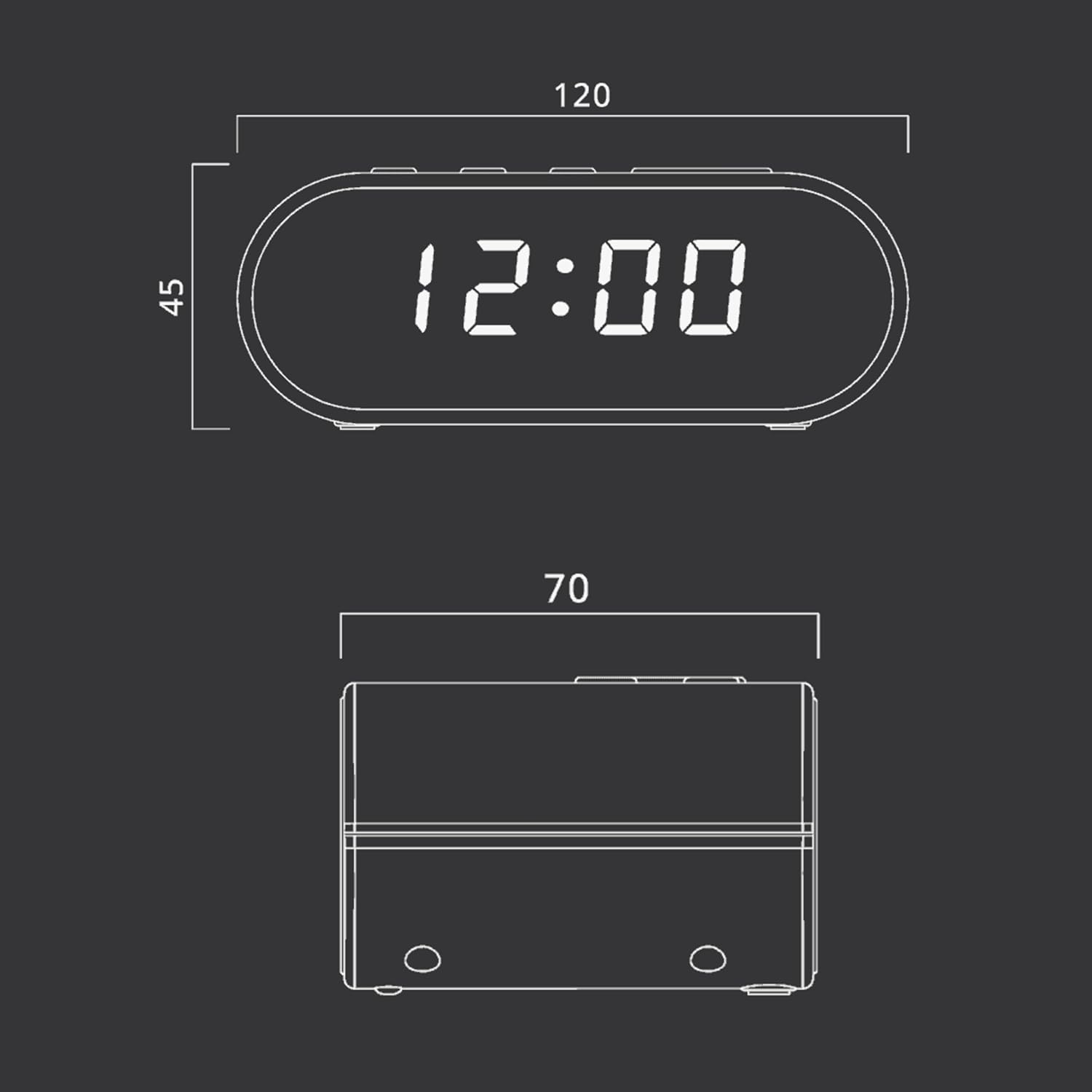
රූපය: Technical drawing illustrating the dimensions of the Muse M-10 CR Clock Radio, with measurements in millimeters.
- වෙළඳ නාමය: කෞතුකාගාරය
- ආදර්ශ අංකය: 3700460200701
- වර්ණය: ෂ්වාස් (කළු)
- නිෂ්පාදන මානයන්: 12 x 7 x 10.9 cm (L x W x H)
- අයිතමයේ බර: 200 ග්රෑම්
- වෙළුමtage: වෝල්ට් 220
- ද්රව්ය: කුන්ස්ට්ස්ටොෆ් (ප්ලාස්ටික්)
- සංදර්ශක වර්ගය: LED (0.6-inch white)
- ගුවන්විදුලිය: FM PLL Radio with 20 preset stations
- විශේෂ ලක්ෂණ: Adjustable Brightness, Large Display, Radio, Snooze Function, Dual Alarm
වගකීම් සහ සහාය
For warranty information or technical support, please refer to the warranty card included with your purchase or contact your local Muse distributor or retailer. Keep your proof of purchase for any warranty claims.
You can also visit the official Muse webවැඩිදුර සහාය සහ නිෂ්පාදන තොරතුරු සඳහා අඩවිය.


