1. හැඳින්වීම
ස්තූතියි, උදව් කළාටasing the Atlanta 1669/19 Quartz Alarm Clock. This digital alarm clock features a silent movement, a light sensor for automatic display illumination, and a snooze function. This manual provides detailed instructions for setup, operation, and maintenance to ensure optimal performance and longevity of your device.
2 ආරක්ෂිත තොරතුරු
- උපාංගය ජලයෙන් හා අධික ආර්ද්රතාවයෙන් ඈත් කරන්න.
- ඔරලෝසුව සෘජු හිරු එළියට හෝ අධික උෂ්ණත්වයන්ට නිරාවරණය කිරීමෙන් වළකින්න.
- ඔරලෝසුව ඔබම විසුරුවා හැරීමට හෝ අලුත්වැඩියා කිරීමට උත්සාහ නොකරන්න. සුදුසුකම් ලත් සේවා නිලධාරීන් වෙත යොමු වන්න.
- භාවිතා කරන ලද බැටරි දේශීය රෙගුලාසිවලට අනුව වගකීමෙන් යුතුව බැහැර කරන්න.
- පැරණි සහ නව බැටරි, හෝ විවිධ වර්ගයේ බැටරි මිශ්ර නොකරන්න.
3. පැකේජ අන්තර්ගතය
- Atlanta 1669/19 Quartz Alarm Clock Unit
- පරිශීලක අත්පොත (මෙම ලේඛනය)
සටහන: බැටරි ඇතුළත් නොවන අතර වෙන වෙනම මිලදී ගත යුතුය.
4. නිෂ්පාදන අවසන්view
The Atlanta 1669/19 features a clear digital display, intuitive controls, and a light sensor for enhanced visibility in low-light conditions.
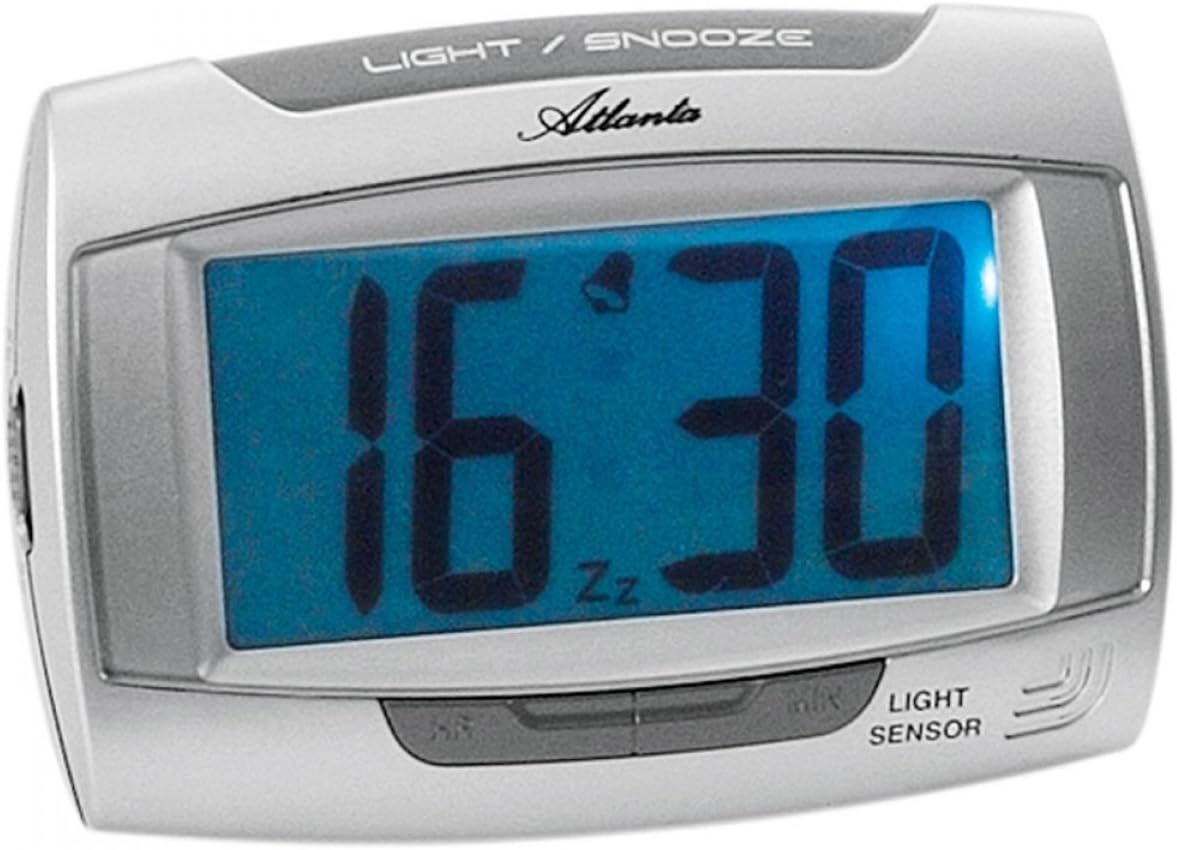
රූපය 1: ඉදිරිපස view of the Atlanta 1669/19 Quartz Alarm Clock. The clock features a large digital display, a "LIGHT / SNOOZE" button at the top, and a "LIGHT SENSOR" indicator at the bottom right. The display shows the time 16:30, with an alarm bell icon and 'Zz' indicating snooze functionality.
ප්රධාන සංරචක:
- සංඛ්යාංක දර්ශකය: Shows time and alarm status.
- LIGHT / SNOOZE Button: Activates temporary backlight and snooze function.
- ආලෝක සංවේදකය: Automatically illuminates the display in dark environments.
- Control Buttons (Rear/Side): For setting time and alarm.
- Battery Compartment (Rear): Holds the required batteries.
5. පිහිටුවීම
5.1. බැටරි ස්ථාපනය
- අනතුරු ඇඟවීමේ ඔරලෝසුවේ පිටුපස බැටරි මැදිරි කවරය සොයා ගන්න.
- කවරය ලිස්සා යාමෙන් හෝ එසවීමෙන් ඉවත් කරන්න.
- Insert the required batteries (typically 1x AA, refer to compartment markings) ensuring correct polarity (+ and -).
- බැටරි මැදිරි ආවරණය ආරක්ෂිතව ප්රතිස්ථාපනය කරන්න.
5.2. මූලික කාල සැකසුම
Upon battery installation, the display will typically show a default time. You will need to set the current time.
- Locate the time setting buttons, usually labeled "SET", "HOUR", and "MINUTE" or similar, on the back or side of the clock.
- Press the "SET" button (or equivalent) to enter time setting mode. The hour digits may start flashing.
- Use the "HOUR" button to adjust the hour.
- Press "SET" again to move to minute setting. The minute digits may start flashing.
- Use the "MINUTE" button to adjust the minutes.
- Press "SET" one more time to confirm and exit time setting mode.
6. මෙහෙයුම් උපදෙස්
6.1. අනතුරු ඇඟවීම සැකසීම
- Locate the alarm setting buttons, typically labeled "ALARM SET", "ALARM HOUR", and "ALARM MINUTE" or similar.
- Press the "ALARM SET" button to enter alarm setting mode. The alarm hour digits may flash.
- Use the "ALARM HOUR" button to adjust the desired alarm hour.
- Press "ALARM SET" again to move to alarm minute setting. The alarm minute digits may flash.
- Use the "ALARM MINUTE" button to adjust the desired alarm minutes.
- Press "ALARM SET" one more time to confirm and exit alarm setting mode.
6.2. අනතුරු ඇඟවීම සක්රිය/අක්රිය කිරීම
There is usually a switch or button to turn the alarm on or off. Look for a switch labeled "ALARM ON/OFF" or an alarm icon button. When the alarm is active, an alarm icon (e.g., a bell) will typically appear on the display.
6.3. ස්නූස් ක්රියාකාරිත්වය
When the alarm sounds, press the large "LIGHT / SNOOZE" button located on the top of the clock. This will temporarily silence the alarm, and it will sound again after a few minutes (typically 5-9 minutes). The "Zz" icon on the display indicates that the snooze function is active.
6.4. Light Sensor and Display Backlight
- Automatic Backlight (Light Sensor): The clock is equipped with a light sensor. When enabled, the display will automatically illuminate with a soft, constant light in dark environments, making it easy to read the time at night without pressing any buttons. Look for a switch or button labeled "SENSOR ON/OFF" or similar to enable or disable this feature.
- Temporary Backlight: To briefly illuminate the display in any lighting condition, press the "LIGHT / SNOOZE" button on the top of the clock. The backlight will stay on for a few seconds and then turn off automatically.
7. නඩත්තු කිරීම
- පිරිසිදු කිරීම: මෘදු වියළි රෙද්දකින් ඔරලෝසුව පිස දමන්න. උල්ෙල්ඛ පිරිසිදු කරන්නන් හෝ ද්රාවක භාවිතා නොකරන්න, මන්ද මේවා c වලට හානි කළ හැකිය.asing හෝ සංදර්ශකය.
- බැටරි ආදේශනය: When the display dims or the clock stops functioning correctly, it is time to replace the batteries. Follow the battery installation steps in Section 5.1.
- ගබඩා: If the clock will not be used for an extended period, remove the batteries to prevent leakage and damage.
8. දෝශ නිරාකරණය
| ගැටලුව | විය හැකි හේතුව | විසඳුම |
|---|---|---|
| ඔරලෝසු සංදර්ශකය හිස් හෝ අඳුරුයි. | අඩු හෝ මිය ගිය බැටරි; වැරදි බැටරි ස්ථාපනය. | නිවැරදි ධ්රැවීයතාව සහතික කරමින් බැටරි අලුත් ඒවා සමඟ ප්රතිස්ථාපනය කරන්න. |
| එලාම් එක නාද වෙන්නේ නැහැ. | Alarm is not activated; alarm time is incorrect; low batteries. | Ensure alarm is switched ON (bell icon visible); verify alarm time setting; replace batteries. |
| Automatic backlight not working. | Light sensor feature is disabled; insufficient darkness. | Ensure the light sensor switch is ON; test in a completely dark room. |
| කාලය වැරදියි. | Time was not set correctly; batteries were removed/replaced. | Reset the current time following Section 5.2. |
9. පිරිවිතර
| ආකෘතිය | 1669/19 |
| වෙළඳ නාමය | ඇට්ලන්ටා |
| මෙහෙයුම් ආකාරය | ඩිජිටල් |
| විශේෂ ලක්ෂණ | Alarm, Lighting (Light Sensor) |
| ද්රව්ය | ප්ලාස්ටික් |
| රාමු ද්රව්ය | ප්ලාස්ටික් |
| සවිකිරීමේ වර්ගය | ටැබ්ලටය |
| වර්ණය | Blue (display), Silver-coloured (case) |
| අවශ්ය බැටරි | Yes (Type not specified, typically AA or AAA for such clocks) |
| බැටරි ඇතුළත් | නැත |
| මානයන් (ආසන්න වශයෙන්) | 11 x 7 සෙ.මී |
10. වගකීම් සහ සහාය
වගකීම් තොරතුරු හෝ තාක්ෂණික සහාය සඳහා, කරුණාකර මිලදී ගැනීමේදී සපයා ඇති ලියකියවිලි වෙත යොමු වන්න හෝ ඔබේ සිල්ලර වෙළෙන්දා අමතන්න. ඕනෑම වගකීම් හිමිකම් පෑමක් සඳහා ඔබේ මිලදී ගැනීමේ සාක්ෂි තබා ගන්න.


