1. වැදගත් ආරක්ෂක තොරතුරු
අවවාදයයි: මෙම නිෂ්පාදනයට ඔබව ඊයම් ඇතුළු රසායනික ද්රව්යවලට නිරාවරණය කළ හැකිය, එය පිළිකා සහ උපත් ආබාධ හෝ වෙනත් ප්රජනක හානි ඇති කිරීමට කැලිෆෝනියා ප්රාන්තය දන්නා කරුණකි. වැඩි විස්තර සඳහා යන්න www.P65Warnings.ca.gov.
Please read all instructions carefully before using this heater. Failure to follow these instructions may result in fire, electric shock, serious injury, or death.
- සෑම විටම තාපක සෘජුවම බිත්ති පිටවන ස්ථානයට/භාජනයකට සම්බන්ධ කරන්න. විස්තීරණ ලණුවකින් හෝ නැවත ස්ථානගත කළ හැකි බල ටැප් එකකින් (පිටස්තර/බල තීරුව) කිසිවිටෙක භාවිතා නොකරන්න.
- මෙම හීටරය භාවිතා කරන විට උණුසුම් වේ. පිළිස්සුම් වළක්වා ගැනීම සඳහා, හිස් සම උණුසුම් මතුපිට ස්පර්ශ කිරීමට ඉඩ නොදෙන්න. මෙම හීටරය චලනය කරන විට හැන්ඩ්ල් භාවිතා කරන්න.
- ගෘහ භාණ්ඩ, කොට්ට, ඇඳ ඇතිරිලි, කඩදාසි, ඇඳුම් සහ තිර වැනි දහනය කළ හැකි ද්රව්ය අවම වශයෙන් අඩි 3ක් (මීටර් 0.9) හීටරයේ ඉදිරිපසින් තබා ඒවා දෙපස සහ පසුපසින් ඈත් කර තබන්න.
- ඕනෑම හීටරයක් ළමුන් හෝ ඔවුන් අසල හෝ ආබාධිතයන් භාවිතා කරන විට සහ හීටරය ක්රියාත්මක වන විට සහ අවධානයෙන් තොරව තබා ඇති සෑම අවස්ථාවකම අතිශයින්ම ප්රවේශම් වීම අවශ්ය වේ.
- හානියට පත් ලණුවකින් හෝ ප්ලග් එකකින් හෝ හීටරයේ අක්රියතාවයෙන් පසුව කිසිදු ආකාරයකින් හීටරයක් ක්රියා නොකරන්න.
- එළිමහනේ භාවිතා නොකරන්න.
- හීටරය විසන්ධි කිරීමට, පාලන ක්රියා විරහිත කරන්න, පසුව ප්ලග් එක අලෙවිසැලෙන් ඉවත් කරන්න.
- විදුලි කම්පනයක් හෝ ගින්නක් හෝ හීටරයට හානි විය හැකි බැවින් කිසියම් වාතාශ්රයක් හෝ පිටාර විවරයක් ඇතුළු කිරීමට විදේශීය වස්තූන් ඇතුළු කිරීම හෝ ඉඩ නොදෙන්න.
- හීටරයක් ඇතුළත උණුසුම් සහ චාප හෝ පුළිඟු කොටස් ඇත. පෙට්රල්, තීන්ත හෝ දැවෙන වාෂ්ප හෝ දියර භාවිතා කරන හෝ ගබඩා කරන ප්රදේශවල එය භාවිතා නොකරන්න.
- මෙම අත්පොතෙහි විස්තර කර ඇති පරිදි පමණක් මෙම හීටරය භාවිතා කරන්න. නිෂ්පාදකයා විසින් නිර්දේශ නොකරන ලද වෙනත් භාවිතයක් ගින්නක්, විදුලි කම්පනයක් හෝ පුද්ගලයන්ට තුවාල වීමට හේතු විය හැක.
2. නිෂ්පාදන අවසන්view
The Optimus H-4500 is a 14-inch oscillating pedestal digital dish heater designed to provide efficient and targeted warmth with convenient features.
ප්රධාන ලක්ෂණ:
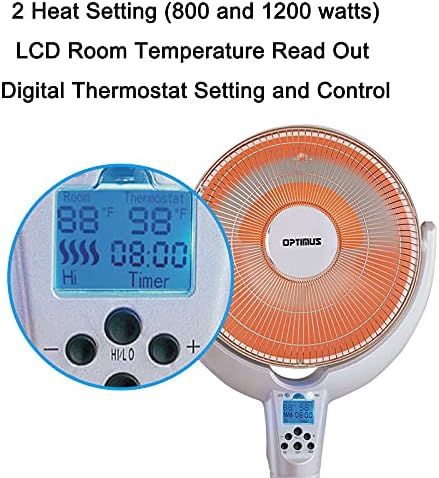
- 2 Heat Settings: Choose between 800 watts and 1200 watts for optimal comfort.
- Digital Thermostat Control: Maintain your desired room temperature with precision.
- LCD Room Temperature Read Out: Easily monitor the current room temperature.
- Oscillating Function: Distributes heat more effectively across a wider area.
- Full Function Remote Control: Adjust settings conveniently from a distance.
- Programmable Timer: Set the heater to operate for 30 minutes up to 8 hours.
- Adjustable Dish Tilting Mechanism: Direct heat precisely where it's needed.
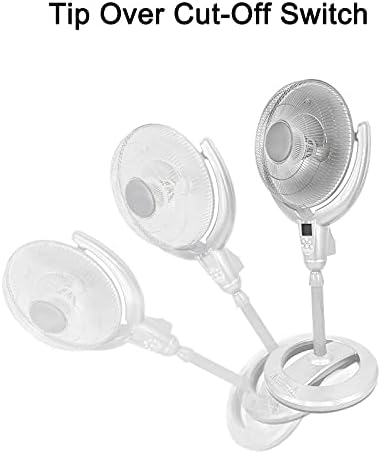
- Safety Features: Includes a Tip Over Cut-off Switch and Overload Thermal Protector for enhanced safety.
නිෂ්පාදන පින්තූර:


නිෂ්පාදන වීඩියෝව:
මෙම වීඩියෝව පුළුල් විස්තරයක් සපයයිview of the Optimus H-4500 14-Inch Oscillating Pedestal Digital Dish Heater, demonstrating its features and operation.
3. සැකසුම් උපදෙස්
- ඇසිරීම: Carefully remove the heater from its packaging. Retain packaging materials for future storage or transport.
- එකලස් කිරීම: If the unit requires assembly (e.g., attaching the pedestal base), follow the specific instructions provided in the separate assembly guide included with your product. Ensure all components are securely fastened.
- ස්ථානගත කිරීම: Place the heater on a firm, level surface. Ensure it is at least 3 feet (0.9 m) away from walls, furniture, and other combustible materials. Do not place the heater in areas where it could be easily tipped over.
- බල සම්බන්ධතාවය: Plug the heater directly into a 120V AC, 60 Hz wall outlet. Do not use extension cords, power strips, or surge protectors.
- මූලික පරීක්ෂාව: Before first use, inspect the power cord and plug for any signs of damage. If any damage is found, do not operate the heater and contact customer support.
4. මෙහෙයුම් උපදෙස්
The Optimus H-4500 heater can be operated using the control panel on the unit or the included full-function remote control.
පාලක පැනලය / දුරස්ථ කාර්යයන්:
- බලය සක්රිය / අක්රිය: Press the 'ON/OFF' button to turn the heater on or off.
- තාප සැකසුම්: Select between 'LOW' (800 watts) and 'HIGH' (1200 watts) heat settings using the corresponding buttons or controls.
- ඩිජිටල් උෂ්ණත්ව පාලකය: Use the '+' and '-' buttons to set your desired room temperature. The LCD display will show the current room temperature and your set temperature. The heater will cycle on and off to maintain the set temperature.
- දෝලනය: Press the 'OSC' button to activate or deactivate the oscillating function. This will allow the dish to move from side to side, distributing heat more broadly.
- ටයිමරය: Press the 'TIMER' button to set the auto-off timer. Each press will cycle through available settings from 30 minutes up to 8 hours. The heater will automatically turn off once the set time has elapsed.
- Adjustable Dish Tilt: Manually adjust the angle of the heating dish to direct warmth upwards or downwards as needed.
දුරස්ථ පාලක භාවිතය:
Point the remote control directly at the heater's receiver window. Ensure there are no obstructions between the remote and the heater. The remote requires batteries (not included, typically AAA).
5. නඩත්තු කිරීම
නිතිපතා නඩත්තු කිරීම ඔබේ හීටරයේ ප්රශස්ත ක්රියාකාරිත්වය සහ කල්පැවැත්ම සහතික කරයි.
- පිරිසිදු කිරීම: පිරිසිදු කිරීමට පෙර සෑම විටම හීටරය විසන්ධි කරන්න. මෘදු, d ස්විචයක් භාවිතා කරන්න.amp බාහිර පෘෂ්ඨයන් පිස දැමීමට රෙදි කැබැල්ලක් භාවිතා කරන්න. උල්ෙල්ඛ පිරිසිදු කරන්නන් හෝ ද්රාවක භාවිතා නොකරන්න. හීටරයේ අභ්යන්තරයට ජලය ඇතුළු නොවන බවට වග බලා ගන්න.
- දූවිලි ඉවත් කිරීම: Periodically use a vacuum cleaner with a brush attachment to remove dust from the grilles and heating elements. This helps maintain heating efficiency and prevents overheating.
- ගබඩා: භාවිතයේ නොමැති විට, හීටරය සිසිල් වියළි ස්ථානයක ගබඩා කරන්න. දූවිලි හා හානිවලින් ආරක්ෂා වීම සඳහා එහි මුල් ඇසුරුම්වල ගබඩා කිරීම රෙකමදාරු කරනු ලැබේ.
- රැහැන් රැකවරණය: Never wrap the power cord tightly around the heater. Avoid placing heavy objects on the cord.
6. දෝශ නිරාකරණය
ඔබේ හීටරය නිවැරදිව ක්රියා නොකරන්නේ නම්, කරුණාකර පහත පොදු ගැටළු සහ විසඳුම් වෙත යොමු වන්න:
| ගැටලුව | විය හැකි හේතුව | විසඳුම |
|---|---|---|
| තාපකය සක්රිය නොවේ. | No power to the unit; Tip-over switch activated; Overheat protection activated. | Check if the power cord is securely plugged into a working outlet. Ensure the heater is on a flat, stable surface. Allow the unit to cool down for 10-15 minutes if it overheated. |
| හීටරය අනපේක්ෂිත ලෙස නිවා දමයි. | Tip-over switch activated; Overheat protection activated; Timer function active. | Ensure the heater is upright and stable. Allow the unit to cool down. Check if the timer is set to turn off the heater. |
| ප්රමාණවත් තාප ප්රතිදානයක් නොමැත. | Low heat setting selected; Room size too large for heater; Obstruction of heating element. | Select the 'HIGH' heat setting. Ensure the heater is appropriate for the room size. Clean any dust or debris from the heating element and grilles. |
| දෝලනය ක්රියා නොකරයි. | දෝලන ශ්රිතය සක්රිය කර නැත. | Press the 'OSC' button on the control panel or remote to activate. |
| දුරස්ථ පාලකය ක්රියා නොකරයි. | බැටරි අක්රිය වීම; දුරස්ථ පාලකය සහ හීටරය අතර අවහිරතා. | Replace batteries in the remote control. Ensure a clear line of sight to the heater's receiver. |
If the problem persists after trying these solutions, please contact Optimus customer support.
7. පිරිවිතර
| ගුණාංගය | විස්තර |
|---|---|
| වෙළඳ නාමය | Optimus |
| ආදර්ශ අංකය | H-4500 |
| විශේෂ ලක්ෂණය | දෝලනය |
| වර්ණය | බහු වර්ණ |
| ආකෘති සාධකය | කෑමක් |
| ගෘහස්ථ / එළිමහන් භාවිතය | ගෘහස්ථ |
| නිෂ්පාදන මානයන් | 15"D x 17"W x 38.5"H |
| නිර්දේශිත භාවිතයන් | නිවස |
| සවිකිරීමේ වර්ගය | මහල කන්ද |
| කාමර වර්ගය | නිදන කාමරය, ගෘහ කාර්යාලය, අධ්යයන කාමරය |
| දාහක වර්ගය | විකිරණශීලී |
| ඉන්ධන වර්ගය | විදුලි |
| වේග ගණන | 1 |
| උපරිම උෂ්ණත්ව සැකසුම | අංශක 300 ෆැරන්හයිට් |
| අයිතමයේ බර | රාත්තල් 11.43 කි |
| නිෂ්පාදකයා | Optimus |
| අවශ්ය බැටරි | නැත |
| ඇතුළත් සංරචක | තාපකය, අතින්, දුරස්ථ පාලකය |
8. වගකීම් සහ සහාය
This Optimus H-4500 heater comes with a වසර 3ක නිෂ්පාදකයාගේ වගකීමක්.
For warranty claims, technical support, or any questions regarding your product, please contact Optimus customer service directly. Refer to the contact information provided in the separate warranty card or on the official Optimus webඅඩවිය.
Please have your model number (H-4500) and proof of purchase ready when contacting support.


