නිෂ්පාදනය අවසන්view
The DoorKing 1503 Keypad is an advanced access control device designed for both residential and commercial applications. It features a durable stainless steel faceplate and offers secure access through programmable entry codes. This manual provides comprehensive instructions for the installation, operation, and maintenance of your DoorKing 1503 Keypad.
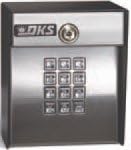
රූපය 1: ඉදිරිපස view of the DoorKing 1503 Keypad, displaying the numeric buttons and an integrated key lock mechanism at the top for manual override.
ප්රධාන ලක්ෂණ
- Code Storage: Stores two 4-digit entry codes, two 5-digit entry codes, and two 4-digit hold codes.
- වැඩසටහන්කරණය: Codes can be programmed and activated via the keypad or through the DoorKing app.
- මතක තබා ගැනීම: EEPROM memory ensures programmed codes are retained even during power outages.
- බලශක්ති කාර්යක්ෂමතාව: Features a low power mode, making it suitable for solar installations.
- ඉදිකිරීම්: Durable stainless steel faceplate.
- මානයන්: Approximately 5 x 5 x 4 inches (L x W x H).
- බර: ආසන්න වශයෙන් රාත්තල් 3 කි.
සැකසුම සහ ස්ථාපනය
1. ඇසිරීම සහ පරීක්ෂා කිරීම
Carefully remove all components from the packaging. Verify that all items listed in the packing list are present and undamaged. If any items are missing or damaged, contact your supplier immediately.
2. සවිකරන ස්ථානය
Select a suitable mounting location. The keypad should be installed on a flat, stable surface at a convenient height for users. Ensure the location is protected from direct harsh weather conditions if possible, although the unit is designed for outdoor use.
3. රැහැන් සම්බන්ධතා
අවවාදයයි: Disconnect all power to the access control system before making any wiring connections. Improper wiring can damage the unit or cause electrical shock.
- Connect the power supply wires to the designated terminals on the keypad. Refer to the wiring diagram provided with your specific access control system.
- Connect the output wires from the keypad to the control board of your gate operator or door strike.
- කෙටි පරිපථ වැළැක්වීම සඳහා සියලුම සම්බන්ධතා ආරක්ෂිත සහ පරිවරණය කර ඇති බවට සහතික වන්න.
4. Securing the Keypad
Use the provided mounting hardware to securely attach the keypad to the chosen surface. Do not overtighten screws, as this may damage the housing.
මෙහෙයුම් උපදෙස්
1. මූලික බල-අප්
Once all wiring is complete and secure, restore power to the access control system. The keypad should illuminate or provide an audible confirmation of power.
2. Programming Entry Codes (Keypad Method)
To program a new entry code:
- Enter the Master Programming Code (refer to your system's main control board manual for the default or current master code).
- ඔබන්න * යතුර.
- Enter the desired new entry code (4 or 5 digits).
- ඔබන්න # තහවුරු කිරීමට යතුර.
- The keypad will provide an audible beep or visual flash to confirm successful programming.
සටහන: The DoorKing 1503 supports two 4-digit codes, two 5-digit codes, and two 4-digit hold codes. Consult the DoorKing app for advanced programming options.
3. Using Entry Codes
To gain access, simply enter your valid entry code on the keypad. The system will activate the gate or door strike upon successful code entry.
4. Using Hold Codes
Hold codes are typically used to keep a gate or door open for an extended period. Enter the hold code, and the system will maintain the open state until the code is re-entered or a timer expires (if configured).
නඩත්තු කිරීම
The DoorKing 1503 Keypad is designed for minimal maintenance. However, regular checks can ensure optimal performance and longevity.
- පිරිසිදු කිරීම: වරින් වර යතුරු පුවරුවේ මතුපිට මෘදු, d රෙදි කඩකින් පිස දමන්න.amp cloth. Avoid abrasive cleaners or solvents that could damage the finish or keypad buttons.
- සම්බන්ධතා පරීක්ෂාව: Annually inspect all wiring connections for corrosion or looseness. Ensure all connections are secure.
- ක්රියාකාරීත්ව පරීක්ෂණය: Regularly test all programmed entry codes and hold codes to ensure they are functioning correctly.
- ස්ථිරාංග යාවත්කාලීන කිරීම්: Check the DoorKing website or app for any available firmware updates for your model to ensure you have the latest features and security enhancements.
දෝෂගවේෂණය
| ගැටලුව | විය හැකි හේතුව | විසඳුම |
|---|---|---|
| Keypad not responding to input. | No power; loose wiring; keypad malfunction. | Check power supply. Verify all wiring connections are secure. If problem persists, contact technical support. |
| Entry code not granting access. | Incorrect code entered; code not programmed; system fault. | Ensure correct code is entered. Verify the code is properly programmed via keypad or app. Check the main access control system for error indicators. |
| Keypad lights are dim or flickering. | Insufficient power supply; faulty unit. | බල සැපයුම් පරිමාව පරීක්ෂා කරන්නtage. If using solar, ensure adequate sunlight and battery charge. |
| Cannot program new codes. | Incorrect master code; memory full; programming error. | Verify the master programming code. Ensure you are following the programming steps precisely. The unit has limited code storage; consider deleting old codes if necessary. |
පිරිවිතර
| විශේෂාංගය | විස්තර |
|---|---|
| ආකෘතිය | 1503 (Note: Model 1503-080 is obsolete, replaced by 1515-081) |
| වෙළඳ නාමය | දොර කිං |
| අගුළු වර්ගය | යතුරු පුවරුව |
| මානයන් (L x W x H) | අඟල් 5 x 5 x 4 |
| බර | පවුම් 3ක් |
| කේත ධාරිතාව | Two 4-digit entry codes, two 5-digit entry codes, two 4-digit hold codes |
| මතක වර්ගය | EEPROM (Non-volatile) |
| විශේෂ ලක්ෂණ | Low power mode for solar installations, Ergonomic design |
| සම්බන්ධතාවය | Wi-Fi (for App control) |
| නිර්දේශිත භාවිතය | නේවාසික සහ වාණිජ |
වගකීම් තොරතුරු
DoorKing products are manufactured to the highest quality standards. For specific warranty terms and conditions, please refer to the warranty card included with your product or visit the official DoorKing website. Typically, DoorKing offers a limited warranty covering defects in materials and workmanship from the date of purchase.
සටහන: The warranty may be voided by improper installation, unauthorized repairs, or damage caused by misuse or neglect.
සහාය සහ සම්බන්ධතා
For technical assistance, troubleshooting beyond this manual, or warranty claims, please contact DoorKing customer support:
- Webඅඩවිය: Visit the official DoorKing webනිතර අසන ප්රශ්න, යාවත්කාලීන කරන ලද අත්පොත් සහ සහාය සම්පත් සඳහා අඩවිය.
- දුරකථනය: Refer to the contact information provided on the DoorKing website or product packaging for direct phone support.
- යෙදුම් සහාය: Utilize the DoorKing app for certain support features and programming assistance.
සහාය සම්බන්ධ කර ගැනීමේදී, කරුණාකර ඔබේ නිෂ්පාදන මාදිලි අංකය (1503) සහ අනුක්රමික අංකය (අදාළ නම්) සූදානම්ව තබා ගන්න.


