1. හැඳින්වීම
This manual provides essential instructions for the installation, operation, and maintenance of your Intel Server Board S1200BTLR. This server board is designed to support Intel Xeon Processor E3-1200 series based on the Next-Generation Intel Microarchitecture (Sandy Bridge).
ප්රධාන ලක්ෂණ ඇතුළත් වේ:
- 4 DDR3 (1066/1333MHz) ECC UDIMM sockets (Unbuffered)
- Multiple PCI Express slots for expansion: 1x PCIe 2.0 x8 (x16 mechanical), 1x PCIe 2.0 x8 (x8 mechanical), 1x PCIe 2.0 x4 (x8 mechanical), 1x PCIe x4 (x8 mechanical), and 1x PCI 32/33 (5V) slot
- 6 SATA ports (2x 6Gbps, 4x 3Gbps) via Intel C204 chipset with Intel Embedded Server RAID Technology and Intel RST
- Embedded Intel Dual Gigabit Controller 82574L and 82578DM
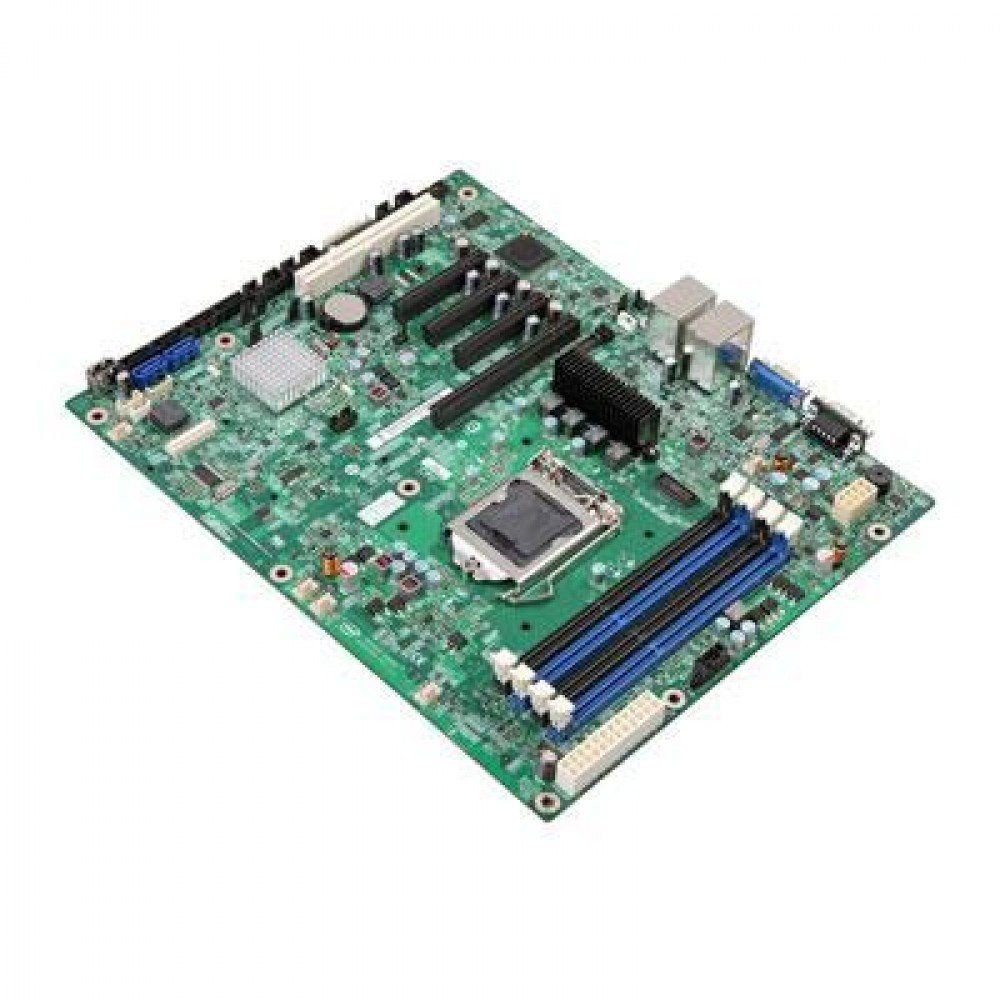
රූපය 1: Intel Server Board S1200BTLR. This image displays the full layout of the server motherboard, highlighting the CPU socket, RAM slots, PCI Express slots, and various connectors.
2. පිහිටුවීම සහ ස්ථාපනය
Before beginning installation, ensure your workspace is clean, well-lit, and static-free. Use an anti-static wrist strap to prevent damage to components.
2.1. අවශ්ය සංරචක
- Intel Xeon Processor E3-1200 series (LGA 1155 socket compatible)
- DDR3 ECC UDIMM memory modules (1066/1333MHz)
- අනුකූල බල සැපයුම් ඒකකය (PSU)
- Storage devices (SATA hard drives or SSDs)
- Server chassis
- Operating system installation media
2.2. සකසනය ස්ථාපනය කිරීම
- මවු පුවරුවේ LGA 1155 CPU සොකට් එක සොයා ගන්න.
- Gently lift the load plate lever and open the load plate.
- Align the processor's triangular mark with the corresponding mark on the socket. Carefully place the processor into the socket without forcing it.
- Close the load plate and secure it with the lever.
- තාප පේස්ට් ආලේප කර නිෂ්පාදකයාගේ උපදෙස් අනුව CPU සිසිලකය ස්ථාපනය කරන්න.
2.3. මතක ස්ථාපනය
- Identify the four DDR3 UDIMM sockets.
- මතක කොටසේ දෙපසම රඳවා ගැනීමේ ක්ලිප් විවෘත කරන්න.
- Align the memory module's notch with the key in the slot.
- රඳවා ගැනීමේ ක්ලිප් නිසි තැනට වැටෙන තුරු මොඩියුලය ස්ලට් එකට තදින් ඇතුළු කරන්න.
- Repeat for additional memory modules, ensuring proper channel configuration as per your system requirements.
2.4. ගබඩා උපාංග සම්බන්ධතාවය
- Connect SATA data cables from your storage devices to the SATA ports on the motherboard. The board features 2x 6Gbps ports and 4x 3Gbps ports.
- Connect power cables from the PSU to your storage devices.
2.5. බල සැපයුම් සම්බන්ධතාවය
- Connect the 24-pin ATX main power connector from the PSU to the corresponding socket on the motherboard.
- Connect the 8-pin (or 4-pin) ATX 12V CPU power connector to the motherboard.
2.6. පුළුල් කිරීමේ කාඩ්පත් ස්ථාපනය
The server board includes various PCI Express and PCI slots:
- 1x PCI Express 2.0 x8 slot (x16 mechanical)
- 1x PCI Express 2.0 x8 slot (x8 mechanical)
- 1x PCI Express 2.0 x4 slot (x8 mechanical)
- 1x PCI Express x4 slot (x8 mechanical)
- 1x PCI 32/33 (5V) slot
Insert expansion cards firmly into the appropriate slots and secure them with the chassis retention mechanism.
3. මෙහෙයුම් උපදෙස්
3.1. මූලික බලය සක්රිය කිරීම
- After all components are installed and connected, ensure the power supply is switched on.
- Press the power button on your server chassis.
- Monitor the POST (Power-On Self-Test) sequence.
3.2. BIOS/UEFI වින්යාසය
During POST, press the designated key (usually DEL or F2) to enter the BIOS/UEFI setup utility. Here you can configure:
- ඇරඹුම් ඇණවුම
- SATA controller mode (AHCI, RAID)
- මතක සැකසුම්
- Integrated peripherals
- පද්ධතියේ වේලාව සහ දිනය
Refer to the Intel documentation for detailed BIOS/UEFI settings specific to the S1200BTLR.
3.3. මෙහෙයුම් පද්ධති ස්ථාපනය
Insert your operating system installation media (USB drive or DVD) and configure the BIOS/UEFI to boot from it. Follow the on-screen instructions to install your preferred server operating system (e.g., Linux, Windows Server).
3.4. ධාවක ස්ථාපනය
After OS installation, install all necessary drivers for the motherboard components, including chipset, network controllers (Intel Dual Gigabit Controller 82574L and 82578DM), and any integrated graphics or RAID controllers. Drivers are typically available on the Intel support webඅඩවිය.
4. නඩත්තු කිරීම
Regular maintenance ensures optimal performance and longevity of your Intel Server Board S1200BTLR.
4.1. දූවිලි ඉවත් කිරීම
Periodically clean the interior of the server chassis to prevent dust buildup, which can lead to overheating. Use compressed air to gently remove dust from heatsinks, fans, and other components. Ensure the system is powered off and unplugged before cleaning.
4.2. Firmware and Driver Updates
නිතිපතා ඉන්ටෙල් සහාය පරීක්ෂා කරන්න website for updated BIOS/UEFI firmware and device drivers. Keeping these components up-to-date can improve stability, performance, and security.
4.3. සංරචක පරීක්ෂාව
Occasionally inspect the motherboard for any signs of damage, loose connections, or bulging capacitors. Address any issues promptly.
5. දෝශ නිරාකරණය
මෙම කොටසින් ඔබට මුහුණ දීමට සිදුවිය හැකි පොදු ගැටළු සඳහා විසඳුම් සපයයි.
5.1. බලය නැත
- Verify that the power supply unit (PSU) is connected correctly to the motherboard (24-pin ATX and 8-pin/4-pin CPU power).
- Ensure the PSU is switched on and connected to a working power outlet.
- Check the power button connection from the chassis to the motherboard.
- වෙනත් පද්ධතියක් හෝ තිබේ නම් PSU පරීක්ෂකයක් සමඟ PSU පරීක්ෂා කරන්න.
5.2. සංදර්ශක ප්රතිදානයක් නොමැත
- Ensure the monitor is connected to the correct video output port and is powered on.
- Reseat the memory modules. Incorrectly seated RAM is a common cause of no display.
- If using a dedicated graphics card, ensure it is properly seated in its PCIe slot and has auxiliary power connected (if required).
- එක් මතක මොඩියුලයක් පමණක් ස්ථාපනය කර ආරම්භ කිරීමට උත්සාහ කරන්න.
5.3. පද්ධති අස්ථාවරත්වය හෝ බිඳ වැටීම්
- Check CPU and system temperatures. Overheating can cause instability. Ensure CPU cooler is properly installed.
- දෝෂ සහිත RAM මොඩියුල පරීක්ෂා කිරීමට මතක රෝග විනිශ්චය මෙවලම් ධාවනය කරන්න.
- Verify that all drivers are correctly installed and up-to-date.
- Check for BIOS/UEFI updates.
- Ensure the power supply is sufficient for all installed components.
5.4. Storage Device Not Detected
- Verify SATA data and power cables are securely connected to both the drive and the motherboard.
- Check BIOS/UEFI settings to ensure SATA ports are enabled and configured correctly (e.g., AHCI mode).
- Test the drive on another system or with a different SATA cable.
6. පිරිවිතර
| විශේෂාංගය | විස්තර |
|---|---|
| මාදිලියේ නම | S1200BTLR |
| වෙළඳ නාමය | ඉන්ටෙල් |
| CPU සොකට් | LGA 1155 |
| අනුකූල සකසනයන් | Intel Xeon E3-1200 series |
| චිප්සෙට් වර්ගය | Intel C204 |
| RAM මතක තාක්ෂණය | DDR3 ECC UDIMM |
| මතක ඔරලෝසු වේගය | 1066 MHz, 1333 MHz |
| මතක තව් | 4 |
| උපරිම මතක ගබඩා ධාරිතාව | 16 GB (per input) |
| PCI එක්ස්ප්රස් ස්ලොට් | 1x PCIe 2.0 x8 (x16 mechanical), 1x PCIe 2.0 x8 (x8 mechanical), 1x PCIe 2.0 x4 (x8 mechanical), 1x PCIe x4 (x8 mechanical) |
| PCI Slots | 1x PCI 32/33 (5V) |
| SATA වරාය | 6 (2x 6Gbps, 4x 3Gbps) with Intel Embedded Server RAID Technology and Intel RST |
| ජාල පාලකය | Embedded Intel Dual Gigabit Controller 82574L and 82578DM |
| ගැළපෙන උපාංග | Personal Computer (Server) |
| වේදිකාව | Linux (and other server OS) |
| අයිතමයේ බර | රාත්තල් 3.75 කි |
| පළමු දිනය තිබේ | 24 මැයි 2012 |
7. සහාය සහ වගකීම්
7.1 තාක්ෂණික සහාය
For technical assistance, driver downloads, and additional documentation, please visit the official Intel support website. You can find product-specific information by searching for "Intel Server Board S1200BTLR" or "S1200BTLR".
Intel's support resources typically include:
- දැනුම පදනම් ලිපි
- ධාවක සහ මෘදුකාංග බාගැනීම්
- ප්රජා සංසද
- Contact information for direct support
7.2. වගකීම් තොරතුරු
Warranty terms and conditions for the Intel Server Board S1200BTLR are provided by Intel. Please refer to the warranty documentation included with your product or visit the Intel website for the most current warranty policy. Keep your proof of purchase for warranty claims.


