හැඳින්වීම
This manual provides comprehensive instructions for the installation, operation, maintenance, and troubleshooting of your Intel Core i3-3220 Processor. Designed for desktop computing, this processor delivers reliable performance for everyday tasks and multimedia.
නිෂ්පාදනය අවසන්view
The Intel Core i3-3220 is a dual-core processor featuring Intel Hyper-Threading Technology, providing 4-way multi-task processing. It operates at a base clock speed of 3.3 GHz and is designed for the LGA 1155 socket. This processor includes 3MB of Intel Smart Cache and supports a 5.0 GT/s DMI (Direct Media Interface).
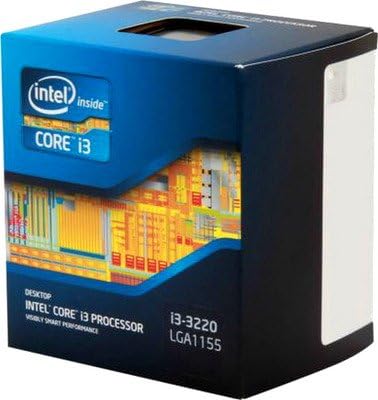
Image: Retail packaging for the Intel Core i3-3220 Processor, showing the Intel Inside Core i3 branding and model number.
සැකසුම සහ ස්ථාපනය
Proper installation is crucial for optimal performance and longevity of your processor. Always ensure your system is powered off and unplugged before beginning installation.
පෙර-ස්ථාපන පිරික්සුම් ලැයිස්තුව:
- Compatible Motherboard (LGA 1155 socket).
- Adequate CPU Cooler (compatible with LGA 1155).
- Thermal Interface Material (thermal paste).
- Anti-static wrist strap or proper grounding procedures.
ස්ථාපන පියවර:
- මවු පුවරුව සකස් කරන්න: CPU සොකට් ලීවරය විවෘත කර පැටවුම් තහඩුව ඔසවන්න.
- සකසනය හසුරුවන්න: Hold the processor by its edges. Avoid touching the gold contacts or the top surface.
- පෙළගස්වා ඇතුළු කරන්න: Carefully align the two notches on the processor with the keys on the socket. Gently lower the processor into the socket. Do not force it.
- සකසනය සුරක්ෂිත කරන්න: Close the load plate and push the lever down until it locks into place.
- තාප පේස්ට් යොදන්න: Apply a small amount of thermal paste (pea-sized dot) to the center of the processor's integrated heat spreader (IHS).
- CPU සිසිලකය ස්ථාපනය කරන්න: Mount the CPU cooler according to its manufacturer's instructions, ensuring even pressure distribution.
- විදුලි පංකාව සම්බන්ධ කරන්න: Connect the CPU cooler fan cable to the designated CPU_FAN header on the motherboard.
Note: Refer to your motherboard's manual for specific CPU installation instructions, as procedures may vary slightly.
සකසනය ක්රියාත්මක කිරීම
Once installed, the Intel Core i3-3220 processor functions as the central processing unit of your computer system. It executes instructions, performs calculations, and manages the flow of information, enabling your operating system and applications to run.
Initial Boot and Driver Installation:
- After assembling your PC, power it on. The system should recognize the new processor.
- Install the operating system if not already present.
- Install the latest chipset drivers for your motherboard, typically found on the motherboard manufacturer's website. These drivers ensure proper communication between the CPU and other system components.
The processor is designed to operate within specified thermal and power limits. Modern operating systems and motherboards automatically manage CPU frequencies and power states for optimal performance and energy efficiency.
පිරිවිතර
| විශේෂාංගය | විස්තර |
|---|---|
| CPU නිෂ්පාදකයා | ඉන්ටෙල් |
| CPU ආකෘතිය | Core i3 |
| අයිතම ආදර්ශ අංකය | i3 3220 |
| CPU වේගය | 3.3 GHz |
| CPU සොකට් | LGA 1155 |
| අයිතමයේ බර | අවුන්ස 15.8 කි |
| ASIN | B00AHAV68S |
| පළමු දිනය තිබේ | 10 මාර්තු 2014 |
නඩත්තු කිරීම
Processors generally require minimal direct maintenance. However, maintaining the overall cleanliness and proper thermal environment of your computer system is vital for the processor's longevity and performance.
- දූවිලි කළමනාකරණය: Regularly clean dust from inside your computer case, especially around the CPU cooler and case fans. Dust accumulation can impede airflow and lead to overheating.
- තාප පේස්ට්: The thermal paste applied between the CPU and cooler may degrade over many years. If you notice consistently high temperatures, reapplying fresh thermal paste might be necessary. This should only be done by experienced users.
- පාරිසරික තත්ත්වයන්: Ensure your computer operates in a well-ventilated area, away from direct sunlight or heat sources.
දෝෂගවේෂණය
If you encounter issues with your system after installing the processor, consider the following common troubleshooting steps:
- බූට් එකක් නැත/සංදර්ශකයක් නැත:
- Verify that the CPU is correctly seated in its socket and the lever is locked.
- Ensure the CPU power cable (4-pin or 8-pin EPS) is securely connected to the motherboard.
- Check that the CPU cooler is properly installed and its fan is spinning.
- Confirm RAM modules are correctly seated.
- අධික උනුසුම් වීම:
- Ensure the CPU cooler is making good contact with the CPU and thermal paste is applied correctly.
- Check for proper airflow within the computer case; clean any dust buildup.
- Verify CPU cooler fan is functioning.
- පද්ධති අස්ථාවරත්වය/බිඳවැටීම්:
- Update motherboard BIOS to the latest version (if necessary and compatible).
- සියලුම ධාවක, විශේෂයෙන් චිප්සෙට් ධාවක, යාවත්කාලීන බව සහතික කර ගන්න.
- Run system diagnostics to check for other component failures (RAM, storage).
If issues persist, consult your motherboard's troubleshooting guide or seek professional assistance.
වගකීම් සහ සහාය
Intel processors typically come with a limited warranty. For specific warranty terms and conditions, please refer to the documentation included with your purchase or visit the official Intel webඅඩවිය.
For technical support, driver downloads, and additional resources, please visit the official Intel support webඅඩවිය:
For information regarding protection plans, please refer to the details provided by your retailer at the time of purchase.


