1. හැඳින්වීම
ස්තූතියි, උදව් කළාටasing the Fonestar AS-170RU Hi-Fi Amplifier. This device is designed to provide high-fidelity stereo audio amplification, featuring a built-in USB/MP3 player, AM/FM digital tuner, and multiple audio inputs. This manual provides detailed instructions for safe installation, operation, and maintenance of your amplifier. Please read this manual thoroughly before use and retain it for future reference.
2. ආරක්ෂිත උපදෙස්
- බල සැපයුම: සහතික කරන්න amplifier is connected to a power supply matching the voltage specified on the unit. Disconnect the power cord from the outlet if the unit will not be used for an extended period.
- වාතාශ්රය: Do not block ventilation openings. Ensure adequate space around the unit for proper airflow to prevent overheating.
- ජලය සහ තෙතමනය: ඒකකය වැසි, තෙතමනය හෝ බිංදු/ඉසින ද්රව වලට නිරාවරණය නොකරන්න. බඳුන් වැනි ද්රව වලින් පිරුණු වස්තූන් ඒකකය මත තබන්න එපා.
- තාප ප්රභවයන්: ඒකකය රේඩියේටර්, තාප රෙජිස්ටර්, උදුන් හෝ වෙනත් උපකරණ (ඇතුළුව) වැනි තාප ප්රභවයන්ගෙන් ඈත් කර තබන්න. ampලිෆයර්) තාපය නිපදවන.
- පිරිසිදු කිරීම: වියළි රෙද්දකින් පමණක් පිරිසිදු කරන්න. දියර පිරිසිදු කරන්නන් හෝ aerosol ක්ලීනර් භාවිතා නොකරන්න.
- සේවා: මෙම නිෂ්පාදනය ඔබම සේවය කිරීමට උත්සාහ නොකරන්න. සියලුම සේවා සුදුසුකම් ලත් සේවකයින් වෙත යොමු කරන්න.
- ස්ථානගත කිරීම: Place the unit on a stable, flat surface. Avoid placing it in direct sunlight or near strong magnetic fields.
3. පැකේජ අන්තර්ගතය
කරුණාකර පහත අයිතම ඔබගේ පැකේජයට ඇතුළත් කර ඇත්දැයි පරීක්ෂා කරන්න:
- Fonestar AS-170RU Hi-Fi Ampජීවිතාරක්ෂකයා
- දුරස්ථ පාලකය
- ඒඑම් ඇන්ටෙනා
- FM ඇන්ටනාව
- පරිශීලක අත්පොත (මෙම ලේඛනය)
4. නිෂ්පාදන අවසන්view
4.1 ඉදිරිපස පුවරුව
The front panel provides access to essential controls and the display.
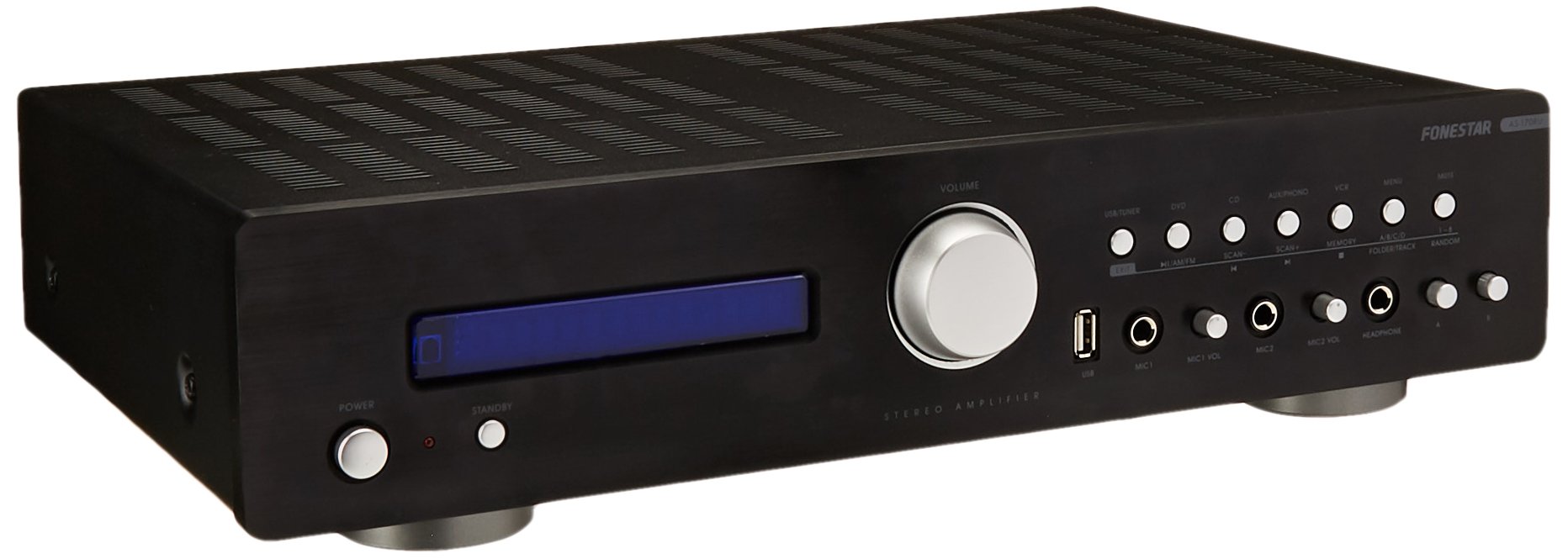
Image: Fonestar AS-170RU Front Panel. මෙම රූපය ඉදිරිපස පෙන්වයි view හි amplifier, showing the VFD display, USB port, headphone output, input selectors, volume knob, and other control buttons.
- බල බොත්තම: හැරෙනවා ampජීවිත කාලය ක්රියාත්මක කිරීම හෝ අක්රිය කිරීම.
- VFD Display: Shows current input, volume level, tuner information (frequency, RDS), and USB/MP3 track details (ID3 tag).
- USB Port: For connecting USB storage devices to play MP3 files.
- හෙඩ්ෆෝන් ප්රතිදානය: හෙඩ්ෆෝන් සම්බන්ධ කිරීම සඳහා 6.3mm ජැක්.
- ආදාන තේරීම්: Buttons for choosing audio sources (CD, DVD, VCR, AUX/Phono, USB/Tuner).
- ශබ්ද පාලනය: Rotary knob to adjust the master volume level.
- මයික්රෆෝන ආදාන: Two 6.3mm microphone jacks with independent volume control.
- නාද පාලන: Buttons or menu options for adjusting Bass, Treble, and Balance.
4.2 පසුපස පුවරුව
The rear panel contains all the necessary connections for your audio sources, speakers, and antennas.

Image: Fonestar AS-170RU Rear Panel. This image illustrates the rear connections of the amplifier, including speaker terminals (A/B), various RCA input jacks (CD, DVD, VCR, AUX/Phono), REC OUT, PRE OUT, AMP IN, and antenna connections (FM COAX, AM LOOP ANT).
- Speaker Outputs (A/B): Terminals for connecting two pairs of speakers. Supports 4-16 ohms for A or B, or 8-16 ohms for A+B.
- Audio Inputs (RCA):
- CD ආදානය: For connecting a CD player.
- DVD Input: For connecting a DVD player or other audio source.
- VCR Input: For connecting a VCR or other audio source.
- AUX/PHONO Input: For connecting auxiliary devices or a turntable (Phono input may require a pre-amplifier if your turntable does not have one built-in).
- පිටතට යන්න: RCA output for connecting to a recording device.
- පූර්ව පිටවීම: RCA output for connecting to an external power ampජීවිතාරක්ෂකයා.
- AMP IN: RCA input for connecting an external pre-ampජීවිතාරක්ෂකයා.
- ඇන්ටෙනා සම්බන්ධතා:
- FM COAX 75Ω: For connecting an FM antenna.
- AM LOOP ANT: For connecting the supplied AM loop antenna.
4.3 දුරස්ථ පාලනය
The included remote control allows convenient operation of the ampදුර සිට lifier.

Image: Fonestar AS-170RU Remote Control. This image shows the remote control unit with various buttons for power, input selection, volume, mute, tuner functions, USB playback controls, and tone adjustments.
- සුදානමින් සිටීම: බලය සක්රිය / අක්රිය.
- ආදාන තේරීම්: Buttons for CD, DVD, VCR, AUX/PHONO, USB/TUNER.
- ශබ්දය ඉහළ/පහළ (VOL +/-): ප්රධාන පරිමාව සකසයි.
- නිශ්ශබ්දතාව: ශ්රව්ය ප්රතිදානය නිහඬ කරයි.
- AM/FM: Switches between AM and FM tuner modes.
- ස්කෑන්: Scans for radio stations.
- මතකය: Stores radio station presets.
- USB Playback Controls: Play/Pause, Stop, Skip Track, Folder/Track navigation.
- EQ OFF / BASS / TREBLE: Access tone controls.
- RDS / ID3: Displays RDS information for radio or ID3 tag MP3 සඳහා files.
5. පිහිටුවීම
5.1 සම්බන්ධක ස්පීකර
- සහතික කරන්න ampලයිෆයර් ක්රියා විරහිත කර විදුලිබල පද්ධතියෙන් විසන්ධි කර ඇත.
- Connect your speakers to the "SPEAKERS OUTPUT" terminals on the rear panel.
- Match the positive (+) terminal of the amplifier (red) to the positive (+) terminal of your speaker, and the negative (-) terminal (black) to the negative (-) terminal.
- The AS-170RU supports two groups of speakers (A and B). You can connect one pair to "SPEAKERS A" and another to "SPEAKERS B".
- Ensure your speakers' impedance matches the amplifier's specifications: 4-16 ohms for A or B, or 8-16 ohms for A+B.
5.2 ශ්රව්ය මූලාශ්ර සම්බන්ධ කිරීම
Use RCA cables to connect your audio components to the corresponding input jacks on the rear panel.
- සීඩි ධාවකය: "CD" ආදානයට සම්බන්ධ කරන්න.
- DVD ධාවකය: Connect to the "DVD" input.
- වීසීආර්: Connect to the "VCR" input.
- Auxiliary Device (e.g., smartphone, tablet): Connect to the "AUX/PHONO" input.
- හැරවිය හැකි: Connect to the "AUX/PHONO" input. If your turntable does not have a built-in pre-amplifier, you may need an external phono pre-ampජීවිතාරක්ෂකයා.
5.3 සම්බන්ධක ඇන්ටනා
- එෆ්එම් ඇන්ටෙනා: Connect the supplied FM wire antenna to the "FM COAX 75Ω" terminal. Extend the wire for optimal reception.
- AM ඇන්ටනාව: Connect the supplied AM loop antenna to the "AM LOOP ANT" terminals. Position the loop for best reception.
5.4 බල සම්බන්ධතාවය
සියලුම ශ්රව්ය සහ ස්පීකර් සම්බන්ධතා ඇති කළ පසු, ප්ලග් කරන්න amplifier's power cord into a suitable AC power outlet.
6. මෙහෙයුම් උපදෙස්
6.1 මූලික මෙහෙයුම
- බලය සක්රිය / අක්රිය: Press the Power button on the front panel or the STANDBY button on the remote control to turn the ampජීවිත කාලය ක්රියාත්මක කිරීම හෝ අක්රිය කිරීම.
- ආදාන මූලාශ්රය තෝරන්න: Press the desired input selector button on the front panel (CD, DVD, VCR, AUX/PHONO) or the remote control (CD, DVD, VCR, AUX/PHONO, USB/TUNER).
- පරිමාව සකසන්න: Rotate the Volume knob on the front panel or use the VOL +/- buttons on the remote control to adjust the sound level.
- නිශ්ශබ්ද කරන්න: Press the MUTE button on the remote control to temporarily silence the audio. Press it again to restore sound.
6.2 USB/MP3 නැවත ධාවනය
- Insert a USB storage device (flash drive) into the USB port on the front panel.
- Select "USB/TUNER" as the input source. The amplifier will automatically detect and begin playing MP3 files.
- Use the playback controls on the remote control (Play/Pause, Stop, Skip Track, Folder/Track) to navigate and control your music.
- The VFD display will show track information, including ID3 tags තිබේ නම්.
- ද amplifier supports up to 65,000 indexable folders and files, with a maximum of 8 folder levels.
6.3 AM/FM Tuner Operation
- Select "USB/TUNER" as the input source, then press the AM/FM button on the remote control to switch between AM and FM bands.
- ස්වයංක්රීය ස්කෑන්: Press the SCAN button on the remote control to automatically search for and store available radio stations.
- අත්පොත සුසර කිරීම: Use the tuning buttons (usually arrow keys) on the remote control to manually adjust the frequency.
- පෙර සැකසූ ස්ථාන: ද amplifier supports 64 presets. Use the MEMORY button to store and recall your favorite stations.
- RDS Function: If available, press the RDS button on the remote control to display Radio Data System information (e.g., station name, program type).
6.4 මයික්රොෆෝන ආදාන
- Connect microphones to the 6.3mm MIC 1 and MIC 2 jacks on the front panel.
- Adjust the independent volume controls for each microphone to achieve the desired level.
6.5 ස්වරය සහ තුලනය පාලනය
ද amplifier allows adjustment of bass, treble, and balance through its menu system or dedicated buttons on the remote control. Refer to the remote control section for specific buttons like EQ OFF, BASS, TREBLE.
7. නඩත්තු කිරීම
- පිරිසිදු කිරීම: Disconnect the power before cleaning. Use a soft, dry cloth to wipe the exterior surfaces. Do not use abrasive cleaners, waxes, or solvents.
- වාතාශ්රය: වාතාශ්රය විවරයන් දූවිලි හා සුන්බුන් වලින් පිරිසිදු දැයි වරින් වර පරීක්ෂා කරන්න.
- ගබඩා: If storing the unit for an extended period, unplug it from the power outlet and store it in a cool, dry place, away from direct sunlight and extreme temperatures.
8. දෝශ නිරාකරණය
If you encounter problems with your amplifier, refer to the following table for possible solutions.
| ගැටලුව | විය හැකි හේතුව | විසඳුම |
|---|---|---|
| බලය නැත | විදුලි රැහැන සම්බන්ධ කර නැත; විදුලිබල පිටවාන දෝෂ සහිතයි; Ampපොරොත්තු මාදිලියේ lifier. | Ensure power cord is securely plugged in. Test the outlet with another device. Press the Power/STANDBY button. |
| ශබ්දයක් නැත | වැරදි ආදානය තෝරා ඇත; ශබ්දය ඉතා අඩුය; ස්පීකර් නිසි ලෙස සම්බන්ධ වී නැත; නිහඬ කිරීමේ කාර්යය සක්රියයි. | Select the correct input source. Increase volume. Check speaker connections. Deactivate MUTE. |
| දුර්වල ගුවන් විදුලි පිළිගැනීම | Antenna not connected or poorly positioned; Interference. | Connect and adjust the position of the AM/FM antennas. Move the ampලිෆයර් අනෙකුත් ඉලෙක්ට්රොනික උපාංග වලින් ඈත් කරන්න. |
| USB ප්ලේබැක් ක්රියා නොකරයි | USB උපාංගය නිවැරදිව ඇතුළත් කර නැත; නොගැලපේ. file format; USB device faulty. | Ensure USB device is fully inserted. Check if files are MP3 format. Try a different USB device. |
| Amplifier turns off unexpectedly or cycles power | Overheating; Short circuit in speaker wiring; Internal fault. | Ensure adequate ventilation. Check speaker wires for frayed strands causing short circuits. If the problem persists, disconnect power and contact qualified service personnel. |
9. පිරිවිතර
- ආකෘතිය: AS-170RU
- බල ප්රතිදානය: 80 + 80 W RMS at 4 Ω
- ස්පීකර් සම්බාධනය: 4-16 Ω (A or B), 8-16 Ω (A+B)
- ආරක්ෂාව: 3 circuits (short circuits, overload, overvoltage)
- USB ප්ලේයරය: MP3 file නැවත ධාවනය, ID3 tag support. Max 65,000 indexable folders/files, max 8 folder levels.
- සුසරකය: Digital AM/FM, 64 presets, RDS.
- යෙදවුම්: 2 x Microphone (6.3mm), 4 x RCA (CD, DVD, VCR, AUX/Phono), 1 x RCA (AMP තුල).
- නිමැවුම්: 1 x RCA (REC OUT), 1 x RCA (PRE OUT), Headphone (6.3mm).
- සංදර්ශකය: Blue VFD.
- නාද පාලනය: Bass, Treble, Balance (via menu/remote).
- මානයන්: 40 x 40 x 60 සෙ.මී. (ආසන්න වශයෙන් 15.7 x 15.7 x 23.6 අඟල්)
- බර: 7.2 kg (දළ වශයෙන් රාත්තල් 15.87)
10. වගකීම් සහ සහාය
For warranty information and technical support, please refer to the warranty card included with your product or contact your authorized Fonestar dealer. Do not attempt to repair the unit yourself, as this may void your warranty.


