1. හැඳින්වීම
This manual provides comprehensive instructions for the proper use and maintenance of your Horizon SF-400D Digital Precision Scale. Please read this manual thoroughly before operating the device to ensure accurate measurements and prolong its lifespan.
The Horizon SF-400D is a versatile digital precision scale designed for various weighing applications, including jewelry, coins, herbs, spices, and medication. It offers high accuracy and multiple weighing modes, along with a convenient counting function.

රූපය 1: Horizon SF-400D Digital Precision Scale. This image shows the overall design of the scale, featuring a black body, a stainless steel weighing platform, and a blue backlit LCD display with control buttons.
2. ආරක්ෂිත පූර්වාරක්ෂාවන්
- උපරිම ධාරිතාව වන ග්රෑම් 500 ට වඩා තරාදිය අධික ලෙස පටවන්න එපා.
- අධික උෂ්ණත්වයට, ආර්ද්රතාවයට හෝ සෘජු හිරු එළියට පරිමාණය නිරාවරණය කිරීමෙන් වළකින්න.
- ශක්තිමත් විද්යුත් චුම්භක ක්ෂේත්රවලින් පරිමාණය ඈත් කර තබන්න.
- මෘදු, ඩී සමග පරිමාණය පිරිසිදු කරන්නamp රෙදි. උල්ෙල්ඛ පිරිසිදු කරන්නන් භාවිතා නොකරන්න හෝ ඒකකය ජලයේ ගිල්වන්න එපා.
- Ensure the scale is placed on a stable, level surface during operation to ensure accuracy.
3. නිෂ්පාදන සංරචක
Familiarize yourself with the main parts of your SF-400D scale:
- බර කිරීමේ වේදිකාව: භාණ්ඩ තැබීම සඳහා මල නොබැඳෙන වානේ මතුපිට.
- LCD සංදර්ශකය: Backlit screen showing weight, units, and other indicators.
- සක්රිය / අක්රිය බොත්තම: පරිමාණය සක්රිය හෝ අක්රිය කරයි.
- මාදිලි බොත්තම: Changes weighing units (g, oz, ct, dwt, gn, T).
- TARE බොත්තම: Resets the display to zero, useful for weighing items in a container.
- PCS බොත්තම: කෑලි ගණන් කිරීමේ කාර්යය සක්රිය කරයි.
- CAL බොත්තම: Used for calibration.
- සකස් කළ හැකි කකුල්: Located on the bottom for leveling the scale.
- බුබුලු මට්ටම: Integrated on the scale to assist with leveling.
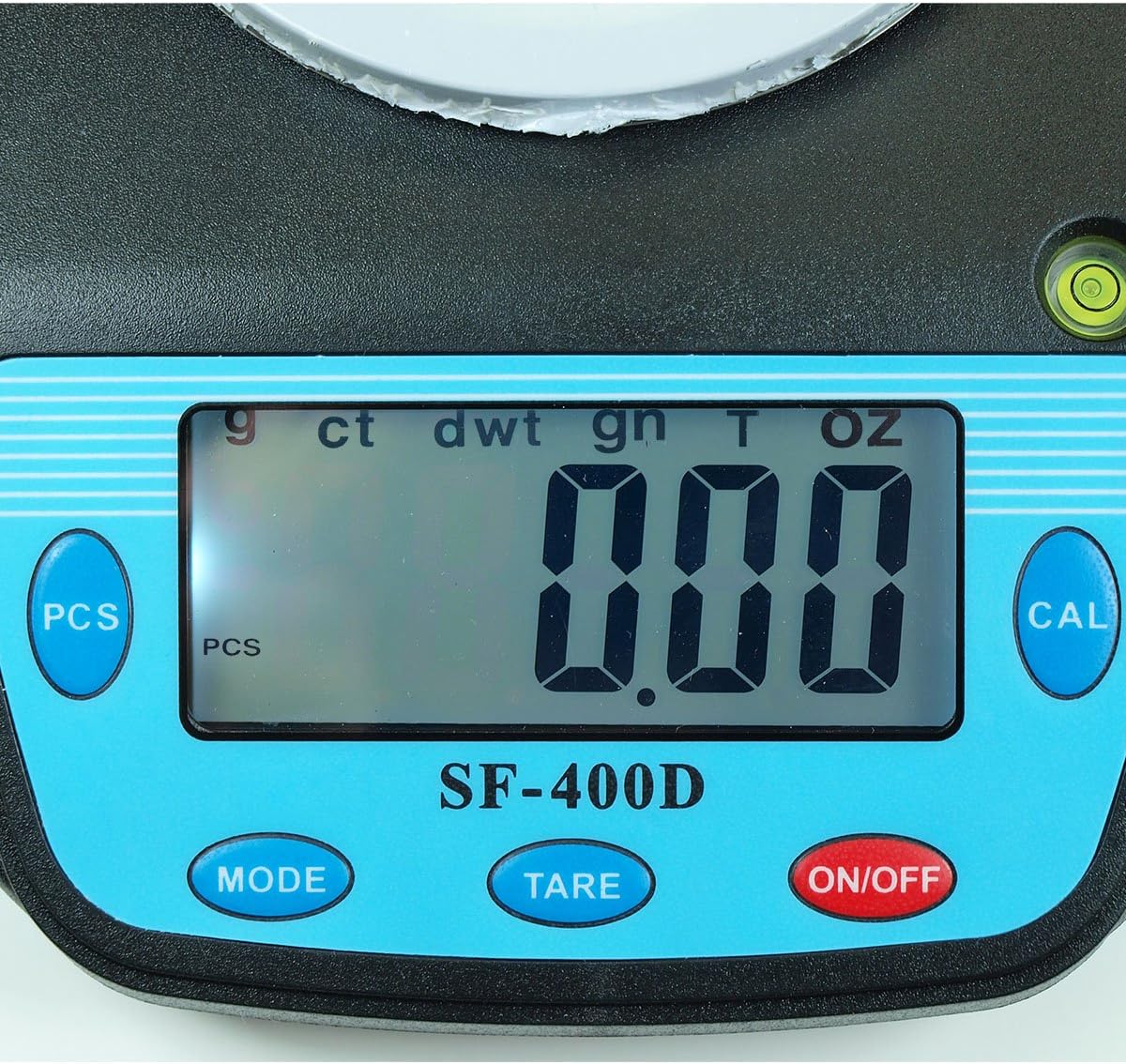
රූපය 2: Close-up of the SF-400D display and control buttons. This image highlights the LCD screen, showing various unit indicators (g, ct, dwt, gn, T, oz), and the function buttons: PCS, MODE, TARE, ON/OFF, and CAL.

රූපය 3: Underside of the SF-400D scale showing adjustable legs. Green arrows indicate the location of the four adjustable feet, which are used to level the scale for accurate measurements.
4. පිහිටුවීම
4.1. බල සැපයුම
The SF-400D scale operates on two AA batteries (included) or an optional AC power adapter (not included).
- Open the battery compartment cover on the underside of the scale.
- නිවැරදි ධ්රැවීයතාව (+/-) සහතික කරමින් AA බැටරි දෙකක් ඇතුළු කරන්න.
- බැටරි මැදිරිය වසා දමන්න.
- Alternatively, connect a compatible AC power adapter (6V, amperage not specified in product details, consult manufacturer if needed) to the power port.
4.2. ස්ථානගත කිරීම සහ මට්ටම් කිරීම
For optimal accuracy, the scale must be placed on a stable, flat, and level surface.
- Place the scale on your desired weighing surface.
- Observe the integrated bubble level.
- Adjust the four adjustable legs on the bottom of the scale by rotating them until the bubble is centered within the level indicator.
5. මෙහෙයුම් උපදෙස්
5.1. මූලික බර කිරා බැලීම
- ඔබන්න සක්රිය / අක්රිය button to turn on the scale. The display will show "88888" and then "0.00" (or "0.0" depending on the unit).
- සංදර්ශකය බිංදුව නොපෙන්වන්නේ නම්, ඔබන්න TARE පරිමාණය ශුන්ය කිරීමට බොත්තම.
- ඔබන්න මාදිලිය button to select your desired weighing unit (g, oz, ct, dwt, gn, T).
- Gently place the item(s) to be weighed on the center of the stainless steel platform.
- Read the stable weight displayed on the LCD screen.
- පරිමාණය අක්රිය කිරීමට, ඔබා අල්ලාගෙන සිටින්න සක්රිය / අක්රිය button for a few seconds. The scale also features an auto shut-off function to conserve battery power.
5.2. තාරේ ශ්රිතය
The Tare function allows you to subtract the weight of a container, so only the contents are weighed.
- බර කිරන වේදිකාව මත හිස් භාජනයක් තබන්න.
- Wait for the display to stabilize and show the container's weight.
- ඔබන්න TARE button. The display will reset to "0.00" (or "0.0").
- Add the items you wish to weigh into the container. The display will now show only the net weight of the items.
- To clear the tare, remove all items from the platform and press TARE again if the display does not return to zero automatically.
5.3. Piece Counting Function (PCS)
This function is useful for counting multiple identical items.
- Turn on the scale and ensure it is zeroed.
- ඔබන්න PCS button. The display will show "PCS" and a sample size (e.g., "25", "50", "75", "100").
- ඔබන්න මාදිලිය button to cycle through the available sample sizes (25, 50, 75, 100 pieces). Select the sample size that matches the number of items you will place on the scale for sampලින්ග්.
- හරියටම s ගණන තබන්න.ample items (e.g., 25 pieces) onto the weighing platform according to your selected sample ප්රමාණය.
- ඔබන්න PCS s තහවුරු කිරීමට නැවත බොත්තම ඔබන්නample. The display will now show the number of pieces.
- දැන් ඔබට එකම වර්ගයේ තවත් අයිතම එකතු කළ හැකි අතර, පරිමාණය මුළු ගණන පෙන්වනු ඇත.
- ගණන් කිරීමේ මාදිලියෙන් පිටවීමට, ඔබන්න මාදිලිය බොත්තම.
5.4 ක්රමාංකනය
Calibration ensures the accuracy of your scale. It is recommended to calibrate the scale periodically or if you suspect inaccurate readings. You will need a known calibration weight (e.g., 500g) for this process.

රූපය 4: SF-400D display showing "CAL" during calibration mode. This image illustrates the scale's screen indicating it is in calibration mode, prompting the user to place a calibration weight.
- Ensure the scale is on a stable, level surface and turned off.
- ඔබා අල්ලාගෙන සිටින්න CAL බොත්තම, පසුව ඔබන්න සක්රිය / අක්රිය button simultaneously. Release both buttons when the display shows "CAL".
- The display will then show a flashing weight value (e.g., "500.00g"). This is the required calibration weight.
- කිරුම් වේදිකාවේ මැදට නිශ්චිත ක්රමාංකන බර (උදා: ග්රෑම් 500) තබන්න.
- Wait for the display to stabilize and show "PASS" or return to normal weighing mode. This indicates successful calibration.
- Remove the calibration weight. The scale is now calibrated and ready for use.
- If "FAIL" or an error message appears, repeat the calibration process.
6. නඩත්තු කිරීම
6.1 පිරිසිදු කිරීම
- Wipe the scale surface with a soft, slightly damp රෙදි.
- Do not use harsh chemicals, abrasive cleaners, or immerse the scale in water.
- ගබඩා කිරීමට හෝ ඊළඟ භාවිතයට පෙර පරිමාණය සම්පූර්ණයෙන්ම වියළී ඇති බවට වග බලා ගන්න.
6.2. ගබඩා කිරීම
- සෘජු හිරු එළියෙන් සහ අධික උෂ්ණත්වයන්ගෙන් ඈත්ව සිසිල්, වියළි ස්ථානයක පරිමාණය ගබඩා කරන්න.
- දිගු කාලයක් ගබඩා කරන්නේ නම්, කාන්දු වීම වැළැක්වීම සඳහා බැටරි ඉවත් කරන්න.
7. දෝශ නිරාකරණය
| ගැටලුව | විය හැකි හේතුව | විසඳුම |
|---|---|---|
| පරිමාණය සක්රිය නොවේ. | Low or dead batteries; incorrect battery installation; no power from AC adapter. | Replace batteries; check battery polarity; ensure AC adapter is properly connected and functional. |
| වැරදි කියවීම්. | Scale not level; unstable surface; needs calibration; overloaded; strong air currents or vibrations. | Ensure scale is level using adjustable legs and bubble level; place on stable surface; perform calibration; do not exceed 500g capacity; operate in a stable environment. |
| "O_Ld" or "EEEE" displayed. | පරිමාණය අධික ලෙස පටවා ඇත. | Remove excess weight immediately. Do not exceed 500g capacity. |
| සංදර්ශකය "UNST" පෙන්වයි. | Unstable environment or surface. | Move the scale to a more stable location, away from vibrations or drafts. |
| Counting function not working correctly. | වැරදි එස්ample size selected; sample items not identical in weight. | එස් සහතික කරන්නample size matches the number of items placed for sampling; use identical items for accurate counting. |
8. පිරිවිතර
| විශේෂාංගය | විස්තර |
|---|---|
| ආකෘතිය | SF-400D |
| ධාරිතාව | 500 grams (g) / 17.5 ounces (oz) |
| Accuracy (Readability) | 0.01 grams (g) / 0.0005 ounces (oz) |
| කිරුම් මාදිලි | g (grams), oz (ounces), ct (carats), dwt (pennyweights), gn (grains), T (troy ounces), pcs (pieces) |
| වේදිකා ද්රව්ය | මල නොකන වානේ |
| Platform Diameter | අඟල් 4.2 |
| ප්රදර්ශනය කරන්න | පසුතල ආලෝකය සහිත LCD |
| බලය | 2 x AA batteries (included) or 6V AC adapter (not included) |
| මානයන් (L x W x H) | 8.25" x 6.0" x 1.75" |
| විශේෂාංග | Tare function, Piece Counting, Auto Shut-Off, Backlit Display, Adjustable Legs, Bubble Level |
9. වගකීම් සහ සහාය
For warranty information or technical support, please refer to the documentation included with your purchase or contact the retailer. Specific warranty terms may vary by region and retailer.
For general inquiries or to explore other products, you may visit the Horizon Store on Amazon.


