හැඳින්වීම
This manual provides essential information for the safe and effective use of your Olympus PEN E-PL6 Mirrorless SLR Camera. Please read it thoroughly before operating the camera and keep it for future reference. The Olympus PEN E-PL6 is designed to deliver superior image quality and performance, featuring a 16 MP Live MOS Sensor and TruePic VI image processing engine.
නිෂ්පාදනය අවසන්view
The Olympus PEN E-PL6 offers advanced photographic capabilities in a compact mirrorless body. Key features include:
- 16 Megapixel Live MOS Sensor: For high-resolution images with rich detail.
- TruePic VI Image Processing Engine: Ensures vibrant colors and fast performance.
- 3-Axis In-Body Image Stabilization: Reduces blur from camera shake, especially in low light.
- ISO Range from 100 to 25,600: Excellent low-light performance.
- 8 fps Sequential Shooting: Capture fast-moving subjects with ease.
- Full HD Video 1080i: අධි-විභේදන වීඩියෝ පටිගත කරන්න.
- 12 Art Filters and Effects: Enhance creativity directly in-camera.
- Customizable Settings (My Set) and Self-Timer: Personalize your shooting experience.
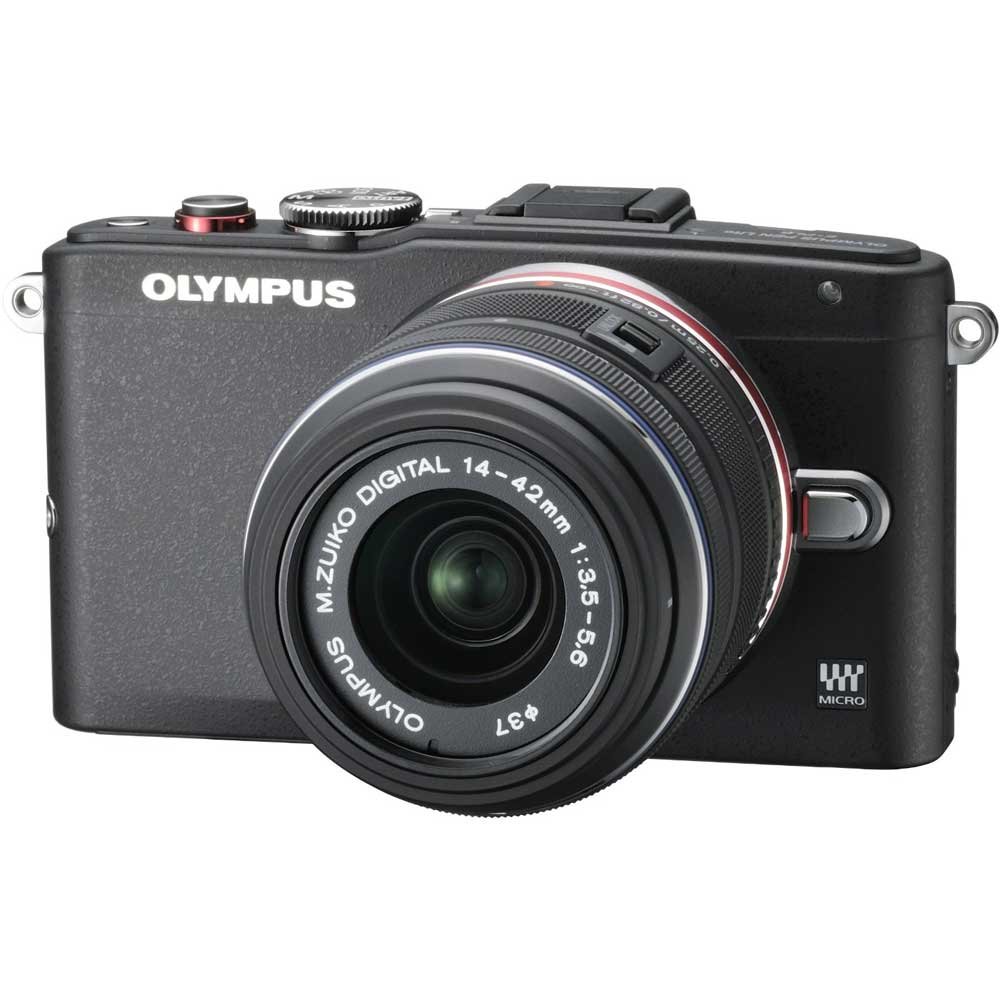
Figure 1: Olympus PEN E-PL6 Mirrorless SLR Camera with M.Zuiko Digital 14-42mm Lens attached.
සැලසුම
1. බැටරි ස්ථාපනය
- කැමරාවේ පහළින් පිහිටා ඇති බැටරි මැදිරි කවරය විවෘත කරන්න.
- නිවැරදි දිශානතිය සහතික කරමින්, සපයන ලද ලිතියම්-අයන බැටරිය ඇතුළු කරන්න.
- බැටරි මැදිරි කවරය ආරක්ෂිතව වසා දමන්න.
- Charge the battery using the provided charger before first use.
2. කාච ඇමුණුම
- Remove the body cap from the camera and the rear lens cap from the M.Zuiko Digital 14-42mm lens.
- කාචයේ සුදු දර්ශක සලකුණ කැමරා බඳෙහි ඇති සුදු දර්ශක සලකුණ සමඟ පෙළගස්වන්න.
- කාචය නිසි තැනට ක්ලික් වන තුරු දක්ෂිණාවර්තව කරකවා සවි කරන්න.
3. මතක කාඩ්පත ඇතුළු කිරීම
- මතක කාඩ්පත් තව් කවරය විවෘත කරන්න.
- Insert an SD/SDHC/SDXC memory card with the label facing the front of the camera until it clicks.
- මතක කාඩ්පත් තව් කවරය වසන්න.
කැමරාව ක්රියාත්මක කිරීම
මූලික ඡායාරූපකරණ ක්රම
Turn the mode dial to select your desired shooting mode (e.g., Program Auto, Aperture Priority, Shutter Priority, Manual, Art Filter, Scene Mode).
අවධානය යොමු කිරීම
- ස්වයංක්රීය අවධානය (AF): The camera automatically focuses when the shutter button is pressed halfway.
- අතින් අවධානය (MF): Rotate the focus ring on the lens to adjust focus manually. Use the magnified view or focus peaking for precision.
නිරාවරණ සැකසුම්
- ISO: Adjust sensitivity to light (ISO 100-25600). Higher ISO allows shooting in darker conditions but may introduce noise.
- විවරය: Controls the amount of light entering the lens and the depth of field.
- ෂටර වේගය: Controls the duration the sensor is exposed to light. Faster speeds freeze motion, slower speeds allow for motion blur.
රූප ස්ථායීකරණය
The 3-axis in-body image stabilization system helps reduce blur. Activate or deactivate it via the camera's menu settings.
Art Filters and Effects
Explore the 12 built-in Art Filters to add creative effects to your photos and videos. Select 'ART' on the mode dial to access these options.
වීඩියෝ පටිගත කිරීම
To record Full HD 1080i video, switch the mode dial to the video recording setting and press the dedicated video record button.
අභිරුචිකරණය කළ හැකි සැකසුම්
Utilize the 'My Set' feature to save your preferred camera settings for quick recall. The customizable self-timer allows for delayed shooting.
නඩත්තු කිරීම
කැමරාව සහ කාචය පිරිසිදු කිරීම
- කැමරා ශරීරය පිරිසිදු කිරීම සඳහා මෘදු, ලින්ට් රහිත රෙද්දක් භාවිතා කරන්න.
- For the lens and sensor, use a blower brush to remove dust, followed by a lens cleaning solution and cloth if necessary. Avoid touching the lens surface directly.
බැටරි සත්කාර
- භාවිතයේ නොමැති විට සිසිල් වියළි ස්ථානයක බැටරි ගබඩා කරන්න.
- Avoid fully discharging batteries regularly to prolong their lifespan.
ගබඩා කිරීම
When storing the camera for extended periods, remove the battery and memory card. Store the camera in a dry, dust-free environment, preferably with a desiccant to prevent mold.
දෝෂගවේෂණය
කැමරාව ක්රියාත්මක නොවේ
- බැටරිය සම්පූර්ණයෙන්ම ආරෝපණය වී නිවැරදිව ඇතුළු කර ඇති බවට වග බලා ගන්න.
- බැටරි සම්බන්ධතා පිරිසිදු දැයි පරීක්ෂා කරන්න.
රූප බොඳයි
- කාචය නිසි ලෙස නාභිගත කර ඇති බව තහවුරු කර ගන්න.
- Check shutter speed; use a faster speed or tripod in low light.
- Ensure image stabilization is active if needed.
මතක කාඩ්පත් දෝෂයකි
- මතක කාඩ්පත නැවත ඇතුල් කරන්න.
- Try a different memory card to rule out card malfunction.
- මතක කාඩ්පත ආකෘතිකරණය කරන්න (සටහන: මෙය සියලු දත්ත මකා දමනු ඇත).
පිරිවිතර
| විශේෂාංගය | පිරිවිතර |
|---|---|
| ආදර්ශ අංකය | PEN E-PL6 |
| සංවේදකය | 16 Megapixel Live MOS |
| රූප සකසනය | TruePic VI |
| රූප ස්ථායීකරණය | 3-Axis In-Body, Sensor-shift |
| ISO පරාසය | 100 to 25,600 (Expanded Minimum 100) |
| වීඩියෝ පටිගත කිරීම | Full HD 1080i |
| සහාය දුන්නා File ආකෘති | RAW (Olympus ARW), JPEG, MPO (3D still) |
| අනුකූල සවි කිරීම් | ක්ෂුද්ර තුනෙන් හතර |
| Optical Zoom (with 14-42mm lens) | 3x |
| Maximum Focal Length (with 14-42mm lens) | මිලිමීටර් 42 යි |
| මිනුම් විස්තරය | බහු, මධ්ය බර, ස්ථානය |
| නිෂ්පාදන මානයන් | අඟල් 4.37 x 1.5 x 2.52 |
| අයිතමයේ බර | අවුන්ස 9.8 කි |
| බැටරි | 1 Lithium Ion බැටරි (ඇතුළත්) |
| නිෂ්පාදකයා | ඔලිම්පස් |
වගකීම් සහ සහාය
Your Olympus PEN E-PL6 camera is covered by a manufacturer's warranty. For specific details regarding warranty coverage, duration, and terms, please refer to the warranty card included with your product or visit the official Olympus support website. For technical assistance, troubleshooting, or service inquiries, please contact Olympus customer support.


