1. හැඳින්වීම
The Gembird UVG-002 Audio/Video Grabber is designed to facilitate the digitization and editing of analog video and audio content on your personal computer. This device allows you to connect various analog video sources, such as VCRs, camcorders, and digital receivers, to your computer via a USB connection, enabling you to preserve your media in a digital format.
2. නිෂ්පාදන අවසන්view
2.1 පැකේජයේ අන්තර්ගතය
සියලුම අයිතම පැකේජයේ ඇති බව තහවුරු කරගන්න:
- Gembird UVG-002 Audio/Video Grabber (USB device)
- Software CD (for drivers and recording application)
- Stereo RCA Audio Cable
- Video RCA Cable
- එස්-වීඩියෝ කේබලය
- SCART to Cinch (RCA) and S-Video Adapter
- USB දිගු කේබල්
2.2 ප්රධාන ලක්ෂණ
- Direct USB connection, no external power supply required.
- Supports various analog input sources: Composite Video, Stereo RCA, S-Video.
- Includes software for video conversion and editing.
- Compatible with a wide range of devices including VCRs, digital receivers, and camcorders.

Figure 1: Gembird UVG-002 Audio/Video Grabber with all included accessories, including the main grabber unit, USB extension, RCA cables, S-Video cable, and SCART adapter.
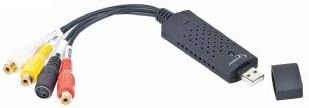
රූපය 2: සමීප රූපය view of the Gembird UVG-002 Audio/Video Grabber unit, showing the USB connector and input ports.
3. පිහිටුවීම
3.1 පද්ධති අවශ්යතා
To ensure proper functionality, your computer should meet the following minimum requirements:
- Operating System: Windows (specific versions may vary, refer to software documentation)
- Available USB port (USB 2.0 or 3.0 recommended)
- Sufficient hard drive space for recorded video files
- CD-ROM drive for software installation (if not downloading drivers online)
3.2 දෘඪාංග සම්බන්ධතාවය
- Connect the Gembird UVG-002 grabber to an available USB port on your computer. You may use the included USB extension cable if needed.
- Identify the output ports on your analog video source (e.g., VCR, camcorder). These are typically Composite Video (yellow RCA), Stereo Audio (red and white RCA), or S-Video.
- Using the appropriate cables (RCA or S-Video) provided, connect the output of your analog source to the corresponding input ports on the Gembird UVG-002 grabber.
- If your source device only has a SCART output, use the included SCART adapter. Connect the SCART adapter to your source device, then connect the RCA or S-Video cables from the adapter to the grabber. Ensure the adapter's switch is set to 'Output' if applicable.
3.3 මෘදුකාංග ස්ථාපනය
- Insert the included software CD into your computer's CD-ROM drive.
- Follow the on-screen instructions to install the drivers and the video capture/editing software.
- If the auto-run does not start, navigate to the CD drive in 'My Computer' or 'This PC' and run the setup file අතින්.
- For Windows 10/11 users, it may be necessary to manually download the latest drivers from the Gembird website if the included CD drivers are outdated. Additionally, ensure that camera/microphone permissions are granted to the capture software in your operating system's privacy settings for the device to be recognized.
- ස්ථාපනය කිරීමෙන් පසු විමසන්නේ නම් ඔබේ පරිගණකය නැවත ආරම්භ කරන්න.
4. මෙහෙයුම් උපදෙස්
4.1 වීඩියෝ පටිගත කිරීම
- Ensure all hardware connections are secure and the grabber is connected to your PC.
- Turn on your analog video source device (e.g., VCR, camcorder) and insert the media you wish to digitize.
- Launch the video capture software installed from the CD or downloaded from the Gembird webඅඩවිය.
- Within the software, select the Gembird UVG-002 as your video and audio input device.
- Start playback on your analog video source. You should see the video feed appear in the capture software window.
- Adjust video and audio settings within the software as needed (e.g., resolution, quality, volume).
- Click the 'Record' button in the software to begin capturing the video.
- Once recording is complete, click 'Stop'. The captured video will be saved to your computer in the format and location specified in the software settings.
- Refer to the specific software's help documentation for detailed instructions on editing and exporting your digitized videos.
5. නඩත්තු කිරීම
The Gembird UVG-002 Audio/Video Grabber requires minimal maintenance. Follow these guidelines to ensure its longevity:
- Keep the device and cables clean and free from dust. Use a soft, dry cloth for cleaning.
- උපාංගය අධික උෂ්ණත්වයට, ආර්ද්රතාවයට හෝ සෘජු හිරු එළියට නිරාවරණය කිරීමෙන් වළකින්න.
- Do not attempt to disassemble the device, as this will void any warranty and may cause damage.
- Store the device and cables in a cool, dry place when not in use.
6. දෝශ නිරාකරණය
If you encounter issues with your Gembird UVG-002, refer to the following common problems and solutions:
- No video signal in software:
- Ensure all cables are securely connected to both the source device and the grabber.
- Verify that the source device is powered on and playing media.
- Check if the correct input source (Composite or S-Video) is selected in the capture software.
- For SCART adapters, ensure the switch is set to 'Output'.
- No audio signal:
- Confirm the red and white RCA audio cables are correctly connected.
- Check audio settings in the capture software and your computer's sound settings.
- Ensure the source device's volume is not muted or too low.
- පරිගණකය මඟින් උපාංගය හඳුනා නොගත්තේ:
- Reinstall the drivers from the included CD or download the latest drivers from the Gembird webඅඩවිය.
- Try connecting the grabber to a different USB port on your computer.
- For Windows 10/11, ensure camera/microphone privacy settings allow the capture software to access the device.
- ඔබේ පරිගණකය නැවත ආරම්භ කරන්න.
- Poor video quality or dropped frames:
- ඔබේ පරිගණකය අවම පද්ධති අවශ්යතා සපුරාලන බවට වග බලා ගන්න.
- Close other demanding applications running in the background.
- Try reducing the recording resolution or quality settings in the capture software.
- Ensure you are using a USB 2.0 or 3.0 port.
7. පිරිවිතර
| විශේෂාංගය | විස්තරය |
|---|---|
| වෙළඳ නාමය | මැණික් කුරුල්ලා |
| ආකෘතිය | UVG-002 |
| දෘඩාංග අතුරුමුහුණත | USB |
| ගැළපෙන උපාංග | PC, Video Recorder, Digital Receiver, Digital Camcorder, TV, DVD Player, VHS Recorder, MP4 Player, MP3 Player, Camera, Cell Phone, TV Box, Projector, Amplifier, Speaker, Microphone, Printer |
| සම්බන්ධක වර්ගය | USB වර්ගය B |
| ආදාන වරායන් | Composite Video (RCA), Stereo Audio (RCA), S-Video |
| බල සැපයුම | USB Powered (no external power required) |
| නිෂ්පාදන මානයන් (L x W x H) | 27 x 90 x 14 මි.මී. (2.7 x 9 x 1.4 සෙ.මී.) |
| අයිතමයේ බර | 1 ග්රෑම් |
| වර්ණය | කළු |
| පළමු දිනය තිබේ | 15 නොවැම්බර් 2013 |
8. වගකීම් සහ සහාය
Warranty information for the Gembird UVG-002 Audio/Video Grabber is typically provided with the product packaging or can be found on the official Gembird website. For technical support, driver updates, or further assistance, please visit the Gembird support portal or contact their customer service department directly. Keep your purchase receipt as proof of purchase for warranty claims.


