1. හැඳින්වීම
This manual provides essential instructions for the safe operation and maintenance of your QFX PBX-410204BTD PA Speaker. Please read this manual thoroughly before using the device and retain it for future reference.
1.1. නිෂ්පාදන අවසන්view
The QFX PBX-410204BTD is a versatile battery-powered PA speaker system featuring dual 10-inch woofers and dual 1-inch tweeters. It includes multiple audio input options such as Bluetooth, USB, SD card, FM radio, and DVD playback. Additional features include a disco light and karaoke functionality, making it suitable for various entertainment and public address applications. The unit operates on a 12V 12AH rechargeable battery and supports AC 100-240V input.
1.2. ආරක්ෂිත උපදෙස්
- බලශක්ති ප්රභවය: බල සැපයුම පරිමාවට ගැලපෙන බව සහතික කර ගන්නtage requirements (AC 100-240V or DC 12V).
- වාතාශ්රය: වාතාශ්රය විවරයන් අවහිර නොකරන්න. නිසි වායු ප්රවාහය සඳහා ඒකකය වටා ප්රමාණවත් ඉඩක් පවත්වා ගන්න.
- ජලය සහ තෙතමනය: ඒකකය වැසි, තෙතමනය හෝ දියර වලට නිරාවරණය නොකරන්න.
- තාප ප්රභවයන්: රේඩියේටර්, තාප රෙජිස්ටර්, උදුන් හෝ වෙනත් තාප නිපදවන උපකරණ වැනි තාප ප්රභවයන්ගෙන් ඒකකය ඈත් කර තබන්න.
- පිරිසිදු කිරීම: Disconnect the power before cleaning. Use a dry cloth.
- සේවා: මෙම නිෂ්පාදනය ඔබම සේවය කිරීමට උත්සාහ නොකරන්න. සියලුම සේවා සුදුසුකම් ලත් සේවකයින් වෙත යොමු කරන්න.
- බැටරි: The unit contains a rechargeable battery. Follow proper disposal guidelines for batteries. Do not expose to excessive heat.
2. පැකේජ අන්තර්ගතය
කරුණාකර පහත අයිතම සඳහා පැකේජය පරීක්ෂා කරන්න:
- QFX PBX-410204BTD PA Speaker Unit
- බල ඇඩැප්ටරය/කේබල්
- දුරස්ථ පාලකය (ඇතුළත් කර ඇත්නම්)
- මයික්රෆෝනය (ඇතුළත් කර ඇත්නම්)
- පරිශීලක අත්පොත (මෙම ලේඛනය)
3. පාලන සහ විශේෂාංග
Familiarize yourself with the various controls and connection ports on your PA speaker.
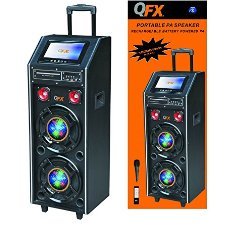
රූපය 1: ඉදිරිපස view of the QFX PBX-410204BTD PA Speaker. This image displays the speaker's front panel, including the dual 10-inch woofers, the central control panel with various buttons and knobs, and the integrated disco light.
3.1. පාලන පැනලය අවසන්view
- බල සැපයුම් සුවිචය: ඒකකය ක්රියාත්මක/අක්රිය කරන්න.
- ශබ්ද පාලනය: ප්රධාන පරිමාව සකසයි.
- මයික්රෆෝන ආදානය: Connects a wired microphone.
- Echo/Mic Volume: Adjusts microphone volume and echo effect.
- USB Port: USB ෆ්ලෑෂ් ඩ්රයිව් නැවත ධාවනය සඳහා.
- SD කාඩ් තව්: SD කාඩ් නැවත ධාවනය සඳහා.
- මාදිලි බොත්තම: Switches between input modes (Bluetooth, USB, SD, FM, DVD).
- වාදනය/විරාම බොත්තම: මාධ්ය නැවත ධාවනය පාලනය කරයි.
- පෙර/ඊළඟ ධාවන බොත්තම්: Navigates media tracks or FM stations.
- එෆ්එම් ඇන්ටෙනා: වැඩිදියුණු කළ FM රේඩියෝ පිළිගැනීම සඳහා.
- Disco Light Switch: Turns the disco light ON/OFF.
- DVD ධාවකය: Integrated DVD disc slot and controls.
- AC ආදානය: Connects the power adapter for charging and AC operation.
- DC 12V Input/Output: For external 12V power source or output.
4. පිහිටුවීම
4.1. මූලික අයකිරීම
Before first use, fully charge the internal battery. Connect the power adapter to the AC input on the speaker and plug it into a standard wall outlet. The charging indicator will illuminate. Charging typically takes several hours. The indicator will change or turn off once fully charged.
4.2. ස්ථානගත කිරීම
Place the speaker on a stable, flat surface. Ensure there is adequate space around the unit for ventilation. Avoid placing it near direct sunlight, heat sources, or areas with high humidity.
5. මෙහෙයුම් උපදෙස්
5.1. බලය සක්රිය / අක්රිය කරන්න
To power on the unit, toggle the Power Switch to the "ON" position. To power off, toggle it to "OFF".
5.2. බ්ලූටූත් සම්බන්ධතාවය
- Turn on the speaker and press the "Mode" button until "Bluetooth" mode is selected.
- Enable Bluetooth on your mobile device or audio player.
- ඒ සඳහා සොයන්න "QFX PBX-410204BTD" (or similar name) in your device's Bluetooth settings.
- Select the speaker to pair. A confirmation tone will sound upon successful connection.
- දැන් ඔබට ඔබේ උපාංගයෙන් ස්පීකරය හරහා ශ්රව්ය වාදනය කළ හැක.
5.3. USB/SD කාඩ් නැවත ධාවනය
- Insert a USB flash drive or SD card into the respective slot.
- Press the "Mode" button to select "USB" or "SD" mode. The unit will automatically begin playing compatible audio files.
- නැවත ධාවනය පාලනය කිරීමට Play/Pause, Previous සහ Next බොත්තම් භාවිතා කරන්න.
5.4. එෆ්එම් රේඩියෝව
- Press the "Mode" button to select "FM" mode.
- වඩා හොඳ පිළිගැනීමක් සඳහා FM ඇන්ටනාව දිගු කරන්න.
- Press and hold the Play/Pause button to auto-scan and save available FM stations.
- සුරකින ලද ස්ථාන හරහා සැරිසැරීමට පෙර/ඊළඟ බොත්තම් භාවිතා කරන්න.
5.5. DVD Playback
- Insert a DVD disc into the DVD slot.
- Press the "Mode" button to select "DVD" mode.
- Use the integrated DVD controls or the remote control to manage playback.
5.6. කැරෝකී කාර්යය
- Connect a microphone to the Microphone Input jack.
- Adjust the Microphone Volume and Echo controls to your preference.
- Play music from any source (Bluetooth, USB, SD, DVD) and sing along.
5.7. Disco Light
Toggle the Disco Light Switch to activate or deactivate the integrated disco light feature.
6. නඩත්තු කිරීම
6.1 පිරිසිදු කිරීම
Wipe the exterior of the unit with a soft, dry cloth. Do not use abrasive cleaners, waxes, or solvents. Ensure the unit is powered off and unplugged before cleaning.
6.2. බැටරි රැකවරණය
To prolong battery life, fully charge the unit before storing it for extended periods. Recharge the battery at least once every 3 months if not in regular use. Avoid completely draining the battery frequently.
6.3. ගබඩා කිරීම
සෘජු හිරු එළියෙන් සහ අධික උෂ්ණත්වයන්ගෙන් ඈත්ව සිසිල් වියළි ස්ථානයක ස්පීකරය ගබඩා කරන්න.
7. දෝශ නිරාකරණය
| ගැටලුව | විය හැකි හේතුව | විසඳුම |
|---|---|---|
| බලය නැත | Unit not plugged in; Power switch off; Battery drained. | Check power connection; Turn power switch ON; Charge the battery. |
| ශබ්දයක් නැත | ශබ්දය ඉතා අඩුයි; වැරදි ආදාන ප්රකාරය; උපාංගය යුගලනය කර නැත (බ්ලූටූත්). | Increase volume; Select correct input mode; Re-pair Bluetooth device. |
| බ්ලූටූත් සම්බන්ධ නොවේ | ස්පීකරය බ්ලූටූත් මාදිලියේ නැත; උපාංගය ඕනෑවට වඩා දුරයි; බාධාව. | Ensure speaker is in Bluetooth mode; Move device closer; Avoid obstacles. |
| USB/SD ධාවනය නොවේ | වැරදියි file format; USB/SD card corrupted; Incorrect mode. | සහතික කරන්න files are compatible (e.g., MP3); Try another USB/SD card; Select correct mode. |
| FM රේඩියෝව දුර්වල ලෙස ලැබීම | ඇන්ටනාව දිගු කර නැත; දුර්වල සංඥාවක්. | Fully extend the FM antenna; Try repositioning the unit. |
8. පිරිවිතර
- ආකෘතිය: PBX-410204BTD
- ස්පීකර් වර්ගය: බැටරි බලයෙන් ක්රියාත්මක වන PA ස්පීකර්
- වූෆර් ප්රමාණය: අඟල් 2 x 10
- ට්වීටර් ප්රමාණය: අඟල් 2 x 1
- සම්බන්ධතාවය: Bluetooth, USB, SD, FM Radio, DVD
- විශේෂ ලක්ෂණ: Disco Light, Karaoke
- බැටරි: 12V 12AH නැවත ආරෝපණය කළ හැකි
- AC ආදානය: 100-240V
- DC Input/Output: 12V
- ප්රතිදානය Wattage: වොට් 346
- පාර්සල් මානයන්: 100.33 x 43.18 x 43.18 cm (39.5 x 17 x 17 අඟල්)
- අයිතමයේ බර: කිලෝග්රෑම් 29.94 (රාත්තල් 66)
9. වගකීම් සහ සහාය
For warranty information and technical support, please refer to the warranty card included with your product or contact QFX customer service directly. Keep your purchase receipt as proof of purchase.
සටහන: නිශ්චිත වගකීම් නියමයන් කලාපය සහ සිල්ලර වෙළෙන්දා අනුව වෙනස් විය හැකිය.


