1. හැඳින්වීම
This manual provides essential instructions for the safe and effective operation of your GIMA 32921 Smart Automatic Digital Blood Pressure Monitor. Please read this manual thoroughly before using the device and retain it for future reference. This device is designed for non-invasive measurement of systolic and diastolic blood pressure and pulse rate in adults.
2 ආරක්ෂිත තොරතුරු
- ඔබට කිසියම් වෛද්ය තත්වයක් ඇත්නම් මෙම උපකරණය භාවිතා කිරීමට පෙර ඔබේ වෛද්යවරයා හමුවන්න.
- මිනුම් ප්රතිඵල මත පදනම්ව ස්වයං-රෝග විනිශ්චය හෝ ස්වයං-ඖෂධ ලබා නොගන්න. සෑම විටම සෞඛ්ය සේවා වෘත්තිකයෙකුගෙන් විමසන්න.
- උපාංගය ළමයින්ට සහ සුරතල් සතුන්ට ළඟාවිය නොහැකි ලෙස තබා ගන්න.
- චලනය වන වාහනයක හෝ ගුවන් යානයක උපාංගය භාවිතා නොකරන්න.
- Avoid using the device near strong electromagnetic fields.
- නිෂ්පාදකයා විසින් අනුමත කරන ලද උපාංග පමණක් භාවිතා කරන්න.
3. පැකේජ අන්තර්ගතය
පැකේජය විවෘත කිරීමෙන් පසු සියලුම සංරචක පවතින බවත් හානි නොවී ඇති බවත් තහවුරු කර ගන්න:
- GIMA 32921 Blood Pressure Monitor Unit
- Standard Adult Arm Cuff (22-30 cm)
- 4 x AA බැටරි
- උපදෙස් අත්පොත (මෙම ලේඛනය)

This image illustrates the typical contents of the GIMA 32921 Blood Pressure Monitor package, including the main monitor unit, a standard adult arm cuff (22-30 cm), and a set of four AA batteries required for operation.
4. උපාංගය අවසන්view
The GIMA 32921 monitor features a clear digital display and intuitive controls for ease of use.

මෙම රූපයේ ඉහළින්ම පෙන්වයි view of the GIMA 32921 Smart Automatic Digital Blood Pressure Monitor. It features a large digital display, a 'MEM' button for accessing stored measurements, and a 'START' button to initiate or stop a measurement. Indicators for SYS mmHg, DIA mmHg, and PULSE/min are visible, along with a blood pressure classification scale on the left side of the screen.
ප්රධාන සංරචක:
- සංඛ්යාංක දර්ශකය: Shows blood pressure readings (systolic, diastolic), pulse rate, and other indicators.
- ආරම්භක බොත්තම: Powers on the device and initiates a measurement. Press again to stop.
- MEM බොත්තම: ගබඩා කර ඇති මිනුම් වාර්තා වෙත ප්රවේශ වේ.
- Cuff Port: Located on the side of the unit for connecting the arm cuff.
- බැටරි මැදිරිය: Located on the bottom of the unit.

මෙම රූපයේ දැක්වෙන්නේ පැති වෘත්තිකයෙකිfile of the GIMA 32921 Smart Automatic Digital Blood Pressure Monitor, highlighting its compact design and the port for connecting the arm cuff.
5. පිහිටුවීම
5.1. බැටරි ස්ථාපනය කිරීම
- Open the battery compartment cover on the bottom of the monitor.
- Insert four (4) AA batteries, ensuring correct polarity (+/-) as indicated inside the compartment.
- බැටරි මැදිරි කවරය ආරක්ෂිතව වසා දමන්න.
5.2. බාහු කෆ් සම්බන්ධ කිරීම
- Locate the air tube connector on the arm cuff.
- Firmly insert the air tube connector into the air jack located on the side of the monitor unit. Ensure a snug fit.
6. උපාංගය ක්රියාත්මක කිරීම
6.1. Arm Cuff යෙදීම
- ඔබේ පිටුපසට ආධාරක වන පරිදි සහ පාද බිමට සමතලා කර සුවපහසු ඉරියව්වක වාඩි වන්න.
- Place the cuff on your bare upper left arm, approximately 1-2 cm (0.4-0.8 inches) above your elbow. The air tube should run down the inside of your arm.
- Ensure the cuff is wrapped snugly but not too tightly around your arm. The indicator mark on the cuff should align with your brachial artery.
- ඔබේ අත මේසයක් මත තබන්න, එවිට කෆ් එක ඔබේ හදවතට සමාන මට්ටමක පවතී.
6.2. මිනුම් ගැනීම
- ඔබන්න ආරම්භ කරන්න බොත්තම. කෆ් එක ස්වයංක්රීයව පිම්බීමට පටන් ගනී.
- Remain still and silent during the measurement. Do not talk or move.
- Once the measurement is complete, the cuff will deflate, and your systolic pressure (SYS), diastolic pressure (DIA), and pulse rate will be displayed on the screen.
- The device will automatically store the measurement in its memory.
- The device features an automatic shut-off function to conserve battery life.
6.3. ඔබේ ප්රතිඵල අවබෝධ කර ගැනීම
- Blood Pressure Classification Indicator: The display includes a visual scale (e.g., Normal, Hypertension) to help you interpret your blood pressure level according to European Society of Hypertension (EHS) guidelines.
- අක්රමවත් හෘද ස්පන්දන හඳුනාගැනීම: If an irregular heartbeat is detected during the measurement, a specific symbol will appear on the display. If this symbol appears frequently, consult your physician.
6.4. Accessing Memory Records
- උපාංගය ක්රියා විරහිත වූ විට, ඔබන්න MEM බොත්තම.
- The most recent measurement will be displayed.
- ඔබන්න MEM button repeatedly to cycle through previous measurements. The device stores 2x60 sets of measurements.
7. නඩත්තු කිරීම
7.1 පිරිසිදු කිරීම
- මොනිටර ඒකකය සහ කෆ් එක මෘදු, වියළි රෙද්දකින් පිස දමන්න.
- අවශ්ය නම්, සැහැල්ලුවෙන් රෙද්දක් භාවිතා කරන්න dampජලය හෝ මෘදු ඩිටර්ජන්ට් එකකින් ආලේප කර ඇත. උල්ෙල්ඛ පිරිසිදු කරන්නන් භාවිතා නොකරන්න හෝ උපාංගය ජලයේ ගිල්වන්න එපා.
7.2. ගබඩා කිරීම
- උපාංගය සෘජු හිරු එළිය, අධික උෂ්ණත්වයන් සහ ආර්ද්රතාවයෙන් ඈත්ව පිරිසිදු, වියළි ස්ථානයක ගබඩා කරන්න.
- උපාංගය දිගු කාලයක් භාවිතා නොකරන්නේ නම්, කාන්දු වීම වැළැක්වීම සඳහා බැටරි ඉවත් කරන්න.
7.3. බැටරි ප්රතිස්ථාපනය
When the low battery indicator appears on the display, replace all four AA batteries with new ones. Ensure correct polarity.
8. දෝශ නිරාකරණය
| ගැටලුව | විය හැකි හේතුව | විසඳුම |
|---|---|---|
| උපාංගය බලගන්වන්නේ නැත. | බැටරි අක්රිය වී හෝ වැරදි ලෙස ඇතුළත් කර ඇත. | බැටරි ප්රතිස්ථාපනය කරන්න හෝ ධ්රැවීයතාව පරීක්ෂා කරන්න. |
| දර්ශනය වන දෝෂ පණිවිඩය. | කෆ් නිවැරදිව යොදවා නොමැති වීම, මිනුම් අතරතුර චලනය, හෝ වාතය කාන්දු වීම. | Reapply cuff, remain still, check cuff connection. Repeat measurement. |
| නොගැලපෙන කියවීම්. | Improper measurement technique, external factors. | Ensure proper cuff placement and body position. Avoid caffeine, exercise, or smoking before measurement. Take multiple readings. |
9. පිරිවිතර
- ආදර්ශ අංකය: 32921
- මානයන්: 8.5 x 18 x 12 සෙ.මී
- බර: 210 ග්රෑම් (බැටරි නොමැතිව)
- බලශක්ති ප්රභවය: 4 x AA බැටරි
- මිනුම් ක්රමය: ඔස්කිලෝමෙට්රික්
- විශේෂාංග: Blood Pressure Classification Indicator, Irregular Heartbeat Detection, 2x60 Memory Storage, Automatic Shut-off
- නිෂ්පාදකයා: ANDON HEALTH CO., Ltd.
- මුල් රට: Italy (as per product listing)
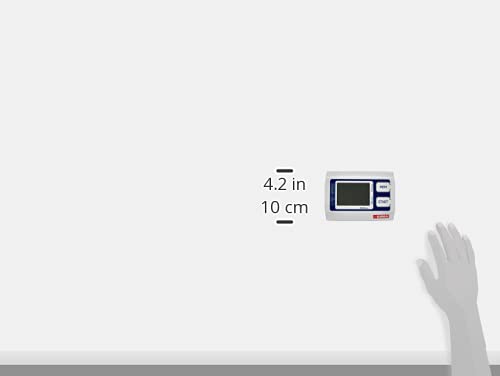
This image provides a size comparison of the GIMA 32921 Blood Pressure Monitor against an average adult hand, demonstrating its compact and portable dimensions.
10. වගකීම් සහ සහාය
For warranty information or technical support, please refer to the documentation provided with your purchase or contact your local GIMA distributor. Keep your proof of purchase for warranty claims.


