1. හැඳින්වීම
This manual provides detailed instructions for the installation, setup, and operation of your Intel Wireless-N 7260 Half Mini PCI-E Wi-Fi and Bluetooth Card. This internal component is designed to enhance your laptop's wireless capabilities, offering 802.11b/g/n Wi-Fi and Bluetooth connectivity.
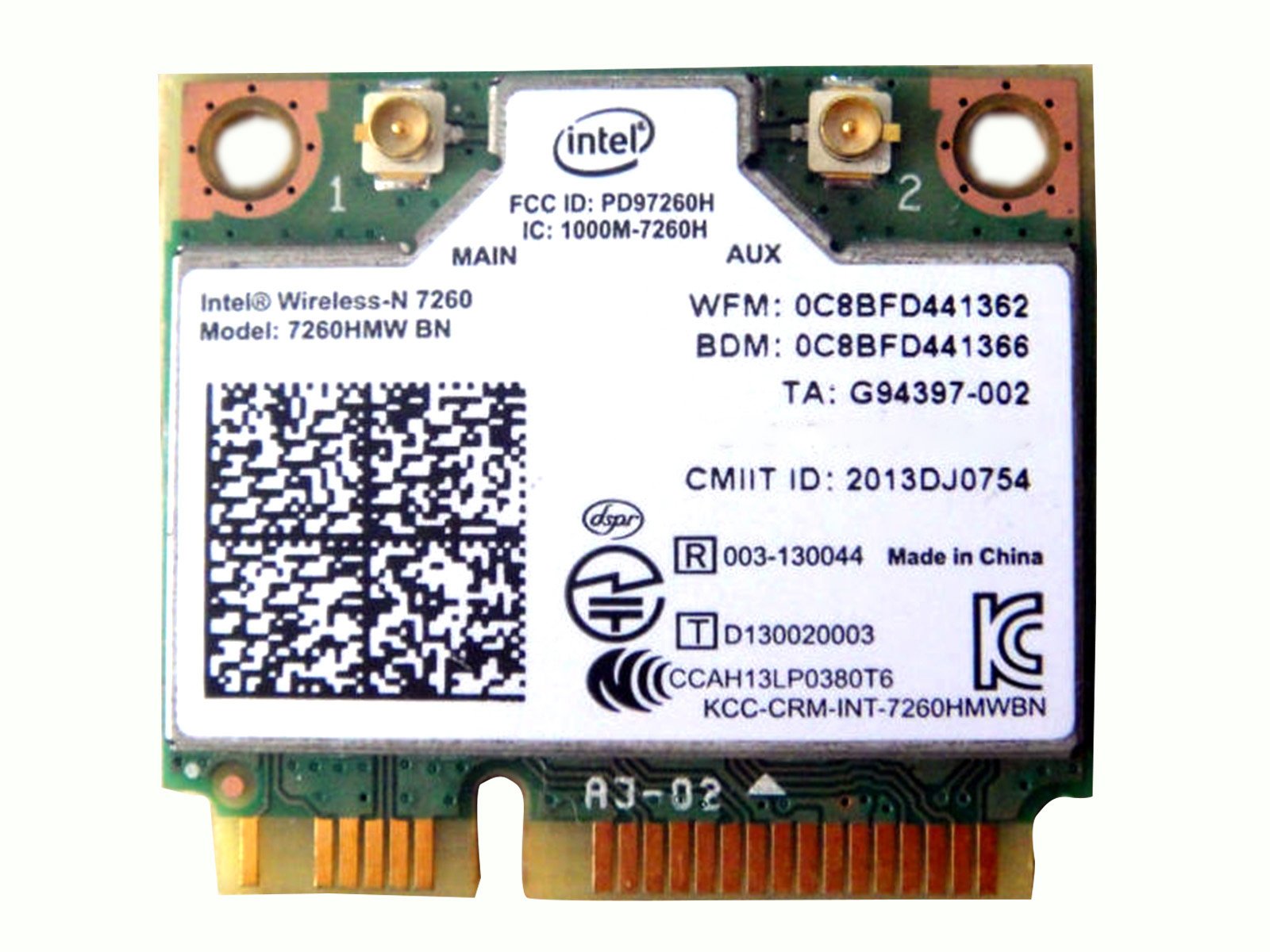
Image 1: Intel Wireless-N 7260 Half Mini PCI-E Wi-Fi and Bluetooth Card. This image displays the compact form factor of the wireless card, highlighting its connectors and labeling.
2. Compatibility Notes
වැදගත්: This Wireless Card is generally compatible with most PC/laptops that support a Half Mini PCI-E slot. However, it is crucial to note that this card may not work on IBM/Lenovo/Thinkpad and HP Version Laptops due to specific BIOS whitelisting or hardware restrictions. Please verify your laptop's compatibility before installation.
3. පිරිවිතර
| විශේෂාංගය | විස්තර |
|---|---|
| වෙළඳ නාමය | ඉන්ටෙල් |
| ආදර්ශ අංකය | 7260 |
| ටයිප් කරන්න | 802.11 b/g/n + BT (Bluetooth) |
| අතුරු මුහුණත | අර්ධ Mini PCI-e |
| නිෂ්පාදන මානයන් | අඟල් 1.18 x 1.06 x 0.04 |
| අයිතමයේ බර | අවුන්ස 0.352 (කිලෝග්රෑම් 0.01) |
| දත්ත සම්බන්ධක ප්රොටෝකෝලය | බ්ලූටූත් |
| දෘඩාංග අතුරුමුහුණත | Bluetooth, PCI |
| ගැළපෙන උපාංග | ලැප්ටොප් |
| BIOS | Standard / Public Version |
| UPC | 722851200599 |
4. ස්ථාපනය සහ සැකසුම
Installing the Intel Wireless-N 7260 card requires opening your laptop. If you are not comfortable with hardware installation, it is recommended to seek professional assistance.
4.1. භෞතික ස්ථාපනය
- බලය විසන්ධි කර විසන්ධි කරන්න: Ensure your laptop is completely powered off and disconnected from all power sources. Remove the battery if possible.
- Access the Internal Components: Carefully open your laptop's back panel to access the internal components. This usually involves unscrewing several screws. Refer to your laptop's specific service manual for precise instructions.
- Locate the Existing Wireless Card: Identify the current wireless card, typically a small module connected to a Half Mini PCI-E slot. It will have antenna cables attached.
- Disconnect Antennas: Gently disconnect the antenna cables from the existing wireless card. Note their positions (Main/Aux) for reattachment.
- Remove Old Card: Unscrew the retaining screw(s) holding the old wireless card in place. The card should pop up slightly, allowing you to slide it out of the slot.
- නව කාඩ්පතක් ඇතුළු කරන්න: Carefully insert the Intel Wireless-N 7260 card into the Half Mini PCI-E slot at an angle. Press it down until it clicks into place, then secure it with the retaining screw(s).
- Reattach Antennas: Connect the antenna cables to the corresponding connectors on the new Intel Wireless-N 7260 card. Ensure a snug fit.
- Reassemble Laptop: Carefully close the laptop's back panel and secure all screws. Reinsert the battery if removed.
4.2. ධාවක ස්ථාපනය
Upon booting your laptop, the operating system (e.g., Windows) may automatically detect and install the necessary drivers for the Intel Wireless-N 7260 card. If not, you may need to download the latest drivers from the official Intel website or your laptop manufacturer's support page. ඒ සඳහා සොයන්න "Intel Wireless-N 7260 drivers" to find the appropriate software.
5. මෙහෙයුම
5.1. Wi-Fi වෙත සම්බන්ධ වීම
- Wi-Fi සබල කරන්න: Ensure Wi-Fi is enabled on your laptop. This can usually be done through the operating system's network settings or a physical switch/function key combination on some laptops.
- ජාලය තෝරන්න: Click on the Wi-Fi icon in your system tray (Windows) or menu bar (macOS) to view පවතින ජාල.
- සම්බන්ධ කරන්න: Select your desired Wi-Fi network (SSID) and click "Connect." Enter the network password if prompted.
- සම්බන්ධතාවය තහවුරු කරන්න: Once connected, the Wi-Fi icon will indicate a successful connection, and you should be able to browse the internet.
5.2. බ්ලූටූත් භාවිතා කිරීම
- බ්ලූටූත් සබල කරන්න: Ensure Bluetooth is enabled on your laptop. This is typically found in your operating system's settings.
- යුගල උපාංගය: ඔබගේ බ්ලූටූත් උපාංගය (උදා: හෙඩ්ෆෝන්, මූසිකය, යතුරුපුවරුව) යුගල කිරීමේ ප්රකාරයට දමන්න.
- උපාංගය එක් කරන්න: On your laptop, go to Bluetooth settings and select "Add Bluetooth or other device." Choose "Bluetooth" and select your device from the list.
- යුගල කිරීම තහවුරු කරන්න: යුගල කිරීමේ ක්රියාවලිය සම්පූර්ණ කිරීමට ඕනෑම තිරයේ විමසීම් අනුගමනය කරන්න.
6. Performance Considerations
The Intel Wireless-N 7260 card supports 802.11b/g/n standards, offering reliable wireless performance. Actual speeds may vary based on your network environment, router capabilities, distance from the access point, and interference. For optimal performance, ensure your router supports 802.11n and operates on both 2.4GHz and 5GHz bands (though this card primarily uses 2.4GHz for N-standard, it's good practice for overall network health). Keeping your drivers updated is also essential for maintaining peak performance.
7. නඩත්තු කිරීම
- ධාවක යාවත්කාලීන: නිතිපතා ඉන්ටෙල් සහාය පරීක්ෂා කරන්න website for the latest drivers for your Wireless-N 7260 card. Updated drivers can improve performance, stability, and security.
- පද්ධති යාවත්කාලීන: Keep your operating system updated to ensure compatibility and optimal performance with your wireless card.
- Physical Cleanliness: If you experience issues, ensure your laptop's internal components, especially the wireless card and its slot, are free from dust and debris.
8. දෝශ නිරාකරණය
- No Wi-Fi/Bluetooth Connection:
- Verify physical installation: Ensure the card is seated correctly and antenna cables are securely attached.
- Check Device Manager: Look for the device under "Network adapters" and "Bluetooth." If there's a yellow exclamation mark, reinstall or update drivers.
- Ensure Wi-Fi/Bluetooth is enabled in your operating system settings.
- මන්දගාමී Wi-Fi වේගය:
- Move closer to your Wi-Fi router.
- Ensure your router is configured for 802.11n speeds.
- වෙනත් උපාංගවලින් (උදා: මයික්රෝවේව්, රැහැන් රහිත දුරකථන) බාධා ඇති දැයි පරීක්ෂා කරන්න.
- ඔබගේ Wi-Fi ධාවක යාවත්කාලීන කරන්න.
- අතරමැදි සම්බන්ධතාවය:
- Check for driver conflicts or outdated drivers.
- ඔබගේ රවුටරයේ ස්ථිරාංග යාවත්කාලීන බව සහතික කර ගන්න.
- Consider changing your Wi-Fi channel on your router to avoid interference.
9. වගකීම් තොරතුරු
This Intel Wireless-N 7260 card is covered by a standard manufacturer's warranty. Please refer to the warranty documentation included with your purchase or visit the official Intel website for specific terms and conditions. Keep your proof of purchase for warranty claims.
10. පාරිභෝගික සහාය
For technical assistance, driver downloads, or further information, please visit the official Intel support website. You may also contact your product reseller for support related to your purchase.


