1. හැඳින්වීම
This manual provides detailed instructions for the safe and efficient operation of your BAOFENG UV-5RTP 8/4/1W Two-Way Radio. The UV-5RTP is a high-power, dual-band handheld ham radio designed for reliable communication. Please read this manual thoroughly before using the device to ensure proper functionality and to prevent damage.
The BAOFENG UV-5RTP features tri-power settings (8W/4W/1W), dual-band frequency range (VHF: 144-148MHz RX only, UHF: 420-450MHz RX/TX), and a rugged design suitable for outdoor use. It is FCC Part 15 & Part 97 Certified.
2. පැකේජ අන්තර්ගතය
ඔබගේ පැකේජයේ සියලුම අයිතම ඇති බව තහවුරු කරගන්න:
- 2 x BAOFENG UV-5RTP Tri-Power 8/4/1W Two-Way Radio
- 2 x ඉයර්පීස්
- 2 x Speaker Microphones
- 2 x 1800mAh Li-ion බැටරි
- 2 x ඉහළ ලාභ ඇන්ටනා
- 2 x මැණික් කටුව පටි
- 2 x ඩෙස්ක්ටොප් චාජර්
- 1 x ක්රමලේඛන කේබලය

Figure 2.1: Complete package contents of the BAOFENG UV-5RTP radio kit.
3. නිෂ්පාදන අවසන්view
The BAOFENG UV-5RTP is a compact and robust two-way radio. Key features include a metallic frame for durability, an exquisite LED screen for clear visibility in various lighting conditions, and multiple power levels for versatile use.

රූපය 3.1: ඉදිරිපස view of the BAOFENG UV-5RTP radio.

Figure 3.2: Display showing transmit power settings (High, Medium, Low).
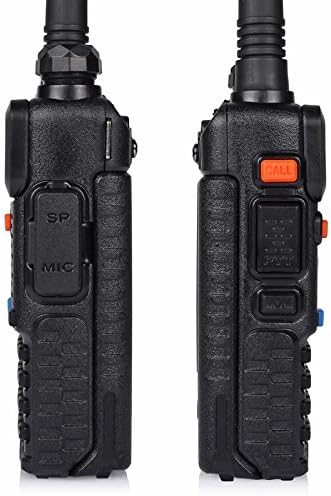
රූපය 3.3: පැත්ත view of the radio with speaker/mic port.

රූපය 3.4: ඉහළ view of the radio with antenna and controls.
4. පිහිටුවීම
4.1 බැටරි ස්ථාපනය සහ ආරෝපණය කිරීම
- රේඩියෝවේ පිටුපස ඇති කට්ට සමඟ බැටරි පැකට්ටුව පෙළගස්වන්න.
- බැටරිය නිසි තැන ක්ලික් වන තුරු ඉහළට තල්ලු කරන්න.
- ආරෝපණය කිරීමට, රේඩියෝව (බැටරිය සවිකර ඇති) ඩෙස්ක්ටොප් චාජරයට දමන්න. ආරෝපණ සම්බන්ධතා පෙළගස්වා ඇති බවට වග බලා ගන්න.
- Connect the desktop charger to a power outlet. The indicator light will show charging status.
4.2 ඇන්ටෙනා ඇමුණුම
ඇන්ටෙනාව ඇඟිලි තුඩුවලින් තද වන තුරු රේඩියෝවේ මුදුනේ ඇති සම්බන්ධකයට දක්ෂිණාවර්තව ඉස්කුරුප්පු කරන්න. ඕනෑවට වඩා තද නොකරන්න.
4.3 Speaker Mic / Earpiece Connection
Insert the 2-pin plug of the speaker microphone or earpiece into the accessory jack on the side of the radio. Ensure a secure connection.
5. මෙහෙයුම් උපදෙස්
5.1 බලය සක්රිය/අක්රිය කිරීම සහ ශබ්ද පාලනය
Rotate the top knob clockwise to power on the radio and increase volume. Rotate counter-clockwise to decrease volume and power off.
5.2 Frequency and Channel Mode
ඔබන්න VFO/MR button to switch between Frequency (VFO) mode and Channel (MR) mode. In VFO mode, you can manually input frequencies. In MR mode, you can select pre-programmed channels.
5.3 Programming Channels Manually
Manual programming involves setting frequencies, CTCSS/DCS tones, and other parameters directly on the radio. This process is similar to the UV-5R series.
Video 5.1: A brief demonstration of manual programming on a similar Baofeng radio, showing menu navigation and channel saving. This video is a preview and provides a quick overview ක්රියාවලියේ.
- Switch to VFO mode using the VFO/MR බොත්තම.
- Enter the desired frequency using the keypad.
- ඔබන්න මෙනුව, then navigate to the appropriate settings for CTCSS/DCS tones (e.g., T-CTCS, R-CTCS) and set them as required for your repeater or direct communication.
- වෙත සංචාලනය කරන්න සුරකින්න menu option (usually 27 or 28) to save the frequency and settings to a channel.
- Select an empty channel number and press මෙනුව තහවුරු කිරීමට.
5.4 Programming with Software (CHIRP)
For advanced programming, including adding channel names, it is recommended to use programming software like CHIRP with the provided programming cable. The official Baofeng software may have compatibility issues with Windows 10.
5.5 Transmit Power Adjustment
The UV-5RTP offers three power levels: High (8W), Medium (4W), and Low (1W). You can cycle through these power levels by pressing the # key on the keypad. The display will indicate the current power setting (H, M, L).
5.6 Scanning Channels
To initiate scanning, long-press the ස්කෑන් කරන්න button (key 5). The radio will scan through programmed channels or frequencies depending on the current mode. Press පිටවීම ස්කෑන් කිරීම නතර කිරීමට.
6. නඩත්තු කිරීම
6.1 පිරිසිදු කිරීම
රේඩියෝව මෘදු, ඩී සමඟ පිස දමන්නamp cloth. Do not use harsh chemicals or solvents. Ensure the radio is dry before use.
6.2 බැටරි සත්කාර
Charge the battery fully before first use (approximately 5 hours). Avoid overcharging or completely draining the battery to prolong its lifespan. Store batteries in a cool, dry place.
7. දෝශ නිරාකරණය
| ගැටලුව | විය හැකි හේතුව | විසඳුම |
|---|---|---|
| Radio not powering on | අඩු හෝ මිය ගිය බැටරිය; නුසුදුසු ලෙස ස්ථාපනය කර ඇති බැටරිය. | Charge battery; ensure battery is correctly installed. |
| සම්ප්රේෂණය කිරීමට හෝ ලැබීමට නොහැකිය | Incorrect frequency/channel; antenna not connected; low power setting. | Verify frequency/channel; check antenna connection; increase transmit power. |
| Programming software not working | Driver issues; incompatible software version (e.g., official Baofeng software on Windows 10). | Install correct drivers for programming cable; try CHIRP software. |
| Poor audio quality with external mic | Faulty mic; improper connection. | Test with another mic; ensure secure connection. |
7.1 කර්මාන්තශාලා යළි පිහිටුවීම
If experiencing persistent issues, a factory reset may resolve them. Navigate to the සියල්ල යළි පිහිටුවන්න මෙනුවේ විකල්පය. Warning: This will erase all programmed channels and settings.
8. පිරිවිතර
- ආකෘතිය: UV-5RTP
- සංඛ්යාත පරාසය: VHF: 144-148MHz (RX only), UHF: 420-450MHz (RX/TX)
- සම්ප්රේෂණ බලය: 8W / 4W / 1W (Tri-Power)
- නාලිකා ගණන: 128
- බැටරි: 2 x 1800mAh ලිතියම් අයන (ඇතුළත්)
- අයිතමයේ බර: අවුන්ස 15.2 කි
- නිෂ්පාදන මානයන්: අඟල් 2.05 x 1.26 x 3.94
- සංදර්ශක වර්ගය: LED
- විශේෂ ලක්ෂණ: Call Alert, Dual Band, Keypad Lock, Long Range, Voice Operated Transmission
- ජල ප්රතිරෝධක මට්ටම: ජලයට ඔරොත්තු නොදෙන
- වෙළුමtage: වෝල්ට් 7.4
9. වගකීම් සහ සහාය
For warranty information and technical support, please refer to the documentation provided with your purchase or contact BAOFENG customer service. Protection plans are available for extended coverage.
- අවුරුදු 2ක ආරක්ෂණ සැලැස්ම: මිලදී ගැනීමට තිබේ.
- අවුරුදු 3ක ආරක්ෂණ සැලැස්ම: මිලදී ගැනීමට තිබේ.


