1. හැඳින්වීම
This manual provides essential information for the safe and proper installation, operation, and maintenance of your Leviton SmartlockPro Blank Face Ground Fault Circuit Interrupter (GFCI). The SmartlockPro self-test GFCI is designed to continuously monitor for ground faults, providing protection against electric shock. It features an automatic internal self-test function and a slim profile පහසු ස්ථාපනය සඳහා.
2 ප්රධාන ලක්ෂණ
- ස්වයං පරීක්ෂණ කාර්යය: Regularly conducts an automatic internal test to confirm proper ground fault response.
- අඛණ්ඩ ආරක්ෂාව: Detects and trips on actual ground faults even during self-testing.
- තත්ව දර්ශක ආලෝකය: Provides clear feedback on power and protection status, including line/load reversal.
- අගුලු දැමීම යළි පිහිටුවන්න: Patented mechanism prevents resetting if the GFCI is damaged or cannot respond to a ground fault.
- සිහින් නිර්මාණය: Reduced depth facilitates easier installation in various electrical boxes.
3 ආරක්ෂිත තොරතුරු
WARNING: To avoid fire, shock, or death; turn OFF power at the circuit breaker or fuse box and test that power is OFF before wiring!
- This device must be installed by a qualified electrician or a knowledgeable individual familiar with electrical wiring.
- සෑම විටම දේශීය සහ ජාතික විදුලි කේත අනුගමනය කරන්න.
- මෙම උපකරණය හානි වී ඇති බව පෙනේ නම් එය භාවිතා නොකරන්න.
- නිසි බිම් සැකසීම සහතික කරන්න.
- නිසි ක්රියාකාරිත්වය සහතික කිරීම සඳහා GFCI මාසිකව පරීක්ෂා කරන්න.
4. පිහිටුවීම සහ ස්ථාපනය
The Leviton SmartlockPro GFCI is designed for quick and easy installation due to its slim profile, allowing more room in the electrical box. Ensure power is OFF at the circuit breaker before beginning installation.
4.1 රැහැන් සම්බන්ධතා
Properly identify LINE and LOAD wires. The LINE wires bring power from the circuit breaker, and the LOAD wires carry power to downstream outlets protected by this GFCI. Incorrect wiring will prevent the GFCI from providing ground fault protection.

රූපය: පැත්ත view of the Leviton Blank Face GFCI, showing its slim profile and wiring terminals for connection.
4.2 ස්ථාපන වීඩියෝ මාර්ගෝපදේශය
Video: This official Leviton video demonstrates the easy installation process for a GFCI outlet, highlighting its slim design and wiring connections.
5. මෙහෙයුම් උපදෙස්
The Blank Face GFCI provides ground fault protection in areas where a standard receptacle is not needed, such as for hard-wired appliances or in conjunction with other protected outlets.
5.1 Self-Test and Indicator Light
The SmartlockPro GFCI continuously monitors its own functionality. A green LED indicator light confirms that the device is working correctly and providing protection. If the LED turns red or does not illuminate, the GFCI may be faulty and requires attention.
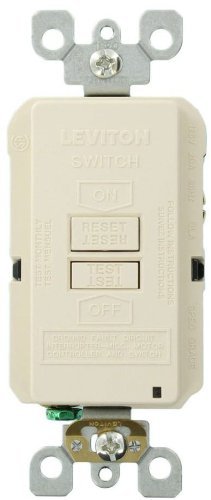
රූපය: ඉදිරිපස view of the Leviton Blank Face GFCI, showing the TEST and RESET buttons and the LED indicator light.
5.2 මාසික පරීක්ෂාව
Even with the self-test feature, it is important to manually test your GFCI monthly to ensure it is functioning correctly. To test:
- ඔබන්න පරීක්ෂණය button. The GFCI should trip, and the indicator light may change or turn off.
- ඔබන්න යළි පිහිටුවන්න button. The GFCI should reset, and the indicator light should return to green.
If the GFCI does not trip or reset as described, it may be faulty and should be replaced.
6. නඩත්තු කිරීම
Regular maintenance for your Leviton GFCI involves monthly manual testing and visual inspection. Ensure the device is free from physical damage, discoloration, or loose connections. If any issues are observed, refer to the troubleshooting section or contact a qualified electrician.
7. දෝශ නිරාකරණය
7.1 GFCI Trips Frequently
If your GFCI trips, it is performing its intended safety function by detecting a ground fault. To identify the cause:
- Inspect the GFCI: Check for any signs of discoloration, burning, or loose connections. If found, replace the GFCI immediately.
- හේතුව හඳුනා ගන්න: Note what was happening when the GFCI tripped. Were you using a specific appliance? Did you plug something in or turn something on?
- Check Appliances/Cords: Visually inspect any connected appliances or their cords for damage (e.g., frayed wires). Unplug any device with obvious damage or faults.
- නැවත සකසන්න: After addressing potential causes, press the RESET button. If it resets, the issue was likely with the appliance or cord.
- නොනවතින පැකිලීම: If the GFCI continues to trip, or if the reason for the trip is not obvious, it is time to contact a qualified electrician.
7.2 GFCI Troubleshooting Video
Video: This official Leviton video explains what to do when your GFCI outlet trips and when it's appropriate to call an electrician.
8. පිරිවිතර
| පිරිවිතර | වටිනාකම |
|---|---|
| අයිතම ආදර්ශ අංකය | GFRBF-T |
| නිෂ්පාදන මානයන් | 1.69 x 1.32 x 4.21 අඟල්; අවුන්ස 3.2 |
| වෙළඳ නාමය | ලෙවිටන් |
| වර්ණය | සැහැල්ලු ආමන්ඩ් |
| ද්රව්ය | පොලිකාබනේට් (PC) |
| වෙළුමtage | වෝල්ට් 125 |
| නිෂ්පාදකයා | Leviton Direct |
| පළමු දිනය තිබේ | 5 අගෝස්තු 2015 |
9. වගකීම් සහ සහාය
Leviton products are backed by a manufacturer's warranty. For specific warranty details, technical support, or further assistance, please refer to the documentation included with your product or visit the official Leviton webවෙබ් අඩවිය. වගකීම් හිමිකම් සඳහා ඔබේ මිලදී ගැනීමේ සාක්ෂි තබා ගැනීම නිර්දේශ කෙරේ.


