1. හැඳින්වීම
The Alpine IVA-W520E is a full-featured 2DIN DVD player solution designed for in-car entertainment and media. It integrates advanced video and audio technologies, including a 7-inch LED touchscreen and a Burr-Brown 24-bit DAC, to deliver high-quality sound and clear images. This manual provides essential information for the proper installation, operation, and maintenance of your IVA-W520E unit.
2 ආරක්ෂිත තොරතුරු
Please read all safety instructions carefully before installing or operating the unit. Failure to follow these instructions may result in injury or damage to the unit or vehicle.
- වෘත්තීය ස්ථාපනය නිර්දේශ කෙරේ: Due to the complexity of car audio-visual systems, professional installation is highly recommended to ensure proper wiring and functionality.
- බලශක්ති ප්රභවය: Connect the unit only to a 12V DC negative ground power supply.
- අවධානය වෙනතකට යොමු කිරීමෙන් වළකින්න: Do not operate the unit's controls or view video content while driving, as this can lead to accidents. Always pull over to a safe location before making adjustments.
- වාතාශ්රය: අධික උනුසුම් වීම වැළැක්වීම සඳහා ඒකකය වටා ප්රමාණවත් වාතාශ්රයක් සහතික කරන්න. වාතාශ්රය විවරයන් අවහිර නොකරන්න.
- තෙතමනය සහ දියර: Keep the unit away from moisture and liquids. Do not expose it to rain or water.
- පිරිසිදු කිරීම: පිරිසිදු කිරීම සඳහා මෘදු, වියළි රෙද්දක් භාවිතා කරන්න. උල්ෙල්ඛ පිරිසිදු කරන්නන් හෝ ද්රාවක භාවිතා කිරීමෙන් වළකින්න.
3. පැකේජ අන්තර්ගතය
ස්ථාපනය සමඟ ඉදිරියට යාමට පෙර සියලුම අයිතම පැකේජයේ ඇති බව තහවුරු කර ගන්න:
- Alpine IVA-W520E Head Unit
- බලය/ස්පීකර් පටි
- සවි කිරීමේ දෘඩාංග (ඉස්කුරුප්පු, වරහන්)
- ටිම් වලල්ල
- පරිශීලක අත්පොත (මෙම ලේඛනය)
- වගකීම් තොරතුරු
4. පිහිටුවීම සහ ස්ථාපනය
4.1. ස්ථාපන මාර්ගෝපදේශ
ප්රශස්ත කාර්ය සාධනය සහ ආරක්ෂාව සඳහා නිසි ස්ථාපනය ඉතා වැදගත් වේ. සුදුසුකම් ලත් වෘත්තිකයෙකු විසින් ඒකකය ස්ථාපනය කිරීම බෙහෙවින් නිර්දේශ කෙරේ.
- බැටරිය විසන්ධි කරන්න: Before starting any electrical work, disconnect the vehicle's negative battery terminal to prevent short circuits.
- සවි කිරීම: Securely mount the unit in the vehicle's double-DIN opening using the provided mounting brackets and screws. Ensure it is stable and does not obstruct any vehicle controls.
- රැහැන් ඇදීම: Connect the power harness, speaker wires, and other input/output cables according to the wiring diagram provided in the separate installation guide. Pay close attention to ground connections.
- Antenna and External Devices: Connect the radio antenna and any external devices such as a reverse camera or external ampජීවිතාරක්ෂක.
4.2. මූලික සැකසුම
After installation, reconnect the battery and power on the unit for the first time.
- භාෂා තේරීම: ඔබ කැමති භාෂාව තෝරා ගැනීමට තිරයේ ඇති විමසීම් අනුගමනය කරන්න.
- වේලාව සහ දිනය: Set the correct time and date for accurate display.
- ශ්රව්ය සැකසුම්: Adjust basic audio settings such as volume, balance, and fader.
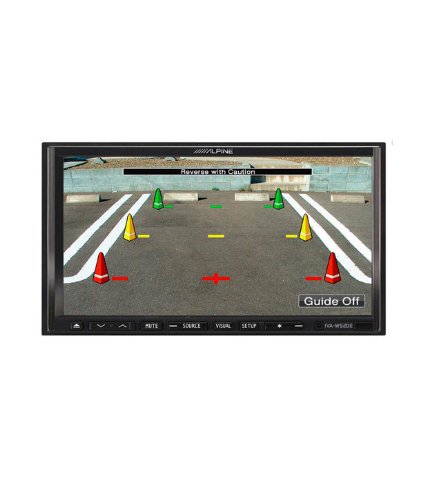
රූපය 4.1: උදාample of the IVA-W520E displaying a reverse camera feed, showing parking guidelines. This feature aids in safe vehicle maneuvering.
5. ඒකකය ක්රියාත්මක කිරීම
5.1. Touchscreen and Button Controls
The IVA-W520E features a responsive 7-inch LED touchscreen for primary control, supplemented by physical buttons for quick access to common functions.
- ස්පර්ශ තිරය: Navigate menus, select sources, and control playback by touching the screen.
- ශබ්ද පාලනය: ශ්රව්ය මට්ටම් සකස් කිරීමට කැපවූ ශබ්ද බොත්තම් හෝ තිරය මත ඇති පාලන භාවිතා කරන්න.
- මූලාශ්ර බොත්තම: Press to cycle through available audio/video sources (Radio, DVD, USB, iPod, AUX, Bluetooth).
- නිශ්ශබ්ද බොත්තම: Temporarily mutes the audio output.
- සැකසුම් බොත්තම: පද්ධති සැකසුම් මෙනුව වෙත පිවිසෙන්න.
5.2. ශ්රව්ය ප්ලේබැක්
The unit supports various audio formats and sources, enhanced by its Burr-Brown 24-bit DAC for superior sound quality.
- USB ශ්රව්ය: Connect a USB device containing audio files. The unit will display track information and allow navigation through folders.
- iPod/iPhone Connectivity: Connect your iPod or iPhone for direct audio playback and control.
- DVD/CD නැවත ධාවනය: Insert a DVD or CD into the disc slot for audio or video playback.
- රේඩියෝ සුසරකය: Access AM/FM radio stations.
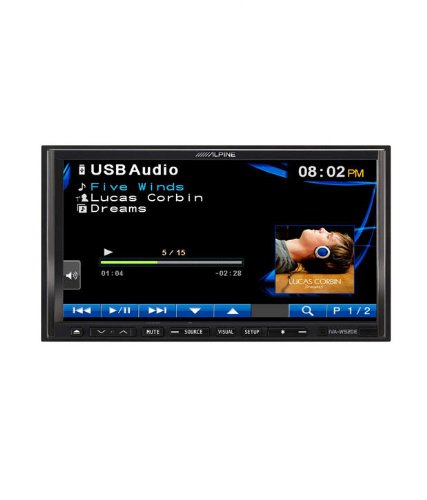
Figure 5.1: The IVA-W520E displaying the USB Audio interface, showing current track, artist, and playback controls. This allows for easy navigation of digital music files.
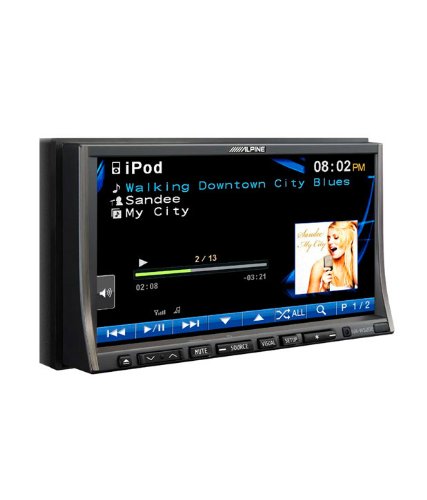
Figure 5.2: The IVA-W520E displaying the iPod interface, showing a list of songs and album art. This demonstrates seamless integration with Apple devices for music playback.
5.3. වීඩියෝ නැවත ධාවනය
The 7-inch LED screen provides enhanced image quality with higher resolution, better contrast, and improved color reproduction compared to standard LCD screens.
- DVD Video: Insert a video DVD for playback. Ensure the parking brake safety wire is correctly connected for video to display while the vehicle is stationary.
- External Video Input: The unit supports external video sources, such as a reverse camera or other video devices.
5.4. බ්ලූටූත් සම්බන්ධතාව
The IVA-W520E is upgradable for Bluetooth hands-free system functionality, allowing for safe and convenient communication while driving.
- යුගල කිරීම: Refer to the separate Bluetooth module manual (if applicable) for pairing instructions with your mobile phone.
- හෑන්ඩ්ස්-ෆ්රී ඇමතීම: Make and receive calls directly through the unit.
- ශ්රව්ය ප්රවාහය: Stream audio from your Bluetooth-enabled device.
5.5. Navigation System (Upgradable)
The unit is designed to be upgradable with a navigation system. Consult your Alpine dealer for compatible navigation modules and installation.
6. නඩත්තු කිරීම
Regular maintenance helps ensure the longevity and optimal performance of your Alpine IVA-W520E.
- තිර පිරිසිදු කිරීම: Gently wipe the touchscreen with a soft, lint-free cloth. For stubborn smudges, slightly dampen the cloth with water or a screen-specific cleaner. Do not spray cleaner directly onto the screen.
- තැටි කට්ට: Keep the disc slot free of dust and debris. Avoid inserting bent, scratched, or irregular discs.
- සාමාන්ය පිරිසිදු කිරීම: Use a soft, dry cloth to wipe the unit's exterior. Avoid harsh chemicals or abrasive materials.
7. දෝශ නිරාකරණය
If you encounter issues with your IVA-W520E, refer to the following common problems and solutions:
| ගැටලුව | විය හැකි හේතුව | විසඳුම |
|---|---|---|
| බලය නැත | පිපිරුණු ෆියුස්, වැරදි රැහැන් ඇදීම, ලිහිල් සම්බන්ධතාවය. | Check vehicle fuses and unit's fuse. Verify power and ground wiring connections. Ensure battery is connected. |
| ශබ්දයක් නැත | Volume too low, mute activated, speaker wiring issue, incorrect source selected. | ශබ්දය වැඩි කරන්න. නිහඬ කිරීම අක්රිය කරන්න. ස්පීකර් සම්බන්ධතා පරීක්ෂා කරන්න. නිවැරදි ශ්රව්ය මූලාශ්රය තෝරන්න. |
| තැටි දෝෂයකි | Dirty, scratched, or incompatible disc. | Clean the disc. Try a different, known-good disc. Ensure disc format is supported. |
| Video Not Displaying (while driving) | Parking brake safety wire not connected or incorrectly connected. | This is a safety feature. Video playback is disabled while the vehicle is in motion. Ensure the parking brake wire is correctly connected to the vehicle's parking brake circuit. |
| බ්ලූටූත් යුගල කිරීමේ ගැටළු | Bluetooth module not connected, phone not in pairing mode, interference. | Ensure optional Bluetooth module is correctly installed. Put phone in pairing mode. Move closer to the unit. |
If the problem persists after trying these solutions, please contact your authorized Alpine dealer or customer support.
8. පිරිවිතර
Key technical specifications for the Alpine IVA-W520E:
- ආකෘතිය: IVA-W520E
- සංදර්ශක ප්රමාණය: අඟල් 7 (18 සෙ.මී.)
- සංදර්ශක වර්ගය: LED LCD Touchscreen
- විභේදනය: 480 x 272 පික්සල
- ශ්රව්ය DAC: Burr-Brown 24-bit
- ගැළපෙන උපාංග: Smartphone (via USB/iPod, Bluetooth upgradable)
- විශේෂ ලක්ෂණ: Touchscreen, Bluetooth (upgradable)
- ශ්රව්ය ප්රතිදාන ප්රකාරය: කථානායක
- නිෂ්පාදකයා: ඇල්පයින්
- මුලින්ම ලබා ගත හැකි: 20 අගෝස්තු 2015
9. වගකීම් සහ සහාය
For detailed warranty information, please refer to the warranty card included with your product package or visit the official Alpine webවෙබ් අඩවිය. මිලදී ගැනීම පිළිබඳ සාක්ෂියක් ලෙස ඔබේ මිලදී ගැනීමේ රිසිට්පත තබා ගන්න.
For technical support, service, or inquiries about compatible accessories and upgrades (such as navigation modules or Bluetooth kits), please contact your authorized Alpine dealer or visit the Alpine customer support portal online.
ඇල්පයින් නිල Webඅඩවිය: www.alpine.com


